Perfect, this was the only thing putting me off having a custom wake word that needed registered every 30 days. I now have a free-tier account. Thanks for posting.
Also they have cobra in that and slightly puzzled why they did go all out with AEC & Beamforming also or at least wish they had but seems just VAD.
Hi
Has anyone got this to work? I created a custom wake word and reconfigured rhasspy, but after it restarts the wake word doesn’t trigger. If I use one of the supplied wake words it works as expected.
I see this in the start logs…
[DEBUG:2021-12-10 23:31:42,249] rhasspywake_porcupine_hermes: Loading porcupine for lappy
[ERROR:2021-12-10 23:31:42,251] rhasspywake_porcupine_hermes: detection_thread_proc
Traceback (most recent call last):
File “/usr/lib/rhasspy/rhasspy-wake-porcupine-hermes/rhasspywake_porcupine_hermes/init.py”, line 254, in detection_thread_proc
sensitivities=self.sensitivities,
File “/usr/lib/rhasspy/usr/local/lib/python3.7/site-packages/pvporcupine/init.py”, line 68, in create
sensitivities=sensitivities)
File “/usr/lib/rhasspy/usr/local/lib/python3.7/site-packages/pvporcupine/porcupine.py”, line 94, in init
raise self._PICOVOICE_STATUS_TO_EXCEPTION[status] ()
ValueError
I noticed the Picovoice console is generating v2.0 ppn files, but Rhasspy is using porcupine 1.9.5 so maybe they have to match?
correct, this is not working with Rhasspy yet
Got it to work with install from scratch on Pi3a+
Install bullseye
Install pvporcupine in actual version,
Install rhasspy
Copy pv porcupine libs over the old porcupine dir
Link libffi6 to libffi7
Change some files in rhasspiprofile, rhasspisupervisor and rhasspy-wake-porcupine-hermes to supply access_key
enter access_key in profile file
copy custom wakeword file in profile/porcupine dir
do some custom additional steps (compile driver for matrix voice-bullseye, pipe audio to command - sox - matrix speaker , change porcupine process file to german version….)
enjoy
I will write a detailed howto - tomorrow
Part 1 - Basic installation
Download latest Pi OS lite from:
Flash it with a tool like Win32DiskImager
Create a new empty file named ssh on the boot drive
Create a text file on boot drive and name ist wpa_supplicant.conf, paste the following content in.
ctrl_interface=DIR=/var/run/wpa_supplicant GROUP=netdev
update_config=1
country=DE
network={
ssid=“yourSSID”
psk=“yourWPAKey”
}
Use eject hardware to unmount sd card –otherwise sometimes boot filesystem will by inconsistent
Insert sd in pi, connect mic array and power
Connect to pi with putty, log in with user pi and password raspberry
Change password with
passwd
Update system with
sudo apt-get update
sudo apt-get upgrade
Disable onboard audio with
sudo vi /boot/config.txt
comment out by adding hashtag
#dtparam=audio=on
Quit with :wq!
Do a reboot
sudo reboot
Download and install Rhasspy
wget https://github.com/rhasspy/rhasspy/releases/latest/download/rhasspy_armhf.deb
sudo apt install ./rhasspy_armhf.deb
Install python3-pip and midnight commander
sudo apt-get install python3-pip mc
remove old porcupine
sudo rm -r /usr/lib/rhasspy/usr/local/lib/python3.7/site-packages/pvporcupine-1.9.5.dist-info
sudo rm -r /usr/lib/rhasspy/usr/local/lib/python3.7/site-packages/pvporcupine
copy new porcupine
sudo mv /usr/local/lib/python3.9/dist-packages/pvporcupine /usr/lib/rhasspy/usr/local/lib/python3.7/site-packages/pvporcupine
sudo mv /usr/local/lib/python3.9/dist-packages/pvporcupine-2.0.1.dist-info/ /usr/lib/rhasspy/usr/local/lib/python3.7/site-packages/pvporcupine-2.0.1.dist-info/
Start Rhasspy and configure as needed. Leave Porcupine unconfigured
Rhasspy –profile de
Stop rhasspy (ctrl-c)
Next part - changing py Files to Run porcupine 2.0.1
intermediate step:
Build Audio-Drivers for matrix voice and bullseye
Install kernel headers and git
sudo apt-get -y install raspberrypi-kernel-headers raspberrypi-kernel git
clone matrix kernel modules
git clone https://github.com/matrix-io/matrixio-kernel-modules
make superuser and change permissions for build dir (build will fail otherwise)
sudo su
chmod 666 /lib/modules/5.10.63-v7+ --recursive
make driver
cd /home/pi/matrixio-kernel-modules/src/
make && make install
cp /home/pi/matrixio-kernel-modules/misc/matrixio.conf /etc/modules-load.d/
cp /home/pi/matrixio-kernel-modules/misc/asound.conf /etc/
reboot
add matrixio driver to boot/config.txt
sudo su
nano /boot/config.txt
add
dtoverlay=matrixio
reboot
check sound card devices with aplay -l and arecord -l
Link /usr/lib/arm-linux-gnueabihf/libffi.so.7 to /usr/lib/arm-linux-gnueabihf/libffi.so.6
sudo ln -s /usr/lib/arm-linux-gnueabihf/libffi.so.7 /usr/lib/arm-linux-gnueabihf/libffi.so.6
Start rhasspy
rhasspy --profile de
Configure Audio recording in rhasspy
Stop rhasspy
(Ctrl+c)
Create new file in /home/pi/.config/rhasspy/profile/de
touch /home/pi/.config/rhasspy/profiles/de/copy-audio.sh
open flie and paste content
nano /home/pi/.config/rhasspy/profiles/de/copy-audio.sh
#!/usr/bin/env bash
DIR="$( cd “$( dirname “$0” )” && pwd )"
output_dir="$DIR/output"
mkdir -p “$output_dir”
sox - -r 44100 -c 2 -b 16 -e signed -t wav - | aplay -D hw:0,1
mark file as executable
chmod +x /home/pi/.config/rhasspy/profiles/de/copy-audio.sh
Start rhasspy
rhasspy --profile de
Configure Audio playing in rhasspy
Set mode to Local command and enter as command:
/home/pi/.config/rhasspy/profiles/de/copy-audio.sh
Test but keep in mind default output of the matrix voice is headaphone jack
Changes for Porcupine V 2.0.1
Replace in
/usr/lib/rhasspy/rhasspy-profile/rhasspyprofile/profiles/defaults.json
“porcupine”: {
“compatible”: true,
“keyword_path”: “porcupine.ppn”,
“sensitivity”: 0.5,
“udp_site_info”: {}
},
with
“porcupine”: {
“compatible”: true,
“keyword_path”: “porcupine.ppn”,
“sensitivity”: 0.5,
“udp_site_info”: {},
“access_key”: “”
},
Replace in
/usr/lib/rhasspy/rhasspy-supervisor/rhasspysupervisor/init.py
if wake_system == "porcupine":
    keyword = profile.get("wake.porcupine.keyword_path") or "porcupine.ppn"
    if not keyword:
        _LOGGER.error("wake.porcupine.keyword_path required")
        return []

    sensitivity = profile.get("wake.porcupine.sensitivity", "0.5")

    wake_command = [
        "rhasspy-wake-porcupine-hermes",
        "--keyword",
        shlex.quote(str(keyword)),
        "--sensitivity",
        str(sensitivity),
        "--keyword-dir",
        shlex.quote(str(write_path(profile, "porcupine"))),
    ]
with
if wake_system == “porcupine”:
keyword = profile.get(“wake.porcupine.keyword_path”) or “porcupine.ppn”
if not keyword:
_LOGGER.error(“wake.porcupine.keyword_path required”)
return []
    sensitivity = profile.get("wake.porcupine.sensitivity", "0.5")
    access_key = profile.get("wake.porcupine.access_key")

    wake_command = [
        "rhasspy-wake-porcupine-hermes",
        "--keyword",
        shlex.quote(str(keyword)),
        "--sensitivity",
        str(sensitivity),
        "--access_key",
        str(access_key),
        "--keyword-dir",
        shlex.quote(str(write_path(profile, "porcupine"))),
    ]
Replace in
/usr/lib/rhasspy/rhasspy-wake-porcupine-hermes/rhasspywake_porcupine_hermes/init.py
replace
def __init__(
    self,
    client,
    model_ids: typing.List[str],
    wakeword_ids: typing.List[str],
    sensitivities: typing.List[float],
    keyword_dirs: typing.Optional[typing.List[Path]] = None,
    site_ids: typing.Optional[typing.List[str]] = None,
    sample_rate: int = 16000,
    sample_width: int = 2,
    channels: int = 1,
    udp_audio: typing.Optional[typing.List[typing.Tuple[str, int, str]]] = None,
    udp_chunk_size: int = 2048,
    udp_raw_audio: typing.Optional[typing.Iterable[str]] = None,
    udp_forward_mqtt: typing.Optional[typing.Iterable[str]] = None,
    lang: typing.Optional[str] = None,
):
with
def __init__(
    self,
    client,
    model_ids: typing.List[str],
    wakeword_ids: typing.List[str],
    sensitivities: typing.List[float],
    access_key: str = "",
    keyword_dirs: typing.Optional[typing.List[Path]] = None,
    site_ids: typing.Optional[typing.List[str]] = None,
    sample_rate: int = 16000,
    sample_width: int = 2,
    channels: int = 1,
    udp_audio: typing.Optional[typing.List[typing.Tuple[str, int, str]]] = None,
    udp_chunk_size: int = 2048,
    udp_raw_audio: typing.Optional[typing.Iterable[str]] = None,
    udp_forward_mqtt: typing.Optional[typing.Iterable[str]] = None,
    lang: typing.Optional[str] = None,
):
replace
    self.subscribe(AudioFrame, HotwordToggleOn, HotwordToggleOff, GetHotwords)

    self.wakeword_ids = wakeword_ids
    self.model_ids = model_ids
    self.sensitivities = sensitivities

    self.keyword_dirs = keyword_dirs or []
with
    self.subscribe(AudioFrame, HotwordToggleOn, HotwordToggleOff, GetHotwords)

    self.wakeword_ids = wakeword_ids
    self.model_ids = model_ids
    self.sensitivities = sensitivities
    self.access_key = access_key
    self.keyword_dirs = keyword_dirs or []
replace
def detection_thread_proc(self, site_info: SiteInfo):
    """Handle WAV audio chunks."""
    try:
        if site_info.porcupine is None:
            _LOGGER.debug("Loading porcupine for %s", site_info.site_id)
            site_info.porcupine = pvporcupine.create(
                keyword_paths=[str(kw) for kw in self.model_ids],
                sensitivities=self.sensitivities,
            )
with
def detection_thread_proc(self, site_info: SiteInfo):
    """Handle WAV audio chunks."""
    try:
        if site_info.porcupine is None:
            _LOGGER.debug("Loading porcupine for %s", site_info.site_id)
            _LOGGER.debug("access_key %s", self.access_key)
            for kw in self.model_ids:
                 _LOGGER.debug("kw %s", kw)
            site_info.porcupine = pvporcupine.create(
                keyword_paths=[str(kw) for kw in self.model_ids],
                sensitivities=self.sensitivities,
                access_key=self.access_key,
            )
Replace in /usr/lib/rhasspy/rhasspy-wake-porcupine-hermes/rhasspywake_porcupine_hermes/main.py
def main():
“”“Main method.”""
parser = argparse.ArgumentParser(prog=“rhasspy-wake-porcupine-hermes”)
parser.add_argument(
“–keyword”,
required=True,
action=“append”,
help=“Path(s) to one or more Porcupine keyword file(s) (.ppn)”,
)
parser.add_argument(
“–keyword-dir”,
action=“append”,
default=[],
help=“Path to directory with keyword files”,
)
with
def main():
“”“Main method.”""
parser = argparse.ArgumentParser(prog=“rhasspy-wake-porcupine-hermes”)
parser.add_argument(
“–keyword”,
required=True,
action=“append”,
help=“Path(s) to one or more Porcupine keyword file(s) (.ppn)”,
)
parser.add_argument(
“–access_key”,
required=True,
action=“append”,
help=“access_key”,
)
parser.add_argument(
“–keyword-dir”,
action=“append”,
default=[],
help=“Path to directory with keyword files”,
)
replace
# Listen for messages
client = mqtt.Client()
hermes = WakeHermesMqtt(
    client,
    args.keyword,
    keyword_names,
    sensitivities,
    keyword_dirs=args.keyword_dir,
    udp_audio=udp_audio,
    udp_raw_audio=args.udp_raw_audio,
    udp_forward_mqtt=args.udp_forward_mqtt,
    site_ids=args.site_id,
    lang=args.lang,
)
with
# Listen for messages
akey = args.access_key[0]
client = mqtt.Client()
hermes = WakeHermesMqtt(
client,
args.keyword,
keyword_names,
sensitivities,
keyword_dirs=args.keyword_dir,
udp_audio=udp_audio,
udp_raw_audio=args.udp_raw_audio,
udp_forward_mqtt=args.udp_forward_mqtt,
site_ids=args.site_id,
lang=args.lang,
access_key=akey,
)
Put your custom created ppn file to /home/pi/.config/rhasspy/lang/porcupine/
Edit your config file and add
“wake”: {
“porcupine”: {
“keyword_path”: “put your ppn file name here”,
“access_key”: “put Your Access_Key here”
},
“system”: “porcupine”
}
Install german params modell:
cd /usr/lib/rhasspy/usr/local/lib/python3.7/site-packages/pvporcupine/lib/common
sudo wget https://github.com/Picovoice/porcupine/raw/master/lib/common/porcupine_params_de.pv
sudo rm porcupine_params.pv
sudo mv ./porcupine_params_de.pv ./porcupine_params.pv
Start rhasspy and test
rhasspy –profile de
btw.: PVP2.0.1 needs internet for access key activation
Code isn’t build perfect - it’s a proof of concept.
Im trying to get the “etwas speziellen²” Matrix Voice Leds to work. If they will work i will write here.
Have fun
Andreas
“²etwas speziellen”=“fuc**ng”
The install Script from
doesnt work on Bullseye. Building venv will fail so we have to do it self
Install build utils
sudo apt-get install cmake g++ git libfftw3-dev libgflags-dev swig
Install Py Bindings
sudo python3 -m pip install pybind11
Clone and build WiringPi lib
git clone --recursive https://github.com/WiringPi/WiringPi-Python.git
cd WiringPi-Python/
sudo python3 setup.py install
cd WiringPi
sudo ./build
cd ~
Clone and build Matrix Creator Hal
git clone https://github.com/matrix-io/matrix-creator-hal.git
cd matrix-creator-hal
mkdir build
cd home/pi/matrix-creator-hal/cpp/driver/
replace in cmakelists.txt
add_library(matrix_creator_hal SHARED ${matrix_creator_hal_src})
set_property(TARGET matrix_creator_hal PROPERTY CXX_STANDARD 11)
target_link_libraries(matrix_creator_hal ${CMAKE_THREAD_LIBS_INIT} ${CMAKE_THREAD_LIBS_INIT})
target_link_libraries(matrix_creator_hal ${FFTW_LIBRARIES})
target_link_libraries(matrix_creator_hal ${WIRINGPI_LIB} ${WIRINGPI_DEV_LIB} ${CRYPT_LIB})
with
add_library(matrix_creator_hal SHARED ${matrix_creator_hal_src})
set_property(TARGET matrix_creator_hal PROPERTY CXX_STANDARD 11)
target_link_libraries(matrix_creator_hal ${CMAKE_THREAD_LIBS_INIT} ${CMAKE_THREAD_LIBS_INIT})
target_link_libraries(matrix_creator_hal ${FFTW_LIBRARIES})
target_link_libraries(matrix_creator_hal ${WIRINGPI_LIB} ${WIRINGPI_DEV_LIB} ${CRYPT_LIB} -lcrypt -lrt)
cd ~/matrix-creator-hal/build
cmake …
make -j4 && sudo make install
cd ~
Clone and build Matrix lite
git clone https://github.com/matrix-io/matrix-lite-py
cd matrix-lite-py
sudo python3 -m pip install ./
download and exctract development repository - build will fail - dont try…RPI.GPIO will fail for venv.
We run it without virtual environment.
copy content to /home/pi/HermesLedControl-3.0.0
install dependencies
pip3 install PyYAML
pip install paho-mqtt
create config file
mkdir /home/pi/.config/hermesLedControl
nano /home/pi/.config/hermesLedControl/configuration.yml
Paste content
engine: “rhasspy”
pathToConfig: “/home/pi/.config/rhasspy/profiles/de/profile.json”
hardware: “matrixvoice”
pattern: “alexa”
enableDoA: false
Add mqtt Port to:
/home/pi/.config/rhasspy/profiles/de/profile.json
    "enabled": "true",
    "host": "your_mqtt_host",
    "port": "your_mqtt_port",
    "site_id": "your_rhasspy_site_id"
Build startup file for hermesLedControl
cd ~/HermesLedControl-3.0.0 $
nano hermes.sh
paste the following content
#!/usr/bin/env bash
LD_LIBRARY_PATH=/usr/local/lib
export LD_LIBRARY_PATH
/usr/bin/python3 /home/pi/HermesLedControl-3.0.0/main.py --hermesLedControlConfig=/home/pi/.config/hermesLedControl/configuration.yml
mark as executable
chmod +x hermes.sh
Run hermes.sh for testing - led’s should lit up short
stop with ctrl+c
Build startup Scipt
sudo touch /etc/systemd/system/hermesledcontrol.service
sudo nano /etc/systemd/system/hermesledcontrol.service
paste this content
[Unit]
Description=Hermes Led Control
[Service]
Type=simple
User=pi
WorkingDirectory=/home/pi/HermesLedControl-3.0.0
ExecStart=/bin/bash -c ‘/home/pi/HermesLedControl-3.0.0/hermes.sh 2>&1 | cat’
Restart=always
RestartSec=5
User=pi
[Install]
WantedBy=multi-user.target
safe (ctrl+o)
enable the startup script
sudo systemctl enable hermesledcontrol.service
reboot
sudo reboot
Hello Andreas,
works perfectly (in french) with porcupine V2.1 too, thank you!
Jean
Hi,
Managed to get it to work pretty well with a German setup of Rhasspy. The new longer custom wakeword works so much better than the old one that was giving me false triggers even at .3 sensitivity.
The way this website mangles “” quotes really caused me some grief and I had to include an environment statement with PATH in my systemd service file. Not sure if other people will have the same problem because I (foolishly) decided to go with a 64-bit install of Rasperry Pi OS and that might be the cause of my problems there.
For reference here is what I added to the service file:
Environment=PATH=/usr/lib/rhasspy/lib/kaldi:/usr/lib/rhasspy/bin:/usr/lib/rhasspy/usr/local/bin:/usr/local/sbin:/usr/local/bin:/usr/sbin:/usr/bin:/sbin:/bin
blkhawk
Hi @Sturi2011
Thanks for your tutorial.
I think I did some progress, however still have a small issue when starting rhasspy:
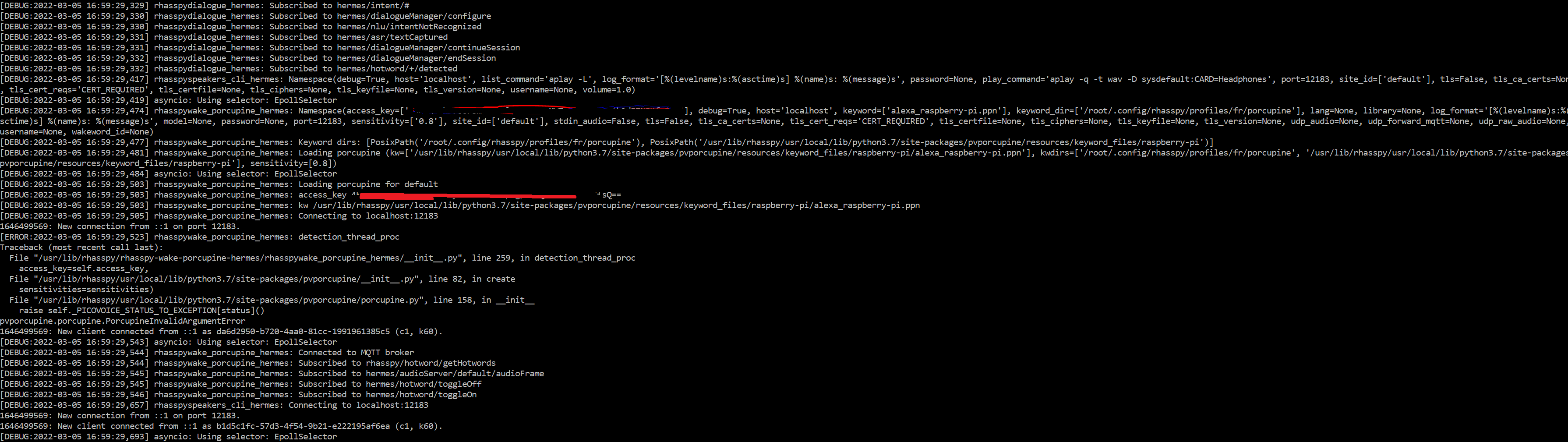
[DEBUG:2022-03-05 16:59:29,503] rhasspywake_porcupine_hermes: kw /usr/lib/rhasspy/usr/local/lib/python3.7/site-packages/pvporcupine/resources/keyword_files/raspberry-pi/alexa_raspberry-pi.ppn
[DEBUG:2022-03-05 16:59:29,505] rhasspywake_porcupine_hermes: Connecting to localhost:12183
1646499569: New connection from ::1 on port 12183.
[ERROR:2022-03-05 16:59:29,523] rhasspywake_porcupine_hermes: detection_thread_proc
Traceback (most recent call last):
  File "/usr/lib/rhasspy/rhasspy-wake-porcupine-hermes/rhasspywake_porcupine_hermes/__init__.py", line 259, in detection_thread_proc
    access_key=self.access_key,
  File "/usr/lib/rhasspy/usr/local/lib/python3.7/site-packages/pvporcupine/__init__.py", line 82, in create
    sensitivities=sensitivities)
  File "/usr/lib/rhasspy/usr/local/lib/python3.7/site-packages/pvporcupine/porcupine.py", line 158, in __init__
    raise self._PICOVOICE_STATUS_TO_EXCEPTION[status]()
pvporcupine.porcupine.PorcupineInvalidArgumentError
I am not sure why porcupine cannot start, I was trying with default wake word provided by the library
"wake": {
        "porcupine": {
            "access_key": "4[..............................................]==",
            "keyword_path": "alexa_raspberry-pi.ppn",
            "sensitivity": "0.8"
        },
        "system": "porcupine"
    }

Do you have any ideas what I might be missing?
Actually I was able to resolve this; the ppn used was still from the previous porcupine version!
Thanks, your implementation was really helpful!
I see you have this tutorial written for a rpi zero with rhasspy installed with the .deb package. I was able to replicate your tutorlal and got it working. Although CPU usage shot up to 80 percent for me when I did.
But my question is actually, has anyone been able to do something like this on a linux server running rhasspy in a docker container? I am attempting to do that but was wondering if anyone was able to do it already
My time is currently consumed by other projects, so while I was planning on this, I have had no time yet.
No problem. I actually got it to work. I followed the guide Sturi2011 put together but inside the docker container. I ran docker cp to copy the files out of the container, edit them and then copy them back into the container. All the file paths were the same except for the python site packages paths.
site-packages were in /usr/lib/rhasspy/.venv/lib/python3.7/site-packages
Other things to note. to install pvporcupine, the latest version was 2.1.2. Downloading my custom word from there site said it was version 2.1.0. I didnt test if 2.1.2 worked but I installed the pvporcupine version 2.1.0, while in the docker console with:
pip3 install pvporcupine==2.1.0
Also when copying anything from the guide that is not in a code box, be carefull with quotes and dashes. Anything I copied within the code blocks had no formatting issues, but anything I copied not in a code box had the formatting problems.
looking at docker logs was very helpful to find where I missed those format issues. used the below docker cmd
docker logs
To specify, I did this in a docker container on a linux machine (fedora/redhat). I assume this would work on any machine running rhasspy in a container
I also wanted to thank @Sturi2011 for putting this guide together. without it I never would have got this working.
Great, do not forget to commit your changes to the image 
Hi @dblanc28,
If you have made the changes to your container would you mind to commit the changes to the image and share it ?
It would really be appreciated 
#sharingiscaring
Hey @Remi ,
I would love to help. But to be honest with you. I am a rookie with managing docker images and docker hub repos. So I think I did the right thing but let me know if there is something else i should do to make it easier for everyone
I have run the cmd “docker commit [container] rhasspy/rhasspy:latest”. which I think commited my changes to the default rhasspy docker repo. But not sure if this was the right thing to do.
I also created my own docker hub repo that is public and pushed my image to that repo so if you would like you can just pull the image from there. Not sure how I will have it updated with future rhasspy updates and not overwrite the changes I made. Again rookie docker manager. But i you would like to pull the image from my repo you can just replace rhasspy/rhasspy in the install guide to dblanc28/rhasspy. So it would look like below:
docker run -d -p 12101:12101 \
      --name rhasspy \
      --restart unless-stopped \
      -v "$HOME/.config/rhasspy/profiles:/profiles" \
      -v "/etc/localtime:/etc/localtime:ro" \
      --device /dev/snd:/dev/snd \
      dblanc28/rhasspy \
      --user-profiles /profiles \
      --profile en
Probably wouldnt be a bad idea to change the name as well so you remember it wasnt from the normal repo.
Again if there is something else I should have done that would make it easier for everyone to get the changes I made, let me know and I will do that as well.
Thank you!
You may find a solution implemented at: https://github.com/LuisMalhadas/rhasspy
It uses the latest pvporcupine version ( 2.1.4), so this is an online version of rhasspy, but exclusively to check the key with picovoice.ai service.
This version doesn’t have deepspeech and includes snips as well as some minor updates of some dependencies.
You’ll have to build the docker image yourself after clonning the project.
It has only been tested on a raspberry pi 4.
@Sturi2011 thank you very much for your instructions.
For anyone interested in upgrading Porcupine to 2.x, I made a diff for Rhasspy 2.5.11 which makes the upgrade much more automated:
# How to upgrade Porcupine 1.9.x installed by Rhasspy 2.5.11 DEB to version 2.x

sudo su -

# Install Rhasspy 2.5.11 (replace "armel" with your architecture if needed)
wget https://github.com/rhasspy/rhasspy/releases/download/v2.5.11/rhasspy_armel.deb
dpkg -i rhasspy_armel.deb

# If you have Rhasspy already installed, just stop it.
systemctl stop rhasspy

# Install latest Porcupine.
apt update
apt install -y python3-pip
pip3 install pvporcupine

# Set installed Porcupine version in the variable below
porcupine_ver=2.1.4

# Porcupine is installed in /usr/local/lib/python3.?/dist-packages/pvporcupine
# Check it:
echo /usr/local/lib/python3.?/dist-packages/pvporcupine

# If you see anything other than "python3.7" in the path, change "3.7"
# in the variable below to the version you see...
pyver=3.7

# Move old Porcupine into ~/bcp-pvporcupine-1.9 and replace it with symlinks
# to the new version.
mkdir bcp-pvporcupine-1.9
mv /usr/lib/rhasspy/usr/local/lib/python3.7/site-packages/pvporcupine-1.9.*.dist-info bcp-pvporcupine-1.9/
mv /usr/lib/rhasspy/usr/local/lib/python3.7/site-packages/pvporcupine bcp-pvporcupine-1.9/
ln -s /usr/local/lib/python$pyver/dist-packages/pvporcupine \
  /usr/lib/rhasspy/usr/local/lib/python3.7/site-packages/pvporcupine
ln -s /usr/local/lib/python$pyver/dist-packages/pvporcupine-$porcupine_ver.dist-info \
  /usr/lib/rhasspy/usr/local/lib/python3.7/site-packages/pvporcupine-$porcupine_ver.dist-info

# Patch Rhasspy.
curl https://gist.githubusercontent.com/mprymek/f72474052aa39687af266f572e76675e/raw/7c107124faf7d7a21bdc101ba2f27bf0f9fb0f36/rhasspy-porcupine-v2.diff \
| patch -d / -p0

# (optional) Put your custom wake word file to .config/rhasspy/profiles/en/porcupine
#
# Configure your Porcupine access key and your custom wake word file in your
# profile.json:

# "wake": {
#     "porcupine": {
#       "keyword_path": "hey-hilly_en_raspberry-pi_v2_1_0.ppn",
#       "sensitivity": "0.6",
#       "access_key": "blahblahblahblahblahblahblahblahblahblahblahblahblahbl=="
#     },
#     "system": "porcupine"
# }

# If everything went well, you can now start Rhasspy.

systemctl start rhasspy
The formatting here is terrible. The same code as gist:
thanks for the effort!
Hi Andreas,
does this mean you manged to get a Matrix Voice running on Debian/Raspberry OS Bullseye?
I built the drivers as described but the card doesn’t show up as a soundcard.
Am i missing something?
Hi djfil,
I’m trying to build the docker image without success. Specifically, I have a: failed to compute cache key: “/rhasspy-tts-larynx-hermes/requirements.txt” not found: not found
But I see lot of more errors so I’m not sure where is the main problem:
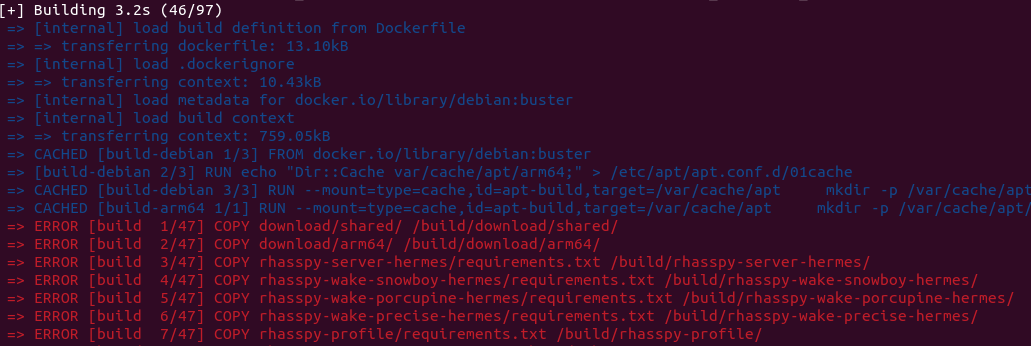
My steps are:
- Clone the repository: git clone GitHub - LuisMalhadas/rhasspy: Offline private voice assistant for many human languages
- Checkout the branch porcupinev2.1.4 with: git checkout porcupineV2.1.4
- Build the image: DOCKER_BUILDKIT=1 docker build -t rhasspy_porcupine_v2.1.4 .
I’m on a rpi4 with raspbian with Debian 11 arm64.
Do you know what I’m doing wrong? (I’m a docker newbie)
Thank you!
Don’t know exactly, I am afk for a few days.
I suspect you are missing some pre-built packages.
You should try building the master branch, following the documentation tutorial. Once that’s working, you can try changing branches and build the new version.
I’ll get back in a few days, and may try to help more.
update of the system with kernel and so on
sudo su
apt-get update
apt-get upgrade
wait to finish
reboot
check for actual kernel headers
sudo apt-get -y install raspberrypi-kernel-headers raspberrypi-kernel
should be already the newest or will installed with the above command
cd /home/pi/matrixio-kernel-modules/src/
make && make install
cp /home/pi/matrixio-kernel-modules/misc/matrixio.conf /etc/modules-load.d/
check for overlays
sudo su
nano /boot/config.txt
check for
dtoverlay=matrixio
if exit then fine otherwise add th overlay
reboot
check sound card devices with
aplay -l and arecord -l
have fun
With the actual kernel 6.1.21-v7+ the modules wont compile. Workaround se below:
sudo su
apt-get update
apt-get upgrade
wait to finish
reboot
check for actual kernel headers
sudo apt-get -y install raspberrypi-kernel-headers raspberrypi-kernel
should be already the newest or will installed with the above command
cd /home/pi/matrixio-kernel-modules/src/
nano ./matrixio-uart.c
Replace lines
static void matrixio_uart_set_termios(struct uart_port *port,
struct ktermios *termios,
struct ktermios *old)
by
static void matrixio_uart_set_termios(struct uart_port *port,
struct ktermios *termios,
const struct ktermios *old)
Now the kernelmodules will compile with Kernel 6.1.21-v7+
Alternatively You can also clone from:
GitHub - Sturi2011/matrixio-kernel-modules: MATRIX HAL in kernel space
make && make install
cp /home/pi/matrixio-kernel-modules/misc/matrixio.conf /etc/modules-load.d/
check for overlays
sudo su
nano /boot/config.txt
check for
dtoverlay=matrixio
if exit then fine otherwise add th overlay
reboot
check sound card devices with
aplay -l and arecord -l
have fun
Hey i’m new to Docker maybe someone can help me. I’ve been trying to build this repo.
My steps are
cloning it…
open the folder in terminal
and then i start
sudo docker build -t ‘rhasspy_mod’ .
(im locked in at docker) im getting the error:
+] Building 1.3s (6/6) FINISHED
 => [internal] load build definition from Dockerfile                                                                                                                        0.1s
 => => transferring dockerfile: 13.10kB                                                                                                                                     0.0s
 => [internal] load .dockerignore                                                                                                                                           0.0s
 => => transferring context: 10.43kB                                                                                                                                        0.0s
 => CANCELED [internal] load metadata for docker.io/library/build-armv8:latest                                                                                              1.1s
 => ERROR [internal] load metadata for docker.io/library/run-armv8:latest                                                                                                   1.1s
 => [auth] library/run-armv8:pull token for registry-1.docker.io                                                                                                            0.0s
 => [auth] library/build-armv8:pull token for registry-1.docker.io                                                                                                          0.0s
------
 > [internal] load metadata for docker.io/library/run-armv8:latest:
------
Dockerfile:241
--------------------
 239 |     ARG TARGETARCH
 240 |     ARG TARGETVARIANT
 241 | >>> FROM run-$TARGETARCH$TARGETVARIANT
 242 |     ARG TARGETARCH
 243 |     ARG TARGETVARIANT
--------------------
ERROR: failed to solve: run-armv8: pull access denied, repository does not exist or may require authorization: server message: insufficient_scope: authorization failed (did you mean run-armv7?)
does anyone know what im doing wrong?
From the error I would say your system is not supported, or it is giving the wrong architecture.
try passing the --platform argument that corresponds to your system…
Thank you, didnt worked. I think i will stick to my “old” docker version, till im ready for rhasspy 3.
I registered to PicoVoice and created a custom Wake Word.
The problem is, that this wakeword is working for Porcupine 3.0.
Unfortunatelly, any newer Version than Pcorcupine 2.1.4 starts with following error:
AttributeError: module 'pvporcupine' has no attribute 'porcupine'
    porcupine: typing.Optional[pvporcupine.porcupine.Porcupine] = None
  File "/usr/lib/rhasspy/rhasspy-wake-porcupine-hermes/rhasspywake_porcupine_hermes/__init__.py", line 46, in SiteInfo
    @dataclass
  File "/usr/lib/rhasspy/rhasspy-wake-porcupine-hermes/rhasspywake_porcupine_hermes/__init__.py", line 36, in <module>
    __import__(pkg_name)
  File "/usr/lib/python3.7/runpy.py", line 109, in _get_module_details
    return _get_module_details(pkg_main_name, error)
  File "/usr/lib/python3.7/runpy.py", line 142, in _get_module_details
    mod_name, mod_spec, code = _get_module_details(mod_name, _Error)
  File "/usr/lib/python3.7/runpy.py", line 183, in _run_module_as_main
Hi,
replace line 46 in
/usr/lib/rhasspy/rhasspy-wake-porcupine-hermes/rhasspywake_porcupine_hermes/init.py
replace
porcupine: typing.Optional[pvporcupine.porcupine.Porcupine] = None
with
porcupine: typing.Optional[pvporcupine.Porcupine] = None
Greetings
Andreas
Hi,
this are the migration steps to pvporcupine 3.0.1
uninstall old packages/pvporcupine
sudo pip3 uninstall pvporcupine
install actual packages/pvporcupine
sudo pip3 install pvporcupine
remove old packages from rhasspy
sudo rm -r /usr/lib/rhasspy/usr/local/lib/python3.7/site-packages/pvporcupine-2.1.2.dist-info
sudo rm -r /usr/lib/rhasspy/usr/local/lib/python3.7/site-packages/pvporcupine
copy new porcupine
sudo cp /usr/local/lib/python3.9/dist-packages/pvporcupine-3.0.1.dist-info/ /usr/lib/rhasspy/usr/local/lib/python3.7/site-packages/pvporcupine-3.0.1.dist-info/ -r
sudo cp /usr/local/lib/python3.9/dist-packages/pvporcupine/ /usr/lib/rhasspy/usr/local/lib/python3.7/site-packages/pvporcupine/ -r
copy your porcupine 3.0 keyword file to the profile
sudo cp ./your_keyword.ppn /home/pi/.config/rhasspy/profiles/(your_language)/porcupine
Install german parameter modell if needed
cd /usr/lib/rhasspy/usr/local/lib/python3.7/site-packages/pvporcupine/lib/common
sudo wget https://github.com/Picovoice/porcupine/raw/master/lib/common/porcupine_params_de.pv
sudo rm porcupine_params.pv
sudo mv ./porcupine_params_de.pv ./porcupine_params.pv
prepare the scripts for pvporcupine 3
replace line 46 in
/usr/lib/rhasspy/rhasspy-wake-porcupine-hermes/rhasspywake_porcupine_hermes/init.py
replace
porcupine: typing.Optional[pvporcupine.porcupine.Porcupine] = None
with
porcupine: typing.Optional[pvporcupine.Porcupine] = None
reboot
sudo init 6
Greetings Andreas
Does porcupine 3 still require registration?
Hi,
yes you have to register for the liftime free tier.
Greetings Andreas
Thanks for the hints how to update porcupine. I successfully managed to update the rhasspy container 2.5.11 with porcupine 3.0.2. It is a bit tricky but it works fine with my recent created custom wake word. If someone is interested I can create a DOC from my notes.