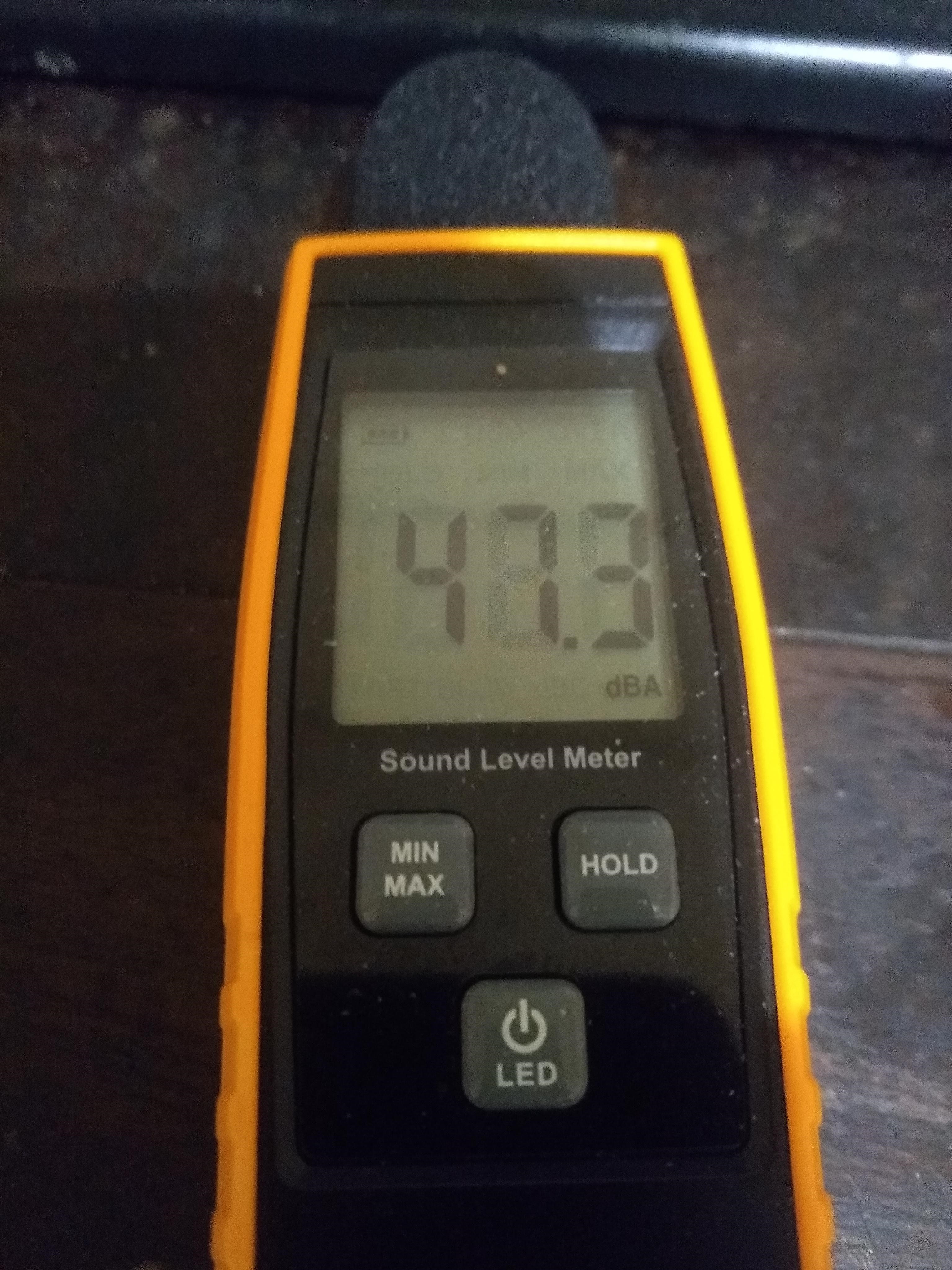
Simple cheap USB Microphone / Soundcard

Probably the cheapest, easiest with a touch of soldering and most effective mic / audio out is a cheap soundcard and a Max9814 board.

The Max9814 is a very cheap module with electret microphone onboard.
https://www.ebay.co.uk/itm/MAX9814-Microphone-AGC-Amplifier-Board-Module-Auto-Gain-Control-CMA-4544PF-W/191879408509
£1.60 with free p&p

Couple that with an equivalent USB soundcard


£1.90 with free p&p

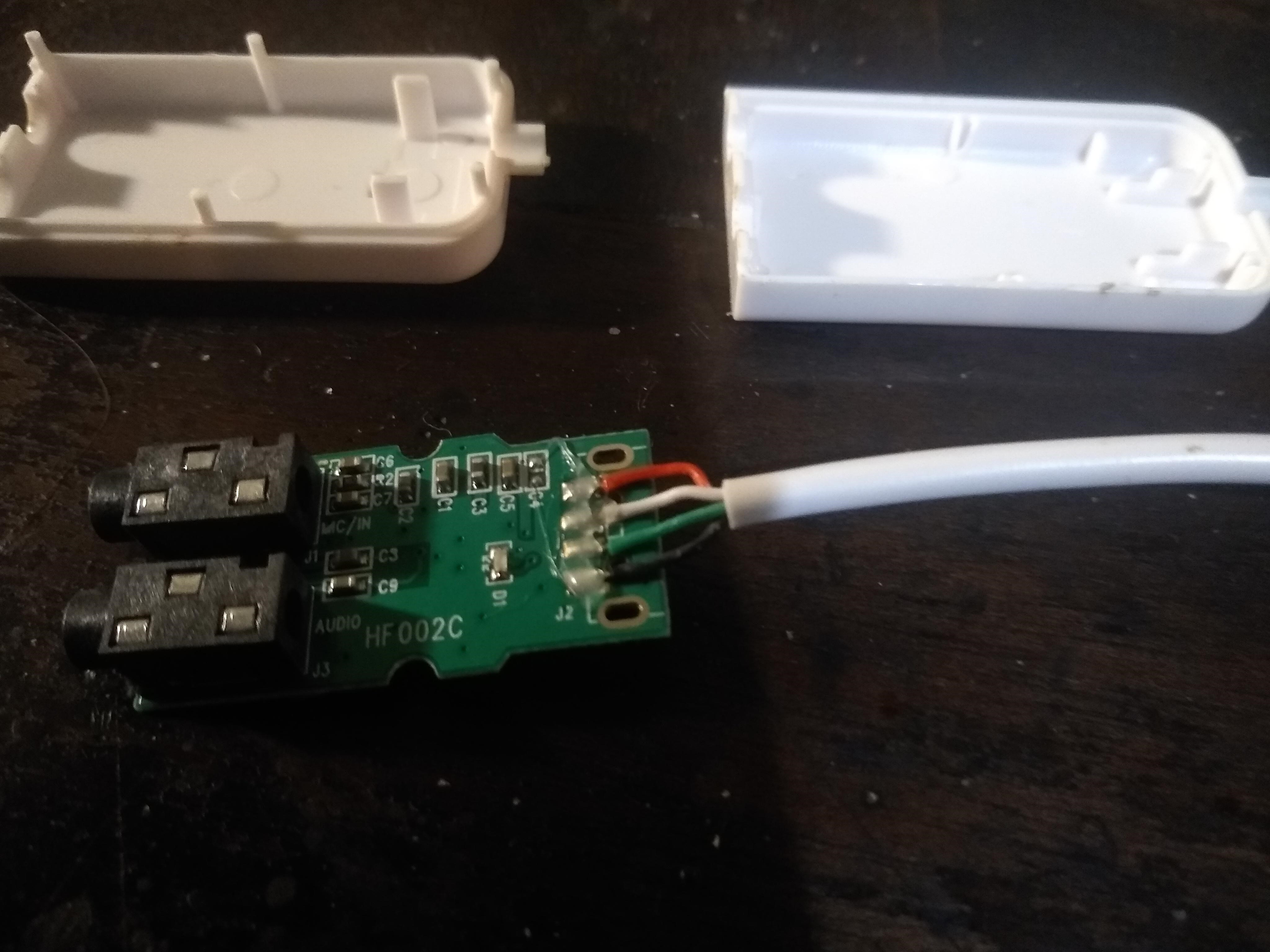
You need to buy or find a 3.5mm jack lead and cut in half, so you can solder some Pi jumper wires to the Red/White & Gnd cables of the 3.5mm.
Again a £ or more should get you one on ebay and end up with x2 as you cut one in half.
The other half you can use to wire from the soundcard headphone to a amplifier such as.

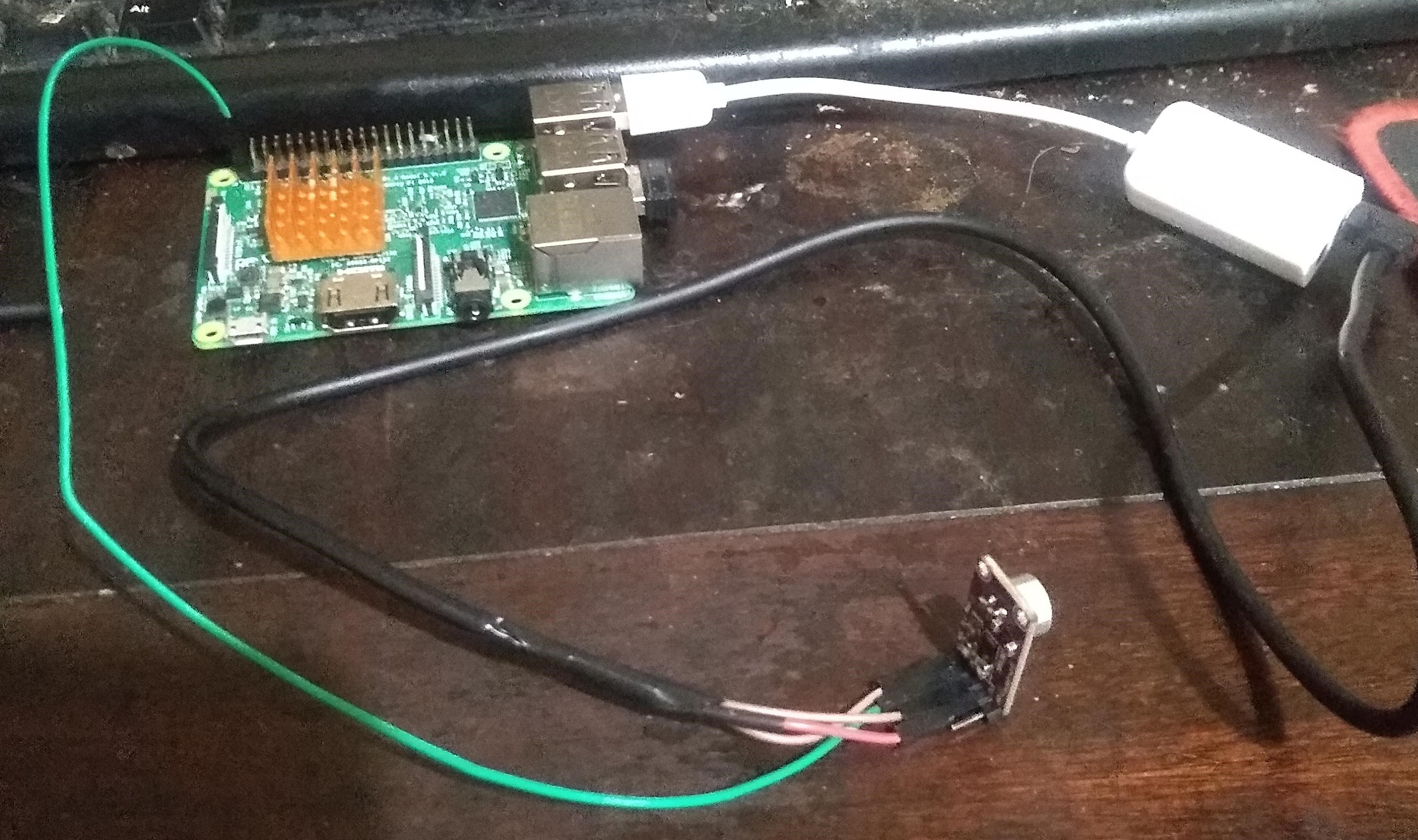
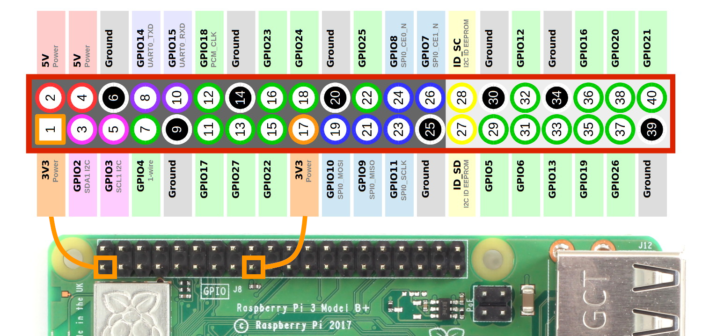
You should end up with something like the above with a Pi Jumper wire going to 3.3v on the Pi, Gnd going to the copper screen of the 3.5mm Jack and what turned out to be the white cable on this sound card to the Max9814 out. One cable red or white will not be used as that is the bias voltage to feed a passive mic.

The mono sound cards are for passive mic so they have 1x signal in and 1x bias voltage to power a mic.
We don’t need the bias as we are using a active more advanced powered module in the Max9814.

If you check the Max9814 datasheet it has 2 stages of gain the selectable gain 1st stage and the agc gain 2nd stage.

Make a Pi jumper to go to 3.3v and that is cut and has 2x connectors one side as its going to be Vdd but also the VDD for the 40db selectable gain as the mono soundcards are extremely sensitive.
If you wire to a stereo soundcard that will be line-in (less sensitive) so have a double connector on the gnd going to the soundcard (gain select) instead.
The A/R pin can be left disconnected as that gives the biggest ratio for attack/release of the AGC.

This recording due to me forgetting how sensitive the max9814 is is set with gnd on the gain pin so its 50db and it was lazyness that left it that way as you can see in the above pic.
My sugesstion is use VDD and 40db overall gain as that is a lot of gain, but guess leaving the 3.3v as a single and having double gnd connectors for 50db is more tidy and not that big a thing.

Near
https://drive.google.com/open?id=1rm6bzhlDUpMYuFY6E6SHvcWdoUG_E9Ae
Far @ approx 3m
https://drive.google.com/open?id=1_FOwSbcHtRYjYxu8JJ-t5BYKPWzqR4B2
In the cli alsamixer F6 to select the soundcard and set the sound card to 0db gain.

The card also has AGC and there is software AGC that can also add gain that will likely add less noise than doing it above the 40db gain of the MAX9814.
I do prefer the directional electrets but those are really fiddly to solder and the omnidirectional comes with the board.

A couple £ you can get and effective microphone with decent far field for voice AI and don’t worry about the AGC noise ramping up on silence as this is of no bother for recognition unlike a broadcast setup would be.
What the AGC does is limit gain on clipping (overload) and just keeps raising gain to the max if no clipping or signal is found.
The attack to drop gain on clipping is fast .24ms and the release time to get to full gain is 1sec (960ms).
Prob really be better if slightly longer and double that and you can change the capacitor Ct but too fiddly to bother with the minimal diference.

5 Likes

Thanks for the tutorial :+1:t2:
Although I must say that i don’t find the 3 m performance that impressive compared to the diy and soldering you have to do. Especially once you have to spend the extra time to hook up an amp and some rgb leds separately and build / design your own case that doesn’t look bad in a living room.
Considering all that it becomes much less attractive for me.
But of course your mileage may vary.
Whats your experience with it when you try to do wake word detection in a room with some tv/music noises. How nicely does it play with the stt models for kaldi or deepspeech? I ask this as i found that the character of the used microphone can sometimes have a bigger impact than the actual sound quality on how good it works as much depends on the characteristics of the audio the models were trained on.
What is your real life experience for things like that like compared to the mics that a lot of people use here.
Id be really interested as purely a sound sample unfortunately doesn’t tell the whole story in this case.

3m is the limit of my workroom not the mic as you may notice there is little noticeable difference apart from more slightly room reverb at 3m with the above far & near.
I am unsure to distance max as current walls get in the way, but yes you are correct and that is the whole point as any cheap microphone with AGC should be able to get quite distant far field with reasonable SNR and not much impressive about that.
Its got a line out and doesn’t incorporate a toy like amp that restricts choice as you can choose any amp of choice for the right environment.
That is the problem with all-in-ones as they put huge design restrictions with fixed placement of mics, amps and pixel rings that are often purely redundant and as a hat dictates placement.
Because a USB soundcard shares the same clock control for audio out/in the AEC algorithms to enable barge-in work on the pi.
Speex AEC is currently the most effective on the pi and the criteria is to share the same clock for the near/far reference and input and dacs or products like the respeaker with 4 mics and lovely pixel ring will not allow barge in as we don’t have working AEC for them.
Another problems with all-in-ones is microphone isolation as a small wired module is much easier to isolate from speaker noise than any onboard mic that really makes isolation impossible.
Electrets also have some advantages due to round case that are easier for DiY mounts and isolation and are much easier to resolder than SMD devices and also have directional noise suppressive/studio versions and can extremely cheap or expensive and again choice.

Because of the nature of the MFCC and the way low order energy is dropped due to the process it is why a multitude of microphones do work with the likes of kaldi or deepspeech.
There frequency response differences are far far less than the huge differences age, dialect and gender provide for the human voice where microphone colour pales into insignificance as its an impossible match unless you are Google or Amazon where you enforce the microphone of use.
Deepspeech uses the common voice dataset which has a very similar recording environment of the submitted samples by general PC mics and headsets whilst Kaldi tends to use ‘over’ clean datasets captured from Ted talks and Youtube but again this pales into insignificance when compared to the difference of gender, age, dialect and pronunciation of the spoken word.
This is also similar to the sample rate and bit width of the audio where 16Khz 16bit gives a voice nyquist of 8Khz range as the microphone isn’t the major consideration.

It is why you are likely better with a cheap easily available microphone rather than a studio mic or one with beamforming artefacts as currently its more likely the source dataset was also recorded that way.
Its why Google and Amazon do have an advantage as they dictate a microphone and also the datasets that they collect through use.

Its a cheap solution that is extremely flexible due to being wired that has a collection of components that can mix and match with choice or even an analogue array.
Due to being analogue you can add analogue modules without need for further processing load such as a compressor/noise gate or replace the omni directional electret with a directional or studio grade one where the cost of the latter is likely not worth it as its likely models are rarely recorded with one, because the environment of use is a living one not a studio.

https://uk.rs-online.com/web/p/condenser-microphone-components/7542104/

Its a £1.90 USB sound card that you may already have or equivalent and a £1.60 mic module that is a close call to the INMP401/4 analogue mems that do offer better clarity (SNR) that start about £2.50 for a module that wire the same minus the selectable gain as they are fixed.
You can use any soundcard as their quality for a long time has surpassed the recording quality of the environment of use.

Just because you have chosen an all-in-one solution and enclosed directly inline with a speaker that makes AEC impossible doesn’t mean that is true of other solutions that are often much less cost and more flexible.
Its the same for DACs or ‘microphone only’ products as AEC will not function correctly dependent on clock drift on the processing power available, unless using built-in DSP.
Where with criteria to kaldi and deepspech models and microphones there is absolutely no difference as the recording microphone(s) is always an unknown.

If your solder averse use a quick splice connector or something like


Or just crimp, I am just old school. Soldering iron and insulation tape but if you have hot air gun

Or, but for me a bit big and clunky
Are real easy, its a shame they are 3.3v and not 5v as we could power from the usb and leave the gpio completely clean.
But you can use a something like a step-down ldo, again choice and flexibility and may give a cleaner VDD as an LDO as opposed to a buck (really should try that as have some somewhere).

But the DiY done is 3 wires and presume for many that is not much of a chore its just a 3.5mm jack to jumper leads and presume you can buy them but easy to create and your mic can be less than £1.60 if you shop around!

As I said im interested in real life use experience you’ve had with this combination? As you said yourself hardware doesn’t tell the story with its price.
You list alot of theory about why it should work but how did it actually perform in your living room? How many false positives with which engine (raven/precise/snowboy/porcupine) did you have compared to other hardware combinations in a room with tv/music. How high would you say was your stt hit rate with kaldi or deepspeech?
Thats all I want to know because that is what counts in the end and would make me consider the hardware instead of for example a 2 mic pi hat which costs the same in the end once i shop all the components to have feature parity. So i would be very thankful if you could share those real life experiences.
I for example often set up the different mics at the same time when i get a new one to try so that I can have a few days of using them around the clock in production side by side and have that in use comparison. So I would be very thankful if you could share your in use experience with Rhasspy/Voice2json/Linto/Mycroft and this hardware.

actually i see the usb soundcard as a weakness. Not from an audio standpoint as you state its positives from a hardware perspective but from a design standpoint.
Having the necessity to have anything attached to the usb ports makes it harder to design small minimal satellites that dont look like a Raspberry or anything too much diy. This is of course a question of taste but for something I have in every room and my partner has to be happy to use too its easier to build a clean compact solution when everything is attached to the gpios.

I really wish there were better all in one solutions in this field as i think a majority of the people trying something like Rhasspy are just fleetingly familiar with the commandline and dont want to solder and buy a number of handpicked components and than diy a case or have the naked concoction lying around. You yourself titled this post simple usb mic and it might be for you but for many people dipping there feet into something like Rhasspy the hardware you described above will be an advanced diy project.
For an adoption that is more widespread than now and for communities like this to grow I think we also have to offer easy hardware buying advice that is plug and play. We need cases which can easily ordered on treatstock to be printed (maybe even with a Rhasspy Logo?) that fit those common hardware choices. Hardware knowledge cant be the entry hurdle.

People like you @rolyan_trauts and your knowledge are very important for this community and i dont want to discourage you or start a fight i just want you to see that side of the equation too.
Maybe you could design a pcb one day with those components that you found and investigated and we could than get seeed to manufacture a small run of a Rhasspy aec agc rgb led low cost sound hat. Id be happy to built / design a case for that.

Johannes

A microphone in itself will make no difference to hardware combinations to a room with predominant noise from TV/music if its omnidirectional.

If its directional then you will get an element of noise suppression through directionality.

Unless you have advanced beamforming and even then when there is predominant noise via 3rd/party tv & media it will kill any recognition.
Beamformers work exceptionally well in distributed noise fields of say industrial locations but what could be common in domestic of TV voice or loud music of a single source that floods voice not so.

I have been using a whole collection of mics from Kaldi, Precise, Snowboy, procupine, deepspeech, Mycroft & Linto plus various tensor flow models hacked by myself and compared to room noise, models and my own dialect the microphone makes absolutely no difference and I am not going to start recording empirical evidence of going through everything I have tested again just to satisfy you of what I already know.

This is what I am saying as you can get a £1.60 mic module and it will be equally as bad as your respeaker 2 mic in your case as opensource doesn’t have the algs Google & Amazon print on silicon and we process on a Pi! not Google & Amazon AI accelerated state of the art data centers.

Your mic doesn’t matter Jack when compared to what does! As long as it can record with a level of clarity and sensitivity and we are all in the same boat to missing what really matters and a £1.60 mic is as good as any other.

So its the same performance in a more diy and less feature complete package as its just a mic. The price advantage is non existent as i would have to get all the other components separately.
I see the positives being choosing your own amp and maybe doing ec if playing music from the same device.
Thank you thats all I wanted to know.

It can use equally cheap directional electrets and likely perform better as it will garner an element of noise suppression if placed where directionality can have effect.
The components you use is choice but all you need is a usb soundcard & mic module and because they are components any upgrade upgrades only the component not the whole.

The https://www.microchipdirect.com/product/ZL38063LDG1 does seem reasonably priced and how it compares to the Xmos chip in the respeaker or my Anker powerconf I dunno but not all that impressed with the Xmos chip or even Google or Amazon units when 3rd party TV or media is the predominant noise.

A small run would just produce a costly product for very little gain but if someone like Raspberry uses its economies of scale that would be a different matter.
I guess if Raspberry gets to a stage of providing a cost effective AI accelerator then its likely we will see something like the ZL38063LDG1.

If we where to make something as a community I wouldn’t advocate any beamformer or the current infrastructure rhasppy uses as all that would remain is the py of the language that is programmed.

Rather than try the impossible with far field beamformers it is getting at a cost level with ESP32 boards to create near field multiple distributed mics.
The ESP32-A1S has a built in codec (the one in the pi 4 mic hat) that could interface directional electrets.

http://www.ai-thinker.com/Uploads/file/20190715/20190715141756_57655.pdf

Its capable of running a KWS that runs locally but provides KWS hit score so that a central HAL(2001) type rhasspy can choose the best mic for a single ASR session.
Opensource has been copying the commercial product we see and not providing solutions to rival commercial infrastructure.
You can provide a central system with GPU with multiple room mics to service a room and if the system is also the audio server then we can provide EC for all problematic domestic noise.

But a lesser stage would be to provide a Rhasspy sound bar that the TV can provide audio pass through and then you have solved the problem of 3rd party media as you bring it to the system and it is no longer 3rd party.

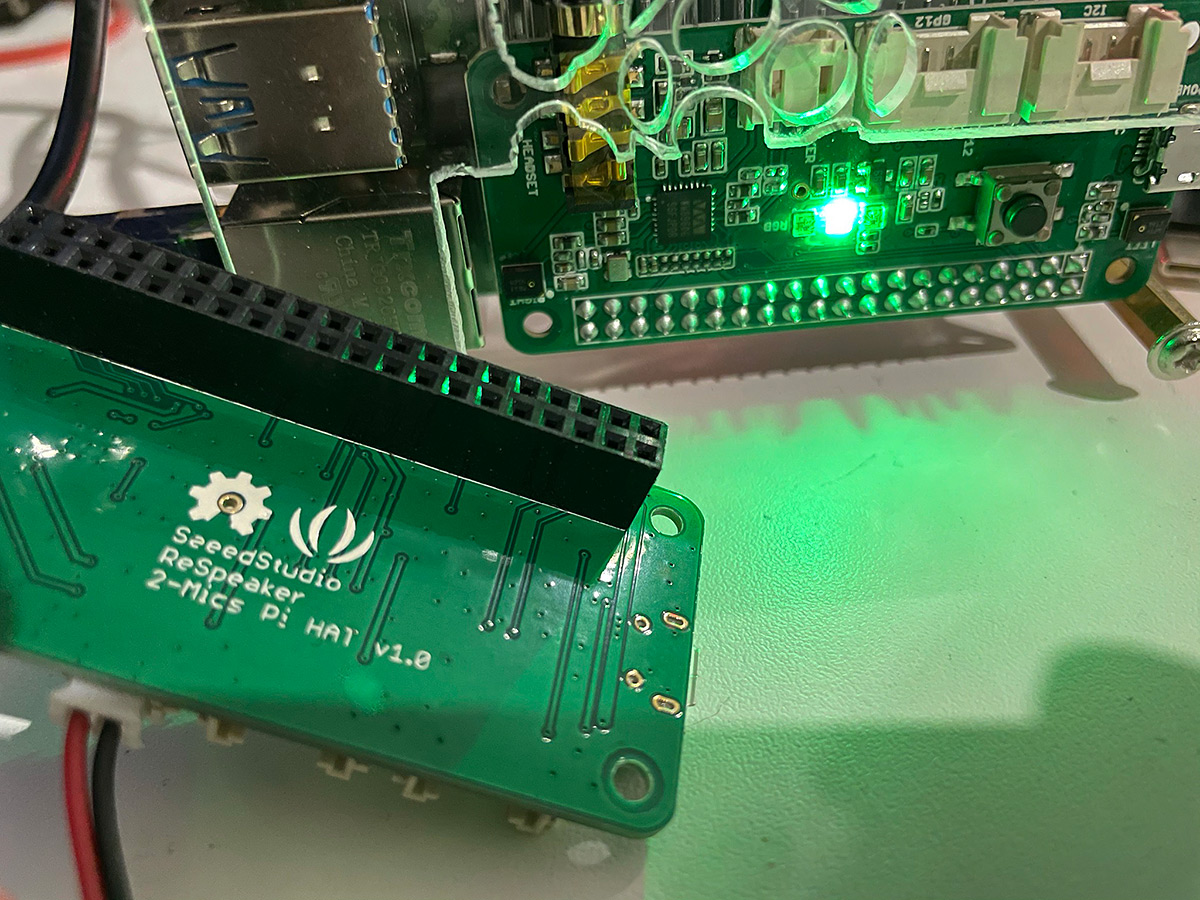
Here is a Pi 2 mic hat.

Near
https://drive.google.com/open?id=1w6qK8BYCd-gtfwXP4eh6dfyflELzZ0yM
Far @ 3m.
https://drive.google.com/open?id=119ifVznzy57AT-LkkQ9a_Ev5q6nNnxkh

I actually had this up and running and thought I would post.

I tried with the hardware ALC & Noise gate and it just didn’t seem right so turned it off set the gain of the 2mic to 34(9db)

Added this to /etc/voicecard/asound_2mic.conf

# The IPC key of dmix or dsnoop plugin must be unique
# If 555555 or 666666 is used by other processes, use another one


# use samplerate to resample as speexdsp resample is bad
defaults.pcm.rate_converter "samplerate"

pcm.!default {
    type asym
    playback.pcm "playback"
    capture.pcm "capture"
}

pcm.playback {
    type plug
    slave.pcm "dmixed"
}

pcm.capture {
    type plug
    slave.pcm "array"
}

pcm.dmixed {
    type dmix
    slave.pcm "hw:seeed2micvoicec"
    ipc_key 555555
}

pcm.array {
    type dsnoop
    slave {
        pcm "hw:seeed2micvoicec"
        channels 2
    }
    ipc_key 666666
}

pcm.agc {
 type speex
 slave.pcm "sum"
 agc 1
 agc_level 4000
 denoise no
 dereverb no
}

pcm.sum {
 type plug
 slave {
   pcm "array"
   channels 2
   }
 route_policy sum
}

So its sums to mono then runs agc and recorded via.
arecord -D agc -r16000 -fS16_LE far.wav

I spent considerable time trying to sort the hardware ALC but just don’t have patience with that card any more.
Its software gain and the far @ 3.2m (if we are going to be exact) is far from impressive.

If there is anyone who is a fan of the Pi2mic maybe they can help out kibo with Recognize command with music

Hmm mine doesn’t sound like this:
https://drive.google.com/file/d/1x0jGJLIDa1Sa-AFRYHPE0aTfDNfaWYro/view?usp=sharing
This is the 2 mic hat recording a tv that is ca 4m away. It’s recorded with a sox record command with a compand effect with a transfer function that effectively acts as an agc. The tv is running at normal room level and there is no other effects. Sorry for the amount of base but we have a 2.1 system with a big subwoofer connected to the tv.

Edit here is another one with some talking by me and my girlfriend over the tv between 3 and 4 meters away from the mic and talking away from it:
https://drive.google.com/file/d/1gu3EqmqkDQVDIUmDRfBaHjFeJTKJ_vUL/view?usp=sharing

You need to record the exact same at the same volume at near & far as otherwise its impossible to tell what that should be like.
As we can only tell by comparing the 2 if they are the same source.
Maybe you should post the sox settings & commands you have as it is not likely to sound the same if you are using a different effect.

Do you not have a bluetooth speaker or something that you can move or move the rhasspy to record a prerecorded playback each time.
Also why are you using sox when this 2mic is supposedly so good with all functionality all in?

never said anything about agc

Because Im the developer of https://github.com/johanneskropf/node-red-contrib-sox-utils and this is what i use in combination with voice2json and as I find sox to be a great all around tool offering much more flexibility than arecord or parec. This was recorded straight from nodered. The compand is the only applied effect. Its pretty much the same as doing sox -t alsa plughw:1,0 -L -e signed-integer -c 1 -r 16000 -b 16 test.wav trim 0 60 compand 0.1,0.3 -40,-40,-20,-10,0,-10 -10 -60 from the commandline. The installation of the 2 mic pi hat is stock with no settings changed.

near (1.5 meters):
https://drive.google.com/file/d/146HSYi1_PYQInMD6CSC0V7RXvsj3jXJO/view?usp=sharing

far (4.5 meters):
https://drive.google.com/file/d/1bQPYgqjH-tyE1ItDhXZms-Q3uD4FsbAr/view?usp=sharing

With just default settings no alc, agc or anything with the default gain of 40 (12db)

Running near and far @3m.

Near
https://drive.google.com/open?id=1YRUMobeWg5LJ3W7s1cRYhR05j12AmEY_
Far
https://drive.google.com/open?id=1e8mh0whva8doO9WKRLX03THYVKXFx3vR

It really sounds to me like at least for the 2mic hat the speex agc is doing no favors and your better of without it.

Well that is a problem as have you seen the amplitude of the last far signal and that is only @ 3m.

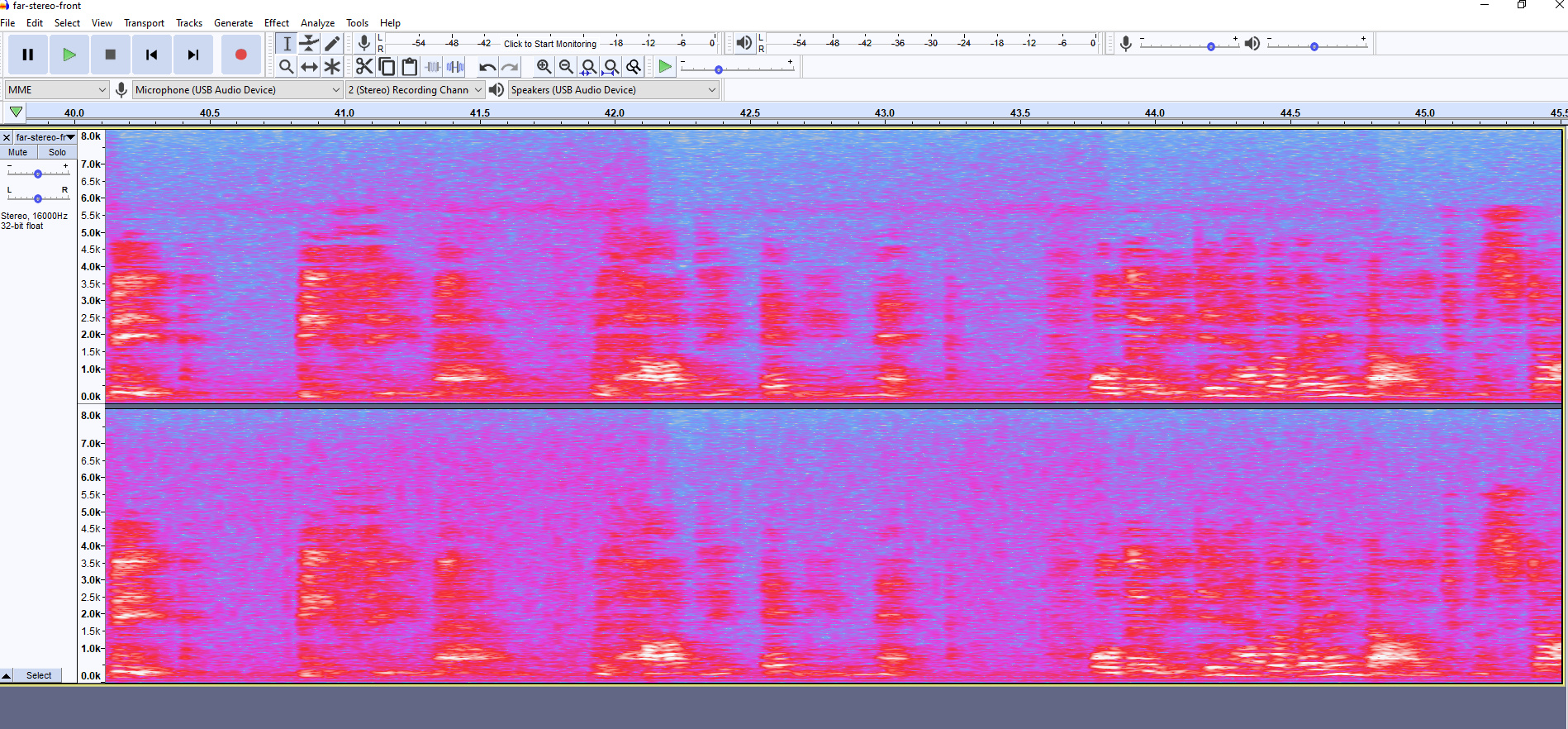
The USB mic @3 meter looks like this.

Problem is without Speex AGC due to the ALC not seeming to working correctly on the 2 mic your signal is woefully low.

I ve been playing some more with the sox compand. Added a noise gate and will see how I go:

compand 0.1,0.2 -inf,-35.1,-inf,-35,-35,-25,-12,0,-12 -12 -60 0.1

Edit:
Also I think the sox compand transfer function agc is doing a better job than the speex when you look at the far example at 4.5 meters above.

I just posted above a respeaker not running AGC with the sox compand and the picture is there right above and its far field is truly awful.

sox -t alsa plughw:1,0 -L -e signed-integer -c 1 -r 16000 -b 16 test.wav trim 0 60 compand 0.1,0.3 -40,-40,-20,-10,0,-10 -10 -60

Here I have got my posh Max9814 boards that are 3.6v-12v supply with own regulator and jumpers to select A/R & gain.
Its being fed from the 5v rail this time and because once more I ripped the solder pad off the cheaper Max9814 boards trying to remove the electret I dug one these out as the mic connector is on jumper leads.
Apart from that essentially the same but this does let me try out an el cheapo 20p directional electret.

Its the same thing again but this time near-rear has the mic facing the opposite way as its directional.
far-rear has a much lesser effect because of room echo and dispersion of sound so much less hits the rear as it does in the near-far sample.
Also distance sensitivity is much less because again due to room echo and dispersion of sound much more hits the rear of the mic.

This is where a sound card and mic module really shines as its the only form of 3rd party noise suppression available to us without expensive beamforming.

https://drive.google.com/open?id=15fGs3rwbAAO3nI5RPLapGTKAv9x00MvP

https://drive.google.com/open?id=1wKbfUc7-qHCVYSQvVBBqD0xnLi7O9SBO

https://drive.google.com/open?id=1wUTH2DLO7O4OZZP_hFo_o4M0nsOxvcAd

https://drive.google.com/open?id=1nMi5EStkPOv5zZn5QejRvvpER3hD90je

Its placement and using directionality but as you can see it will attenuate noise from the rear.

There are better electrets than the el cheapo 20p china ones but struggled to source them prob would have to buy more than just a couple and need to try and find them again.

They exist like these out of a cheap £10 directional microphone.

I think I ll stay with the 2 mic pi hat and sox for now as building a nice compact satellite out of this with a button as an additional stt trigger, an amp, rgb leds, a speaker and no cables visible apart from the power cable really would be pain and not one I would want to have four times which is how many satellites I have right now. Soon it will be six. I can see this on my workbench for playing but not as something that would be accepted as a general solution in the household that everybody has to be happy with.
It would really be a tiny improvement for hours I’d have to spent to build it.
That’s the charme of the hat. Takes me 3 minutes to assemble another satellite.
But thanks for the noise gate inspiration, I think it will be a nice addition to my sox command.
And at least for me the 2mic works fine up too more than four meters set up like this.

If that is what your happy with the fair enough but when I tried the commands you forwarded for sox with a Pi2Mic with the default settings you said of 40(12db) gain far field was absolutely tragic.

But hey if your happy with that go for it.

That’s what my 4.5 m example above was recorded with.

I copied and pasted what you posted here and @ 3m it was tragic.


Was near and far with a Pi2Mix recorded with your sox command.
I will try it with more gain on the capture but you did say defaults.

PS can you play to a sink rather than a file with Sox?

I didn’t change anything in the settings or a mixer. Pretty much the only thing I did was install the seeed driver, sox and nodered.

Edit just confirmed default 40

Yes should be possible. It should support alsa or pulseaudio sinks as outputs.
You would probably have to add something pretty similar to the input argument:
-t alsa yoursink but you should better google that. You can also play to standard out when defining the format with the t argument: -t raw -.

You saw the volumes with those settings and they are far to quiet maybe not all wm8960 2mics are alike!?

Do you have a copy or one of the seeedstudio originals? Because I know I ve had bad clones before.

Copy I guess.

Maybe the mics on it are shit as it is.

You would probably need an original to compare against.
By the way i cant recommend trying to integrate a noisegate into the compand. At least i didn’t find a sweet spot.

Prob not as it sort of already is compander doesn’t expand the higher energies and compress the smaller ones.
I always forget but seem to remember compander will help drop noise, so maybe what it could do is already done.
But unless your broadcasting don’t worry about low level noise as recognition ignores it.

1 Like

Ok played a bit more and I actually dropped the compand command completely. I also played with the alsamixer settings and I actually found that I get much better results lowering the capture gain to around 30 and the alc target to 20.

Hi,
Following the discussion, even if a bit too much technical for me but really interesting.

Does lwoering capture gain will need them to speaker stronger ?
Also, in alsamixer, when on capture, why do we have some speaker settings ??

Trying to get command recognized with low/normal background music. Actually rhasspy is totally unable to understand anything with very low background sounds. Listening never ends. So I will experiment some capture settings to see if we can improve this even a bit :confused:

Do you have the asound.conf set up with dsnoop for the mic and is Rhasspy recording set to record directly from the mic or from the abstracted capture pcm defined in the asound.conf?
Because than you could run a separate record command on the commandline recording the audio either to the sd card or an attached usb stick (would recommend that to minimize sd card wear).
This way you could actually hear what Rhasspy hears when you speak.
I use a very different set up as I use voice2json and sox silence detection to record commands. So my commands are limited to 5s length even if there is no silence.
But actually hearing what your settings sound like is important to make decisions about settings.

Edit
also very important there seems to be quite a spread in sound quality of those 2 mic pi hats especially when dealing with the 3rd party clones

Kibo 1st of all have you got a cone 2 mic or official one? As if you have an official one you can put that to bed.

I have a clone but have a hunch they are all the same apart from to slight strains of the respeaker & respeaker clones and the waveshare & waveshare clones as they are slightly different.

I have four official seed pi hat.
The last one have black mic when other three have silver mics.

Problem is that with snips and same hardware I can trigger wakeword and commands with music. Absolutely no way to get a command recognised with rhasspy and even low music or background noise. This is the last thing that prevent me replacing snips by rhasspy.

I think you might still have that bug kibo has an update and fix been made yet?

Yes this has not been fixed and no new docker anyway.
But apart ending the recognition, which would still be better than listening for hours, maybe some mic settings could help to get command recognized.
Or better mic, dunno, but as music doesn’t come from same device I doubt it would help.

There is a gulf of price as the USB respeaker is much more resilient to noise and is packed with technology.

https://www.seeedstudio.com/ReSpeaker-Mic-Array-v2-0.html

I personally think they are overrated for price and not a fan but there are those who like them they are better than ‘just a mic’ which you have when it comes to 3rd party noise.

What you should do is record some test waves just use arecord and get a good full normalised wav that you can see in audacity.

https://www.audacityteam.org/
Free open source and pretty great.

Basically you want the biggest wave possible without it clipping.

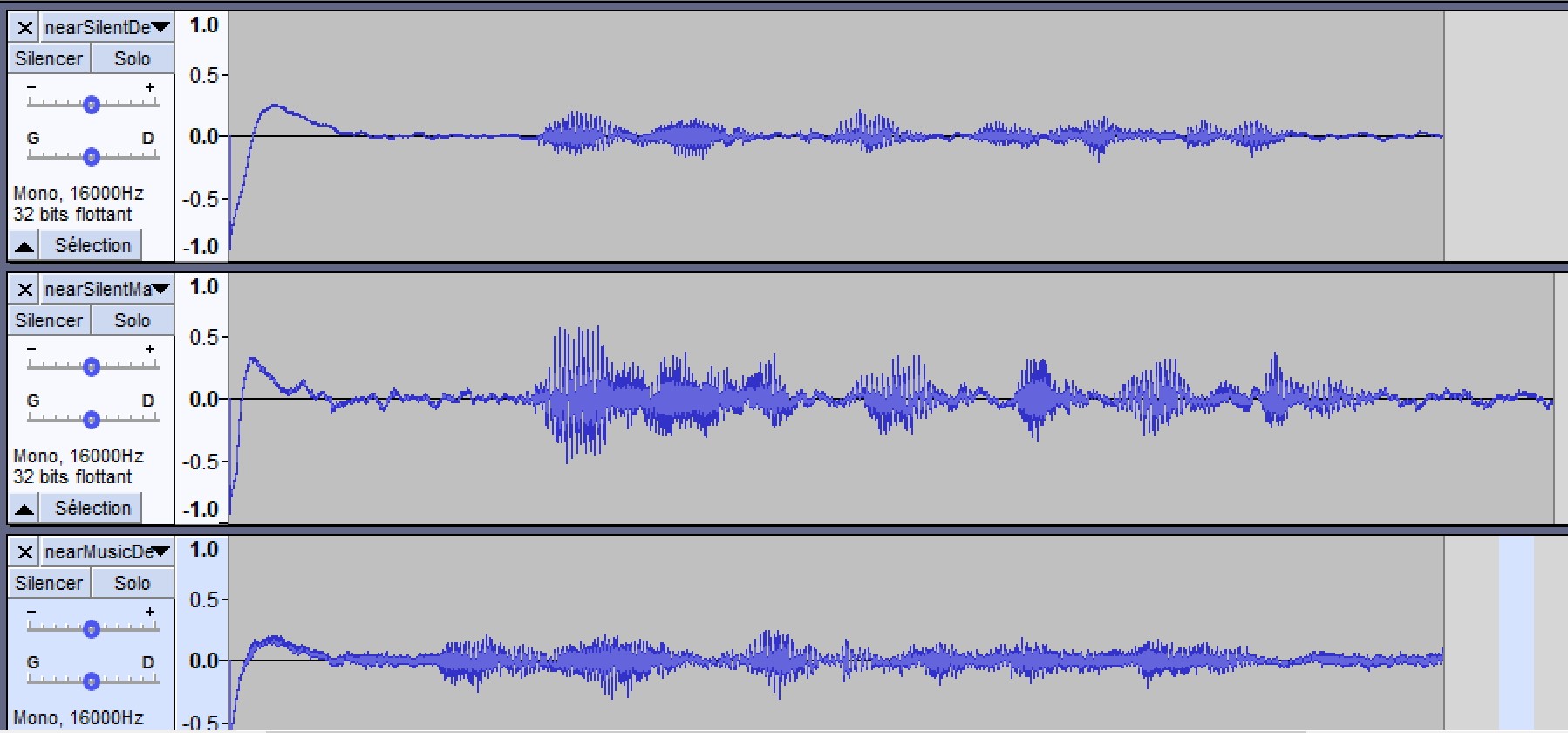
There are 4 recordings there and the top 1 is just too loud but wasn’t bothered as the wifi speaker was very close and a touch too loud.
The recording below are too low.

So what you need to do is get close with what you would call loud set up your gain and ALC so that gives you a full wave with no clipping, maybe let it get away with a tad.

But also do some arecords and post here and let us have a look see.

arecord -D mydevice -r16000 -fS16_LE -c1 test.wav

aplay -l to get device indexes

aplay -L to get device names

use winscp to pull to windows or ubuntu or whatever you use as a desktop and have a look at in in audacity.

There is another one I have never tried https://antimatter.ai/acusis-s and might be a choice as not a fan of respeaker, personally I don’t think there is any variance in quality its just they are all a bit poor.

My anker power conf uses the same chip as the 2 above and that doesn’t really impress me that much but is much better than ‘just another microphone’

1 Like

Thats a steep price for the mic you linked

What the Anker as that is just RRP from the manufacturer site Mine was £70 same approx same as respeaker.

The https://antimatter.ai/acusis-s is the only linear array I know of using the same chip as the other 2.

But that is the huge gulf between ‘just another mic’ and some technology for aec and noise supression and yeah some do, some don’t think they are worth it as Google & Amazon have similar algs in silicon at obviously much lower prices.

There is another one

Which really is a stereo usb card with software they supply to run on a Pi.

I have purchased the software as been meaning to check if I can get it to work and had forgot about that.

1 Like

Here is another set of test recordings for you to look at and import into audacity @rolyan_trauts :


This is 4 recordings. Each one is me reading the first paragrapgh of the hobbit.
Near is less than 1m distance to 2 mics pi hat and far is 3.5 meters distance.
There is one with and one without background music for each.
Background music is normal tv level 4.5 meters from the mic.
This is the Respeaker 2 mics hat stock installation alsa mixer settings of capture gain 31 and alc target 20. No recording effects applied and the room is about 35 square meters big.

I really can’t know if such mic would help, no experience in this field. Also, I understand echo cancellation comes from the DSP having the music input to invert it and cancel it, which will never be the case for me (hifi amp).

Example right now ;
I’m sitting beside Triangle Antal playing normal music level, at 5 meters from snips (rpi3 + respeaker 2 mic).
I call snips, bip, ‘shutdown the music’, boum… no more music.
Actually I can’t get even near such result with rhasspy on exact same hardware. So before paying such advanced mic (which I can), with no mic experience and audio knowledge, I’m not sure the problem comes from the mic when I see what snips can achieve with this hardware, being totally usable day to day as of a living with it.

I will definitely test gain / ALC settings and record in such environment. As snips was selling dev kit with pi hat, maybe they have tweak a lot their algo for such hardware. Dunno. @fastjack also mentioned the khaldi versus vad detection.

Here are my mic.
You can see the last one behind with the black mic (all other parts exact same).

I use a custom precise model I trained myself on 100+ samples from both my girlfriend and me with and without background noise. It’s trained against about 20 hours of pieces of random noise. This gave me a pretty noise resistant responsive keyword model.
When it comes to recording the command after a wake Word was spotted as I use voice2json I have set up the command recoding differently to what Rhasspy does with vad.
I use sox with a combination of silence detection and a max record length of 5 seconds as I found that no command takes me longer than that. So it records either until silence or for max 5 seconds and than sends the recorded audio to the voice2json Kaldi stt component if silence was detected or not. (I also use sox vad on the audio After rec before stt to trim the end and the beginning for non speech).
I found this approach quite robust.

I have talked to @synesthesiam before about doing something similar for voice2json and maybe Rhasspy.
For example adding an option to send the audio even if a time out was reached instead of erroring. This would allow to effectively do the same I do with sox and configure a short timeout and if no end of speech was detected when the timeout was reached try the best stt wise with what was recorded.

1 Like

Agree about the timeout. I also suggested to have a max duration settings as yes I rarely speak command more than 5 or 7 seconds. And the yes it should try to recognise this instead of error.

Talking about snips it does stop listening when I stop talking, with near same level music.

Maybe your solution should be implemented into rhasspy for everyone.

Yes that’s the Kaldi endpoint strategy. It stops not when you stop talking but when the stt thinks it understood a sensible command from the language model as the the stt happens streaming while you speak. So it doesn’t need silence to stop.
Voice2json actually does something like this already but I don’t use it for robustness reasons.

Record with arecord position yourself how you wish to control rhasspy with your music or whatever and post on here.
Do what I do and just paste it to google drive.

But as far as I am concerned with current Rhasspy setup if you are sat by a speaker playing music and you are trying to control Rhasspy you haven’t a chance because of a total lack of any audio processing.
I never used Snips but it sounds like they must of had some form of audio processing to enable that.

Kibo did you play the music through snips or just have the hifi on as if playing from rhasppy we can do something about that.

I never play audio from snips or rhasspy. Always on a separated hifi amp.

We very rarely watch tv but very often have background music. I guess that’s why this is important for us (family) and maybe less for others.

Yes I will do such recording tomorrow.

Wow ! Now I understand why snips works so well compared to rhasspy :flushed::sob:

It’s much more than that. They had a whole team working on this. They optimized every part of the pipeline probably doing audio pre processing as @rolyan_trauts proposed. Having custom language and acoustic models and so on. Sonos didn’t pay for nothing. They were a talented bunch.

Sure, but when I see all things rhasspy do better, it’s frustrating to not be able to use it due to this problem. Even if I understand this problem is not a small one.

Its a strange one as the bit Rhasspy seems to fail on is the input audio processing with a total lack of.
Its a bit of a disaster as in terms of recognition and computers the phrase is ‘garbage in, garbage out’.

Speech recognition is actually image recognition and whilst you have Audacity out switch to spectrogram mode as speech recognition just uses MFCC’s which are just fancy spectrographs where KWS looks for a match of the spectrogram of your keyword.
ASR looks for individual phonemes and is backed by a dictionary and has some idea of sentence sense so it tries to get the most plausible return on a sentence.

If you have audio coming in of a level then the spectrograms of keyword and phonemes will be just lost in a jumble of noise.

We have the race track, the stadium but for some reason we are missing the starting blocks and until something is sorted we are not going to win this race.

PS I never used Snips and have no idea how clever or what it was capable and Sonos may of purchased Snips but there products use Alexa or Google.
Snips may of just been a multiword KWS as Keywords and a KWS are far more resilient to noise than ASR but I have no idea, my introduction was Mycroft and that suffers the same.

Snips was based on something quite similar to raven for custom hotwords and their own universal model for hey snips.
Their asr/stt was actually based on kaldi same as we are using in Rhasspy or Voice2json but they were using a few features Rhasspy isn’t yet.

If the above is true then the only thing true about Snips is that you have no idea how it worked.
There is a fundamental huge gaping hole in your knowledge of how snips worked where you might know how later parts worked but are missing key elements of importance.
As the above is fantastically good and without any algs for audio processing its an absolute lack of knowledge on display this had anything to do with custom hotwords or Kaldi as the audio processing nessacary to give true results by the nature of audio physics comes before.

What’s the point of you’re message ? If true ? You mean if I’m not lying ? And I don’t think I have hide the fact that my expertise isn’t in audio.

I use snips for two years now with three custom wakeword and lot of intents, all family use it several time daily. So yes I know how we can use it and in which situation it works or not.

I will stop here I guess.

I am not saying your lying at all but a bad attempt at copying snips without obviously knowing is why you are getting the results you do.
There is no audio processing and that is why your results are so bad.

I completely believe you.

That’s precisely why I came on this post. To better understand the why and try to find solutions.

Rhasppy doesn’t have the algs and its debatable if the will run on the Pi.

Its closed source for the like of https://www.nvidia.com/en-gb/geforce/guides/nvidia-rtx-voice-setup-guide/ to embedded silicon such as https://www.xmos.ai/applications/#XVF3000-TQ128-C or https://www.microchip.com/wwwproducts/en/ZL38063

If Snips did have it they sold it to Sonos and efforts here to recreate are missing the recipe for the secret sauce.

Could Respeajer mic array v2 help in such situation ? https://wiki.seeedstudio.com/ReSpeaker_Mic_Array_v2.0/
And can you use it also as output for tts ?

Or actually, whatever mic we use, the algos inside rhasspy just isn’t there (yet) ?

The algs are in some silicon and yes it could help.

https://developer.amazon.com/en-US/alexa/solution-providers/dev-kits there are more

Your 2 mic respeaker is completely absent of any of the methods they employ.
I don’t like the respeaker mic array v2 as dependent on the volume of the speaker you are sat next to, it still is dependent on the predominant noise at the mic and can quickly start to create a synthetic ‘vocode’ effect.

Yes they are a lot better than the mic you have but there is still an argument distributed mics to a single processor will always be better.

Ps here is a reply from James Hughes (raspberry) if you know who that is.

Demand for HQ audio products on Pi. Very High. Demand for DSP to do beamforming calculations, 3.

I know which product I would prefer to sell.

Ok, very first test.
1m meter direct to mic

  • top: default settings (gain 63)
  • middle: max gain
  • bottom: default settings with music. Level seems low but voice is clear and not drowned into music ‘noise’

I’m speaking normally (maybe a bit low) but even max gain, I’m far from clipping !!

Yeah very far from clipping, in fact the other way a tad to low as the further away the less that will become.

I have been having a search around but its all very much the same.

Noisetorch https://github.com/lawl/NoiseTorch & https://github.com/josh-richardson/cadmus are non gpu based like RTXVoice which actually will run with any Nvidia from about 780 and above I think.
Seems to even work with my 1050TI even though input volume seems low.

Also https://github.com/wwmm/pulseeffects

But they are all desktop and think X86 but I have thought for a while now that WebRTC AEC is woeful purely because the Pi lacks the ooomf or even though it compiles the AEC isn’t the same as it runs on X86.

But maybe you can get https://github.com/werman/noise-suppression-for-voice installed and use pulse audio as you can make alsa use pulse also.
The above is a Linux non nvidia RTXVoice but again how well it runs and if will need to be tried.

There is a whole rake of technologies from tensorflow vad that I have said before the same FFT routines of MFCC creation are all very much similar and its very much too much load because these routines are being run separately for each element in different threads but could reduce load much be utilising a single fft routine.
Its all beyond me C which is non existent and would seem beyond Rhasspy because its non existant.

My opinion is that just about everything is wrong here from non existent audio processing to vad choice to infrastructure.

I post every now and then as a single usb sound card and uni-directional mic (prob a better electret than the china ones I tested) is prob best you can get before spending big $ on DSP silicon.
But even then in comparison to more horsepower and what you can do with a GPU is that spend worth it? Is this infrastructure worthwhile?

My opinion is probably not so hence I am going to run and keep stum.

I will post occasionally about simple cheap soundcards and the best available electret you can get. (PS there are uni-directional dual port mems but never seen one to source but they do exist).

The case on the el cheapo white one if you run a scapel blade around snaps open clean and pretty easy.

If I was to take 5v from there I would prob run outside the current screen as was think about using the spare bias core but maybe is a bad idea than leaving the output alone and screened.

You can still run from gpio but if you want to keep that clean tacking onto 5v is pretty easy.

Yes and I don’t know how to rise capture level, being at max gain level :face_with_raised_eyebrow: I’m also not sure setting capture gain at max won’t induce distortion (doesn’t seems so in the waves)

Next time I will do same test with some sentence corresponding to some intents, and test the wav into rhasspy.
As my voice is quite clear on top of music, I guess rhasspy will manage to recognize intent. Which would mean that with a max_duration settings for listening it would stop listening, and send the audio to ASR which could then work !

I don’t know if it’s possible that before wakeword, rhasspy (always listening for wakeword) detect average sound level, and after wakeword cut such level to better detect silence. But a max_duration for listening around 6 or 7 second, even less, would cut it without silence detection and make things a lot better. Really hope @synesthesiam can implement such max_duration user settings like actual min_duration, speaach before, silence after etc settings.

1 Like

Yeah that a really great idea as basically when we have Vad=!voice the rms should create a noisegate if vad=voice.rms - vad=!voice.rms > voice.ceiling.

You can create a noise gate by a right rotation without carry and just drop LSB’s, then rotate back with zero’s replacing.

My C & Python sucks almighty its not even hacking but molesting so might leave to someone else :slight_smile:

PS apols @romkabouter as posted beamformers and totally forgot about

Thats funny I actually have to lower the gain on all of my 2mic hats as otherwise I get horrible distortion and clipping when closer than 1.5 meters.

Do you want to give another group session a go as we can test the difference between yours my clone and kibo’s.

do a amixer -c 'my card index' contents and will try a recording

numid=12,iface=MIXER,name='Headphone Playback ZC Switch'
  ; type=BOOLEAN,access=rw------,values=2
  : values=off,off
numid=11,iface=MIXER,name='Headphone Playback Volume'
  ; type=INTEGER,access=rw---R--,values=2,min=0,max=127,step=0
  : values=127,127
  | dBscale-min=-121.00dB,step=1.00dB,mute=1
numid=17,iface=MIXER,name='PCM Playback -6dB Switch'
  ; type=BOOLEAN,access=rw------,values=1
  : values=off
numid=57,iface=MIXER,name='Mono Output Mixer Left Switch'
  ; type=BOOLEAN,access=rw------,values=1
  : values=off
numid=58,iface=MIXER,name='Mono Output Mixer Right Switch'
  ; type=BOOLEAN,access=rw------,values=1
  : values=off
numid=41,iface=MIXER,name='ADC Data Output Select'
  ; type=ENUMERATED,access=rw------,values=1,items=4
  ; Item #0 'Left Data = Left ADC;  Right Data = Right ADC'
  ; Item #1 'Left Data = Left ADC;  Right Data = Left ADC'
  ; Item #2 'Left Data = Right ADC; Right Data = Right ADC'
  ; Item #3 'Left Data = Right ADC; Right Data = Left ADC'
  : values=0
numid=19,iface=MIXER,name='ADC High Pass Filter Switch'
  ; type=BOOLEAN,access=rw------,values=1
  : values=off
numid=36,iface=MIXER,name='ADC PCM Capture Volume'
  ; type=INTEGER,access=rw---R--,values=2,min=0,max=255,step=0
  : values=195,195
  | dBscale-min=-97.50dB,step=0.50dB,mute=1
numid=18,iface=MIXER,name='ADC Polarity'
  ; type=ENUMERATED,access=rw------,values=1,items=4
  ; Item #0 'No Inversion'
  ; Item #1 'Left Inverted'
  ; Item #2 'Right Inverted'
  ; Item #3 'Stereo Inversion'
  : values=0
numid=2,iface=MIXER,name='Capture Volume ZC Switch'
  ; type=INTEGER,access=rw------,values=2,min=0,max=1,step=0
  : values=0,0
numid=3,iface=MIXER,name='Capture Switch'
  ; type=BOOLEAN,access=rw------,values=2
  : values=on,on
numid=1,iface=MIXER,name='Capture Volume'
  ; type=INTEGER,access=rw---R--,values=2,min=0,max=63,step=0
  : values=39,39
  | dBscale-min=-17.25dB,step=0.75dB,mute=0
numid=10,iface=MIXER,name='Playback Volume'
  ; type=INTEGER,access=rw---R--,values=2,min=0,max=255,step=0
  : values=255,255
  | dBscale-min=-127.50dB,step=0.50dB,mute=1
numid=23,iface=MIXER,name='3D Filter Lower Cut-Off'
  ; type=ENUMERATED,access=rw------,values=1,items=2
  ; Item #0 'Low'
  ; Item #1 'High'
  : values=0
numid=22,iface=MIXER,name='3D Filter Upper Cut-Off'
  ; type=ENUMERATED,access=rw------,values=1,items=2
  ; Item #0 'High'
  ; Item #1 'Low'
  : values=0
numid=25,iface=MIXER,name='3D Switch'
  ; type=BOOLEAN,access=rw------,values=1
  : values=off
numid=24,iface=MIXER,name='3D Volume'
  ; type=INTEGER,access=rw------,values=1,min=0,max=15,step=0
  : values=0
numid=33,iface=MIXER,name='ALC Attack'
  ; type=INTEGER,access=rw------,values=1,min=0,max=15,step=0
  : values=2
numid=32,iface=MIXER,name='ALC Decay'
  ; type=INTEGER,access=rw------,values=1,min=0,max=15,step=0
  : values=3
numid=26,iface=MIXER,name='ALC Function'
  ; type=ENUMERATED,access=rw------,values=1,items=4
  ; Item #0 'Off'
  ; Item #1 'Right'
  ; Item #2 'Left'
  ; Item #3 'Stereo'
  : values=0
numid=30,iface=MIXER,name='ALC Hold Time'
  ; type=INTEGER,access=rw------,values=1,min=0,max=15,step=0
  : values=0
numid=27,iface=MIXER,name='ALC Max Gain'
  ; type=INTEGER,access=rw------,values=1,min=0,max=7,step=0
  : values=7
numid=29,iface=MIXER,name='ALC Min Gain'
  ; type=INTEGER,access=rw------,values=1,min=0,max=7,step=0
  : values=0
numid=31,iface=MIXER,name='ALC Mode'
  ; type=ENUMERATED,access=rw------,values=1,items=2
  ; Item #0 'ALC'
  ; Item #1 'Limiter'
  : values=0
numid=28,iface=MIXER,name='ALC Target'
  ; type=INTEGER,access=rw------,values=1,min=0,max=15,step=0
  : values=4
numid=21,iface=MIXER,name='DAC Deemphasis Switch'
  ; type=BOOLEAN,access=rw------,values=1
  : values=off
numid=42,iface=MIXER,name='DAC Mono Mix'
  ; type=ENUMERATED,access=rw------,values=1,items=2
  ; Item #0 'Stereo'
  ; Item #1 'Mono'
  : values=0
numid=20,iface=MIXER,name='DAC Polarity'
  ; type=ENUMERATED,access=rw------,values=1,items=4
  ; Item #0 'No Inversion'
  ; Item #1 'Left Inverted'
  ; Item #2 'Right Inverted'
  ; Item #3 'Stereo Inversion'
  : values=0
numid=45,iface=MIXER,name='Left Boost Mixer LINPUT1 Switch'
  ; type=BOOLEAN,access=rw------,values=1
  : values=on
numid=43,iface=MIXER,name='Left Boost Mixer LINPUT2 Switch'
  ; type=BOOLEAN,access=rw------,values=1
  : values=off
numid=44,iface=MIXER,name='Left Boost Mixer LINPUT3 Switch'
  ; type=BOOLEAN,access=rw------,values=1
  : values=off
numid=9,iface=MIXER,name='Left Input Boost Mixer LINPUT1 Volume'
  ; type=INTEGER,access=rw---R--,values=1,min=0,max=3,step=0
  : values=3
  | dBrange-
    rangemin=0,,rangemax=1
      | dBscale-min=0.00dB,step=13.00dB,mute=0
    rangemin=2,,rangemax=3
      | dBscale-min=20.00dB,step=9.00dB,mute=0

numid=5,iface=MIXER,name='Left Input Boost Mixer LINPUT2 Volume'
  ; type=INTEGER,access=rw---R--,values=1,min=0,max=7,step=0
  : values=0
  | dBscale-min=-15.00dB,step=3.00dB,mute=1
numid=4,iface=MIXER,name='Left Input Boost Mixer LINPUT3 Volume'
  ; type=INTEGER,access=rw---R--,values=1,min=0,max=7,step=0
  : values=0
  | dBscale-min=-15.00dB,step=3.00dB,mute=1
numid=49,iface=MIXER,name='Left Input Mixer Boost Switch'
  ; type=BOOLEAN,access=rw------,values=1
  : values=on
numid=53,iface=MIXER,name='Left Output Mixer Boost Bypass Switch'
  ; type=BOOLEAN,access=rw------,values=1
  : values=off
numid=37,iface=MIXER,name='Left Output Mixer Boost Bypass Volume'
  ; type=INTEGER,access=rw---R--,values=1,min=0,max=7,step=0
  : values=0
  | dBscale-min=-21.00dB,step=3.00dB,mute=0
numid=52,iface=MIXER,name='Left Output Mixer LINPUT3 Switch'
  ; type=BOOLEAN,access=rw------,values=1
  : values=off
numid=38,iface=MIXER,name='Left Output Mixer LINPUT3 Volume'
  ; type=INTEGER,access=rw---R--,values=1,min=0,max=7,step=0
  : values=0
  | dBscale-min=-21.00dB,step=3.00dB,mute=0
numid=51,iface=MIXER,name='Left Output Mixer PCM Playback Switch'
  ; type=BOOLEAN,access=rw------,values=1
  : values=on
numid=35,iface=MIXER,name='Noise Gate Switch'
  ; type=BOOLEAN,access=rw------,values=1
  : values=off
numid=34,iface=MIXER,name='Noise Gate Threshold'
  ; type=INTEGER,access=rw------,values=1,min=0,max=31,step=0
  : values=0
numid=48,iface=MIXER,name='Right Boost Mixer RINPUT1 Switch'
  ; type=BOOLEAN,access=rw------,values=1
  : values=on
numid=46,iface=MIXER,name='Right Boost Mixer RINPUT2 Switch'
  ; type=BOOLEAN,access=rw------,values=1
  : values=off
numid=47,iface=MIXER,name='Right Boost Mixer RINPUT3 Switch'
  ; type=BOOLEAN,access=rw------,values=1
  : values=off
numid=8,iface=MIXER,name='Right Input Boost Mixer RINPUT1 Volume'
  ; type=INTEGER,access=rw---R--,values=1,min=0,max=3,step=0
  : values=3
  | dBrange-
    rangemin=0,,rangemax=1
      | dBscale-min=0.00dB,step=13.00dB,mute=0
    rangemin=2,,rangemax=3
      | dBscale-min=20.00dB,step=9.00dB,mute=0

numid=7,iface=MIXER,name='Right Input Boost Mixer RINPUT2 Volume'
  ; type=INTEGER,access=rw---R--,values=1,min=0,max=7,step=0
  : values=0
  | dBscale-min=-15.00dB,step=3.00dB,mute=1
numid=6,iface=MIXER,name='Right Input Boost Mixer RINPUT3 Volume'
  ; type=INTEGER,access=rw---R--,values=1,min=0,max=7,step=0
  : values=0
  | dBscale-min=-15.00dB,step=3.00dB,mute=1
numid=50,iface=MIXER,name='Right Input Mixer Boost Switch'
  ; type=BOOLEAN,access=rw------,values=1
  : values=on
numid=56,iface=MIXER,name='Right Output Mixer Boost Bypass Switch'
  ; type=BOOLEAN,access=rw------,values=1
  : values=off
numid=39,iface=MIXER,name='Right Output Mixer Boost Bypass Volume'
  ; type=INTEGER,access=rw---R--,values=1,min=0,max=7,step=0
  : values=5
  | dBscale-min=-21.00dB,step=3.00dB,mute=0
numid=54,iface=MIXER,name='Right Output Mixer PCM Playback Switch'
  ; type=BOOLEAN,access=rw------,values=1
  : values=on
numid=55,iface=MIXER,name='Right Output Mixer RINPUT3 Switch'
  ; type=BOOLEAN,access=rw------,values=1
  : values=off
numid=40,iface=MIXER,name='Right Output Mixer RINPUT3 Volume'
  ; type=INTEGER,access=rw---R--,values=1,min=0,max=7,step=0
  : values=2
  | dBscale-min=-21.00dB,step=3.00dB,mute=0
numid=16,iface=MIXER,name='Speaker AC Volume'
  ; type=INTEGER,access=rw------,values=1,min=0,max=5,step=0
  : values=5
numid=15,iface=MIXER,name='Speaker DC Volume'
  ; type=INTEGER,access=rw------,values=1,min=0,max=5,step=0
  : values=4
numid=13,iface=MIXER,name='Speaker Playback Volume'
  ; type=INTEGER,access=rw---R--,values=2,min=0,max=127,step=0
  : values=127,127
  | dBscale-min=-121.00dB,step=1.00dB,mute=1
numid=14,iface=MIXER,name='Speaker Playback ZC Switch'
  ; type=BOOLEAN,access=rw------,values=2
  : values=off,off
Here’s mine:

numid=12,iface=MIXER,name='Headphone Playback ZC Switch'
  ; type=BOOLEAN,access=rw------,values=2
  : values=off,off
numid=11,iface=MIXER,name='Headphone Playback Volume'
  ; type=INTEGER,access=rw---R--,values=2,min=0,max=127,step=0
  : values=127,127
  | dBscale-min=-121.00dB,step=1.00dB,mute=1
numid=17,iface=MIXER,name='PCM Playback -6dB Switch'
  ; type=BOOLEAN,access=rw------,values=1
  : values=off
numid=57,iface=MIXER,name='Mono Output Mixer Left Switch'
  ; type=BOOLEAN,access=rw------,values=1
  : values=off
numid=58,iface=MIXER,name='Mono Output Mixer Right Switch'
  ; type=BOOLEAN,access=rw------,values=1
  : values=off
numid=41,iface=MIXER,name='ADC Data Output Select'
  ; type=ENUMERATED,access=rw------,values=1,items=4
  ; Item #0 'Left Data = Left ADC;  Right Data = Right ADC'
  ; Item #1 'Left Data = Left ADC;  Right Data = Left ADC'
  ; Item #2 'Left Data = Right ADC; Right Data = Right ADC'
  ; Item #3 'Left Data = Right ADC; Right Data = Left ADC'
  : values=0
numid=19,iface=MIXER,name='ADC High Pass Filter Switch'
  ; type=BOOLEAN,access=rw------,values=1
  : values=off
numid=36,iface=MIXER,name='ADC PCM Capture Volume'
  ; type=INTEGER,access=rw---R--,values=2,min=0,max=255,step=0
  : values=195,195
  | dBscale-min=-97.50dB,step=0.50dB,mute=1
numid=18,iface=MIXER,name='ADC Polarity'
  ; type=ENUMERATED,access=rw------,values=1,items=4
  ; Item #0 'No Inversion'
  ; Item #1 'Left Inverted'
  ; Item #2 'Right Inverted'
  ; Item #3 'Stereo Inversion'
  : values=0
numid=2,iface=MIXER,name='Capture Volume ZC Switch'
  ; type=INTEGER,access=rw------,values=2,min=0,max=1,step=0
  : values=0,0
numid=3,iface=MIXER,name='Capture Switch'
  ; type=BOOLEAN,access=rw------,values=2
  : values=on,on
numid=1,iface=MIXER,name='Capture Volume'
  ; type=INTEGER,access=rw---R--,values=2,min=0,max=63,step=0
  : values=50,50
  | dBscale-min=-17.25dB,step=0.75dB,mute=0
numid=10,iface=MIXER,name='Playback Volume'
  ; type=INTEGER,access=rw---R--,values=2,min=0,max=255,step=0
  : values=240,240
  | dBscale-min=-127.50dB,step=0.50dB,mute=1
numid=23,iface=MIXER,name='3D Filter Lower Cut-Off'
  ; type=ENUMERATED,access=rw------,values=1,items=2
  ; Item #0 'Low'
  ; Item #1 'High'
  : values=0
numid=22,iface=MIXER,name='3D Filter Upper Cut-Off'
  ; type=ENUMERATED,access=rw------,values=1,items=2
  ; Item #0 'High'
  ; Item #1 'Low'
  : values=0
numid=25,iface=MIXER,name='3D Switch'
  ; type=BOOLEAN,access=rw------,values=1
  : values=off
numid=24,iface=MIXER,name='3D Volume'
  ; type=INTEGER,access=rw------,values=1,min=0,max=15,step=0
  : values=0
numid=33,iface=MIXER,name='ALC Attack'
  ; type=INTEGER,access=rw------,values=1,min=0,max=15,step=0
  : values=2
numid=32,iface=MIXER,name='ALC Decay'
  ; type=INTEGER,access=rw------,values=1,min=0,max=15,step=0
  : values=3
numid=26,iface=MIXER,name='ALC Function'
  ; type=ENUMERATED,access=rw------,values=1,items=4
  ; Item #0 'Off'
  ; Item #1 'Right'
  ; Item #2 'Left'
  ; Item #3 'Stereo'
  : values=0
numid=30,iface=MIXER,name='ALC Hold Time'
  ; type=INTEGER,access=rw------,values=1,min=0,max=15,step=0
  : values=0
numid=27,iface=MIXER,name='ALC Max Gain'
  ; type=INTEGER,access=rw------,values=1,min=0,max=7,step=0
  : values=7
numid=29,iface=MIXER,name='ALC Min Gain'
  ; type=INTEGER,access=rw------,values=1,min=0,max=7,step=0
  : values=0
numid=31,iface=MIXER,name='ALC Mode'
  ; type=ENUMERATED,access=rw------,values=1,items=2
  ; Item #0 'ALC'
  ; Item #1 'Limiter'
  : values=0
numid=28,iface=MIXER,name='ALC Target'
  ; type=INTEGER,access=rw------,values=1,min=0,max=15,step=0
  : values=4
numid=21,iface=MIXER,name='DAC Deemphasis Switch'
  ; type=BOOLEAN,access=rw------,values=1
  : values=off
numid=42,iface=MIXER,name='DAC Mono Mix'
  ; type=ENUMERATED,access=rw------,values=1,items=2
  ; Item #0 'Stereo'
  ; Item #1 'Mono'
  : values=0
numid=20,iface=MIXER,name='DAC Polarity'
  ; type=ENUMERATED,access=rw------,values=1,items=4
  ; Item #0 'No Inversion'
  ; Item #1 'Left Inverted'
  ; Item #2 'Right Inverted'
  ; Item #3 'Stereo Inversion'
  : values=0
numid=45,iface=MIXER,name='Left Boost Mixer LINPUT1 Switch'
  ; type=BOOLEAN,access=rw------,values=1
  : values=on
numid=43,iface=MIXER,name='Left Boost Mixer LINPUT2 Switch'
  ; type=BOOLEAN,access=rw------,values=1
  : values=off
numid=44,iface=MIXER,name='Left Boost Mixer LINPUT3 Switch'
  ; type=BOOLEAN,access=rw------,values=1
  : values=off
numid=9,iface=MIXER,name='Left Input Boost Mixer LINPUT1 Volume'
  ; type=INTEGER,access=rw---R--,values=1,min=0,max=3,step=0
  : values=3
  | dBrange-
    rangemin=0,,rangemax=1
      | dBscale-min=0.00dB,step=13.00dB,mute=0
    rangemin=2,,rangemax=3
      | dBscale-min=20.00dB,step=9.00dB,mute=0

numid=5,iface=MIXER,name='Left Input Boost Mixer LINPUT2 Volume'
  ; type=INTEGER,access=rw---R--,values=1,min=0,max=7,step=0
  : values=0
  | dBscale-min=-15.00dB,step=3.00dB,mute=1
numid=4,iface=MIXER,name='Left Input Boost Mixer LINPUT3 Volume'
  ; type=INTEGER,access=rw---R--,values=1,min=0,max=7,step=0
  : values=0
  | dBscale-min=-15.00dB,step=3.00dB,mute=1
numid=49,iface=MIXER,name='Left Input Mixer Boost Switch'
  ; type=BOOLEAN,access=rw------,values=1
  : values=on
numid=53,iface=MIXER,name='Left Output Mixer Boost Bypass Switch'
  ; type=BOOLEAN,access=rw------,values=1
  : values=off
numid=37,iface=MIXER,name='Left Output Mixer Boost Bypass Volume'
  ; type=INTEGER,access=rw---R--,values=1,min=0,max=7,step=0
  : values=0
  | dBscale-min=-21.00dB,step=3.00dB,mute=0
numid=52,iface=MIXER,name='Left Output Mixer LINPUT3 Switch'
  ; type=BOOLEAN,access=rw------,values=1
  : values=off
numid=38,iface=MIXER,name='Left Output Mixer LINPUT3 Volume'
  ; type=INTEGER,access=rw---R--,values=1,min=0,max=7,step=0
  : values=0
  | dBscale-min=-21.00dB,step=3.00dB,mute=0
numid=51,iface=MIXER,name='Left Output Mixer PCM Playback Switch'
  ; type=BOOLEAN,access=rw------,values=1
  : values=on
numid=35,iface=MIXER,name='Noise Gate Switch'
  ; type=BOOLEAN,access=rw------,values=1
  : values=off
numid=34,iface=MIXER,name='Noise Gate Threshold'
  ; type=INTEGER,access=rw------,values=1,min=0,max=31,step=0
  : values=0
numid=48,iface=MIXER,name='Right Boost Mixer RINPUT1 Switch'
  ; type=BOOLEAN,access=rw------,values=1
  : values=on
numid=46,iface=MIXER,name='Right Boost Mixer RINPUT2 Switch'
  ; type=BOOLEAN,access=rw------,values=1
  : values=off
numid=47,iface=MIXER,name='Right Boost Mixer RINPUT3 Switch'
  ; type=BOOLEAN,access=rw------,values=1
  : values=off
numid=8,iface=MIXER,name='Right Input Boost Mixer RINPUT1 Volume'
  ; type=INTEGER,access=rw---R--,values=1,min=0,max=3,step=0
  : values=3
  | dBrange-
    rangemin=0,,rangemax=1
      | dBscale-min=0.00dB,step=13.00dB,mute=0
    rangemin=2,,rangemax=3
      | dBscale-min=20.00dB,step=9.00dB,mute=0

numid=7,iface=MIXER,name='Right Input Boost Mixer RINPUT2 Volume'
  ; type=INTEGER,access=rw---R--,values=1,min=0,max=7,step=0
  : values=0
  | dBscale-min=-15.00dB,step=3.00dB,mute=1
numid=6,iface=MIXER,name='Right Input Boost Mixer RINPUT3 Volume'
  ; type=INTEGER,access=rw---R--,values=1,min=0,max=7,step=0
  : values=0
  | dBscale-min=-15.00dB,step=3.00dB,mute=1
numid=50,iface=MIXER,name='Right Input Mixer Boost Switch'
  ; type=BOOLEAN,access=rw------,values=1
  : values=on
numid=56,iface=MIXER,name='Right Output Mixer Boost Bypass Switch'
  ; type=BOOLEAN,access=rw------,values=1
  : values=off
numid=39,iface=MIXER,name='Right Output Mixer Boost Bypass Volume'
  ; type=INTEGER,access=rw---R--,values=1,min=0,max=7,step=0
  : values=5
  | dBscale-min=-21.00dB,step=3.00dB,mute=0
numid=54,iface=MIXER,name='Right Output Mixer PCM Playback Switch'
  ; type=BOOLEAN,access=rw------,values=1
  : values=on
numid=55,iface=MIXER,name='Right Output Mixer RINPUT3 Switch'
  ; type=BOOLEAN,access=rw------,values=1
  : values=off
numid=40,iface=MIXER,name='Right Output Mixer RINPUT3 Volume'
  ; type=INTEGER,access=rw---R--,values=1,min=0,max=7,step=0
  : values=2
  | dBscale-min=-21.00dB,step=3.00dB,mute=0
numid=16,iface=MIXER,name='Speaker AC Volume'
  ; type=INTEGER,access=rw------,values=1,min=0,max=5,step=0
  : values=5
numid=15,iface=MIXER,name='Speaker DC Volume'
  ; type=INTEGER,access=rw------,values=1,min=0,max=5,step=0
  : values=4
numid=13,iface=MIXER,name='Speaker Playback Volume'
  ; type=INTEGER,access=rw---R--,values=2,min=0,max=127,step=0
  : values=127,127
  | dBscale-min=-121.00dB,step=1.00dB,mute=1
numid=14,iface=MIXER,name='Speaker Playback ZC Switch'
  ; type=BOOLEAN,access=rw------,values=2
  : values=off,off

Seems just the default ones

https://drive.google.com/file/d/1gsRN8jYFZuqkl53J6-p5YU-Dz9jTPERo/view?usp=sharing

amixer -c2 cset numid=1 50,50

Sort of normal clear voice @ .5m exact approx 78db @ mic

Mine are at 32,32 to not get clipping or distortions.

https://drive.google.com/file/d/1_b8PTSV9JzsIFtXCXlE_z7CMfnOKPYkT/view?usp=sharing

But need your amixer -c 'my card index' contents to check if you have the same settings

amixer -c2 cset numid=1 32,32

numid=12,iface=MIXER,name='Headphone Playback ZC Switch'
  ; type=BOOLEAN,access=rw------,values=2
  : values=off,off
numid=11,iface=MIXER,name='Headphone Playback Volume'
  ; type=INTEGER,access=rw---R--,values=2,min=0,max=127,step=0
  : values=126,126
  | dBscale-min=-121.00dB,step=1.00dB,mute=1
numid=17,iface=MIXER,name='PCM Playback -6dB Switch'
  ; type=BOOLEAN,access=rw------,values=1
  : values=off
numid=57,iface=MIXER,name='Mono Output Mixer Left Switch'
  ; type=BOOLEAN,access=rw------,values=1
  : values=off
numid=58,iface=MIXER,name='Mono Output Mixer Right Switch'
  ; type=BOOLEAN,access=rw------,values=1
  : values=off
numid=41,iface=MIXER,name='ADC Data Output Select'
  ; type=ENUMERATED,access=rw------,values=1,items=4
  ; Item #0 'Left Data = Left ADC;  Right Data = Right ADC'
  ; Item #1 'Left Data = Left ADC;  Right Data = Left ADC'
  ; Item #2 'Left Data = Right ADC; Right Data = Right ADC'
  ; Item #3 'Left Data = Right ADC; Right Data = Left ADC'
  : values=0
numid=19,iface=MIXER,name='ADC High Pass Filter Switch'
  ; type=BOOLEAN,access=rw------,values=1
  : values=off
numid=36,iface=MIXER,name='ADC PCM Capture Volume'
  ; type=INTEGER,access=rw---R--,values=2,min=0,max=255,step=0
  : values=195,195
  | dBscale-min=-97.50dB,step=0.50dB,mute=1
numid=18,iface=MIXER,name='ADC Polarity'
  ; type=ENUMERATED,access=rw------,values=1,items=4
  ; Item #0 'No Inversion'
  ; Item #1 'Left Inverted'
  ; Item #2 'Right Inverted'
  ; Item #3 'Stereo Inversion'
  : values=0
numid=2,iface=MIXER,name='Capture Volume ZC Switch'
  ; type=INTEGER,access=rw------,values=2,min=0,max=1,step=0
  : values=0,0
numid=3,iface=MIXER,name='Capture Switch'
  ; type=BOOLEAN,access=rw------,values=2
  : values=on,on
numid=1,iface=MIXER,name='Capture Volume'
  ; type=INTEGER,access=rw---R--,values=2,min=0,max=63,step=0
  : values=32,32
  | dBscale-min=-17.25dB,step=0.75dB,mute=0
numid=10,iface=MIXER,name='Playback Volume'
  ; type=INTEGER,access=rw---R--,values=2,min=0,max=255,step=0
  : values=255,255
  | dBscale-min=-127.50dB,step=0.50dB,mute=1
numid=23,iface=MIXER,name='3D Filter Lower Cut-Off'
  ; type=ENUMERATED,access=rw------,values=1,items=2
  ; Item #0 'Low'
  ; Item #1 'High'
  : values=0
numid=22,iface=MIXER,name='3D Filter Upper Cut-Off'
  ; type=ENUMERATED,access=rw------,values=1,items=2
  ; Item #0 'High'
  ; Item #1 'Low'
  : values=0
numid=25,iface=MIXER,name='3D Switch'
  ; type=BOOLEAN,access=rw------,values=1
  : values=off
numid=24,iface=MIXER,name='3D Volume'
  ; type=INTEGER,access=rw------,values=1,min=0,max=15,step=0
  : values=0
numid=33,iface=MIXER,name='ALC Attack'
  ; type=INTEGER,access=rw------,values=1,min=0,max=15,step=0
  : values=2
numid=32,iface=MIXER,name='ALC Decay'
  ; type=INTEGER,access=rw------,values=1,min=0,max=15,step=0
  : values=3
numid=26,iface=MIXER,name='ALC Function'
  ; type=ENUMERATED,access=rw------,values=1,items=4
  ; Item #0 'Off'
  ; Item #1 'Right'
  ; Item #2 'Left'
  ; Item #3 'Stereo'
  : values=0
numid=30,iface=MIXER,name='ALC Hold Time'
  ; type=INTEGER,access=rw------,values=1,min=0,max=15,step=0
  : values=0
numid=27,iface=MIXER,name='ALC Max Gain'
  ; type=INTEGER,access=rw------,values=1,min=0,max=7,step=0
  : values=7
numid=29,iface=MIXER,name='ALC Min Gain'
  ; type=INTEGER,access=rw------,values=1,min=0,max=7,step=0
  : values=0
numid=31,iface=MIXER,name='ALC Mode'
  ; type=ENUMERATED,access=rw------,values=1,items=2
  ; Item #0 'ALC'
  ; Item #1 'Limiter'
  : values=0
numid=28,iface=MIXER,name='ALC Target'
  ; type=INTEGER,access=rw------,values=1,min=0,max=15,step=0
  : values=2
numid=21,iface=MIXER,name='DAC Deemphasis Switch'
  ; type=BOOLEAN,access=rw------,values=1
  : values=off
numid=42,iface=MIXER,name='DAC Mono Mix'
  ; type=ENUMERATED,access=rw------,values=1,items=2
  ; Item #0 'Stereo'
  ; Item #1 'Mono'
  : values=0
numid=20,iface=MIXER,name='DAC Polarity'
  ; type=ENUMERATED,access=rw------,values=1,items=4
  ; Item #0 'No Inversion'
  ; Item #1 'Left Inverted'
  ; Item #2 'Right Inverted'
  ; Item #3 'Stereo Inversion'
  : values=0
numid=45,iface=MIXER,name='Left Boost Mixer LINPUT1 Switch'
  ; type=BOOLEAN,access=rw------,values=1
  : values=on
numid=43,iface=MIXER,name='Left Boost Mixer LINPUT2 Switch'
  ; type=BOOLEAN,access=rw------,values=1
  : values=off
numid=44,iface=MIXER,name='Left Boost Mixer LINPUT3 Switch'
  ; type=BOOLEAN,access=rw------,values=1
  : values=off
numid=9,iface=MIXER,name='Left Input Boost Mixer LINPUT1 Volume'
  ; type=INTEGER,access=rw---R--,values=1,min=0,max=3,step=0
  : values=3
  | dBrange-
    rangemin=0,,rangemax=1
      | dBscale-min=0.00dB,step=13.00dB,mute=0
    rangemin=2,,rangemax=3
      | dBscale-min=20.00dB,step=9.00dB,mute=0

numid=5,iface=MIXER,name='Left Input Boost Mixer LINPUT2 Volume'
  ; type=INTEGER,access=rw---R--,values=1,min=0,max=7,step=0
  : values=0
  | dBscale-min=-15.00dB,step=3.00dB,mute=1
numid=4,iface=MIXER,name='Left Input Boost Mixer LINPUT3 Volume'
  ; type=INTEGER,access=rw---R--,values=1,min=0,max=7,step=0
  : values=0
  | dBscale-min=-15.00dB,step=3.00dB,mute=1
numid=49,iface=MIXER,name='Left Input Mixer Boost Switch'
  ; type=BOOLEAN,access=rw------,values=1
  : values=on
numid=53,iface=MIXER,name='Left Output Mixer Boost Bypass Switch'
  ; type=BOOLEAN,access=rw------,values=1
  : values=off
numid=37,iface=MIXER,name='Left Output Mixer Boost Bypass Volume'
  ; type=INTEGER,access=rw---R--,values=1,min=0,max=7,step=0
  : values=0
  | dBscale-min=-21.00dB,step=3.00dB,mute=0
numid=52,iface=MIXER,name='Left Output Mixer LINPUT3 Switch'
  ; type=BOOLEAN,access=rw------,values=1
  : values=off
numid=38,iface=MIXER,name='Left Output Mixer LINPUT3 Volume'
  ; type=INTEGER,access=rw---R--,values=1,min=0,max=7,step=0
  : values=0
  | dBscale-min=-21.00dB,step=3.00dB,mute=0
numid=51,iface=MIXER,name='Left Output Mixer PCM Playback Switch'
  ; type=BOOLEAN,access=rw------,values=1
  : values=on
numid=35,iface=MIXER,name='Noise Gate Switch'
  ; type=BOOLEAN,access=rw------,values=1
  : values=off
numid=34,iface=MIXER,name='Noise Gate Threshold'
  ; type=INTEGER,access=rw------,values=1,min=0,max=31,step=0
  : values=0
numid=48,iface=MIXER,name='Right Boost Mixer RINPUT1 Switch'
  ; type=BOOLEAN,access=rw------,values=1
  : values=on
numid=46,iface=MIXER,name='Right Boost Mixer RINPUT2 Switch'
  ; type=BOOLEAN,access=rw------,values=1
  : values=off
numid=47,iface=MIXER,name='Right Boost Mixer RINPUT3 Switch'
  ; type=BOOLEAN,access=rw------,values=1
  : values=off
numid=8,iface=MIXER,name='Right Input Boost Mixer RINPUT1 Volume'
  ; type=INTEGER,access=rw---R--,values=1,min=0,max=3,step=0
  : values=3
  | dBrange-
    rangemin=0,,rangemax=1
      | dBscale-min=0.00dB,step=13.00dB,mute=0
    rangemin=2,,rangemax=3
      | dBscale-min=20.00dB,step=9.00dB,mute=0

numid=7,iface=MIXER,name='Right Input Boost Mixer RINPUT2 Volume'
  ; type=INTEGER,access=rw---R--,values=1,min=0,max=7,step=0
  : values=0
  | dBscale-min=-15.00dB,step=3.00dB,mute=1
numid=6,iface=MIXER,name='Right Input Boost Mixer RINPUT3 Volume'
  ; type=INTEGER,access=rw---R--,values=1,min=0,max=7,step=0
  : values=0
  | dBscale-min=-15.00dB,step=3.00dB,mute=1
numid=50,iface=MIXER,name='Right Input Mixer Boost Switch'
  ; type=BOOLEAN,access=rw------,values=1
  : values=on
numid=56,iface=MIXER,name='Right Output Mixer Boost Bypass Switch'
  ; type=BOOLEAN,access=rw------,values=1
  : values=off
numid=39,iface=MIXER,name='Right Output Mixer Boost Bypass Volume'
  ; type=INTEGER,access=rw---R--,values=1,min=0,max=7,step=0
  : values=5
  | dBscale-min=-21.00dB,step=3.00dB,mute=0
numid=54,iface=MIXER,name='Right Output Mixer PCM Playback Switch'
  ; type=BOOLEAN,access=rw------,values=1
  : values=on
numid=55,iface=MIXER,name='Right Output Mixer RINPUT3 Switch'
  ; type=BOOLEAN,access=rw------,values=1
  : values=off
numid=40,iface=MIXER,name='Right Output Mixer RINPUT3 Volume'
  ; type=INTEGER,access=rw---R--,values=1,min=0,max=7,step=0
  : values=2
  | dBscale-min=-21.00dB,step=3.00dB,mute=0
numid=16,iface=MIXER,name='Speaker AC Volume'
  ; type=INTEGER,access=rw------,values=1,min=0,max=5,step=0
  : values=4
numid=15,iface=MIXER,name='Speaker DC Volume'
  ; type=INTEGER,access=rw------,values=1,min=0,max=5,step=0
  : values=4
numid=13,iface=MIXER,name='Speaker Playback Volume'
  ; type=INTEGER,access=rw---R--,values=2,min=0,max=127,step=0
  : values=127,127
  | dBscale-min=-121.00dB,step=1.00dB,mute=1
numid=14,iface=MIXER,name='Speaker Playback ZC Switch'
  ; type=BOOLEAN,access=rw------,values=2
  : values=off,off

Thats a capture volume at 63 which is higher than default.

Edit here is a wav with @KiboOst settings @rolyan_trauts

https://drive.google.com/file/d/1V-XSH6A0dD-1ZRKmLe6ZUnQjbTersFkz/view?usp=sharing

numid=12,iface=MIXER,name='Headphone Playback ZC Switch'
  ; type=BOOLEAN,access=rw------,values=2
  : values=off,off
numid=11,iface=MIXER,name='Headphone Playback Volume'
  ; type=INTEGER,access=rw---R--,values=2,min=0,max=127,step=0
  : values=126,126
  | dBscale-min=-121.00dB,step=1.00dB,mute=1
numid=17,iface=MIXER,name='PCM Playback -6dB Switch'
  ; type=BOOLEAN,access=rw------,values=1
  : values=off
numid=57,iface=MIXER,name='Mono Output Mixer Left Switch'
  ; type=BOOLEAN,access=rw------,values=1
  : values=off
numid=58,iface=MIXER,name='Mono Output Mixer Right Switch'
  ; type=BOOLEAN,access=rw------,values=1
  : values=off
numid=41,iface=MIXER,name='ADC Data Output Select'
  ; type=ENUMERATED,access=rw------,values=1,items=4
  ; Item #0 'Left Data = Left ADC;  Right Data = Right ADC'
  ; Item #1 'Left Data = Left ADC;  Right Data = Left ADC'
  ; Item #2 'Left Data = Right ADC; Right Data = Right ADC'
  ; Item #3 'Left Data = Right ADC; Right Data = Left ADC'
  : values=0
numid=19,iface=MIXER,name='ADC High Pass Filter Switch'
  ; type=BOOLEAN,access=rw------,values=1
  : values=off
numid=36,iface=MIXER,name='ADC PCM Capture Volume'
  ; type=INTEGER,access=rw---R--,values=2,min=0,max=255,step=0
  : values=195,195
  | dBscale-min=-97.50dB,step=0.50dB,mute=1
numid=18,iface=MIXER,name='ADC Polarity'
  ; type=ENUMERATED,access=rw------,values=1,items=4
  ; Item #0 'No Inversion'
  ; Item #1 'Left Inverted'
  ; Item #2 'Right Inverted'
  ; Item #3 'Stereo Inversion'
  : values=0
numid=2,iface=MIXER,name='Capture Volume ZC Switch'
  ; type=INTEGER,access=rw------,values=2,min=0,max=1,step=0
  : values=0,0
numid=3,iface=MIXER,name='Capture Switch'
  ; type=BOOLEAN,access=rw------,values=2
  : values=on,on
numid=1,iface=MIXER,name='Capture Volume'
  ; type=INTEGER,access=rw---R--,values=2,min=0,max=63,step=0
  : values=50,50
  | dBscale-min=-17.25dB,step=0.75dB,mute=0
numid=10,iface=MIXER,name='Playback Volume'
  ; type=INTEGER,access=rw---R--,values=2,min=0,max=255,step=0
  : values=255,255
  | dBscale-min=-127.50dB,step=0.50dB,mute=1
numid=23,iface=MIXER,name='3D Filter Lower Cut-Off'
  ; type=ENUMERATED,access=rw------,values=1,items=2
  ; Item #0 'Low'
  ; Item #1 'High'
  : values=0
numid=22,iface=MIXER,name='3D Filter Upper Cut-Off'
  ; type=ENUMERATED,access=rw------,values=1,items=2
  ; Item #0 'High'
  ; Item #1 'Low'
  : values=0
numid=25,iface=MIXER,name='3D Switch'
  ; type=BOOLEAN,access=rw------,values=1
  : values=off
numid=24,iface=MIXER,name='3D Volume'
  ; type=INTEGER,access=rw------,values=1,min=0,max=15,step=0
  : values=0
numid=33,iface=MIXER,name='ALC Attack'
  ; type=INTEGER,access=rw------,values=1,min=0,max=15,step=0
  : values=2
numid=32,iface=MIXER,name='ALC Decay'
  ; type=INTEGER,access=rw------,values=1,min=0,max=15,step=0
  : values=3
numid=26,iface=MIXER,name='ALC Function'
  ; type=ENUMERATED,access=rw------,values=1,items=4
  ; Item #0 'Off'
  ; Item #1 'Right'
  ; Item #2 'Left'
  ; Item #3 'Stereo'
  : values=0
numid=30,iface=MIXER,name='ALC Hold Time'
  ; type=INTEGER,access=rw------,values=1,min=0,max=15,step=0
  : values=0
numid=27,iface=MIXER,name='ALC Max Gain'
  ; type=INTEGER,access=rw------,values=1,min=0,max=7,step=0
  : values=7
numid=29,iface=MIXER,name='ALC Min Gain'
  ; type=INTEGER,access=rw------,values=1,min=0,max=7,step=0
  : values=0
numid=31,iface=MIXER,name='ALC Mode'
  ; type=ENUMERATED,access=rw------,values=1,items=2
  ; Item #0 'ALC'
  ; Item #1 'Limiter'
  : values=0
numid=28,iface=MIXER,name='ALC Target'
  ; type=INTEGER,access=rw------,values=1,min=0,max=15,step=0
  : values=4
numid=21,iface=MIXER,name='DAC Deemphasis Switch'
  ; type=BOOLEAN,access=rw------,values=1
  : values=off
numid=42,iface=MIXER,name='DAC Mono Mix'
  ; type=ENUMERATED,access=rw------,values=1,items=2
  ; Item #0 'Stereo'
  ; Item #1 'Mono'
  : values=0
numid=20,iface=MIXER,name='DAC Polarity'
  ; type=ENUMERATED,access=rw------,values=1,items=4
  ; Item #0 'No Inversion'
  ; Item #1 'Left Inverted'
  ; Item #2 'Right Inverted'
  ; Item #3 'Stereo Inversion'
  : values=0
numid=45,iface=MIXER,name='Left Boost Mixer LINPUT1 Switch'
  ; type=BOOLEAN,access=rw------,values=1
  : values=on
numid=43,iface=MIXER,name='Left Boost Mixer LINPUT2 Switch'
  ; type=BOOLEAN,access=rw------,values=1
  : values=off
numid=44,iface=MIXER,name='Left Boost Mixer LINPUT3 Switch'
  ; type=BOOLEAN,access=rw------,values=1
  : values=off
numid=9,iface=MIXER,name='Left Input Boost Mixer LINPUT1 Volume'
  ; type=INTEGER,access=rw---R--,values=1,min=0,max=3,step=0
  : values=3
  | dBrange-
    rangemin=0,,rangemax=1
      | dBscale-min=0.00dB,step=13.00dB,mute=0
    rangemin=2,,rangemax=3
      | dBscale-min=20.00dB,step=9.00dB,mute=0

numid=5,iface=MIXER,name='Left Input Boost Mixer LINPUT2 Volume'
  ; type=INTEGER,access=rw---R--,values=1,min=0,max=7,step=0
  : values=0
  | dBscale-min=-15.00dB,step=3.00dB,mute=1
numid=4,iface=MIXER,name='Left Input Boost Mixer LINPUT3 Volume'
  ; type=INTEGER,access=rw---R--,values=1,min=0,max=7,step=0
  : values=0
  | dBscale-min=-15.00dB,step=3.00dB,mute=1
numid=49,iface=MIXER,name='Left Input Mixer Boost Switch'
  ; type=BOOLEAN,access=rw------,values=1
  : values=on
numid=53,iface=MIXER,name='Left Output Mixer Boost Bypass Switch'
  ; type=BOOLEAN,access=rw------,values=1
  : values=off
numid=37,iface=MIXER,name='Left Output Mixer Boost Bypass Volume'
  ; type=INTEGER,access=rw---R--,values=1,min=0,max=7,step=0
  : values=0
  | dBscale-min=-21.00dB,step=3.00dB,mute=0
numid=52,iface=MIXER,name='Left Output Mixer LINPUT3 Switch'
  ; type=BOOLEAN,access=rw------,values=1
  : values=off
numid=38,iface=MIXER,name='Left Output Mixer LINPUT3 Volume'
  ; type=INTEGER,access=rw---R--,values=1,min=0,max=7,step=0
  : values=0
  | dBscale-min=-21.00dB,step=3.00dB,mute=0
numid=51,iface=MIXER,name='Left Output Mixer PCM Playback Switch'
  ; type=BOOLEAN,access=rw------,values=1
  : values=on
numid=35,iface=MIXER,name='Noise Gate Switch'
  ; type=BOOLEAN,access=rw------,values=1
  : values=off
numid=34,iface=MIXER,name='Noise Gate Threshold'
  ; type=INTEGER,access=rw------,values=1,min=0,max=31,step=0
  : values=0
numid=48,iface=MIXER,name='Right Boost Mixer RINPUT1 Switch'
  ; type=BOOLEAN,access=rw------,values=1
  : values=on
numid=46,iface=MIXER,name='Right Boost Mixer RINPUT2 Switch'
  ; type=BOOLEAN,access=rw------,values=1
  : values=off
numid=47,iface=MIXER,name='Right Boost Mixer RINPUT3 Switch'
  ; type=BOOLEAN,access=rw------,values=1
  : values=off
numid=8,iface=MIXER,name='Right Input Boost Mixer RINPUT1 Volume'
  ; type=INTEGER,access=rw---R--,values=1,min=0,max=3,step=0
  : values=3
  | dBrange-
    rangemin=0,,rangemax=1
      | dBscale-min=0.00dB,step=13.00dB,mute=0
    rangemin=2,,rangemax=3
      | dBscale-min=20.00dB,step=9.00dB,mute=0

numid=7,iface=MIXER,name='Right Input Boost Mixer RINPUT2 Volume'
  ; type=INTEGER,access=rw---R--,values=1,min=0,max=7,step=0
  : values=0
  | dBscale-min=-15.00dB,step=3.00dB,mute=1
numid=6,iface=MIXER,name='Right Input Boost Mixer RINPUT3 Volume'
  ; type=INTEGER,access=rw---R--,values=1,min=0,max=7,step=0
  : values=0
  | dBscale-min=-15.00dB,step=3.00dB,mute=1
numid=50,iface=MIXER,name='Right Input Mixer Boost Switch'
  ; type=BOOLEAN,access=rw------,values=1
  : values=on
numid=56,iface=MIXER,name='Right Output Mixer Boost Bypass Switch'
  ; type=BOOLEAN,access=rw------,values=1
  : values=off
numid=39,iface=MIXER,name='Right Output Mixer Boost Bypass Volume'
  ; type=INTEGER,access=rw---R--,values=1,min=0,max=7,step=0
  : values=5
  | dBscale-min=-21.00dB,step=3.00dB,mute=0
numid=54,iface=MIXER,name='Right Output Mixer PCM Playback Switch'
  ; type=BOOLEAN,access=rw------,values=1
  : values=on
numid=55,iface=MIXER,name='Right Output Mixer RINPUT3 Switch'
  ; type=BOOLEAN,access=rw------,values=1
  : values=off
numid=40,iface=MIXER,name='Right Output Mixer RINPUT3 Volume'
  ; type=INTEGER,access=rw---R--,values=1,min=0,max=7,step=0
  : values=2
  | dBscale-min=-21.00dB,step=3.00dB,mute=0
numid=16,iface=MIXER,name='Speaker AC Volume'
  ; type=INTEGER,access=rw------,values=1,min=0,max=5,step=0
  : values=4
numid=15,iface=MIXER,name='Speaker DC Volume'
  ; type=INTEGER,access=rw------,values=1,min=0,max=5,step=0
  : values=4
numid=13,iface=MIXER,name='Speaker Playback Volume'
  ; type=INTEGER,access=rw---R--,values=2,min=0,max=127,step=0
  : values=127,127
  | dBscale-min=-121.00dB,step=1.00dB,mute=1
numid=14,iface=MIXER,name='Speaker Playback ZC Switch'
  ; type=BOOLEAN,access=rw------,values=2
  : values=off,off

Its painful to listen too. About 70 cm from mic

Yeah we are getting things mixed up but dependent on volume of what you are recording I had approx normal talking volume but hard to judge but measured @ mic 78db

The above was just a replay that entered a quote but was with

amixer -c2 cset numid=1 32,32

@rolyan_trauts here is with mysettings of numid 1 32,32 and numid 28 2
https://drive.google.com/file/d/1vnX_B8ffhzTBbMz0vKAZKUvayqe785_a/view?usp=sharing
Both are normal talking volume and same distance

Yeah but unless you have alc on numid=26 numid=28 does nothing.

1 Like

which still leaves the question why numid 1 50,50
gives consistently horribly results for me and not you guys

Dunno but will have to see what kibo sends.

Each time even though a pain send amixer -c 'my card index' contents so no mix up between example and settings

Do you know what the units of the alc hold time are?
ms?

AUTOMATIC LEVEL CONTROL (ALC)
The WM8960 has an automatic level control that aims to keep a constant recording volume
irrespective of the input signal level. This is achieved by continuously adjusting the PGA gain so that
the signal level at the ADC input remains constant. A digital peak detector monitors the ADC output
and changes the PGA gain if necessary. Note that when the ALC function is enabled, the settings of
registers 0 and 1 (LINVOL, IPVU, LIZC, LINMUTE, RINVOL, RIZC and RINMUTE) are ignored.

The ALC function is enabled using the ALCSEL control bits. When enabled, the recording volume can
be programmed between –1.5dB and –22.5dB (relative to ADC full scale) using the ALCL register bits.
An upper limit for the PGA gain can be imposed by setting the MAXGAIN control bits.
HLD, DCY and ATK control the hold, decay and attack times, respectively:
Hold time is the time delay between the peak level detected being below target and the PGA gain
beginning to ramp up. It can be programmed in power-of-two (2
n
) steps, e.g. 2.67ms, 5.33ms,
10.67ms etc. up to 43.7s. Alternatively, the hold time can also be set to zero. The hold time only
applies to gain ramp-up, there is no delay before ramping the gain down when the signal level is
above target.
Decay (Gain Ramp-Up) Time is the time that it takes for the PGA gain to ramp up across 90% of its
range (e.g. from –15B up to 27.75dB). The time it takes for the recording level to return to its target
value therefore depends on both the decay time and on the gain adjustment required. If the gain
adjustment is small, it will be shorter than the decay time. The decay time can be programmed in
power-of-two (2n
) steps, from 24ms, 48ms, 96ms, etc. to 24.58s.
Attack (Gain Ramp-Down) Time is the time that it takes for the PGA gain to ramp down across 90% of
its range (e.g. from 27.75dB down to -15B gain). The time it takes for the recording level to return to its
target value therefore depends on both the attack time and on the gain adjustment required. If the
gain adjustment is small, it will be shorter than the attack time. The attack time can be programmed in
power-of-two (2n
) steps, from 6ms, 12ms, 24ms, etc. to 6.14s.
When operating in stereo, the peak detector takes the maximum of left and right channel peak values,
and any new gain setting is applied to both left and right PGAs, so that the stereo image is preserved.
However, the ALC function can also be enabled on one channel only. In this case, only one PGA is
controlled by the ALC mechanism, while the other channel runs independently with its PGA gain set
through the control register.
When one ADC channel is unused, the peak detector disregards that channel

Sort of hard work but start at minimium and double on each step.

so value 4 would be around 21ms?

think so a pause can be up to 200ms so really a hold of 100ms is prob good with decay of 1s or just set it 0 (hold) and ramp up over 1 sec

Experimental settings right now with both alc and noisegate enabled:

    rangemin=2,,rangemax=3
      | dBscale-min=20.00dB,step=9.00dB,mute=0

numid=7,iface=MIXER,name='Right Input Boost Mixer RINPUT2 Volume'
  ; type=INTEGER,access=rw---R--,values=1,min=0,max=7,step=0
  : values=0
  | dBscale-min=-15.00dB,step=3.00dB,mute=1
numid=6,iface=MIXER,name='Right Input Boost Mixer RINPUT3 Volume'
  ; type=INTEGER,access=rw---R--,values=1,min=0,max=7,step=0
  : values=0
  | dBscale-min=-15.00dB,step=3.00dB,mute=1
numid=50,iface=MIXER,name='Right Input Mixer Boost Switch'
  ; type=BOOLEAN,access=rw------,values=1
  : values=on
numid=56,iface=MIXER,name='Right Output Mixer Boost Bypass Switch'
  ; type=BOOLEAN,access=rw------,values=1
  : values=off
numid=39,iface=MIXER,name='Right Output Mixer Boost Bypass Volume'
  ; type=INTEGER,access=rw---R--,values=1,min=0,max=7,step=0
  : values=5
  | dBscale-min=-21.00dB,step=3.00dB,mute=0
numid=54,iface=MIXER,name='Right Output Mixer PCM Playback Switch'
  ; type=BOOLEAN,access=rw------,values=1
  : values=on
numid=55,iface=MIXER,name='Right Output Mixer RINPUT3 Switch'
  ; type=BOOLEAN,access=rw------,values=1
  : values=off
numid=40,iface=MIXER,name='Right Output Mixer RINPUT3 Volume'
  ; type=INTEGER,access=rw---R--,values=1,min=0,max=7,step=0
  : values=2
  | dBscale-min=-21.00dB,step=3.00dB,mute=0
numid=16,iface=MIXER,name='Speaker AC Volume'
  ; type=INTEGER,access=rw------,values=1,min=0,max=5,step=0
  : values=4
numid=15,iface=MIXER,name='Speaker DC Volume'
  ; type=INTEGER,access=rw------,values=1,min=0,max=5,step=0
  : values=4
numid=13,iface=MIXER,name='Speaker Playback Volume'
  ; type=INTEGER,access=rw---R--,values=2,min=0,max=127,step=0
  : values=127,127
  | dBscale-min=-121.00dB,step=1.00dB,mute=1
numid=14,iface=MIXER,name='Speaker Playback ZC Switch'
  ; type=BOOLEAN,access=rw------,values=2
  : values=off,off

Works pretty well. I will record some samples tomorrow.

Dunno can not see what you have done your amixer contents is truncated

Sorry. Here is the full output:

numid=12,iface=MIXER,name='Headphone Playback ZC Switch'
  ; type=BOOLEAN,access=rw------,values=2
  : values=off,off
numid=11,iface=MIXER,name='Headphone Playback Volume'
  ; type=INTEGER,access=rw---R--,values=2,min=0,max=127,step=0
  : values=126,126
  | dBscale-min=-121.00dB,step=1.00dB,mute=1
numid=17,iface=MIXER,name='PCM Playback -6dB Switch'
  ; type=BOOLEAN,access=rw------,values=1
  : values=off
numid=57,iface=MIXER,name='Mono Output Mixer Left Switch'
  ; type=BOOLEAN,access=rw------,values=1
  : values=off
numid=58,iface=MIXER,name='Mono Output Mixer Right Switch'
  ; type=BOOLEAN,access=rw------,values=1
  : values=off
numid=41,iface=MIXER,name='ADC Data Output Select'
  ; type=ENUMERATED,access=rw------,values=1,items=4
  ; Item #0 'Left Data = Left ADC;  Right Data = Right ADC'
  ; Item #1 'Left Data = Left ADC;  Right Data = Left ADC'
  ; Item #2 'Left Data = Right ADC; Right Data = Right ADC'
  ; Item #3 'Left Data = Right ADC; Right Data = Left ADC'
  : values=0
numid=19,iface=MIXER,name='ADC High Pass Filter Switch'
  ; type=BOOLEAN,access=rw------,values=1
  : values=off
numid=36,iface=MIXER,name='ADC PCM Capture Volume'
  ; type=INTEGER,access=rw---R--,values=2,min=0,max=255,step=0
  : values=195,195
  | dBscale-min=-97.50dB,step=0.50dB,mute=1
numid=18,iface=MIXER,name='ADC Polarity'
  ; type=ENUMERATED,access=rw------,values=1,items=4
  ; Item #0 'No Inversion'
  ; Item #1 'Left Inverted'
  ; Item #2 'Right Inverted'
  ; Item #3 'Stereo Inversion'
  : values=0
numid=2,iface=MIXER,name='Capture Volume ZC Switch'
  ; type=INTEGER,access=rw------,values=2,min=0,max=1,step=0
  : values=0,0
numid=3,iface=MIXER,name='Capture Switch'
  ; type=BOOLEAN,access=rw------,values=2
  : values=on,on
numid=1,iface=MIXER,name='Capture Volume'
  ; type=INTEGER,access=rw---R--,values=2,min=0,max=63,step=0
  : values=32,32
  | dBscale-min=-17.25dB,step=0.75dB,mute=0
numid=10,iface=MIXER,name='Playback Volume'
  ; type=INTEGER,access=rw---R--,values=2,min=0,max=255,step=0
  : values=255,255
  | dBscale-min=-127.50dB,step=0.50dB,mute=1
numid=23,iface=MIXER,name='3D Filter Lower Cut-Off'
  ; type=ENUMERATED,access=rw------,values=1,items=2
  ; Item #0 'Low'
  ; Item #1 'High'
  : values=0
numid=22,iface=MIXER,name='3D Filter Upper Cut-Off'
  ; type=ENUMERATED,access=rw------,values=1,items=2
  ; Item #0 'High'
  ; Item #1 'Low'
  : values=0
numid=25,iface=MIXER,name='3D Switch'
  ; type=BOOLEAN,access=rw------,values=1
  : values=off
numid=24,iface=MIXER,name='3D Volume'
  ; type=INTEGER,access=rw------,values=1,min=0,max=15,step=0
  : values=0
numid=33,iface=MIXER,name='ALC Attack'
  ; type=INTEGER,access=rw------,values=1,min=0,max=15,step=0
  : values=5
numid=32,iface=MIXER,name='ALC Decay'
  ; type=INTEGER,access=rw------,values=1,min=0,max=15,step=0
  : values=6
numid=26,iface=MIXER,name='ALC Function'
  ; type=ENUMERATED,access=rw------,values=1,items=4
  ; Item #0 'Off'
  ; Item #1 'Right'
  ; Item #2 'Left'
  ; Item #3 'Stereo'
  : values=3
numid=30,iface=MIXER,name='ALC Hold Time'
  ; type=INTEGER,access=rw------,values=1,min=0,max=15,step=0
  : values=6
numid=27,iface=MIXER,name='ALC Max Gain'
  ; type=INTEGER,access=rw------,values=1,min=0,max=7,step=0
  : values=4
numid=29,iface=MIXER,name='ALC Min Gain'
  ; type=INTEGER,access=rw------,values=1,min=0,max=7,step=0
  : values=0
numid=31,iface=MIXER,name='ALC Mode'
  ; type=ENUMERATED,access=rw------,values=1,items=2
  ; Item #0 'ALC'
  ; Item #1 'Limiter'
  : values=0
numid=28,iface=MIXER,name='ALC Target'
  ; type=INTEGER,access=rw------,values=1,min=0,max=15,step=0
  : values=2
numid=21,iface=MIXER,name='DAC Deemphasis Switch'
  ; type=BOOLEAN,access=rw------,values=1
  : values=off
numid=42,iface=MIXER,name='DAC Mono Mix'
  ; type=ENUMERATED,access=rw------,values=1,items=2
  ; Item #0 'Stereo'
  ; Item #1 'Mono'
  : values=0
numid=20,iface=MIXER,name='DAC Polarity'
  ; type=ENUMERATED,access=rw------,values=1,items=4
  ; Item #0 'No Inversion'
  ; Item #1 'Left Inverted'
  ; Item #2 'Right Inverted'
  ; Item #3 'Stereo Inversion'
  : values=0
numid=45,iface=MIXER,name='Left Boost Mixer LINPUT1 Switch'
  ; type=BOOLEAN,access=rw------,values=1
  : values=on
numid=43,iface=MIXER,name='Left Boost Mixer LINPUT2 Switch'
  ; type=BOOLEAN,access=rw------,values=1
  : values=off
numid=44,iface=MIXER,name='Left Boost Mixer LINPUT3 Switch'
  ; type=BOOLEAN,access=rw------,values=1
  : values=off
numid=9,iface=MIXER,name='Left Input Boost Mixer LINPUT1 Volume'
  ; type=INTEGER,access=rw---R--,values=1,min=0,max=3,step=0
  : values=3
  | dBrange-
    rangemin=0,,rangemax=1
      | dBscale-min=0.00dB,step=13.00dB,mute=0
    rangemin=2,,rangemax=3
      | dBscale-min=20.00dB,step=9.00dB,mute=0

numid=5,iface=MIXER,name='Left Input Boost Mixer LINPUT2 Volume'
  ; type=INTEGER,access=rw---R--,values=1,min=0,max=7,step=0
  : values=0
  | dBscale-min=-15.00dB,step=3.00dB,mute=1
numid=4,iface=MIXER,name='Left Input Boost Mixer LINPUT3 Volume'
  ; type=INTEGER,access=rw---R--,values=1,min=0,max=7,step=0
  : values=0
  | dBscale-min=-15.00dB,step=3.00dB,mute=1
numid=49,iface=MIXER,name='Left Input Mixer Boost Switch'
  ; type=BOOLEAN,access=rw------,values=1
  : values=on
numid=53,iface=MIXER,name='Left Output Mixer Boost Bypass Switch'
  ; type=BOOLEAN,access=rw------,values=1
  : values=off
numid=37,iface=MIXER,name='Left Output Mixer Boost Bypass Volume'
  ; type=INTEGER,access=rw---R--,values=1,min=0,max=7,step=0
  : values=0
  | dBscale-min=-21.00dB,step=3.00dB,mute=0
numid=52,iface=MIXER,name='Left Output Mixer LINPUT3 Switch'
  ; type=BOOLEAN,access=rw------,values=1
  : values=off
numid=38,iface=MIXER,name='Left Output Mixer LINPUT3 Volume'
  ; type=INTEGER,access=rw---R--,values=1,min=0,max=7,step=0
  : values=0
  | dBscale-min=-21.00dB,step=3.00dB,mute=0
numid=51,iface=MIXER,name='Left Output Mixer PCM Playback Switch'
  ; type=BOOLEAN,access=rw------,values=1
  : values=on
numid=35,iface=MIXER,name='Noise Gate Switch'
  ; type=BOOLEAN,access=rw------,values=1
  : values=on
numid=34,iface=MIXER,name='Noise Gate Threshold'
  ; type=INTEGER,access=rw------,values=1,min=0,max=31,step=0
  : values=20
numid=48,iface=MIXER,name='Right Boost Mixer RINPUT1 Switch'
  ; type=BOOLEAN,access=rw------,values=1
  : values=on
numid=46,iface=MIXER,name='Right Boost Mixer RINPUT2 Switch'
  ; type=BOOLEAN,access=rw------,values=1
  : values=off
numid=47,iface=MIXER,name='Right Boost Mixer RINPUT3 Switch'
  ; type=BOOLEAN,access=rw------,values=1
  : values=off
numid=8,iface=MIXER,name='Right Input Boost Mixer RINPUT1 Volume'
  ; type=INTEGER,access=rw---R--,values=1,min=0,max=3,step=0
  : values=3
  | dBrange-
    rangemin=0,,rangemax=1
      | dBscale-min=0.00dB,step=13.00dB,mute=0
    rangemin=2,,rangemax=3
      | dBscale-min=20.00dB,step=9.00dB,mute=0

numid=7,iface=MIXER,name='Right Input Boost Mixer RINPUT2 Volume'
  ; type=INTEGER,access=rw---R--,values=1,min=0,max=7,step=0
  : values=0
  | dBscale-min=-15.00dB,step=3.00dB,mute=1
numid=6,iface=MIXER,name='Right Input Boost Mixer RINPUT3 Volume'
  ; type=INTEGER,access=rw---R--,values=1,min=0,max=7,step=0
  : values=0
  | dBscale-min=-15.00dB,step=3.00dB,mute=1
numid=50,iface=MIXER,name='Right Input Mixer Boost Switch'
  ; type=BOOLEAN,access=rw------,values=1
  : values=on
numid=56,iface=MIXER,name='Right Output Mixer Boost Bypass Switch'
  ; type=BOOLEAN,access=rw------,values=1
  : values=off
numid=39,iface=MIXER,name='Right Output Mixer Boost Bypass Volume'
  ; type=INTEGER,access=rw---R--,values=1,min=0,max=7,step=0
  : values=5
  | dBscale-min=-21.00dB,step=3.00dB,mute=0
numid=54,iface=MIXER,name='Right Output Mixer PCM Playback Switch'
  ; type=BOOLEAN,access=rw------,values=1
  : values=on
numid=55,iface=MIXER,name='Right Output Mixer RINPUT3 Switch'
  ; type=BOOLEAN,access=rw------,values=1
  : values=off
numid=40,iface=MIXER,name='Right Output Mixer RINPUT3 Volume'
  ; type=INTEGER,access=rw---R--,values=1,min=0,max=7,step=0
  : values=2
  | dBscale-min=-21.00dB,step=3.00dB,mute=0
numid=16,iface=MIXER,name='Speaker AC Volume'
  ; type=INTEGER,access=rw------,values=1,min=0,max=5,step=0
  : values=4
numid=15,iface=MIXER,name='Speaker DC Volume'
  ; type=INTEGER,access=rw------,values=1,min=0,max=5,step=0
  : values=4
numid=13,iface=MIXER,name='Speaker Playback Volume'
  ; type=INTEGER,access=rw---R--,values=2,min=0,max=127,step=0
  : values=127,127
  | dBscale-min=-121.00dB,step=1.00dB,mute=1
numid=14,iface=MIXER,name='Speaker Playback ZC Switch'
  ; type=BOOLEAN,access=rw------,values=2
  : values=off,off
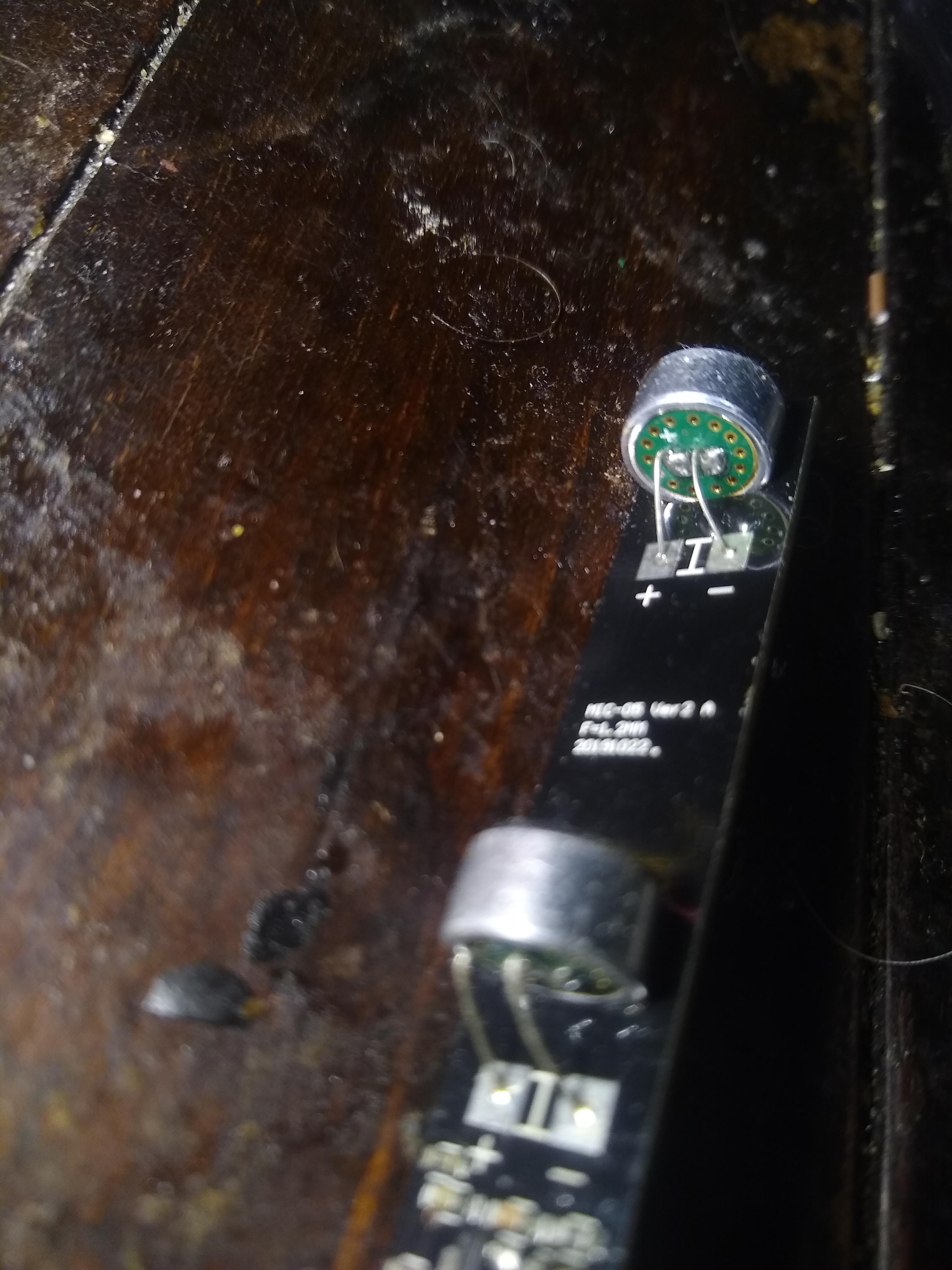
I will give that a try but helps for all so that also an they.

PS Adafruit recently got into the 2x Mix and so annoying as they justy copied the Seed 2 mic, the mics are analogue so could of been the 1st pi complete soundcard.
Even used the respeaker drivers.

This is a far and near sample reading at normal volume with settings from above that have both alc and noisegate enabled:

numid=12,iface=MIXER,name='Headphone Playback ZC Switch'
  ; type=BOOLEAN,access=rw------,values=2
  : values=off,off
numid=11,iface=MIXER,name='Headphone Playback Volume'
  ; type=INTEGER,access=rw---R--,values=2,min=0,max=127,step=0
  : values=126,126
  | dBscale-min=-121.00dB,step=1.00dB,mute=1
numid=17,iface=MIXER,name='PCM Playback -6dB Switch'
  ; type=BOOLEAN,access=rw------,values=1
  : values=off
numid=57,iface=MIXER,name='Mono Output Mixer Left Switch'
  ; type=BOOLEAN,access=rw------,values=1
  : values=off
numid=58,iface=MIXER,name='Mono Output Mixer Right Switch'
  ; type=BOOLEAN,access=rw------,values=1
  : values=off
numid=41,iface=MIXER,name='ADC Data Output Select'
  ; type=ENUMERATED,access=rw------,values=1,items=4
  ; Item #0 'Left Data = Left ADC;  Right Data = Right ADC'
  ; Item #1 'Left Data = Left ADC;  Right Data = Left ADC'
  ; Item #2 'Left Data = Right ADC; Right Data = Right ADC'
  ; Item #3 'Left Data = Right ADC; Right Data = Left ADC'
  : values=0
numid=19,iface=MIXER,name='ADC High Pass Filter Switch'
  ; type=BOOLEAN,access=rw------,values=1
  : values=off
numid=36,iface=MIXER,name='ADC PCM Capture Volume'
  ; type=INTEGER,access=rw---R--,values=2,min=0,max=255,step=0
  : values=195,195
  | dBscale-min=-97.50dB,step=0.50dB,mute=1
numid=18,iface=MIXER,name='ADC Polarity'
  ; type=ENUMERATED,access=rw------,values=1,items=4
  ; Item #0 'No Inversion'
  ; Item #1 'Left Inverted'
  ; Item #2 'Right Inverted'
  ; Item #3 'Stereo Inversion'
  : values=0
numid=2,iface=MIXER,name='Capture Volume ZC Switch'
  ; type=INTEGER,access=rw------,values=2,min=0,max=1,step=0
  : values=0,0
numid=3,iface=MIXER,name='Capture Switch'
  ; type=BOOLEAN,access=rw------,values=2
  : values=on,on
numid=1,iface=MIXER,name='Capture Volume'
  ; type=INTEGER,access=rw---R--,values=2,min=0,max=63,step=0
  : values=32,32
  | dBscale-min=-17.25dB,step=0.75dB,mute=0
numid=10,iface=MIXER,name='Playback Volume'
  ; type=INTEGER,access=rw---R--,values=2,min=0,max=255,step=0
  : values=255,255
  | dBscale-min=-127.50dB,step=0.50dB,mute=1
numid=23,iface=MIXER,name='3D Filter Lower Cut-Off'
  ; type=ENUMERATED,access=rw------,values=1,items=2
  ; Item #0 'Low'
  ; Item #1 'High'
  : values=0
numid=22,iface=MIXER,name='3D Filter Upper Cut-Off'
  ; type=ENUMERATED,access=rw------,values=1,items=2
  ; Item #0 'High'
  ; Item #1 'Low'
  : values=0
numid=25,iface=MIXER,name='3D Switch'
  ; type=BOOLEAN,access=rw------,values=1
  : values=off
numid=24,iface=MIXER,name='3D Volume'
  ; type=INTEGER,access=rw------,values=1,min=0,max=15,step=0
  : values=0
numid=33,iface=MIXER,name='ALC Attack'
  ; type=INTEGER,access=rw------,values=1,min=0,max=15,step=0
  : values=5
numid=32,iface=MIXER,name='ALC Decay'
  ; type=INTEGER,access=rw------,values=1,min=0,max=15,step=0
  : values=6
numid=26,iface=MIXER,name='ALC Function'
  ; type=ENUMERATED,access=rw------,values=1,items=4
  ; Item #0 'Off'
  ; Item #1 'Right'
  ; Item #2 'Left'
  ; Item #3 'Stereo'
  : values=3
numid=30,iface=MIXER,name='ALC Hold Time'
  ; type=INTEGER,access=rw------,values=1,min=0,max=15,step=0
  : values=6
numid=27,iface=MIXER,name='ALC Max Gain'
  ; type=INTEGER,access=rw------,values=1,min=0,max=7,step=0
  : values=4
numid=29,iface=MIXER,name='ALC Min Gain'
  ; type=INTEGER,access=rw------,values=1,min=0,max=7,step=0
  : values=0
numid=31,iface=MIXER,name='ALC Mode'
  ; type=ENUMERATED,access=rw------,values=1,items=2
  ; Item #0 'ALC'
  ; Item #1 'Limiter'
  : values=0
numid=28,iface=MIXER,name='ALC Target'
  ; type=INTEGER,access=rw------,values=1,min=0,max=15,step=0
  : values=2
numid=21,iface=MIXER,name='DAC Deemphasis Switch'
  ; type=BOOLEAN,access=rw------,values=1
  : values=off
numid=42,iface=MIXER,name='DAC Mono Mix'
  ; type=ENUMERATED,access=rw------,values=1,items=2
  ; Item #0 'Stereo'
  ; Item #1 'Mono'
  : values=0
numid=20,iface=MIXER,name='DAC Polarity'
  ; type=ENUMERATED,access=rw------,values=1,items=4
  ; Item #0 'No Inversion'
  ; Item #1 'Left Inverted'
  ; Item #2 'Right Inverted'
  ; Item #3 'Stereo Inversion'
  : values=0
numid=45,iface=MIXER,name='Left Boost Mixer LINPUT1 Switch'
  ; type=BOOLEAN,access=rw------,values=1
  : values=on
numid=43,iface=MIXER,name='Left Boost Mixer LINPUT2 Switch'
  ; type=BOOLEAN,access=rw------,values=1
  : values=off
numid=44,iface=MIXER,name='Left Boost Mixer LINPUT3 Switch'
  ; type=BOOLEAN,access=rw------,values=1
  : values=off
numid=9,iface=MIXER,name='Left Input Boost Mixer LINPUT1 Volume'
  ; type=INTEGER,access=rw---R--,values=1,min=0,max=3,step=0
  : values=3
  | dBrange-
    rangemin=0,,rangemax=1
      | dBscale-min=0.00dB,step=13.00dB,mute=0
    rangemin=2,,rangemax=3
      | dBscale-min=20.00dB,step=9.00dB,mute=0

numid=5,iface=MIXER,name='Left Input Boost Mixer LINPUT2 Volume'
  ; type=INTEGER,access=rw---R--,values=1,min=0,max=7,step=0
  : values=0
  | dBscale-min=-15.00dB,step=3.00dB,mute=1
numid=4,iface=MIXER,name='Left Input Boost Mixer LINPUT3 Volume'
  ; type=INTEGER,access=rw---R--,values=1,min=0,max=7,step=0
  : values=0
  | dBscale-min=-15.00dB,step=3.00dB,mute=1
numid=49,iface=MIXER,name='Left Input Mixer Boost Switch'
  ; type=BOOLEAN,access=rw------,values=1
  : values=on
numid=53,iface=MIXER,name='Left Output Mixer Boost Bypass Switch'
  ; type=BOOLEAN,access=rw------,values=1
  : values=off
numid=37,iface=MIXER,name='Left Output Mixer Boost Bypass Volume'
  ; type=INTEGER,access=rw---R--,values=1,min=0,max=7,step=0
  : values=0
  | dBscale-min=-21.00dB,step=3.00dB,mute=0
numid=52,iface=MIXER,name='Left Output Mixer LINPUT3 Switch'
  ; type=BOOLEAN,access=rw------,values=1
  : values=off
numid=38,iface=MIXER,name='Left Output Mixer LINPUT3 Volume'
  ; type=INTEGER,access=rw---R--,values=1,min=0,max=7,step=0
  : values=0
  | dBscale-min=-21.00dB,step=3.00dB,mute=0
numid=51,iface=MIXER,name='Left Output Mixer PCM Playback Switch'
  ; type=BOOLEAN,access=rw------,values=1
  : values=on
numid=35,iface=MIXER,name='Noise Gate Switch'
  ; type=BOOLEAN,access=rw------,values=1
  : values=on
numid=34,iface=MIXER,name='Noise Gate Threshold'
  ; type=INTEGER,access=rw------,values=1,min=0,max=31,step=0
  : values=20
numid=48,iface=MIXER,name='Right Boost Mixer RINPUT1 Switch'
  ; type=BOOLEAN,access=rw------,values=1
  : values=on
numid=46,iface=MIXER,name='Right Boost Mixer RINPUT2 Switch'
  ; type=BOOLEAN,access=rw------,values=1
  : values=off
numid=47,iface=MIXER,name='Right Boost Mixer RINPUT3 Switch'
  ; type=BOOLEAN,access=rw------,values=1
  : values=off
numid=8,iface=MIXER,name='Right Input Boost Mixer RINPUT1 Volume'
  ; type=INTEGER,access=rw---R--,values=1,min=0,max=3,step=0
  : values=3
  | dBrange-
    rangemin=0,,rangemax=1
      | dBscale-min=0.00dB,step=13.00dB,mute=0
    rangemin=2,,rangemax=3
      | dBscale-min=20.00dB,step=9.00dB,mute=0

numid=7,iface=MIXER,name='Right Input Boost Mixer RINPUT2 Volume'
  ; type=INTEGER,access=rw---R--,values=1,min=0,max=7,step=0
  : values=0
  | dBscale-min=-15.00dB,step=3.00dB,mute=1
numid=6,iface=MIXER,name='Right Input Boost Mixer RINPUT3 Volume'
  ; type=INTEGER,access=rw---R--,values=1,min=0,max=7,step=0
  : values=0
  | dBscale-min=-15.00dB,step=3.00dB,mute=1
numid=50,iface=MIXER,name='Right Input Mixer Boost Switch'
  ; type=BOOLEAN,access=rw------,values=1
  : values=on
numid=56,iface=MIXER,name='Right Output Mixer Boost Bypass Switch'
  ; type=BOOLEAN,access=rw------,values=1
  : values=off
numid=39,iface=MIXER,name='Right Output Mixer Boost Bypass Volume'
  ; type=INTEGER,access=rw---R--,values=1,min=0,max=7,step=0
  : values=5
  | dBscale-min=-21.00dB,step=3.00dB,mute=0
numid=54,iface=MIXER,name='Right Output Mixer PCM Playback Switch'
  ; type=BOOLEAN,access=rw------,values=1
  : values=on
numid=55,iface=MIXER,name='Right Output Mixer RINPUT3 Switch'
  ; type=BOOLEAN,access=rw------,values=1
  : values=off
numid=40,iface=MIXER,name='Right Output Mixer RINPUT3 Volume'
  ; type=INTEGER,access=rw---R--,values=1,min=0,max=7,step=0
  : values=2
  | dBscale-min=-21.00dB,step=3.00dB,mute=0
numid=16,iface=MIXER,name='Speaker AC Volume'
  ; type=INTEGER,access=rw------,values=1,min=0,max=5,step=0
  : values=4
numid=15,iface=MIXER,name='Speaker DC Volume'
  ; type=INTEGER,access=rw------,values=1,min=0,max=5,step=0
  : values=4
numid=13,iface=MIXER,name='Speaker Playback Volume'
  ; type=INTEGER,access=rw---R--,values=2,min=0,max=127,step=0
  : values=127,127
  | dBscale-min=-121.00dB,step=1.00dB,mute=1
numid=14,iface=MIXER,name='Speaker Playback ZC Switch'
  ; type=BOOLEAN,access=rw------,values=2
  : values=off,off
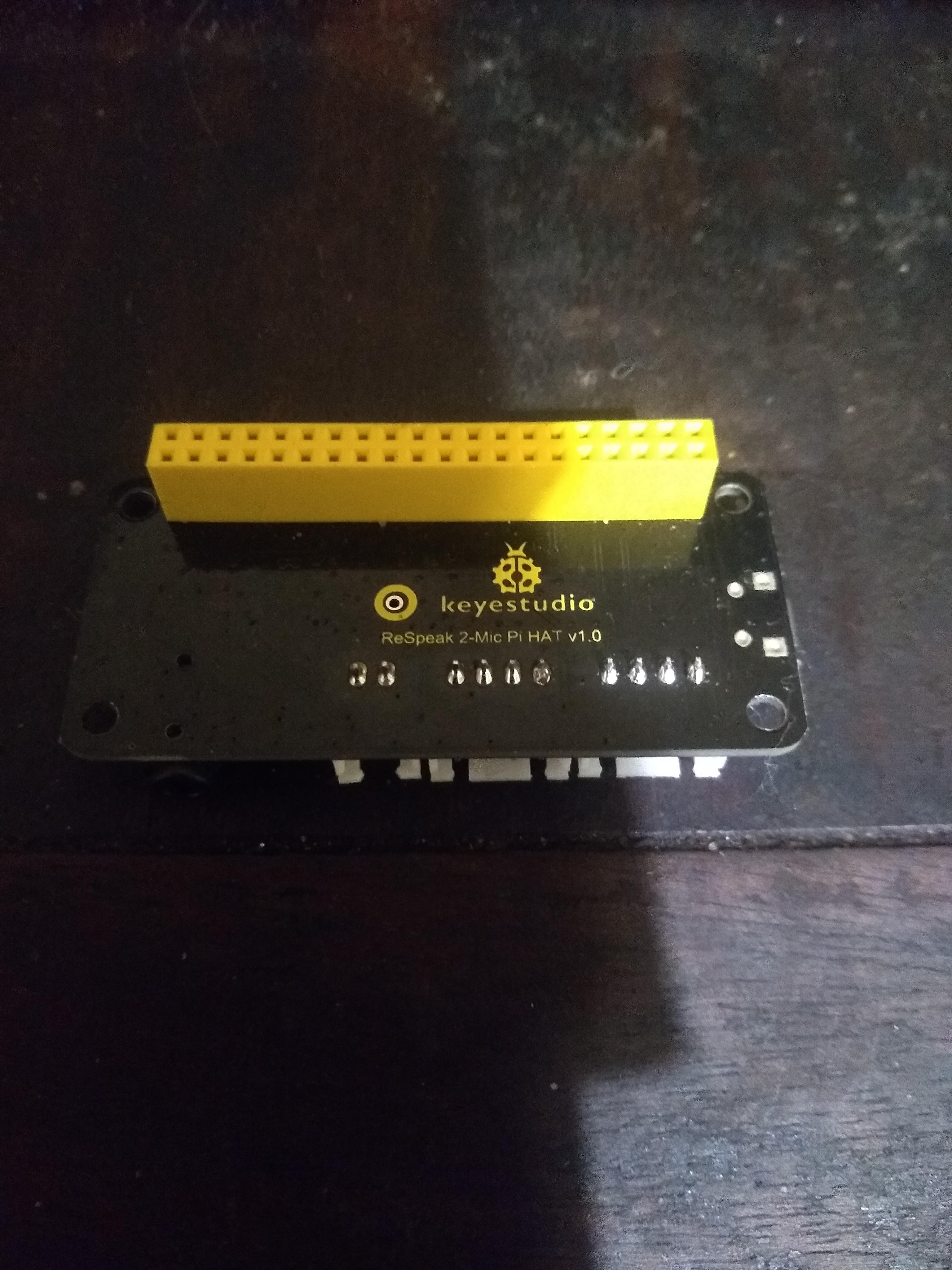
Near is 1m and far is 4.5 m. Excuse the dog paw sounds in the backgroud. The other noise you can hear is the mic picking up sounds from something my girlfriend is watching on her phone down the hallway in another room.
Near:
https://drive.google.com/file/d/1sYOM7rFpr9q7keAVey73cZuhrg0xlb_b/view?usp=sharing
Far:
https://drive.google.com/file/d/11no6UsZWwWYsf3kRc98HhD-9mMk6utMm/view?usp=sharing

What do you think about such settings then ? Does rhasspy better listen ?
Will test them asap

Well they did improve my experience but with my voice2json set up as described above.
You might want to make the decay / ramp up longer to improve vad detection with Rhasspy. You might also want to raise the alc max.
I have a setup where i can record in parallel to my assistant running. So I always save the last command so that i can listen in when something didn’t work. Or just record a few minutes randomly sometimes.
I found this to be the best way to tune the audio side as I can actually listen to what was happening and what the effect of certain settings were.

To compare if your hardware performs equally to mine it would be cool to have samples you recorded with the same settings.

Rhasspy will have better hearing as the low signals will get auto gain from the ALC.

When close the auto gain will be low when far auto gain will be high processed in the incoming signal.

When it comes to noise it depends on the noise vs voice ratio and no it will do nothing for that also as gain increases its also likely so will noise.

But the comparisons here would make some sense if approx levels and distances where given.
Any sample can be used really but the volume at the mic is what we are testing and the distance from the mic.

I have a el cheapo db meter but you need to describe the source and hope you have some level of similarity.

I was just interested in what you posted and some of your wav files as to be honest I don’t think there is any difference between any of the devices. Guess different mems might of been used but think they are are all just el cheapo’s on the 2 mic.


Might well help attenuate noise but I have never successfully set up a ladspa plugin in ALSA and have tried a few times :slight_smile:
Looks fairly easy for pulseaudio and guess you could mangle it back to alsa as you can make alsa use pulseaudio

I did get rnnoise going as a Alsa plugin and think its very much like webrtc as that a Pi3 may struggle.
It might be interesting how much difference a 2.0Ghz Pi makes as think clock speed here has much influence.

Summary

This text will be hidden

pcm.capture {
    # Add an ALSA plug for LADSPA
    type plug
    slave.pcm {
      # Add the LADSPA noise filter
      type ladspa
      slave.pcm {
        # Convert from float to int
        type lfloat
        slave {
          format "S16_LE"
          pcm "hw:CARD=Device"       # Use card 1 (e.g. USB webcam soundcard), device 0 (the default)
        }
      }
      # LADSPA configuration for the noise filter
      # See https://github.com/werman/noise-suppression-for-voice
      path "/usr/local/lib/ladspa"
      capture_plugins [
        {
          label noise_suppressor_mono
          input { controls [ 2 ] }      # VAD Threshold %
        }
      ]
    }
  }


git clone https://github.com/werman/noise-suppression-for-voice
cd noise-suppression-for-voice
cmake -Bbuild -H. -DCMAKE_BUILD_TYPE=Release
cd build
make
sudo make install

Here is a Pi4 going at 2.0Ghz and it doesn’t do that bad a job.
My office is cold and the fan heater is blowing on me and that is quite a severe test that actually it doesn’t make a bad attempt at.
The VAD sensitivity seems crazy high as the setting needs to be crazy low here its at 10% and not sure if its that, that is cutting slightly.

no-rnnoise
https://drive.google.com/open?id=1pIH5O_TP6YoNrp9ql2rr_t5LmnpMB9QE
rnnoise
https://drive.google.com/open?id=1_Qr-XaaaxEy-nQeiS8GaTVCWCd1egde_

Its actually a good attempt by the pi4 running pios 64bit lite @ 2.0Ghz

Rnnoise is pretty low-tech nowadays compared to the fresh rake of voice technologies that need really an X86+GPU with a min of approx GTX 1650.

Got a feeling its just clock speed as there is very little load.

You probably would still need to dial it back a bit. It does sound distorted and cut off a bit and im not sure that either the wakeword models or the asr models would love it as they tend to struggle a lot with heavily processed or to artificially quiet audio as that is just not what they were trained on.

You see that is something that has been said before and is slightly paradoxical.
As the argument of feeding denoised input into a model that has not been denoised is obviously going to be prone to artefact noise.

If you are creating models you must use the the tools you record with (aka run your dataset through denoise) or you force your tools to be as exact as the original.

rnnoise is old tech but if in spring the Pi4a does make an appearance its quite possible to make noise resilient denoised KWS models but really that infrastructure is a crazy model as all with AI quality and results = raw power and likely a single central processor with more horse power than a Pi due to the inherrent nature of sporadic voice commands could serve a much better multi user / multi room role.

I mean this is a Pi4 with rnnoise but you should hear the results of RTX voice with a newer GPU or the facebook research pytorch cuda based voice technologies.
Same goes for tacotron2 + waveglow its actually awesome but on the Pi just forget about it.

Yes that is true for keyword models but it would be a massive effort for some kaldi asr models as you need a lot more of speech plus transcribed text corpora to train those. And the available open source data sets are just not recorded that way mostly.

Yeah why I see distributed models on low end hardware as probably pointless. But you could.

Yes but most people will not have that. They will have one of the many available single board conputers like the pi or a rockpro or an odroid.

Actually no in comparison to the availability of x86 and gpu’s from the GTX780 up more people have those.
Its you who has a Pi and actually in market share its much less.

I think you have to look at the people who are actually interested in diy assistants and home automation and so on. Nodered for example just had a big community survey and a big majority is running all their projects like this on single board computers.
The crowd who run x86 systems with beefy graphic cards as a 24/7 server is very small.
And I would bet that if you did a survey here it would be the same result.
I know the same is true for the user base of things like openhab where i used to be active and home assistant where alot of users for Rhasspy come from.
There might be a few people who also have a beefy machine at home but even those often run their server things on raspberry pis.
I really do talk from experience on this. It is the most popular hardware choice, just look at the questions in the forum.

My point is when it comes to voice AI the best you can produce is for those who want to say “look mum what I have built”.

Otherwise its extremely poor in comparison to $30 big data silicon and the only option is horsepower if you wish to be private and have something that rivals maybe even beats the big guys.

So enjoy but for me your talking toys.

Node red is IoT and that is far more wide ranging than poor voice AI.

That is your opinion but doesn’t a project like Rhasspy also have to look at what the userbase is actually using and listen/ aim its development at that.
Because otherwise you will loose a huge chunk of people.
And no there is a few people including me who actually use tools like Rhasspy or Voice2json in production/ day to day life on that toy hardware you call it. It just turned of my tv and my girlfriend set a timer for the tea we made.
Than I asked what the weather tomorrow will be like and that is all working rather nicely.
My mom wasn’t involved to look at it and say what a good boy i am unfortunately…

There is no user base apart from you, there is a lack of skills and people like Kibo who think compared to Snips this sucks and is currently useless.
I haven’t used a Mycroft or Rhasppy for a long time because they are so poor.
I keep looking for alternatives and hardware that might make a difference but I am not going to convey anything other than the truth.

The hobbyist programmers should enjoy what they are doing but need to reign in claims of effectiveness.

Wow you just disenfranchised a lot of people here. FYI for me it performs on par to snips which i also used for a year before it was shut down.
Don’t you think the project would be dead and the forum full of shouting people if I was the only one successfully using it?
You should really leave the sinking ship and jump to the next project.

Look at post count your about 80% of community and if truth disenfranchises I have no care.
I came to create working opensource voice ai not make friends.

Opensource is about user driven software and currently this needs to be driven hard and you seem at times disingenuous as after never using snips the only vibe I get is Rhasspy is no Snips.

It could be worse as my opinion of Mycroft is utter snakeoil :slight_smile:

No opensource is about contribution. Its about all the people who quietly contribute, be it you that helps people with audio hardware problems. Somebody designing a nice printable case. Small pull requests and so on. There is no them to drive its an us.
But i guess thats just my point of view.

From Stallman to Eric Raymond, Apache, Libreoffice to the Linux Kernel its about how contribution can make effective user driven shared ownership software.
Contributing dross in masse has little use.

PS A armour case with a 12v 40mm fan on 5v makes a super easy and low cost Pi4 2.0Ghz machine.

We do need to sort out the start of the input chain with voiceai and audio processing.
Garbage in, garbage out and currently things are not good in common domestic environs.

I know ive been running mine overclocked for half a year now in a passive heatsink case.

I tried passive with the Pi4 but under stress it just throttles.
Even with the fan it may eventually throttle maybe not but with constant load it quickly gets up to 65c.

Just found the fan just stuck on 5v is silent practically and gives far more load headroom.
Double sided sticky tape rules :slight_smile:

I never said rhasspy is useless.
There have been a long road, with api integration, bug finding/fixing after 2.5 remake, wakeword etc.

But since the beginning the intent definition and asr is better than snips. Raven has close the gap to provide a workable open source wakeword.

I have snips working for two years in house by all family, plugged into Jeedom and everyone here use it everyday for lot of stuff.

Actually rhasspy is ready, plugged into my production Jeedom or test Jeedom with a switch. And it works better than snips. BUT only things preventing me to get ride of snips is this particular problem of infinite listening with background noise/music. And there is some nice ideas here to get this improved. A max duration settings in stt listening would help a lot also. And I have no doubt @synesthesiam will soon find solutions :grinning:

Like ever said snips was a team of lot of dev and rhasspy is driven by one man and a few helpers. And apart this listening problem I ever think it is better than snips.

The world is full of people saying it’s impossible while some are doing it …

One day we will all be able to ditch snips and I would never thanks enough @synesthesiam for that.

4 Likes

We should ditch snips as its completely derailed the excellent work provided by @synesthesiam and took Rhasspy the wrong way.

PS if you are siting next to a Triangle Antal then maybe just go out and buy something that does work :slight_smile:

If you get your hands on one really do try the respeaker usb 2.0 array. Its a bit over priced for what it is but the quality jump from the 2 and 4 mic pi hat is very noticeable and that might be what you need.

hey i would like to ask and suggestion about this below product, if anyone knows that does it work with pi or it is reliable for give it try … ?

Thats just the mic board the I2S board is another layer

thanks @rolyan_trauts:+1: , but i have a question about its datasheet details says that it supports beam forming so can this be efficiently useful for voice based projects?

Yes that its 7 i2s mics on a board and all you have to do is develop your beamforming algs.

The only opensource beamforming I know of is ODAS & https://distantspeechrecognition.sourceforge.io/

I keep meaning to have a go with the latter as got as far as compiling and that does work.

Speechbrain also say they are going to make ‘beamforming’ part of a all-in-one speech kit but still to be released.

Commercial entities don’t seem to release freeware beamforming libs and you can try to find some sispeed ones but my hunch is they do not exist.

thanks @rolyan_trauts:+1:

I haven’t worked out https://distantspeechrecognition.sourceforge.io/ and even though its brilliant stuff it is quite complex so have my fingers crossed for speechbrain as if beamforming does become part of a toolkit that solves a problem even if with the DSR Toolkit via opensource it just takes one of us to work it out and then share.

It does compile I can honestly tell you that and I spent a short time trying to work out how to set the mic geometries which actually from the examples in the utils section of the defaults its probably doable.

Invensense do a great application note AN-1140 on just basic beamforming of the simplest types of Broadside & Endfire which are sort of self descriptive but the read is brilliant simple without science overkill.

There is this huge urban myth that arrays of omni-directional mems are good and the truth couldn’t be anymore different when you lack the software to turn that array into a beamformer.
Its actually better to use a single mic and channel but many are summing and I was guilty also and it creates depending on orientation of incoming audio 1st order high pass filters that means placement can give a totally different tonal pattern purely on placement.

The simple math is in the above and my head can not get past high order broadside or endfire arrays.
I haven’t a clue with the geometry of what you propose there are a smattering of complex examples in other projects (ODAS) that maybe could be hacked but for me is pure guesswork.
I did run ODAS a while ago and the DOA alone seemed to max out a Pi3 it might of even been my Pi4 but can not remember exactly.

If you can run software, develop your own algs or purchase running beamforming its why I created this thread and often comment so.
If you have a dumb array you really need to know what you are doing and that really you might have multiple mics and its much worse than they count for nothing its that they can produce terrible results if you just sum them and at best just cause confusion over varying results.

Have a read of the app note as its not the shortest but once you understand what it contains much becomes apparent.

I have a big review to do on my mic collection and you can do some simple stuff with FFmpeg as it does have a delay that you can set by samples.

The simplest beamformer the broadside the PS3eye style basically adds a delay of the distance of the mics that equates to the speed of sound.
At that point it creates at a specific frequency it creates a big null notch and from that every octave (half frequency) you get -3db of attenuation whilst side on as its a high pass filter.

The initial logic is we can just sum them and 2x mic is twice as much but that couldn’t be further from the truth as the sine waves your adding together are out of phase.
Broadsides front and back do nothing its only the sides that are effected so as you approch (90,270) the effects can be detrimental.

An endfire is just a PS3eye broadside side on at 90’degrees but rather than sum the signal of the rear is inverted so its subtracted when summed via a delay. This creates a 2nd order high pass filter of 6db per octave and the cardioid pattern of a uni-directional where most of the attenuation is at the back.

As said you can use FFmpeg with basic array types but after that it quickly gets akin to rocket science.
But for many for what you gain a simple cheap singular mic /soundcard might be a better option.

Pretty sure even before I run tests the Boya mic is by far the best, its built like a tank good enough that also it screws on a mini tripod and also makes a good broadcast mic or put on the deadcat and use it as a shotgun mic on a camera.
A bit bigger about length of a Pi and a tad more than £15 than my budget hoped but because its a 1/2" camera mount there are a whole manner or tripods and clamps that you can position it with and your pi can go somewhere more discrete.
Its the cheapest thing by far Boya make and for price from what I have tested its really good.
But yeah if your Rhasspy doesn’t work out then camera or PC it is good for other things and why its become my choice.