Rhasspy can tell you the weather

Evening,

the last few days or so I spent porting my fork of the “Snips-Wetter” skill to rhasspy and as of now I got it working and put it onto github.

It can be found here if anyone wants to try it out.

If anyone decides to try it out I would love feedback (or even some help to fix bugs and add in new features). I am afraid the code is one big mess at the moment but it is at least partly documented and works.

Anyone wanting to translate it is welcome, if you can brave the code.

Daenara

5 Likes

This looks very nice, Glückwunsch! - I have just done something simple with openweathermaps in node-red, but maybe I will translate yours to English and call the script. It would be very nice to have such a weather-module that generates decent text for the right questions.

Looks great. I’ll give it a try tomorrow

I could not fall asleep so I did a bit of cleanup work and restructuring. There is a small config file now (thought not everything is implemented yet and leaving the wrong value blank will throw errors) and I split the big logic file up. Way more imports to be done but it is at least better readable. I will split everything concerning language up into an extra file in the next few days which should make translating easier.

If I understand it, it only can be used with Homeassistant.
The result is not automatcally send back to output of asking rhasspy.
I use nodered in Docker.

Really? I am new to rhasspy but I run rhasspy from a docker on the same machine I run a hass docker and I have no problems.

The script itself doesn’t interact with homeassistant at all and I set it up exactly like the documentation said for rhasspy. It should run fine.

Only scenario I can think of is if the speech output from my custom command only works in conjunction with homeassistant but I saw no mention of that anywhere.

That’s what I guess.

 If handle.forward_to_hass is false, the output of your program is not used.

So if I do not have hass, your output will be ignored.

Possible solutions:

  • sending output with mqtt (v2.5??)
  • sending output with api (Problem: no IP, just siteID is sended)

WTF… For what reason does rhasspy have a custom command option if the output is ignored without homeassistant… That seems pretty counterintuitive since it lists custom commands as a possible alternative.

Well, seems like I need to put an alternate command_config.py out there that uses the api for tts. It does not actually effect my script at all, I just describe a general setup in the readme to help ppl out with how to actually call the script. Nothing there stopping ppl to send the output string per api or mqtt anywhere they want from their custom command script.

Thanks for pointing that out. I tried using it with forward_to_hass set to false before but since I still test using the web gui I did not notice the checkbox overriding the settings.

On another note I found something I broke when I worked on it yesterday so back to programming for me.

Ah, it turns out I was hoping too much. I was hoping to have some kind of command line tool that could give you a weather forecast/answer for specific parameters given on the command line. Then I could have sent this result via network to tts to my correct satellite. I basically do all my actions in node-red. I did like your ideas of different questions to ask -but I think I can unfortunately not integrate this into my setup.

Anybody knows of any good weather forecast command line tools?

You can re purpose the logic of this thing for that. If you write a parser that takes command line parameters and puts them into a WeatherRequest object and use that instead of rhasspy_wheather.py then you will get a text response from command line parameters.

If you want the values directly instead of the text response then you can just grab the WeatherForecast object and use that.

The only thing you would need to do is fork it and then replace rhasspy_weather.py with something that works with node-red. The logic for getting the weather and answering is separate from that.

I’m using that:
weather

It uses msg.slots.city as input and gives you some Information as output. Output it is said by calling satellite:

[{“id”:“9bc5e254.49b41”,“type”:“openweathermap”,“z”:“21f11887.571048”,“name”:“GetWetter”,“wtype”:“current”,“lon”:"",“lat”:"",“city”:"",“country”:"",“language”:“de”,“x”:1400,“y”:920,“wires”:[[“8bd9a746.6facc8”]]},{“id”:“8bd9a746.6facc8”,“type”:“function”,“z”:“21f11887.571048”,“name”:“SpeakWeather”,“func”:"id = msg.data.weather[0].id;\n\nmsg.payload = "Das Wetter in " + msg.payload.location + ": " + msg.payload.detail + ". " + \n “Die derzeitige Temperatur beträgt " + msg.payload.tempc.toFixed(1).replace(’.’, ‘,’) + " Grad. " +\n “Es gibt eine Luftfeuchte von " + msg.payload.humidity + " Prozent “\n\n\nreturn msg;”,“outputs”:1,“noerr”:0,“x”:1560,“y”:920,“wires”:[[“93bfaa03.be2c78”]],“icon”:“node-red-node-openweathermap/weather.png”},{“id”:“87f49b03.778728”,“type”:“function”,“z”:“21f11887.571048”,“name”:“setCity”,“func”:”\nmsg.location = {“city” : msg.slots.city,\n “country” : “Germany”}\n\nreturn msg;”,“outputs”:1,“noerr”:0,“x”:1250,“y”:920,“wires”:[[“9bc5e254.49b41”]],“icon”:“node-red-node-openweathermap/weather.png”}]

the node is:

node-red-node-openweathermap

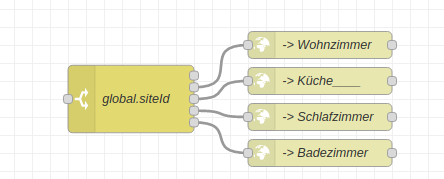
to answer, I save the callers siteId in a global variable and send the output to this switch
answer

[{“id”:“997b2108.5551d”,“type”:“http request”,“z”:“27a1dcd5.ab7ad4”,“name”:“Wohnzimmer_”,“method”:“POST”,“ret”:“txt”,“paytoqs”:false,“url”:“http://10.2.30.1:12101/api/text-to-speech",“tls”:"",“persist”:false,“proxy”:"",“authType”:“basic”,“x”:640,“y”:300,“wires”:[[]]},{“id”:“76f4e8b9.1d15b8”,“type”:“switch”,“z”:“27a1dcd5.ab7ad4”,“name”:“global.siteId”,“property”:“siteId”,“propertyType”:“global”,“rules”:[{“t”:“eq”,“v”:“wohnzimmer”,“vt”:“str”},{“t”:“eq”,“v”:“küche”,“vt”:“str”},{“t”:“eq”,“v”:“schlafzimmer”,“vt”:“str”},{“t”:“eq”,“v”:“badezimmer”,“vt”:“str”}],“checkall”:“false”,“repair”:false,“outputs”:4,“x”:430,“y”:360,“wires”:[[“997b2108.5551d”],[“dbf7b998.d91028”],[“bfbd763.9fd9288”],[“6159d91e.4b7518”]]},{“id”:“6159d91e.4b7518”,“type”:"http request”,“z”:“27a1dcd5.ab7ad4”,“name”:“Badezimmer_”,“method”:“POST”,“ret”:“txt”,“paytoqs”:false,“url”:“http://10.2.30.4:12101/api/text-to-speech",“tls”:"",“persist”:false,“proxy”:"",“authType”:“basic”,“x”:640,“y”:420,“wires”:[[]]},{“id”:“dbf7b998.d91028”,“type”:"http request”,“z”:“27a1dcd5.ab7ad4”,“name”:“Küche______”,“method”:“POST”,“ret”:“txt”,“paytoqs”:false,“url”:“http://10.2.30.2:12101/api/text-to-speech",“tls”:"",“persist”:false,“proxy”:"",“authType”:“basic”,“x”:640,“y”:340,“wires”:[[]]},{“id”:“bfbd763.9fd9288”,“type”:"http request”,“z”:“27a1dcd5.ab7ad4”,“name”:“Schlafzimmer”,“method”:“POST”,“ret”:“txt”,“paytoqs”:false,“url”:“http://10.2.30.3:12101/api/text-to-speech",“tls”:"",“persist”:false,“proxy”:"",“authType”:“basic”,“x”:640,“y”:380,"wires”:[[]]}]

Right now it only tells the basic information, but you can change that in the “SpeakWeather” node
I hope you enjoy.

Ok, forked it and trying to write a parser now that will output the text on stdout. If I get anywhere, you will receive a pull request.

Thanks, I have been doing it exactly this way already.
But it just gives you the current weather - I am looking forward to answering more questions and generating some kind of more complete forecast report. And having that as a cli tool would allow it to be embedded in multiple environments - not only hass, node-red, and rhasspy.

Not exactly what you are asking but I use the DarkSky node-red node to collect weather information and then when I ask for the weather, node-red handles the intent and publishes the information to mqtt on hermes/tts/say. For tts I use MaryTTS.

Does darksky generate some kind of human readable forecast for you that you can directly send to tts?

Openweather has this as “forecast”: “broken clouds” - that’s not enough for me, that’s why I like @Daenara module so much.

Compliments, things are developing fast! I am wondering if I wait until next week to really add something, not sure I can keep up at the moment :wink:

I like the idea of importing the language specific things from locale folder, it could also eventually all go into a config file (could be even python)? and then have language specific templates for that which could be customized for a particular setup?

I see a parser folder, but this is not yet a command line parser eating the detected intent directly, is it? What do you have in mind for getting something fed via command line? It could also be json via stdin if that’s easier, but I think command line parameters would be more unix’ish.

It has a lot of information but I then use node-red to build the response like this

    value = "currently, " + global.get("HornsbyWeatherCurrent.Conditions") + 
            " and " + Math.round(global.get("HornsbyWeatherCurrent.Temperature")) + 
            ". Expected " + global.get("HornsbyWeatherForecast0.Conditions") +
            " with a high of " + Math.round(global.get("HornsbyWeatherForecast0.HighTemperature")) + 
            " and a low of " + Math.round(global.get("HornsbyWeatherForecast0.LowTemperature"));

Where I have stored the fields in an object like:
{“thingname”:“HornsbyWeatherCurrent”,“Comfort”:“Warm”,“Conditions”:“Partly Cloudy”,“Humidity”:85,“LocationUsed”:"-33.6,151.1 - Australia/Sydney",“LocationUsedText”:"-33.6,151.1 - Australia/Sydney",“Pressure”:1026.1,“RainFallDay”:0.2217,“RainFallsource”:“weather”,“THI”:15.08,“Temperature”:15.08,“WindDegrees”:157,“WindDirection”:“SE”,“WindGust”:1.7,“WindSpeed”:1.06,“Windsource”:“weather”,“source”:“weather”}
and
{“thingname”:“HornsbyWeatherForecast0”,“Conditions”:“Mostly cloudy throughout the day.”,“HighComfort”:“Warm”,“HighHumidity”:97,“HighPressure”:1026.1,“HighTHI”:22.2,“HighTemperature”:24.79,“HighWind”:2.94,“HighWindDegrees”:272,“Highsource”:“weather”,“LowComfort”:“Cold”,“LowHumidity”:65,“LowPressure”:1019.7,“LowTHI”:2.19,“LowTemperature”:13.93,“LowWind”:0.73,“LowWindDegrees”:29,“Lowsource”:“weather”,“POP”:44,“source”:“weather”}

I collect 7 days forecast at present I just provide current information and the forecast for the coming day.

So the above would read out:
“currently, Partly Cloudy and 15. Expected Mostly cloudy throughout the day. with a high of 25 and a low of 14”

Thanks for the compliment. I have quite a bit of free time right now so I work on the script quite a bit. The major restructuring should be done now, I did it as fast as I could so me moving things to different files will not break to much later on (I broke everything 5 times yesterday and followed the errors to repair it).

The plan for the locale is to eventually have files that contain ever bit of text that is either input or output and ppl can configure quite a bit with that. The locale moved into the config but so far every config needs to be mentioned in the code to work and I see no way around that at the moment and no need to do research on it. If you have any other ideas for the locale, I would be happy to read about them.

As for the parser folder. I separated the parsing logic from the main program to make it more modular. The parser is (so far, same problem as the locale file) selected via import in rhasspy_weather.py. So basically the only thing someone needs to do to parse a different input would be to replace the file in the import and rewrite the function.

I personally have no plans for a command line parser because for me the current one works fine but if you want to write one put the logic into the parser folder and copy, rename and edit rhasspy_weather.py to work with it.

As for waiting a week before you start, you can do that. By then my new pi will hopefully be here and I will have something else to do but I think the major work that breaks stuff is done. Plans for today are moving the language stuff to the locale file, maybe do some testing (and the resulting bug fixes) and some small work. If you only plan to write yourself a parser then you should be pretty safe from stuff there being broken.

Regarding the combination of configuration and language. My idea was to have some sample configuration templates for different languages, but maybe you are right that it’s better to separate them into two config files. One (config.py) has names of topics, intents, default verboseness, log level, … in it, the other (language.py) all the language specific stuff. Of course that could also go into some kind of ini-file in .config/thasspy_weather, but you need to decide what fits your workflow best.

Problem regarding the command line parser for python is that I seem to always do it a different way - so I will read another comparison and then decide - should be easy to build.

Correction, I did that today, not only for the locale but also for the parser and api. Now the script will try to load a file that is named exactly like what is written in the config.ini, if the file does not exist, it just throws an error.

That is exactly what I am doing right now. If you want to teach the script another language (and I am done with the localisation movement) you can just copy the german.py, rename it to your language, translate everything and name the new language in the config instead of german. The locales are python files directly because I foresaw (and got to that point today) that there will be a need for language specific functions anyway so it is easier to just have that as a python file instead of an ini.

The main goal is you can download it and set it up with minimal effort but if you want to customize the answers more than just changing the word order around you will need to edit code, so you can also edit code for the locale. I don’t see anyone without coding knowledge wanting to translate it anyway, so no need to write a complicated ini parser for that stuff.

As a side note, I finally figured out how to quote stuff, have been wondering how to do that for a few days now.

2 Likes

Hmm, I am currenty trying to get into your WeatherReport class. Not understanding all the details, I get the feeling that switching this to English will be really hard as sentence construction is slightly different - there is a lot of hardcoded German in here. I might take a closer look at https://github.com/MycroftAI/skill-weather and see if I can extract some command line weather forecast reporter from there.

Keep up the good work. Unfortunately using hass is also not really an option for me as writing control logic is much easier for me in node-red (java script), c, and python.

I will also still study your grammar and code a bit more as inspiration for good questions to ask and answer regarding the weather, but I think turning your tool into a multi lingual weather reporter that runs from the command line is at the moment a bit out of my league and I need to fast track some other projects first.

Most of the hardcoded German is moved already, just the preamble for the detailed report is still in there. It just took a while because it was so much. Basically there are 3 parameters that can be used in sentences, and those are formatted by functions in the locale file. I will do a basic English translation that I ran out of time for yesterday either today or tomorrow so there is at least one sentence for each scenario which will make it easier to understand for you. The translation was always part of my plan for the script so it is no extra work for me.

If you find something that suits you more go for it, this script can be adapted for console arguments but it was never really intended for that so you might get lucky and find something that already does that.

Ah, I see a locale/english.py :smiley:

I like the userdefined functions.

Ok, convinced, I need to take another look. If I can understand all your slots an argparser should be easy and hopefully done in a day.

The slots will be translated in a few days also, I just need to fix my setup first. Hassio had an update and that broke my audio for rhasspy (again) so I need to learn how to use docker better and move away from hassio and to homeassistant.

So, I tried to create cli_weather.py module in the main directory that I want to call from __init__.py at one point if this modules is executed from the command line, but for starting I would like to just test cli_weather.py [args] alone first.

I am now a bit confused about the package structure. Most of your other modules refer to rhasspy_weather.globals which is not in the modules searchpath if I run anything from the main directory as there is “only” a rhasspy_weather.py file but not a package directory.

So if not moving things around too much, I can’t get around the error:

ModuleNotFoundError: No module named 'rhasspy_weather.globals'; 'rhasspy_weather' is not a package

Can you explain a bit more how the package structure is supposed to work - it might have to do with the whole thing being called a different way than I think?

That happens because I normally call the whole script from outside the folder that is on github. What is on github is in a folder called rhasspy_weather for me and that is the package that globals.py is in and that rhasspy_weather.py is in.

I am not very good at working with modules in python and sometimes refer to stuff by package name and sometimes just in a relative way. Python imports work kinda strange and I take it the way I can get it to work instead of trying for 2 hours to get a different way to work.

The exact way I call it is in the readme as custom_commands.py. That is on the same level as the rhasspy_weather folder that contains everything from the repository.

Thank you for your work! That looked perfect to me, so I tried it - starting with copying the sentences to my sentences.ini. (My profile is german as well. I use hass.io too, but did not get this far.)

Strangely, after saving the Sentences and retraining Rhasspy, Rhasspy understands me a lot worse than before.

Before I had mainly a few sentences to switch my lights on and off, which worked just fine. STT is Pocketsphinx and my Speech was transcribed and handled correctly.

After adding your sentences STT only understands gibberish - if any.

What did I do wrong?

Ok, not sure why you have to add rhasspy_weather. to things as it should also work without that (and also the .data_types should actually work as data_types without .), but that is no real show stopper here.

However, having a locale package actually breaks the use of gettext as there is a system locale package:

File "/usr/lib/python3.8/argparse.py", line 1671, in __init__
    self._positionals = add_group(_('positional arguments'))
  File "/usr/lib/python3.8/gettext.py", line 736, in gettext
    return dgettext(_current_domain, message)
  File "/usr/lib/python3.8/gettext.py", line 662, in dgettext
    t = translation(domain, _localedirs.get(domain, None))
  File "/usr/lib/python3.8/gettext.py", line 583, in translation
    mofiles = find(domain, localedir, languages, all=True)
  File "/usr/lib/python3.8/gettext.py", line 554, in find
    for nelang in _expand_lang(lang):
  File "/usr/lib/python3.8/gettext.py", line 213, in _expand_lang
    loc = locale.normalize(loc)
AttributeError: module 'locale' has no attribute 'normalize'

Can you rename (or I can refactor it too) the locale package into something different like manage_locales?

Shall we take this discussion to the issues in github?

Managed to hack it with this preamble:

import sys

import logging
log = logging.getLogger(__name__)

import globals
from data_types.config import WeatherConfig
from data_types.report import WeatherReport

# hack to allow correct locale to be used in argparse
syspath_backup = sys.path
sys.path=[]
for p in syspath_backup:
    if "weather" not in p:
        sys.path.append(p)
import argparse

I am restoring then sys.path when finished with parsing the arguments.

Ok, stuck again.
Was hoping to offer you a command line version, that can be inside you package, but that will not work.
So I will make another github project that is dependent on my fork of your project and uses it as is as package - that might still be messy with the location of the config.ini or the selected locale, but I will report back.

Can we assume that your license will be permissive (so not GPL! It should be at least LGPL, better MIT or BSD)? Else I am not allowed to use it in my code.

I never had any problem with that but I also don’t use rhasspy outside of testing right now. It might be because the sentences are to similar and it can’t differentiate between them. I myself use kaldi so far so it might work better for you, or it might not.

I will do so the next time I work on the script. Right now I am solving basic linux issues and docker stuff because hassio broke my rhasspy and I always find 3 things to solve for everything that works again.

Basically the way I set it up it needs to be called from outside the project, so that is basically intended. What you can write is a parser file that is basically a function wich takes everything as a parameter that you call from your console script and puts it into a WeatherRequest. But since there is not that much parsing for console that might not be needed.

This is the first thing on github that is actually my work and not some fork of other stuff that someone wants to actually use so I have not even thought about a license but it is intended to be copied, used and so on so yes, you can assume an permissive licence.

A very initial version of my command line parser using rhasspy_weather is up and working here:

not sure that I did understand everything right in adapting my parser, so feedback is appreciated.

Also parts of the answer are still in German, so I need to see, what still needs to be translated and forwarded upstream to @Deanara

Okay, I thought I got everything but I know where the German is coming from. I take the weather description from openweathermap and I thought I got everything but the language setting is part of the URL and I missed that. I thought my test was a mix of English and German because they get the language from the country code but it is an extra setting. Will be fixed.

The only German that should still happen if everything is working like I intend it to is when detail is set to true because I did not translate that part because I plan to rewrite it completely anyway.

EDIT: I put out a quick fix for the language issue. It is not tested because I am not home but it should work for now. country_code needs to be set to something in this list. And you need to put something in the zipcode setting because otherwise it will not set the country_code. I will move that into the lang file as soon as I get to my pc.

Switching to issues on github. at least one mini pull-request for you is waiting.

My parser is already working, I have integrated it into node-red using my --json '<json-string>' option. You have though to remember to send the json enclosed in single quotation marks (via JSONata "'" & json_message & "'") to the exec node running cli_weather --json

The repo also has some English language files (sentences and slots), you can use (as well as Deanara’s supplied English language file) to run Deanara’s software in English.

Thanks @Daenara, there are still some small bugs to catch and features to implement, but it’s already a lot of fun to use! Thanks for sharing.

I was thinking about a universal connection between intentHandlers and Rhasspy without Hassio.
her you can see my Idea
Connecting command line parser to mqtt

Maybee it’s usefull

My project also focuses on this area. My solution takes a different approach from yours though.

Forum topic: A generic HTTP server for handling Intents (not completely up to date).

Github page, with latest documentation: https://github.com/Wil-Peters/HomeAutomation

Continuing the discussion from Rhasspy can tell you the weather (at least if you speak German):

I would be happy with a way to just call a script for a specific intent instead of having to call one script for everything and filter out what I want to use a script for. I can handle mqtt output, if I want that, myself and I already found a python script that uses mqtt for something else where I can copy how it is done.

… and Apple buys darksky - so all these services will stop working soon.

(This doesn’t impact @Daenara’s module, but the idea to use darksky from node-red directly as mentioned by @jrb5665.)

@Daenara

Are you interested in a dutch translation?

Also, if you want I can have a look whether I can add some test coverage to your code. That’s what I usually do during the day :wink:

A dutch translation sounds great but it needs to wait for a bit because I still need to finish one rewrite. I can maintain the german and english translation if I change anything or add to it but since I can’t speak dutch that translation would break when I do the rewrite.

Test coverage would be nice and I might even learn how to do that in more than the most basic theory. I study computer science but we didn’t learn such practical skills at all. We only learned they existed and did an example on 10 lines of python code in the very first semester and that does not help with anything.

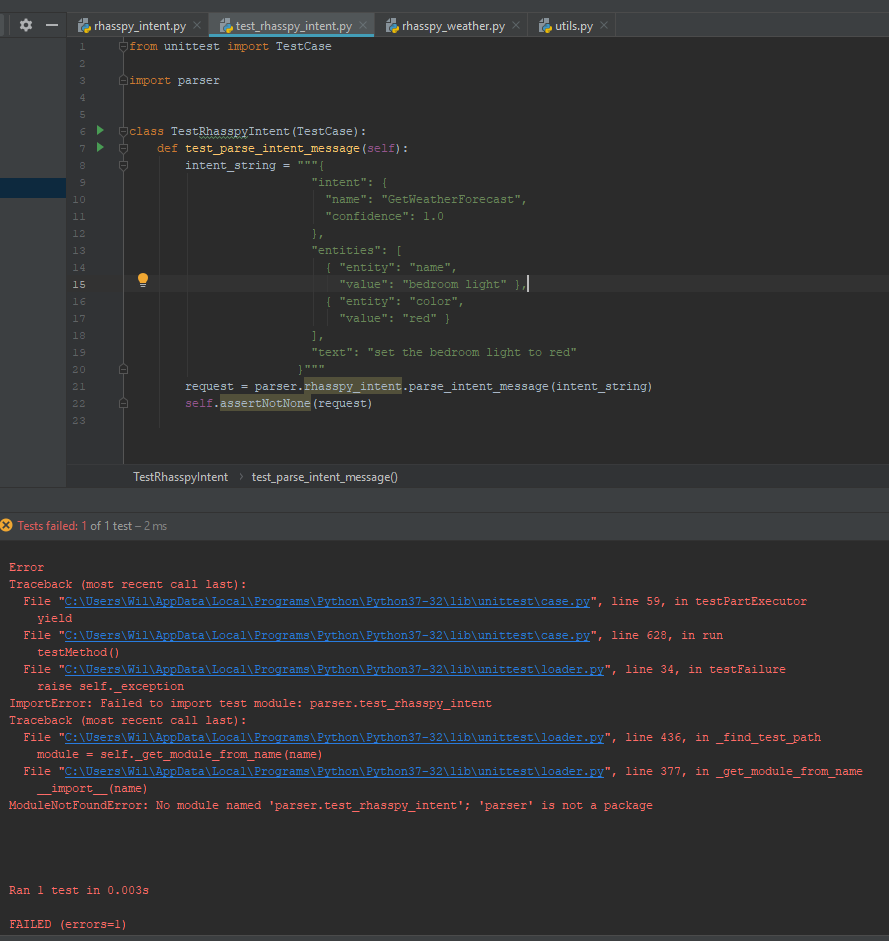
I am having major issues with the imports in your project. When I clone the repo, by default none of the imports in rhasspy_intent.py work:

afbeelding

When I remove the rhasspy_weather from all these lines, the errors disappear, however I’m not sure it actually works.

I have similar issues when I’m trying to add a test file. I’ve added a file in the parser called test_rhasspy_intent.py.

I’m using PyCharm to do development. Any idea what’s going on here?

Not the imports again… I hate imports.

Basically the script only works if it is called from specific places. Calling it from within does not work. The part that is on github actually is the module rhasspy_weather so starting the script from inside the folder always results in that module not being found. I would fix it but so far every time I tried I either broke it or made a worse but still working chaos.

As for the parser part. There is a reason everything is imported via from … Import. For some reason just import never seems to work. I have no idea why and as far as I understand it should work but it just doesn’t. Import as sometimes works, even when import doesn’t.

There is a reason I started out with I hate imports. Nothing seems to work like I would expect.

Feel free to check out https://github.com/ulno/cli_weather it uses a fork from @Daenara as dependency - however, I pulled the newest changes from upstream and after all the changes things are completely broken now - however, maybe it can still serve as a reference how to use rhasspy_weather from outside.

The thing that most likely broke stuff was the new loading system for the config. I removed the globals file in favor of using get_config from config.py.

The only other change that could have broken stuff in your script would be pathing issues. I had to change how I get the config folder because it only worked if called a specific way and I needed to read the config from somewhere else. It worked way better than before for me so that one should not break stuff.

I did some more work today and added slot programs for most slots (location still missing, I have hope something like that will be added by rhasspy in 2.5 eventually) and I did quite a bit of work on the readme.

There now is a section detailing the project structure, what is included in the git and what not as well as a “what not to do” section that basically documents the weird behavior this script has. Both can be found under development.

I also rewrote the setup instructions and would love it if someone that has no idea how to set this up tries it and gives feedback.

Also there is a basic English translation for the sentences.ini but ulno’s is most likely better.
@ulno can I have permission to adapt yours to the new changes and include it in my readme?

Please feel free to use anything from my code/repo that you want (maybe give some credit :wink: )

I also updated my repo with the command line interpreter to work with the latest version from @Daenara. However, I am currently investigating mycroft’s weather skill and building a bridge to mycroft from rhasspy. It will use a mycroft instance that doesn’t need to be connected to the net.

Hi there, your custom weather seems awesome.
Is there any update on how to install this with Rhasspy 2.5?

I tried just following the 2.4 guide, but Im stuck because there are no more custom slot programs in the github. Are these no longer required?

I have reworked quite a bit of the project and the setup instructions are a bit out of date. I added a setup console script that generates the slot programs and automatically creates the symlinks needed. Make sure to edit the setup script because it defaults to a German profile at the moment if you want to use it. You can also just execute generate_slots.py. To get the slot programs, you need to add a ‘-x’ flag to it, otherwise it will create a slot file.

If you don’t plan on changing the contents of the language file you use on a regular basis you can just generate regular slot lists and copy them in the correct folder in your profile. That in combination with the usage of rhasspy hermes app negates the need to install rhasspy_weather inside the docker (if you use that, if you just have both installed on your system you don’t have that problem).

I also would suggest you try out the testing branch which started out as exactly what it is named but ended up being a, almost complete, rewrite. I still have some tiding up to do and, as you noticed, I need to update the documentation, but it should be feature complete by now.

There is also no need for a custom command script anymore, since 2.5 supports mqtt. Here is my current test setup for the rhasspy hermes app:

import logging
from datetime import datetime

from rhasspyhermes.nlu import NluIntent

from rhasspyhermes_app import EndSession, HermesApp

from rhasspy_weather import weather

_LOGGER = logging.getLogger("SkillListener")

app = HermesApp("SkillListener", host="redacted", port=1883, username="redacted", password="redacted")

@app.on_intent("GetWeatherForecast")
@app.on_intent("GetWeatherForecastTemperature")
@app.on_intent("GetWeatherForecastCondition")
@app.on_intent("GetWeatherForecastItem")
async def get_weather(intent: NluIntent):
    """Get weather"""
    forecast = weather.get_weather_forecast(intent, config_path="../rhasspy_weather_config.ini")
    return EndSession(forecast)

app.run()

To use the weather script with the hermesApp you need to set the output to rhasspy_tts because unlike with the command script rhasspy won’t read the text on its own.

1 Like

Hallo,
vielen Dank für das Bereitstellen. Da ich aber noch ein blutiger Anfänger bin, brauche ich doch dringend Hilfe, wie ich genau vorgehen muss.
Ich habe nun pip3 install rhasspy-hermes-app installiert. Aber jetzt fangen die Probleme an: wo und wie muss ich das hier hinkopieren:
@app.on_intent(“GetWeatherForecast”)
@app.on_intent(“GetWeatherForecastTemperature”)
@app.on_intent(“GetWeatherForecastCondition”)
@app.on_intent(“GetWeatherForecastItem”)
async def get_weather(intent: NluIntent):
“”“Get weather”""
forecast = weather.get_weather_forecast(intent, config_path=PATH_TO_RHASSPY_WEATHER_CONFIG)
return EndSession(forecast)

Ich hoffe, du kannst einem Anfänger auf die Sprünge helfen. Vielen Dank!

Ich vermute du hast den Teil aus dem github wiki kopiert. Der Artikel dort setzt voraus das du schon ein funktionierendes Setup für rhasspy-hermes-app hast und gibt nur an, was man dort ergänzen muss damit rhasspy_weather funtioniert. Wenn du den Forenpost über deinem anguckst, siehst du dort mein komplettes Skript. Das kannst du einfach kopieren und in eine python Datei einfügen (pass auf die Formatierung auf, Einrückung ist wichtig). Damit dieses Skript funktioniert musst du rhasspy-hermes-app und rhasspy_weather installiert haben. Wenn du das gemacht hast, kannst du das Skript auf der Konsole ausführen und es sollte was tun. Falls du vorher noch nicht mit python gearbeitet hast würde ich dir empfehlen dir die Grundlagen zum installieren und ausführen anzulesen, das ist zum arbeiten mit rhasspy recht gut zu wissen.

Ich persönlich benutze das Skript mit docker-compose um es in einem Container laufen zu lassen. Das hat vor allem für mich den Vorteil, dass ich sonst in recht große Probleme mit verschiedenen python Versionen laufen würde da rhasspy_weather nicht mit python 3.9 läuft, andere Software das aber braucht. Alles in seinem eigenen Container und es läuft problemlos.

Wenn du es mit docker versuchen möchtest ist hier der Inhalt meines Dockerfile:

FROM python:3.7
RUN apt-get update && apt-get install -y git python3-pip && \
	pip install rhasspy-hermes-app rhasspy-hermes && \
	git clone https://github.com/Daenara/rhasspy_weather.git && \
	pip install ./rhasspy_weather

COPY rhasspy_weather_config.ini /
COPY SkillListener.py /
COPY config.ini /
	
WORKDIR /
ENTRYPOINT ["python", "-u", "SkillListener.py"]

Diese Datei installiert einen Container mit rhasspy-hermes-app und der aktuellsten Version von rhasspy_weather, kopiert SkillListener.py (das python script vom Post über deinem), rhasspy_weather_config.ini (die Config für rhasspy_weather) und config.ini (Config für rhasspy-hermes-app, siehe unten) in den Container und führt dann SkillListener.py aus. Die drei Dateien müssen dazu im selben Ordner liegen wie das Dockerfile. Ich habe alle diese Dateien in einem Ordner namens mqtt_skill_listener was relevant ist weil dieser Ordner in der docker-compose.yml steht.

config.ini

[mqtt]
client=MQTTSkillListener
server=
port=
user=
password=

[rhasspy_weather]
config=rhasspy_weather_config.ini

Um die config.ini zu benutzen musst du unter mqtt die Daten von deinem mqtt Server eintragen.

Um das Ganze mit Docker zu benutzen kannst du entweder docker-compose benutzen, hier meine (gekürzte) docker-compose.yml:

version: '3'
services:
  mqtt_skill_listener:
    container_name: mqtt_skill_listener
    build: 
      context: ./mqtt_skill_listener/
      dockerfile: ./Dockerfile
    restart: unless-stopped
    network_mode: host

Es geht auch nur mit docker, dafür kenne ich mich mit docker allerdings zu wenig aus.

Grundsätzlich musst du rhasspy-hermes-app und rhasspy_weather installieren und dann muss in irgendeiner Form ein python Skript laufen für rhasspy-hermes-app was die Funktion die du in deinem Post hast beinhaltet (auch in abgeänderter Form).

Da du blutiger Anfänger bist solltest du dich etwas in python einlesen und entweder in python venv oder in docker da du sonst in Probleme laufen wirst wenn du verschiedene Python Programme hast deren Voraussetzungen inkompatibel sind. Meine Wahl ist dafür auf docker und docker-compose gefallen da venv nur für python funktioniert und es aber auch mit Linux Paketen Probleme geben kann.

Ich hoffe meine zusammenkopierte Anleitung hilft dir, ich bin für Fragen offen aber ich bin selbst noch relativer Anfänger was Linux angeht, ich arbeite sehr viel mit google um vorwärts zu kommen. Das Setup mit docker was ich beschrieben habe läuft bei mit, ist aber noch recht neu und ich finde vermutlich noch einiges daran was ich ändern werde wenn ich wieder aktiv an rhasspy_weather arbeite, deshalb ist das nicht in der wiki enthalten. Die wiki selbst setzt python Kenntnisse voraus (es steht soweit ich weiß nirgends wie man rhasspy_weather überhaupt installiert) und gehört verbessert, im Moment liegt mein Fokus aber eher auf anderen Projekten und ein Tag hat nur eine begrenzte Anzahl an Stunden daher beantworte ich lieber Setupfragen im Forum wenn jemand rhasspy_weather benutzen will statt Stunden in ein wiki zu investieren was vermutlich eh kaum jemand benutzt.

Daenara

Short English explanation for anyone trying to use the docker stuff provided here. Take the script from two posts above, name it SkillIstener.py, put it in the same folder as the Dockerfile (first codeblock above). copy the content of the 2nd codeblock to a file named config.ini, that is the config used for rhasspy-hermes-app. Add your mqtt credentials in that file abd said file in the same folder as the Dockerfile. Put a rhasspy_config file named rhasspy_weather_config.ini in the same folder. 3rd codeblock is my docker-compose.yms stripped to only contain the skill listener stuff. Rename your folder that contains that stuff mqtt_skill_listener (or change the foldername in the docker-compose.yml) and you should be good to go. This setup works for me but is pretty untested (which is why it is not in the wiki)

old thread, i know, just wanted to let you know that i installed rhasspy weather as a hermes app and it’s working like a charm.

1 Like

There is some bug in the logic that happens close to midnight that I haven’t managed to track down, but otherwise this should still work fine. I only update if there is something to update. Good to know others still find this useful

yes i heard the weather skill talk about midnight from time to time, i guess i’ll change that to a more generic error message: „sorry, can’t get that info“ or something …

Hi Kay,

im quite new to rhasspy, node-red and HA.
I’m using these 3 all in docker-compose.
My problem is to get all of the spoken text to node-red.
Example: Wie ist das wetter in klein-ober-unterhausen
How do you make it, to get “klein-ober-unterhausen” to your msg.slots.city in node-red?