Mycroft Precise - Installation and Use

Hello,

Now that I’ve had some time to deal with Precise, I’d like to share my experiences. Some information can also be found here. I have the feeling that I am the only one who is not satisfied with Snowboy - but there are advantages with Precise: Completely offline, the model can be trained further in case of problems, e.g. to drive out false positive recognitions. In version 2.5 Precise will be supported - thanks @synesthesiam !


Installation: Since I have installed Linux only on Raspberry Pi and they have too little computing power, I use the Windows Subsystem (WSL) to install Debian on my PC.

In Debian / WSL it is necessary to install some things. Some things may be redundant, but with the following commands I could install everything:

sudo apt-get install python-pyaudio python3-pyaudio
sudo apt-get install python3 python3-all-dev python3-pip build-essential swig git libpulse-dev
sudo apt install libasound-dev portaudio19-dev libportaudiocpp0
pip3 install pyaudio
sudo apt-get install libasound-dev portaudio19-dev libportaudio2 libportaudiocpp0
sudo apt-get install ffmpeg libav-tools
sudo pip install virtualenv
sudo add-apt-repository ppa:mc3man/trusty-media && sudo apt-get update && sudo apt-get install ffmpeg && ffmpeg -version
sudo -s
pip install pyaudio

Then I closed and reopened WSL and installed Precise as described in the instructions

git clone https://github.com/mycroftai/mycroft-precise
cd mycroft-precise
sudo ./setup.sh

After the installation it is important to know how to exchange files between Windows and the WSL. The files are located in the following path:

C:\Users\USERNAME\AppData\Local\Packages\TheDebianProject.DebianGNULinux_SOMENUMBERSANDLETTERS\LocalState\rootfs\home\USERNAME\mycroft-precise

Later, when the wake word is ready, copying from this path is no problem. But I had problems when I copied new files to the above path under Windows (Debian didn’t show the folders and files). So I created the folder structure in Debian:

cd mycroft-precise/
mkdir data/random
mkdir to_be_converted/convert_me
mkdir to_be_converted/converted
mkdir WAKEWORD_NAME/not-wake-word
mkdir WAKEWORD_NAME/test/not-wake-word
mkdir WAKEWORD_NAME/test/wake-word
mkdir WAKEWORD_NAME/wake-word

Create the following files with the contents below (in WSL) :

sudo nano to_be_converted/convert_me/convert_mp3.sh

Then in the nano editor, paste this and save using ctrl o - ENTER and exit using ctrl x

SOURCE_DIR=convert_me
DEST_DIR=converted

for i in $SOURCE_DIR/*.mp3; do echo "Converting $i..."; fn=${i##*/}; ffmpeg -i "$i" -acodec pcm_s16le -ar 16000 -ac 1 -f wav "$DEST_DIR/${fn%.*}.wav"; done

nano to_be_converted/convert_me/convert_wav.sh

Again in nano , paste this and save using ctrl o - ENTER and exit using ctrl x

SOURCE_DIR=convert_me
DEST_DIR=converted

for i in $SOURCE_DIR/*.wav; do echo "Converting $i..."; fn=${i##*/}; ffmpeg -i "$i" -acodec pcm_s16le -ar 16000 -ac 1 -f wav "$DEST_DIR/${fn%.*}.wav"; done

To convert the files you have to copy them to WSL, the easiest way to do this is to store the files in C: under Windows and copy them to WSL:

In Windows, for example, you create a path C:/to_be_converted/convert_me, fill it with the files to be converted and then copy it to Debian (replace USERNAME!).

cp -a /mnt/c/to_be_converted/. /home/USERNAME/mycroft-precise/to_be_converted/

Please copy only the files of one type here: Wakeword or files that do not contain a wakeword.

Now you can convert the files in Debian with the following commands, depending on whether you want to convert mp3 or wav:
sh to_be_converted/convert_mp3.sh
sh to_be_converted/convert_wav.sh

After successful conversion the files can be moved to the respective directory and the convert_me shall be emptied to avoid confusion and mixing:

If wakewords were converted for training

sudo mv to_be_converted/converted/ WAKEWORD_NAME/wake-word/
sudo rm to_be_converted/convert_me/*.*

If wakewords were converted for testing

sudo mv to_be_converted/converted/ WAKEWORD_NAME/test/wake-word
sudo rm to_be_converted/convert_me/*.*

If sounds that do not contain a wakeword were converted

sudo mv to_be_converted/converted/ data/random
sudo rm to_be_converted/convert_me/*.*

Whether the conversion and moving worked, can be tracked under Windows. But as I said, I had problems when I created or moved files under Windows.
When the following three folders are filled, the wakeword can be trained

WAKEWORD_NAME/wake-word/
WAKEWORD_NAME/test/wake-word
data/random


EDIT: The data in data/random is important. In my training, a fairly large amount of data was needed to reduce the number of false positives in Precise’s internal training. It took 2 hours until false positive recognitions occurred only rarely. Therefore many, diverse examples are needed:

  • Music
  • Film
  • Audio books
  • Spoken words
  • Noise (vacuum cleaners, pets, …)

At first you can search your own flies for such data. In addition, you can be a little creative and collect data according to your own sound background. If e.g. your pets (I have two parrots) or your own conversations cause false positive triggers, you can simply make recordings with your mobile phone or similar for some time, convert them and train precise against them.

Furthermore, I have links here with data that I have packed into data/random after conversion:

I am grateful for further links to sound databases!

Simply use everything that comes your way for training. The only important thing is that the wake word will most likely not appear in the data. This can only be realized by using a wake word that is untypical for your own and the English language.

You can find the parts of the files of /data/random that trigger false positive detection (against which the wake word) shall be trained in the following folder after running precise-train-incremental mentioned below:
WAKEWORD_NAME/not-wake-word/generated

However, there are so many files that it is difficult to check all of them to see if the selected wake word does not appear in these files. More practical is therefore: unusual, improbable wake word.


Now training can be done with a few simple commands:

source .venv/bin/activate

Create Wakeword

precise-train -e 100 WAKEWORD_NAME.net WAKEWORD_NAME/

Train wakeword against false positive detection (can take some time depending on PC and data set - for me with 30 GB it took 4 h using an i7)

precise-train-incremental WAKEWORD_NAME.net WAKEWORD_NAME/

Repeat training!

precise-train -e 100 WAKEWORD_NAME.net WAKEWORD_NAME/

Test performance

precise-test WAKEWORD_NAME.net WAKEWORD_NAME/

Convert to .pb

precise-convert WAKEWORD_NAME.net

Now you can copy the two files WAKEWORD_NAME.pb and WAKEWORD_NAME.pb.params from the folder mycroft-precise to Rhasspy and look forward to Rhasspy 2.5 :wink:

5 Likes

Thank you for the write up! What is your experience with it?

Personally I only looked into Snowboy based on the Rhasspy documentation that mentions that

  • Precise only has a moderate performance
  • Porcupine has an excellent performance, but requires running an optimizer every 30 days

So the one in the middle appears to be Snowboy, with a good peformance and nothing to rerun every 30 days.

How is it going? Less false positive?

Dear @geoffrey, you’re welcome!

Hopefully the instruction is understandable and without mistakes. While writing it together I have optimized a little bit, therefore there might be errors. Please let me know if something does not work.

Because of the documentation I tried Porcupine first, because there are some free wake words which can be used for an unlimited time. For this reason my Rhasspy listens to “hey pico” from the very beginning. But often the wake word was triggered unintentionally by background noise or conversations. If the detection rate is low, the wake word must be called several times - no solution for me.

Afterwards I tried Sonowboy, both with one (i.e. 3 sample files) and several attempts (I created numerous accounts, and spoke about 20 x 3 wake words into the model - that took as long as getting Precise to run). Still the same problem as with Porcupine. The cofiguration via the website is terrible, especially if you do several iterations of the training using numberous accounts.

Since Rhasspy always detects something (and does so very well when triggered intentionally), false positive reactions are undesirable. Especially if the smart home can already control some things. Therefore I have - sad as it is - deactivated the wake word detection via the api at the moment. Rhasspy currently only works as voice output based on automation, but does not listen. That is a pity!

So I tried Precise, even though - as mentioned above - it is not supported yet but will come in version 2.5. At the moment I can’t say anything about the real usage.

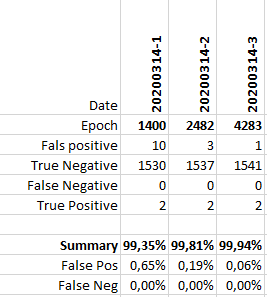
I only have information about the internal test - here you can test the wake word model against an own data set (30 GB wav) and get a false detection rate. This has improved after repeated training as the data set grew and now stands at 99.94%.

image

I’m waiting patiently for version 2.5 and am happy to check if this number withstands real conditions. As mentioned before: If problems occur, your work is not in vain. You can always add more files with your wake word using different tones / speeds / … or enlarge the data set with audio files that do not contain your wake word and improve quality by training again.

I give advance praise and claim: More data = better recognition.

What is interesting about this approach is that we could create hopefully really personalized wakewords. I experimented with custom Snowboy wakewords like e.g. Pollie, but that gave lots of false positives.

At the moment Snowboy is reasonably working well, although the kids think I’m shouting “cowboy” the entire day. Today our 4 year old was able to trigger Rhasspy and to turn on the kitchen cabinet lights on using the Dutch profile.

The parts I ordered for the Rhasspy satellite are arriving today, so that’s the first thing on the list to address and once that’s working, I’m considering placing one in the kids bedroom (deactivating wakeword detection when they are in bed using an automation :blush:)

If all that goes to plan, I’ll see if I can further look into Precise, hopefully finding relevant data sources. I assume you speak German, so if it works for you, then it should be feasible to do it in Dutch (Flemish) as well.

With children it is certainly quite exciting what is intentionally and unintentionally triggered. My parrots do not imitate human language - we communicate our emotions with each other through gestures and sounds (happy, interested, bored, hungry, …). Therefore it is easier for me to separate these sounds from human sounds in training (as compared to small children).

Funny: The satellite of Rhasspy is waiting in my drawer and waits, because my motto is: First a working system with a proper wake word (everything else works great) and then the satellites.

Some data on sounds will be useful for training, regardless of the language: white, brown, … noises and ambient sounds like vacuum cleaners etc. In addition, the English language is present in movies, series and music - you can use some of it here. For data in your own language you can use data from podcasts, news, TV shows. You only need a way to get mp3 or wav files.

It is important with this approach that the selected hot word is very unlikely to appear in the data set. My hotword “hey pico” will most likely not appear in the selected songs, German news broadcasts, …

I have added links to sources of data for data/random in my instructions given aboveand will extend these list of links, if I find or get mentioned further sources.

This whole topic gets now much more important as snowboy is wrapping up (as you can read here): https://github.com/Kitt-AI/snowboy and therefore should probably not even be an option for rhasspy anymore. I wonder how well mycroft.ai is doing with the current crisis.

@ulno: That sounds exciting!
I really hope that Precise’s performance is better as compared to snowboy as well as porcupine and that mycroft will survive the crisis.
I have already played with the pre-2.5 - but I can’t make Precise work yet.

wow, F!!! Snowboy works amazing on my part, no false positive !

Have you tried on 2.4.19? I think I had
“Hey Mycroft” running there for a short time - back to “porcupine” for the moment. What is going wrong for you on 2.4.19 with precise or just trouble on 2.5?

And did you see this? https://github.com/synesthesiam/rhasspy/issues/169

I had to apply that to make it work.

Hope, we can convince you to pitch in for some precise effort in the future :wink:

Oha, I thought precise only worked from 2.5 on! :upside_down_face:
Just tried it again with 2.4.19. Once I defined “system”: “precise”, rhasspy does not load the configuration anymore.

@ulno How does your configuration look like, when “Hey Mycroft” worked for you? :hugs:
EDIT: I don’t quite understand how precise could work for you. I can’t get Rhasspy 2.4.19 started with precise. The log is quite clear: ModuleNotFoundError: No module named ‘precise_runner’

@KiboOst:My condolences on the slow death of snowboy.

My config for the wakeword looks like this (precise does not work, porcupine and snowboy do work):

"wake": {
    "system": "precise",
    "precise": {
        "model": "hey-mycroft-2.pb",
        "sensitivity": "0.5",
        "trigger_level": "3",
        "chunk_size": "2048"
    },
    "porcupine": {
        "keyword_path": "porcupine/hey_pico_raspberrypi.ppn",
        "sensitivity": "0.65"
    },
    "snowboy": {
        "audio_gain": "0.90",
        "model": "snowboy/hey_pico/33_hey_pico_tone_mod_full_2x.pmdl",
        "sensitivity": "0.6"
    }
},

"rhasspy": {
    "listen_on_start": true
}

the runner error is the one you can fix here: https://github.com/synesthesiam/rhasspy/issues/169

Config looks fine. Try the runner fix. It’s pretty dirty to apply as you have to edit a mycroft precise file in your virtualenv - for me that was edit /home/pi/rhasspy/.venv/lib/python3.7/site-packages/precise_runner/runner.py:65

This was unfortunately predictable… They should open source everything. Alas it won’t happen…

Bye bye Snowboy…

The vocal assistant field is starting to become scarce (Snips, Snowboy, …).

Porcupine is only working correctly for English speakers… How long until Mycroft is bought or shuts down… at least Precise is fully open sourced and can be maintained even if Mycroft disappears.

I’d be very interested in Precise detection performance…

I think, we all should give mycroft precise some love and maybe see if we can even train as a community some more wakewords - I can offer help for training English, German, and Portuguese wakewords and also happy to push this for some more commercial applications outside the home automation environment (when I ever am allowed to return to university). Maybe, we could even push the mycroft community to re-implement some of rhasspy’s achievements back into their system- not sure if this is a political issue @synesthesiam? Sorry if I overstep here. For me rhasspy is so much easier to use than mycroft, but that might be personal - I think there should be at least mutual acknowledgement.

I am happy to let our community use my youtube tracks for noise or failure training (especially my lectures should have a lot of real background noise) - I bet there are some other youtubers around in this community or ones we know that we could ask?

2 Likes

I guess I didn’t read consciously enough - you have already written it above. Excuse me!

@ulno EDIT:

I have not found a corresponding file in my docker container from Rhasspy. Your path is:
/home/pi/rhasspy/.venv/lib/python3.7/site-packages/precise_runner/runner.py:65

I searched Rhasspy for “precise_runner” and “site-packages”:
docker exec -it Rhasspy bash

find / -name "*site-packages*"
/usr/local/lib/python2.7/site-packages –> This path is empty.

find / -name "*precise_runner*"
No result!

So I set precise as wakeword again in the profile file, restarted Rhasspy to make sure that the current container has already tried to start with Precise. Again: No success, because no search result. A pity!

The code I want to fix is as follows:
return_time = 1e10 if timeout is None else ( timeout + time.time() )

Therefore I have set out on a search with the following order:
grep -iRls "return_time" ./
No result!

I don’t seem to have the runner.py

Not sure about docker - I despise docker and try to avoid it at all costs - it’s permission system is even worse than chroot and it’s an abolute nightmare to set up on windows and macos - but that is personal preference.

When you are in the docker, is there some kind of default python environment - you could just do a pip install mycroft-precise there - after that you should have precise (and maybe also the runner.py-file)

On a side note installing rhasspy in a virtual env is actually not that hard.

And reading your description again, did you actually search inside the docker image? You might have to start bash inside the docker and then search there.

This would be much appreciated :slight_smile: I’d be happy to host the training data in the Rhasspy repos, unless you’d prefer to keep it separate. I’d also be willing to run training on my home server.

I have another project that’s been shelved for the time being, but may be relevant here. I’ve found and trained a number of MaryTTS voices, but I don’t have full coverage yet for all of Rhasspy’s supported languages. Perhaps we could launch something to help people donate voice samples for wake words or TTS voices?

No political issue, I just don’t have the extra time to reach back into the Mycroft community. Anyone is welcome to pull pieces of Rhasspy into whatever they’d like.

I haven’t looked into if there’s any way to interoperate with Mycroft. I do mention them in the documentation as the current best alternative if you’re cool with your voice being shipped over the internet to some server.

2 Likes

For me with semi-laymanlike Linux knowledge (I’m failing myself up) Docker has certain advantages through the container approach.
Thanks for the idea! I installed python, and then tried to install precise.

apt install python-pip
pip install mycroft-precise

Unfortunately, that doesn’t work as staed below. Maybe I just have to wait until Rhasspy 2.5 is finished forging.

  Could not find a version that satisfies the requirement tensorflow<1.14,>=1.13 (from mycroft-precise) (from versions: )
No matching distribution found for tensorflow<1.14,>=1.13 (from mycroft-precise)

just a guess:

is that python2 or 3?
Maybe give pip3 a chance?

Thanks for the hint! Using pip3 did not solve the problem.

sudo apt install python3 -pip
pip3 install mycroft-precise

Sorry, the only help I can offer is now to support you in trying the virtual env instead of the docker.

However, I still don’t believe that the runner.py is nowhere in the docker.

Did you try sudo docker run -ti synesthesiam/rhasspy-server:latest bash and then search there? And also the pip3 stuff needs to run in there if you don’t find precise’ runner.py there.

No preference here. However, I might try reaching out to mycroft so we can at least share training data.

I kind of liked what was existing on snowboy, especially the option to send a link to your friends to ask for help. Setting something up like this would be great. I hope th ehosting doesn’t get to overwhelming here. I have another unused 2TB instance running in canada if we need more space (and you have a very simple way for me to set something up).

That sounds really nice - I really enjoyed switching my own system to MaryTTS - sounds so much better! So, if this doesn’t demand too much admin time or some others here in the community volunteer and help, it would be an amazing very relevant resource.

Yes, I saw your references - however, I found Rhasspy via an entry in some node red forum even if I studied the mycroft progress on a standalone server quite intensely. However, they seem to use deepspeech and I couldn’t get decent performance out of it here, so I was looking at Julius, and then kaldi in Rhasspy.

I will carefully ask in the forum and gauge the interest.

1 Like

Dear @ulno yes, i have done everything inside the docker container (search, attempt to install via pip3). Now I will practice my patience and wait until Rhasspy 2.5 runs well enough to test precise.

@j3mu5 1) How long must or must not be the wav files?
2) Can I let it record 24h hours of ambient “noise” from the mics and then use that as data/random?
3) The Mycroft guide says “not wakewords”. Can a gigantic wav file be used for this as well? Or maybe an automated wave file chopper?
4) Is it possible to combine more than one wake word at the same time? For instance: “hey computer” and “hey silly” with both of them activating at the same time?

@voice

  1. The length is not important. It can be anything from short clips with white noise to hours of audio from TV shows or your own recordings. During the editing process the complete file is processed and only those parts are used for training to which Precise reacts false positive.
  2. As long as you do not speak any wakewords in the time: Absolutely! I think that normal everyday sounds are just right.
  3. A gigantic file works without problems. Diversity (different files of different origin) is certainly helpful. After a longer training time I added white and pink and other noise and got some false positives.
  4. I did not try that. Maybe it works, maybe not.

Thanks. But according to this it seems that data/random is the same as not wake words? Are they different?

I believe data/random is intended to be a shared directory of background noise, whereas the “not wake words” are supposed to be things close to the wake word (like “hey microsoft” instead of “hey mycroft”). I’m not sure if the training infrastructure treats them any differently, though.

As @synesthesiam says, one can put wrongly positively recognized words in not-wake-word.

When you train Precise, a subfolder called generated is created in not-wake-word. In this folder are the audio snippets of the files from data/random with background noises, to which a false positive reaction was made. So I followed the progress of the training.

Now I only have to get Precise running on my Raspberry. :see_no_evil:

It runs here on 2.5 on a pi 3 with hey mycroft as wakeword.
I the venv, everything worked out of the box but the fix for the runner and phonetisaurus (had to install that manually from the downloaded package).
Not perfect yet as I don’t manage to run rhasspy 2.5 wiht systemd - somehow supervisord and systemd seem to not like each other, but might open another thread for this issue.

rhasspy-supervisor currently outputs configurations for supervisord and docker-compose. Maybe we should add a systemd output as well?

1 Like

I’m giving a try to precise with 2.5.0 but it does not work so far due to the following error with trying to load the engine:

2020-06-10 16:35:31,468 INFO success: wake_word entered RUNNING state, process has stayed up for > than 1 seconds (startsecs)
[DEBUG:2020-06-10 16:35:43,510] rhasspywake_precise_hermes: Namespace(debug=True, engine=None, host='192.168.2.165', log_format='[%(levelname)s:%(asctime)s] %(name)s: %(message)s', log_predictions=False, model='okj.pb', model_dir=['/profiles/fr/precise'], password=None, port=12183, sensitivity=0.5, site_id=['entree', 'entree'], tls=False, tls_ca_certs=None, tls_cert_reqs='CERT_REQUIRED', tls_certfile=None, tls_ciphers=None, tls_keyfile=None, tls_version=None, trigger_level=3, udp_audio=[['localhost', '12345', 'entree']], username=None, wakeword_id='')
[DEBUG:2020-06-10 16:35:43,556] rhasspywake_precise_hermes: Using engine at /usr/lib/rhasspy/lib/python3.7/site-packages/rhasspywake_precise_hermes/precise-engine/precise-engine
[DEBUG:2020-06-10 16:35:43,586] asyncio: Using selector: EpollSelector
[DEBUG:2020-06-10 16:35:43,632] rhasspywake_precise_hermes: ['/usr/lib/rhasspy/lib/python3.7/site-packages/rhasspywake_precise_hermes/precise-engine/precise-engine', '/profiles/fr/precise/okj.pb', '2048']
[DEBUG:2020-06-10 16:35:43,676] rhasspywake_precise_hermes: Listening for audio on UDP localhost:12345
Traceback (most recent call last):
  File "/usr/lib/rhasspy/bin/rhasspy-wake-precise-hermes", line 8, in <module>
    sys.exit(main())
  File "/usr/lib/rhasspy/lib/python3.7/site-packages/rhasspywake_precise_hermes/__main__.py", line 125, in main
    hermes.load_engine()
  File "/usr/lib/rhasspy/lib/python3.7/site-packages/rhasspywake_precise_hermes/__init__.py", line 147, in load_engine
    engine_cmd, stdin=subprocess.PIPE, stdout=subprocess.PIPE
  File "/usr/local/lib/python3.7/subprocess.py", line 800, in __init__
    restore_signals, start_new_session)
  File "/usr/local/lib/python3.7/subprocess.py", line 1551, in _execute_child
    raise child_exception_type(errno_num, err_msg, err_filename)
FileNotFoundError: [Errno 2] No such file or directory: '/usr/lib/rhasspy/lib/python3.7/site-packages/rhasspywake_precise_hermes/precise-engine/precise-engine': '/usr/lib/rhasspy/lib/python3.7/site-packages/rhasspywake_precise_hermes/precise-engine/precise-engine'
2020-06-10 16:35:44,470 INFO exited: wake_word (exit status 1; not expected)

Is there something missing in the Docker image?

Maybe this is because Pi-zero is not supported by Precise? I’ll try later on PI3B+

Precise works now (rhasspy v2.5) in the docker install on a pi4. Which is great as it is the best option for custom wakewords.

Finally I tried precise (with 2.5.0) on my PI3B+… but the CPU load goes to 95+% :frowning:

@j3mu5 did you move to 2.5.0+precise? Please could you share your experience? For the time being, I’ll stick to snowboy…

I have recently made use of this guide and I noticed a few problems with it.

First of all, mycroft-precise needs python<3.8. Trying to use it with python3.8 is futile atm. The official version does not run because the dependencies can’t be resolved and the pull request for a newer version of tensorflow has only half of the scripts even running, and those that run don’t work properly. I wasted 12 hours trying to get a working model and if I used the precise-test script it still only got less than 50% of my wakewords correct.

I did use wsl to begin with, but since I can’t get mic input there, I decided to go the virtual machine way. I tried Hyper-V first, which works pretty well with either a debian or an ubuntu 18.04 but getting sound into there is a torture. I ended up getting pulseaudio to work, but I could not get alsa to work and after a day of trying I decided to switch. Oracles VirtualBox was next, getting audio to work was easy, but I didn’t get tensorflow to run at all. tensorflow is compiled to use avx instructions and I did not manage to get those passed through. Documentation is lacking for VirtualBox, the noly thing I could find was reported to work in beta3 of version 5 but using those instructions did not work for me. In a last ditch effort I used VMware Player and I actually got it working there.

Next was the choice of operating system. I personally prefer debian but after I got it running on ubuntu with minimal effort in quite a few experiments I decided to stick with that for the moment. It has to be ubuntu 18.04 for ease of use since that comes with python 3.7, ubuntu 20.04 comes with python 3.8 and I was not motivated to try a downgrade there.

The following is an updated/corrected version of this guide using ubuntu 18.04. It can be used for other distributions as well but I did not check if all the dependencies were there. i also removed quite a few of not needed sudos, as well as most, if not all mentions of copying files between wsl and the linux since I used a vm with the guest extension installed so I can just drag and drop files and use a shared folder to copy the files.

The only things I needed to install on ubuntu to get everything working as described in this post were git and ffmpeg.

sudo apt-get install git ffmpeg

After that, I could jump to the next part of the guide.

Originally. this is where ./setup.sh was called, but doing that results in quite a few errors because one of the dependencies updated and produces quite a few errors. All the errors produced by this are “Str object has no property decode” errors and it can be fixed by going through all the places it complains about and removing the .decode("utf-8") part. But it can be prevented by editing setup.py before installing mycroft precise.

In the setup.py look for the requirements. Change the line containing h5py to h5py<3.0.0 and everything is fine again.

On with the guide:

In the next part I changed the path of the convert files, since it does not work from the path. I personally created the two files in the file manager and copied the content into it with the gui texteditor ubuntu came with, but nano works fine.

I also made the files executable so I could call them with ./convert_mp3.sh and ./convert_wav.sh but that is optional since it works otherwise.

Next move the files to be converted into the created folders by whatever means you like. I used a shared folder with my vm to copy stuff over.

In the next part I differentiated between not-wakewords and stuff for data/random. I threw everything into data/random that was random background noises, long audio files and so on, but small utterances that were not the wakeword landed in WAKEWORD_NAME/not-wake-word. I specifically recorded words that sounded similar to my wakeword, as well as random words that just came to mind.

If not-wakewords were converted:

mv to_be_converted/converted/ WAKEWORD_NAME/not-wake-word/
rm to_be_converted/convert_me/*.*

mv to_be_converted/converted/ WAKEWORD_NAME/test/not-wake-word/
rm to_be_converted/convert_me/*.*

Of course, having access to a full desktop environment means that all this copying around can also be done graphical. I also found it helpful to name my files properly. I included which microphone it was recorded with, what it contains. Wakewords have my wakeword name in the file name, not-wakewords have not-wakeword in the file name (and I plan on adding exactly what was said in there as well), things i recorded for data/random have an approximate of the situation I recorded in the name and so on. This is important to figure out exactly what did not work during testing to know in which direction the model needs to be trained further. When training with data/random the automatically generated files are also named after the original audio file it came from, so having those named properly helps much.

With a decent PC precise-train runs very fast so I normally just start it with -e 1000 instead of 100. This script can also be terminated at any point so having a high number and terminating once the accuracy value is close to 1 is also workable.

This command can also be used as
precise-train-incremental WAKEWORD_NAME.net WAKEWORD_NAME/ -r data/random/SUBFOLDER
which I have been using to train with different data sources one at a time. I am not sure if the first command works if there are subfolders to train against everything but after my first try of having a few hundreds of files in data/random I decided to sort it into folders depending on the data.

In my tests I did not see the need to train immediately after precise-train-incremental but it can’t hurt to do it because it copies parts from data/random into the wake-word and not-wake-word directories and i am not sure if it also retrains the model with what if finds right then. It does not hurt to run a test in between, I personally run a test after the first training, the incremental training and so on.

Having access to a microphone in a vm, I added another step to the testing:
precise-listen WAKEWORD_NAME.net

I use this to see if my model still goes off on random noises, words and so on. I keep a list of words that still set it off and then record them with the mic my rhasspy uses (and eventually also with my headset, just so I have different qualities of mics in hopes of making the model more universal for me) and put some of them into not-wakeword and test/not-wakeword after conversion. I record those words like I record wakewords, one word per file with a bit of silence (or in case of my mic, random noise) before and after the word.

If the model is set off by random noises I try to make a long recording of the situation and put it into data/random for incremental training.

There is a tool named precise-collect that helps with recording but only with the mic you have access to on your pc. For the recordings with the mic my rhasspy uses I just record everything with arecord and manually create the small files with audacity.

Once the model performs decently, it is time to export it:

2 Likes

This :ok_hand:t2::ok_hand:t2::ok_hand:t2: There is an issue open for this. I was not updating my precise source install because of this.

I mostly save the result achieved after the incremental training and than copy the files saved to test/not-wake-word/generated over to not-wake-word/generated and than do another training round. This mostly improves the model.

If you do that, then sure, the training helps but without mentioning that bit of information, I am not sure if the training is needed. Also, it might improve the model, but copying those files over makes the testing worse. For testing, one should use samples that aren’t used in training to verify that the learning process worked. If the model was trained on the samples in testing then the result of the test will be better than the model might be in reality. Tests should be similar to what the model is trained on, but not 100% the same.

Yes i fully agree it makes testing a bit worthless but in my real life experience it still gives the better model. I prefer to test using it :see_no_evil:
After training precise models for over a year now it turned out for me that more data to train on equals better in 90% of the cases. Although more epochs doesn’t equal better in all cases as ive over trained a few times.

edit one more thing:
I really recommend playing with the -th threshold parameter of both the train and train incremental command as it has a big impact on the sensitivity in noisy environments vs false positives that the final model will have and the -s sensitivity parameter for incremental training as this has a big impact on how retrainings are triggered.
I recommend to use shorter random audio files if you turn up the sensitivity parameter in incremental training.

More data to train is of course better, but if you are starting out and trying to get a working model together I think it is better to insure your tests accurately represent the models quality. If I notice something in the generated folder falling through a test, I try to find similar things for my data/random and not-wake-words and keep what fell through in the testing folder only. That way my model will get better over time while still being represented by somewhat accurate testing.

Once the data the model is trained on is at a point that it rarely triggers falsely, then training on what it puts into the test folder sounds more helpful than detrimental to me.

The reason behind that is pretty simple, I train on a system with a different mic than I use for rhasspy, so to perfectly test it, I have to convert the model and put it into rhasspy and see what still triggers it. So I depend on the test function with audio recorded with the rhasspy mic to figure out if it will work. The first model I trained was trained blind, I put most of my roughly 30 samples I got from raven into the wakeword folder, the rest went to test, put everything from raven that falsely triggered it into not-wake-word folder and trained on tons of random data. The resulting model got all my tests correct, but I only had 5 or so wakewords for testing and they were medium quality at best and once I deployed it, it did not react to anything at all.

That mostly happens to me with over training.
I also think my strategy is slightly different. I dont have any data in not-wake-word or test/not-wake-word when i train. I only have the data in the noise folder.
Thats why i only train for 50-100 epochs in the beginning to have a start but the result will listen to anything as its trained without any non-wake-word data.
All the real training in my case happens in the incremental part against the randoms folder.
I also start from zero with a fresh model everytime i add data as i found continuing training with new data gave me worse results. It probably took me 15 complete training runs to get a good model in the beginning. I just train on a spare raspberry pi 4 and let it sit there for a few hours each time to do its thing while i do other things.

Just for informational value:
Right now i train against 1642 one minute files of random audio.
Thats about 27 hours.
My first usable models were probaby trained on about 5 hours in the beginning.
I use about 100 recorded wake-word samples but i also duplicate each sample with added random background noise from the 1642 randoms.
All in all a robust model takes 2000-3000 epochs of training with this.

I find that having not-wake-word data helps quite a lot. With just 200 epochs of training I have a model that does not react to quite a bit of what I say. I recorded myself saying random words and put about 10 of them into the folder. End result was much better than training incremental with data collected from music, random noises and a few recordings of sentences I had lying around.

As of now my model still reacts to me saying longer words but with just a few samples I have it not reacting at all to short words or similar words than the samples were while still reacting to my wake word.

I plan on adding just random audio of me talking on voice chats into data random once I get around to record them but just for training it not to react to everything I say not-wake-word is great.

A factor of why this works so well for me instead of using random data I did not record might be because my rhasspy mic has permanent noise in every recording and my random data is noises, noise and music in clear quality.

I use a lot of 5 minute recordings i made with the mics that in my case voice2json is running on during normal household activities here. So i recorded hours of us watching television, cooking, vacuuming or talking.
I also really recommend to use audio from videos on youtube like one hour of coffeeshop or bar noises.
There is a lot of them. You can use youtube-dl to download just the audio and than convert and chop it with sox.
Its just an easy way to have more random audio bits with lots of variety.

I am still in the collection phase, I just started recording audio yesterday after fighting with vms and precise for a week. I do plan on recording everyday sounds once I actually do more than watch videos on youtube (I did record 30min of that already, with various videos). I have to be somewhat careful about what i put in as random data because my wakeword of choice is “computer” and I don’t want that in the random data.

Is there any difference with the length of the random data? For now I just chucked 10min+ recordings in there and they run through with a pretty decent speed. Are they actually handled differently when they are shorter or is it just the time factor on the pi4 that has you keeping them short?

On the pi its also a memory factor as it can actually crash with files that are too big during incremental training but the biggest thing i noticed was that it also gave me better results.
When using longer files what i found was that it would train a lot on the first few long files during the incremental training and than the model would be just good enough to not trigger false positives and skip alot of the random data.
By training on shorter random files i found it would train a lot more on a lot more variety of my random audio as it would only train limited amount on each file. This is also because the order that precise-incremental uses the noise data in to train on is random. So this resulted in a lot more epochs the model was trained on a bigger spread of my noise audio and this way also a more robust model.
For example training a model on the same random data in five minute chunks gave me below 1500 epochs while when splitting the same audio in one minute chunks gave me over 2000 and a more robust model.
Another factor is that i use those one minute chunks to add noise to duplicates of my wake word recordings and as i do this from random pieces of audio from the noise folder with my own script (the precise-add-noise command didn’t work well for me) I get a better spread in my noisy wakewords and what noise is added this way.

Zram and extending the dphys-swapfile will prob help much. Training on a PC or Colab notebook is likely much less painful and wondered why we don’t have a Colab Notebook as the free GPU access is pretty handy and you just upload your dataset to your google drive.

I am not Precise fan and will never use it so haven’t scripted a notebook but have wondered for those who are why not?

Also inputting audio in 5 minute chunks if I am reading this right is not going to produce a very efficient model unless your scripts further break down to shorter.

The image you feed sets the initial shape of your model and the number of parameters your model copes with.
Often with KWS and one second windows the time scale index is 30-40 x 13 of the mfcc which sets up feature extraction for labels and the resultant model paramters.
Hopefully I am reading this wrong but your not inputting 5 minute images?!?

No in incremental training mode the model so far is run against the chunks of random audio which can in theory be any length.
Than if a false positive is detected the piece of audio that triggered this is saved to the training folder and than after a certain number of false positives this data is the one that gets trained against.
So the pieces used to train against are only very short bursts (less than a second mostly) that are being saved from the longer audio.
Training is never directly with the random noise folder.

Oh so its just a feed to grab further dataset images I get it.

Not that I use precise but guessing Keras you don’t need to run to thousands of epochs at the start.
The gains you make from approx 50 onwards are minimal but create the final best model.
You can do testing relatively accurate on much less and then just do a final long run.

This might be done but what I do is also feed my dataset into a short epoch model and delete the false positive/negatives as what a model thinks is a bad sample to what a human can hear seems a mystery.
I often get a quick 3-5% accuracy on doing that alone.

I am starting to look again KWS as a few things should become avail.

All just hacks but the ASR datasets are huge and just voice so when you mix noise you will always get a consistent SNR of one you control. As from videos you have no idea what is noise.
I did use Deepspeech to use the timing transcripts but the timings are lousy to accuracy but thinking that and VAD could grab much cleaner word files.

With precise as I use it right now I need something between 200 and 500 epochs to get the accuracy up to nearly 1 with my initial data. After that I let it run run incremential training until it runs out of data to train against (I don’t have much collected yet, so I run out pretty quickly). But since my pc runs through the normal training pretty fast even though I can’t use my gpu and I use tensorflow without AVX2 instructions I just let it run to 1000 because right now it is literally the difference of a few seconds.

Okay, so i should probably try splitting my files into shorter ones, at least the non music files. In the music files I trained against so far it only triggered on a few specific notes, not even any speech, and triggered that note 10 times per file, so I don’t think i will split up music files in chunks.

Since I am not well versed in linux at all, do you know of a script or a command that will split a file into one minute chunks while keeping the name and numbering them? I am pretty sure I could find something working on google but since you are already doing this, you might be willing to share how and it would be collected in this thread which is what I think most ppl with next to no knowledge about how to train a model will use as a reference.

You can use a simple bash command with sox for that:

for f in *.wav; do sox "$f" "split.$f" trim 0 60 : newfile : restart ; done

This will split all wav files in the current folder into 1 minute chunks. It will add a split to the name and sox will number them automatically.

2 Likes

@JGKK ihave been using pysox as more complex scripts in python are for me easier than bash.

https://pysox.readthedocs.io/en/latest/

Bash is just really good for small automations like that. Especially for renaming, moving around files or manipulating them en mass i find a little bit of bash very helpful.

Yeah its usually my first port of call I did some audio manipulation to create that ‘hey marvin’ dataset started off in bash but turned into bash spaghetti.
I used the above and just posting as found it excellent especially when it comes to multi line sox commands as the sox cli documentation for me is bad but the api of pysox is really easy.

Its in https://github.com/StuartIanNaylor/crispy-succotash/blob/main/heymarvin.py

Terrible hack stuff but really easy to hack something together the above might be good as an example.
PS I used the silence cmd as the vad one with sox seems pretty poor.

1 Like

This does the job, but I decided to go over the top a bit with my limited shell script skills. I did not like the fact that it tried to split files that were less than a minute and the naming wasn’t what I wanted. This is the result:

#!/bin/sh

if [ -n "$1" ]; 
then 
	SOURCE_DIR=$1; 
else 
	SOURCE_DIR=.; 
fi

if [ -n "$2" ]; 
then 
	DEST_DIR=$2; 
else 
	DEST_DIR=split; 
fi

#cd $SOURCE_DIR

if [ ! -d $DEST_DIR ];
then
	mkdir -p $DEST_DIR;
fi

for f in $SOURCE_DIR*.wav; 
do 
	lenght=$(sox --info -D $f);
	echo $f;
	name=$(basename $f .wav)
	if [ $(echo "$lenght > 60" | bc -q) = 1 ];
	then
		sox "$f" ""$DEST_DIR"/"$name"..wav" trim 0 60 : newfile : restart;
	else
		cp $f $DEST_DIR
	fi
done

It takes the source folder as the first argument, the destination folder as the second. Files larger than a minute are split and saved into the destination folder as FILENAME.NUMBER.wav. Shorter files are just copied over.

1 Like