Thanks to help and discussions from @rolyan_trauts, now I finally made it working on my Pi 3B+. Not only the original DTLN noise suppression, but also the new AEC model for realtime processing.
The DTLN NS works great. The AEC script and setup still need some optimization.
Check my Github repo for details:
If anyone has a chance to try it out, please feedback.
Just didn’t think a RTXvoice like app would run on a Pi3 so great work quantising a tflite model without the Pb.
Obviously its not RTXvoice but the quality is amazingly good compared to what we had and isn’t all that far away.
Good job packaging it for deployment.
I really need to do some tests as curious if by being able to set the latency then it can work with say higher latency outputs such as bluetooth and like such as any wireless rtp that other NS/AEC often fail with.
I will give feedback as always
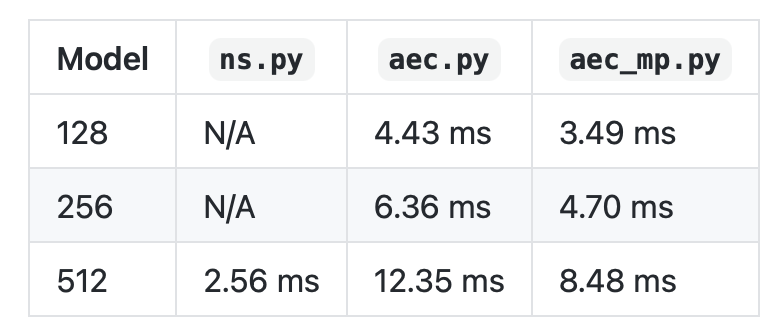
I did some optimization and fixed some bugs. Also conducted some measurements with my Pi 3B+ and this is the result (note that < 8ms is required for it to work in realtime):
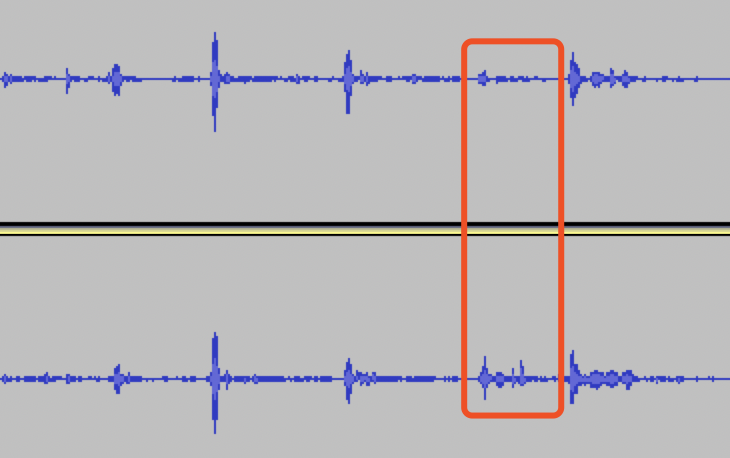
I use 256 model for AEC, it works well in most cases but still swallow my voices sometimes. Same input 512 model can do obviously better, but Pi 3B+ cannot afford it realtime. Maybe traditional AEC + DTLN NS is the most practical choice.
1st track is 256 model on Pi, 2nd track is 512 model run on my MacBook. Highlighted is a word I voiced out, which got attenuated by 256 model but kept by 512 model.
I never did work out the training routine as it seems the code is just for NS, but presume you can greatly improve like all models by providing or supplementing with data of use.
I am not sure what language the dataset was but likely the intonation of the dataset will effect speaker voice.
It would also be interesting what a Pi4 could do especially with an easy OC to 1.8Ghz.
Pi3 you can prob got to 1.5ghz but really the factory OC is quite high and .1Ghz obviously is less than the easy .3ghz of a pi4.
Been a while and here’s some progress on this project.
A large portion of my time was spent on configuring a virtual ALSA device for AEC. Recently I did more research and make it more usable. So I created a separate repo for it with detailed explanation.
I have optimized the multiprocessing to make it faster. Now on my Pi 4 I can run the 512 model under 4ms.
With the new flexible alsa-aec parameters, I also managed to experiment AEC while setting the playback and capture device from different cards. Even with bluetooth playback (use bluealsa) and set defaults.pcm.aec.playback_pcm "bluealsa" for alsa-aec. It can work but the result is not that perfect. Still cheering as most traditional aec requires in/out from the same sound card.
@fastjack you seem to have both SR versions whilst you just need one I presume and choose between 48k or 16k
Depending on your hardware many will only use 44.1 or 48k via hw: but presume you can use plughw: so it will do auto conversion. 16k sometimes isn’t supported via hw: direct
Nice spotting @rolyan_trauts . alsacap is a nice tool also the author has a nice article to demystify alsa which helped me a lot.
It’s quite strange that when use the multi plugin we can’t use plug to warp hardware devices for auto rate conversion, it will result in xruns. Have to use a rate to explicitly set target rate. Maybe some bug in alsa?
Remember you have a Arch with latest alsa running. At your convenience, please help to test if this bug was fixed on more recent alsa versions.
I may have seen the same error when I was on my first version of the alsa config. I thought current version fixed it but obviously it didn’t. I am not sure what’s the cause of the error but you may try the following:
Comment these two lines under both playback_hw and capture_hw in alsa-aec.conf
        period_time 8000
        periods 32
If it still doesn’t work, try to replace them with this:
   period_time 0
   period_size 128     # you may change this to different values like 1024 to test
   buffer_size 4096
Finally, if all not work, try to test with a different soundcard.
Wait… I just reproduced your error as I noticed that I have a USB soundcard also named “Device”, may be same as yours. I took it out and test with your config and the same error was there. Let me do some testing on my side and will let you know if there’s a fix.
@fastjack This error seems to be related to some unknown PortAudio bug. I now have some work around and just uploaded a new version. Please test with this latest version (v0.3):
Guys, can you explain how you configure Rhasspy in this case with NS & AEC? Do I understand this in the right way that each satellite needs to do NS and AEC or is it also possible to do this just on the base system?
I asked in another topic ways to improve Rhasspy in case of wake word detection and reduce the failure rate, @romkabouter gave the advice to search for NS & AEC. Based on the search results it looks like this is the most advanced and updated approach.
I’m trying to get this to work. I’ve gotten to python3 ns.py -o 'Loopback ,0' --measure and it seg faults. I’m running a Pi4 with 64bit PiOS, respeaker 2mic and I copied over the aec config and added snd-aloop to /etc/modules. I originally was trying to get ec to work, but was having issues after switching to the 64bit version of PiOS, so maybe 64bit is my problem? Has anyone tested on 64bit?
How does the flow look like right now? You implement NS AEC before Rhasspy (and its modules) starts working, right?
Because I think it has to be done on the system which has a connected microphone because in case you use the base station this station doesn’t know the audio stream of the satellite systems.
How does your audio recording settings in Rhasspy look like? I guess you need to change the device to avoid grabbing the raw microphone line?
The NS/AEC scripts are standalone. You can setup a virtual sound card with ALSA and then configure Rhasspy to use it. Maybe it’s easier to setup on satellites. I don’t use Rhasspy, hopefully somebody else has tried to configure it and can give you some help.