Wakeword engine

Hi,

Like some may know, I do my tests with snowboy, which works really great but will be turn down end of 2020. Of course it will still works, but we won’t be able to generate new custom wakewords.

I’m looking for an engine with three different custom wakewords. One per family member so I can know who is asking something.

Right now we have such options : https://rhasspy.readthedocs.io/en/latest/wake-word/

  • snowboy : free, offline, custom wakeword. But EOL ! :confounded:
  • porcupine : must redo custom wakeword every 30 days :confounded:
  • pocketsphinx : doesn’t seems very reliable :confounded:
  • precise : seems working nice. training custom wakeword seems hard though, and still don’t run on pi0 ? :confounded:

Actually I still run my snips system in production (Pi3 master and Pi0 satellites). The only thing keeping me from running rhasspy in production is akeword engine. Snips one works great with three custom wakewords (snowboy seems even a bit better).

So actually, what is the consensus regarding wakeword engine for rhasspy with several custom wakewords ?

Is there anything new on this side ? Or something to come ?

Thanks

1 Like

The KWS system is indeed the last major piece of the puzzle.

There have been some discussions to port the Snips personal wakeword detection system detailed in this post:

I made a Node.js module following these guidelines with a few tweaks and it is working pretty good in my homemade setup (not Rhasspy).

It should not be too complicated to port this to python but for more efficiency it would need C++ or Rust (at least the features extraction and DTW parts). I think @maxbachmann is looking into it but not sure…

1 Like

Yes I am looking into it, but since I got quite a bit to do at work right now I am not quite sure when I will find the time to implement it. As far as I remember a couple of the third party sources used by it are GPL Licensed and therefor need to be reimplemented

1 Like

Snips wakeword would be awesome yes.
I saw that ProjectAlice has the dpkg for it, so even if Sonos remove everything it still can be installed and used, with offline generated custom wakewords.

Regarding Porcupine, I did contact them to know what would be a price for more than one custom wakeword and 30days, personnal use. Their answer is just a no-no for this solution

Our sales team has received your inquiry and based on the provided information, has determined that this is not, unfortunately, a good fit for us.
Given our limited resources, we have decided to focus on large enterprise prospects with the significant budgets dedicated to developing innovative voice experiences; Due to the high opportunity cost, we are not able to provide our services towards personal projects, early-stage startups, companies working in the ideation stage, or pure proof-of-concept efforts with no clear path to commercialization in the near term.

I’ve got a start on a Python version of the Snips Personal Wakeword Detector. I’m calling it Rhasspy Raven (Hermes service here).

I recorded myself saying “okay rhasspy” 3 times, trimmed up the audio, and exported the WAV files as 16-bit 16Khz mono. It seems to work OK with a distance threshold of about 38 for me.

It’s a bit CPU hungry right now, so I’m not 100% confident it will run well on a Pi or Pi Zero. I’m not sure I’ve implemented everything correctly either, so there may be a lot of room for improvement. Obviously, a C++ version of the great @maxbachmann will blow it out of the water in terms of speed :slight_smile:

If this works for anyone besides me, I can try to incorporate the template recording into the Rhasspy web UI and bundle it with the Docker image. Maybe we can make this like rhasspy-fuzzywuzzy and swap Raven out with an optimized C++ backend at some point in the future.

6 Likes

@synesthesiam I guess you should replace dtw-python since it is GPL license https://pypi.org/project/dtw-python/ :grimacing:

1 Like

Impressive!

What’s the most CPU intensive part in the code? Can’t we offload just that part to an optimized library?

Nice :+1:

The most CPU hungry part is the MFCC features extraction.

You can ease the resource consumption by calculating only the new frame MFCC features and not the whole buffer (10x improvement).

You can further improve by reducing the number of DTW calculations by averaging the keyword templates. Average template 1 and template 2. Then average avg 1-2 with template 3 etc. Do not average all the templates in one go (very bad for accuracy).

Hope this helps. :blush:

3 Likes

Also the use of the cosine similarity as the DTW distance calculation function with the probability formula detailed in the blog post helps getting a standardized score/threshold across all templates. Usually between 0.45 (more false positive) and 0.55 (more false negative).

Otherwise (using the Euclidean distance) the length of the templates will add too much variation and will require the user to do a trial and error process to determine the correct value to use for his specific keyword.

I think further improvement can be achieved by offloading the features normalization (as well as extraction) and DTW calculations to a lower level library.

3 Likes

Ok, I just tried this on my Raspberry Pi 3 Model B Rev 1.2 satellite and it’s excellent! Good job :slight_smile:

CPU-hungryness is fine: after the initial startup the Python process doesn’t need any more than a couple of percents of the CPU. The arecord process needs more with a continuous use of 11% of the CPU. I haven’t tried it yet on the Raspberry Pi Zero W, this board will probably need the optimizations suggested by @fastjack.

I just ran the example command with:

$ arecord -r 16000 -f S16_LE -c 1 -t raw | \
    bin/rhasspy-wake-raven --distance-threshold 47 --minimum-matches 2 etc/test/okay-rhasspy-*.wav

Note that I had to increase the distance threshold from 38 to 47 and I learned that I had to pronounce Rhasspy in a specific way (I listened to the samples and heard that @synesthesiam pronounces it with shorter vowels than I did), but after these two changes wake word detection was excellent and I haven’t found any false positives yet after shouting a handful of other wake words to my Pi.

This was just a short test, but it already works better than Porcupine in my setup, so I’m sure if I record my own samples wake word detection with rhasspy-wake-raven will be more than good enough for production use for me.

@synesthesiam Oh, and can you publish rhasspy-silence 0.3.0 to PyPI? I had to temporarily change the line for this library in requirements.txt to git+git://github.com/rhasspy/rhasspy-silence@v0.3.0#egg=rhasspy-silence (if anyone else wants to try this in the mean time) so it could find this version because it’s not on PyPI yet.

2 Likes

One thing I included in my Node version is that when a keyword is detected the current audio buffer is made available so it can be saved to disk as WAV.

Maybe rhasspy-raven-hermes can send it in a MQTT message like rhasspy/hotword/<siteId>/audioCaptured and save it to disk if a configuration option is set.

The more you use the personal wakeword, the more dataset you generate for an eventual ulterior CNN (like Precise) to be trained for that keyword.

2 Likes

Sorry, hurry times here.

Does this would mean that Rhasspy docker will one day:

  • install snips wakeword detetor or whatever needed
  • get it as option in rhasspy interface
  • even offer a way to record/generate custom wakewords (multiple ones) from interface ?

This would be just awesome, and the last brick for me allowing going into production !

I could easily rewrite my snowboy tool for recording. Everything is here : https://github.com/KiboOst/jeedom_docs/tree/master/other/Rhasspy/SnowboyCustomMaker
If you need anything from it feel free to.

I do not think that Rhasspy will ever run the original Snips hotword detector as it is not open source and is not maintained anymore (if that was what you were saying… not sure :slight_smile: ).

What @synesthesiam, @maxbachmann, @koan and I are talking about is recreating a service that will handle the “personal” wakeword detection system that Snowboy and Snips used.

The personal wakeword templates could indeed be directly recorded from Rhasspy GUI (like what you did with SnowboyCustomMaker.

This might lead to some kind of user management (Rhasspy 2.6?)…

So we will need to install and set manually the former snips wakeword ?
That’s why I said project alive have it as a dpkg so if it is removed, we can still install it. We need reliable and fully maintainable stuff to avoid such situation like snowboy EOL.

Of course you can install the snips-hotword package, but it’s not open source, so Rhasspy will not distribute nor promote it.

Our current priority (as it’s really the missing piece now) is having a completely open source wake word detector that performs well with low resource use. An optimized version of Rhasspy Raven can be that missing piece.

1 Like

Even better yes. Like you say, completely open source wake word detector is the last brick to have, definitely.

This “one day” me be sooner than you think. It seems to me that @synesthesiam’s hands are already itching to add the recording functionality in Rhasspy’s web interface:

Knowing his god-like productivity, this can’t take long :slight_smile:

2 Likes

It looks like there are a couple of MIT licensed alternatives for dtw-python:

2 Likes

Thank you for the excellent suggestions, @fastjack! Can I use your code on GitHub as a reference for the MIT-licensed raven project?

I think I’m doing this now, if I understand you correctly. For each buffer, I do the sliding window over it and compute MFCC for each (smaller) window. Is that right?

Opps, that’s a good point. If @fastjack allows it, I’ll just port his code to Python for DTW. It’ll be slower for sure, but it will give us a place to start.

Both MFCC and DTW calculations are the slow parts. The template averaging @fastjack mentioned would be a huge boost by itself.

Got it :+1: I’ll switch over to use cosine and probabilities.

Once we get Raven working here with properly licensed dependencies, I plan to add it to the Docker image and have the template recording happen in the web UI :slight_smile:

So we’d have a fully open source wake word system that can have a custom wakeword recorded from within Rhasspy!

Do you mind if I use some of this code in Rhasspy to do recording/trimming in the web UI?

1 Like

Please do :slight_smile:

From what I can understand (not a Python dev…), it seems you extract MFCC features from an entire audio chunk (with an approximate length or the average of the templates). I greatly improved the CPU consuption by only extracting the features from the new window in the audio buffer. The only restriction for this technique to work is that the window size must be a multiple of the shift size (30/10 for example). It’s a bit of a hack but it reduce so much the MFCC calculations that I think it’s worth it.

1 Like

Of course, use everything you need :+1:t2:

1 Like

OK, I’ve removed dtw-python as a dependency, so all that’s left is pythons-speech-features, which is MIT licensed. I used @fastjack’s Javascript code as a base for writing my own dynamic time warping calculation and template averaging.

I’ve added Raven to the Rhasspy web UI as an option in master, but no recording just yet. If you put WAV templates in {profile}/raven/ it should just pick them up. I created a “sensitivity” parameter in the web UI that expands/contracts the probability detection range around 0.5 (now that I’m using cosine distance).

Once I get the Docker images built and pushed, we should have a beta version of Raven out for community testing! For now, anyone building from source can give it a try.

7 Likes

@fastjack, I found accuracy in Raven to be significantly worse with my hand-rolled DTW (based on your code).

I thought dtw-python might be doing something magical under the hood, but it turns out (from their paper) that they just use a “symmetric2” step pattern by default. This doubles the distance added to the match/replacement cost computed during optimization:

distanceCostMatrix[rowIndex][columnIndex] =
  Math.min(
    cost + distanceCostMatrix[rowIndex - 1][columnIndex],          // Insertion
    cost + distanceCostMatrix[rowIndex][columnIndex - 1],          // Deletion
    (2 * cost) + distanceCostMatrix[rowIndex - 1][columnIndex - 1])      // Match

Maybe you’re already aware of this, but if not it gave me much better accuracy :slight_smile:

1 Like

Interesting! I’ll test that soon :+1:

1 Like

Just tested it and the accuracy significantly dropped with the 2 * cost for diagonal moves.

Weird that you’re seeing accuracy improving… Did you changed any other parameter?

Hmmm…the only other difference I can see is that I initialize 0, 0 in the cost matrix to distance(s[0], t[0]) whereas you set it to 0.

Maybe I’m accidentally doing something difference else where too. I’m adding Raven into the next Rhasspy release, so hopefully there will be some more eyes on the code :slight_smile:

1 Like

I do not get this part of your code:

            if (
                self.probability_threshold[0]
                < probability
                < self.probability_threshold[1]
            ):
                # Detection occured

Why is there a maximum probability? According to the probability formula I used, the probability of a template compared to itself (perfect DTW cost) is around 0.73.

The detection should not occur if the probability is between 0.45 and 0.55 but if it is above 0.5.

Maybe I miss something though…

I must have misinterpreted you above in the thread. You mentioned 0.45 and 0.55, and I thought you were saying that this was a range of good probabilities.

Maybe this is why I’ve been getting more false negatives…

Oh… I meant that if you define the threshold to like to 0.45 you’ll get more false positive and if you increase the threshold say to 0.55 you’ll get more false negatives. :wink:

The probability value goes from 0.1 (definitely not the template) to 0.73 (definitely the template).

:man_facepalming:

Thank you for the clarification. I’ll get that corrected before pushing the release.

Do you have an idea of how Snips mapped its “sensitivity” value onto the probability range? I’d prefer to expose a [0, 1] value like the other wake word services in the web UI.

No idea… I guess we could take the maximum possible value (~0.73) and the default threshold of 0.5, calculate the minimum value to be 0.73 - 0.5 = 0.27 and stretch that (0.27 - 0.73) to 0 - 1… That should work… Maybe invert it so higher sensitivity means lower threshold.

This also seems weird:

shift_sec: float = 0.05
        Seconds to shift overlapping window by

If this is indeed in seconds then the shift is 50ms which is bigger than the window size. 10ms should be a more appropriate value (0.01).

1 Like

Found this for an eventual C++ features extraction library for ARM architectures:

1 Like

The library has no License -> all rights are reserved
So when we want to use it we would have to ask them for the permission to do so first.

2 Likes

Thank you for taking the time to look over my code :slight_smile: Raven is getting better, bit by bit!

1 Like

Has the accuracy improved with the last changes (threshold and window shift)?
What does the CPU usage looks like on a Raspberry Pi for instance?

I didn’t see any changes in performance on my desktop. I’m setting up a fresh Pi Zero to test out next, though.

Thanks, @maxbachmann. Glad to have someone on the team who’s helping ensure Rhasspy doesn’t get caught up in licensing issues :slight_smile:

Well, the CPU usage on a Pi Zero spikes pretty high when it detects speech. And there’s about an 8 second delay between saying the wake word and it reporting the detection :frowning:

So for the Zero, we’ll definitely need a native code solution. I’ll test on a Pi 3 tomorrow, but I expect it to run well there.

Can you profile the code on a Pi Zero? That could help in deciding which parts to reimplement in native code.

I’m already using Raven on a Pi 3 here, it works well.

I did not profile it, but I would expect this: https://github.com/rhasspy/rhasspy-wake-raven/blob/master/rhasspywake_raven/dtw.py to be quite slow (at least thats my experience with implementing similar algorithms in python)

1 Like

Great to see that you guys are working on an alternative solution! :sunglasses: :+1:
I’m still using Porcupine but unfortunately what @KiboOst wrote also applies to their support for SEPIA and they will not update the “Hey SEPIA” keyword made back in 2018.
The worst thing is that they are the only ones who have a library that works cross-platform and can be used in the SEPIA HTML client app :frowning:

I quickly checked the code and was wondering … any chance this could be adapted to work in the browser? Or is there anything Node.js native included?

I’m using a native module to extract the MFCC features but I think the WebAudio API can be used to do the same in a browser.

From my profiling on the Node version, the heavier part is the MFCC features extraction. The DTW does not seem to be that consuming (with averaging it also helps a lot to reduce calculations).

I’m still convinced that a C++/Rust library that ingest audio chunks and do the pre-emphasis, windowing, features extraction, DTW and output prediction will be the optimal path resource wise (as most of these steps are loops).

That would be this here? const Gist = require('@mathquis/node-gist')

Yes. The FFT part of the MFCC extraction seems to be the heavier part of the lib.

1 Like

Actually, the gnu-ne10-mfcc library is not really required (and after looking at the code, I think it does not really work as advertised or at all)…

I think the essential part is the NE10 library that provides a heavily optimised FFT calculation for Arm-based CPUs equiped with NEON SIMD capabilities (complex and real):

Does it require NEON support? Because then it won’t run on the Raspberry Pi Zero W, and that’s the device that needs an optimized library most (cfr. @synesthesiam’s 8-second delay for the wake word detection).

It does require NEON support so that won’t work for the Pi Zero indeed but can improve performance for ARM7 and ARM8 architectures which can be nice also.

Other libraries can be used for FFT calculations like FFTW (the fastest according to their benchmark) or KISSFFT (the one I’m using with Gist).

Maybe this can be useful…

I’m testing node-personal-wakeword module on a Raspberry Pi Zero W and the CPU usage so far is as follow:

  • for no keyword:
    between 4% (no voice detected by VAD) and 48% (voice detected + MFCCs)

  • for 1 keyword (using 3 templates averaged to 1)
    between 4% (no voice detected by VAD) and 62% (voice detected + MFCCs + 1 DTW)
    detection is immediate

  • for 2 keywords (using 3 templates averaged to 1 for each keyword)
    between 4% (no voice detected by VAD) and 85% (voice detected + MFCCs + 2 DTW)
    detection is immediate

  • for 3 keywords (using 3 templates averaged to 1 for each keyword)
    between 4% (no voice detected by VAD) and max (voice detected + MFCCs + 3 DTW)
    detection starts to lag but is still acceptable (less than a second)

Adding more keywords will only increase the CPU usage and add to detection lag to the point of triggering audio over-runs.

1 Like

I got audio overruns immediately on the Zero, so you code must be quite a bit faster than mine. I wasn’t doing template averaging, but I would still expect a bad delay.

I haven’t done the MFCC optimization you mentioned yet; that will be my next step. From there, maybe I could try moving the DTW calculations out into a .pyx file?

@KiboOst I recall you were using Snips hotword before switching to Snowboy. Could you give us feedback about the CPU usage of both (Snips and Snowboy) with personal wakewords on a Raspberry Pi Zero… I wonder if they were doing better CPU wise…

Found something interesting for FFT speed up on RPi Zero:
http://www.aholme.co.uk/GPU_FFT/Main.htm

2 Likes

I have both running so I will look at that. Not at home for a few days but give me a console cmd to look at it please (ssh).

If you could just give the %CPU column output of the top command for Snips hotword and Snowboy, that could be helpful.

Will do both idle and detecting hotword for both once at home.

To be looking for new software and solutions its not a good idea to use something as the pi-zero as a critical selection for choice.
The zero is great but its design and hardware is absolutely antiquated by today’s standard and quite likely will be superceded.

Rockchip and Allwinner both have similar priced Socs that leap up A35 or even have codecs or accelerators.
The RockPi-S is $13.99 quad core A35 with audio codec.
I expected a few new releases and boards but much seems to of gone covid shape in the current uncertainty.

@fastjack I am not sure about gnu-ne10-mfcc as its not used by Linto as in their code to my surprise its Sonopy (think that was its name) but the Mycroft python lib.

I have posted this before but https://github.com/JuliaDSP/MFCC.jl looks really awesome and Julia for you Python guys isn’t supposed to be that much of a big deal, but hey that is all I have read :slight_smile:

I have been looking at how MFCC & VAD is created and they seem to share a common heavy FFT process that for some reason is always split into two libs and threads whilst a MFCC lib could very well have a few additional parts of the VAD added to it.
Its been a hunch by me, but if someone had the talent it would prob definitely reduce a considerable amount of what is the heavy process feed to KWS.

I you are going to start programming and adopting something for the future then the critical selection would be to have neon support and not to exclude it.
The ne10 FFT routines are supposed to be really slick but maybe something more generic like FFT3W should be used as it will compile for many platforms as you never know someone might be bat shit crazy enough to want to use it on X86 :slight_smile:

I think that Julia lib does share process with VAD & MFCC but its SAD (Speech Activity Detection) not VAD and don’t joke about being SAD if you wish the author to ever converse again :slight_smile:

PS the GPU FFT is a cul-de-sac as the memory transfer cost outweighs any benefit its actually on all pis in the opt directory samples and is really a relic.

I agree, that the hardware is not completely up to date, but on the other hand it is used by a ton of people and has reasonable software support, while all the rockchip/allwinner chips usually have a pretty small user base. And since it is quite cheap aswell it will be used a lot for satellite devices, thats why at least for the wakeword engine it is important to consider the pi zero aswell as long as it is used so much. (In my eyes what all these “raspberry pi killer boards” do not get is that the reason to use the pi is not not the superior performance, but the huge community behind it)

2 Likes

@rolyan_trauts I agree. The FFT part is indeed the heavier piece of the MFCC extraction. Offloading the FFT and maybe the DTW to the GPU might provide quite an improvement.

As I have said above, the gpu-ne10-mfcc lib looks like something that was never really used or even completed. A dead end for me (though the idea to use Neon might be valid)

Using the GPU of the Pi Zero (and of all the other Pis that use VideoCore IV) should not hurt performance and should greatly improve the CPU load (since at the moment everything is done by the CPU).

I’ll be testing FFTW3 on a Pi zero soon to see if it provides improvements on CPU usage (the Gist library I’m using can already use FFTW instead of the default Kiss FFT).

I hope (not a C++ dev so… fingers crossed :grin:) to also add GPU FFT into Gist to see the difference between the 3 libs on a Pi Zero… I’ll keep you all posted.

Cheers

2 Likes

The GPU method for the zero you can email andrew@aholme.co.uk if you wish as he is a nice guy and will reply.

Hello Stuart,

Although GPU_FFT was faster than the ARM on the original RPi, Peter Onion told me he got equivalent or better performance from FFTW using NEON instructions on a newer RPi.

Forgot what it was as did do more research might be the DMA access of the GPU but small but rapid frame swaps don’t really suit and anything PiII or above is slower.

I remember thinking zero increases are marginal and its slower on all the rest, sod that.
Its pure daft to waste time on a Pi Zero as a Pi3A+ gives approx 10x capacity for just 10x more.

The problem with the zero now is because its not good enough for purpose as you wouldn’t be looking for magic speedups.
Magic speedups don’t exist and all you are going to do is make something not fit for purpose fractionally faster.

@maxbachmann yeah in general use RaspiOS has much more support but when you have a very specific use like we have here you can be very specific.
I am not even suggesting use the RockPiS as I was just using that board to show how antiquated the Pi0 has become when a small scale supplier can provide Pi3 perf at Zero price.
My suggestion would be to tell users that a Pi3A+ is the minimum supported and there are alternatives such as the RockPiS and Pi0 but don’t waste time hampering the project.

When you are talking $15 satellites we are actually not in the realms of a general purpose SoC but much more akin to embedded of very specific purpose and the only criteria for many is price as costs can quickly add up when talking about the multiples that could be common.
Both the RockPiS & Zero come in at that price but the zero instantly hits walls of process wise the answer to any additional audio processing is no. The answer to further security (stunnel) is no, because there is no load space left and all that lovely compatible OS is worth jack shit because the Zero is already maxxed out and it has no room to fit any more.

Its totally pointless to be focussing on what is likely a product to soon be superceded that is different to every model since the Pi2.
There are raspberry products that solve all the problems with the Zero and its much better to be honest an say yeah spend $10 more than roll out crap where a community thinks what you supply is rather poor.

You are actually better with a Pi3 and a USB sound card as there is very little difference with end result price with 10x process load of the zero.
Or you can use a RockPiS and I have took the plunge and doing a systematic evaluation of cost, function, performance and quality you can expect but will do a write up here and yeah its very much a Zero killer for audio orientated applications as that was what it was designed for.
Its a modern A35 design specifically designed for VoiceAi style apps even has a DSP VAD that runs on interrupts for 4 mics and when in sleep mode monitors VAD on a single mic to wake.

Its so specific and at such a good cost price its totaly a brain fart of bean overload to ignore, but yeah for satellites as I commonly say my favourite Raspberry SoC by far is the Pi3A+ as it is still a kick ass piece of kit whilst the PiI inherited Zero really is starting to groan.

The RK3399 became very popular when we where stuck with the Pi3 but the Pi4 has sort of dented the Pine & Radxa offerings quite badly now.
RK3308 until we get a Zero-2 is actually a good option but when the zero-2 comes out probably less so.
Raspberry being Raspberry its likely to be later but as a betting man next year there might be a chance we see all that Pi2-Pi3 IP in a smaller process @ Zero prices.
As a betting man any Zero specific work you do now prob has a max of 2 years life.

I do agree that the Pi3A+ is an often underestimated part of the Raspberry Pi family, and it makes an excellent (although probably too powerful) satellite device.

However, many people still have Raspberry Pi Zero Ws lying around, once used as Snips satellites. And with the right optimized software, these devices should be perfectly capable of executing this task (Snips managed to do it), and they are cheaper than the Pi 3A+.

I also wouldn’t call the Pi Zero W “soon to be superceded”. The Raspberry Pi Foundation claims that:

Raspberry Pi Zero W will remain in production until at least January 2026

So even if there comes a successor, it’s not like the Pi Zero W will disappear.

So, I wouldn’t focus all our resources on getting the wake word engine on the Pi Zero W working, but I think it’s still worthwhile to have it as a cheap option.

2 Likes

The Pi3B+ will be available to January 2023 and @ $35 its obsolete by the Pi4 2gb which is a 1$ cheaper.

The Pi Zero will run till January 2026 but that doesn’t mean Raspberry will not have a replacement way before then and the January 2026 date has Zero relevance (Like what I did there :slight_smile: ) to what we might see.
If we don’t there are already alternatives that are far better at the same price or a step up to Pi3A+.
It doesn’t matter what Snips did as its extremely debatable what Snips would do now as they had a team who were extremely forward thinking.

For me who likes EC functionality then the Zero isn’t an option as it just can not do it, full stop.
It’s also not a cheaper option as with Hat’s and ancillaries the difference to the RockPiS is extremely minimal and doesn’t need a Hat Codec.
A Pi3A+ with 2x I2S mics can use the 3.5mm and still upgrade to a HDMI2HDMI+Audio extractor without need to jettison the extremely cost effective mics.

Then again on both its still prob better to go for just an extremely cheap sound card and couple with an active mic module, but is the zero cheaper is debatable as it needs extra $ to make a working solution.

But this is why I am writing as yeah you can say the Pi0W is a cheap option or like me who has several gaining dust would I use one to create a complete satellite.
Hell no with all the extra cost to complete as it doesn’t make sense now never mind in a year or 2 and as for the off chance they may have a ZeroW it’s equally likely for the Raspberry niche that a Pi2,3 or even a new Pi4 to be collecting dust.
If your focus is existing owners its not true that the Pi0W is the most common and if they are already owned they are certainly no cheaper.
But why are you even thinking about the odd occurance of a Pi owner thinking I could repurpose that than someone with an interest in voiceAI who wants to try a working best price/perf solution of an opensource design?

Well, let’s agree to disagree there, but I actually agree with your other remark that for a $15 price range we should probably look at embedded solutions. If you have some input there, I would love to hear it in the other forum topic.

I don’t think the embedded devices cut the mustard anymore as they are of a similar cost to many dedicated Socs of much more flexibility and capability.
You can take an embedded direction with those socs and create a Buildroot or Yocto ‘embedded’ solution as there is no advantage in cost with say what might be used such as the ESP32-LyraT-Mini.

That was my point as the new function specific low cost Arm boards can be specific embedded solutions and the advantages of a general purpose OS is not so much of an advantage.

If you have a matrix voice its great that a repo is supplied but to purchase one now @$75 with what is available is an extremely dubious choice in terms of $.

MATRIX Voice ESP32 Version (WiFi/BT/MCU)

They are more of a legacy to all what was available a year or more ago when Snips was around that is no longer true now and definitely not of the future.

I’ve tested FFTW3 in place of KISS FFT and there was no noticeable change in the CPU usage on a Pi Zero (still 45% CPU min only for MFCCs).

45% min is pretty hefty but good to know you got it working as FFTW3 if compiled for A53 should use neon from memory.

Anyone got any clues to interfacing Julia libs to Python? :slight_smile: But got a feeling could even be worse.

I was able to get the CPU % down significantly and have Raven run pretty well on a Pi Zero by:

  1. implementing @fastjack’s MFCC optimization (or some flavor of it)
    • MFCC is calculated once on an incoming audio chunk and the matrix is reused when sliding windows
  2. Pre-computing the DTW distance matrix using scipy.spatial.distance.cdist
    • This made a huge difference in speed, rather than computing the cosine distances as needed inside the DTW for loops

One area where the Zero still as problems is when there’s a lot of audio that activates the VAD but doesn’t match a template. This gets buffered and processed, but can clog it up for a few seconds as the DTW calculations run.

A way to help might be to say if so many frames in a row have very low DTW probabilities (< 0.2) that audio is dropped for a little while. Any thoughts on this? Maybe it will be moot once the DTW calculations are externalized.

MFCC doesn’t seem to be the bottleneck so far.

3 Likes

Thinking about it 45% isn’t all that bad on a Pi Zero as its just short of horsepower.

Acoustic EC on the Pi3 is really heavy but actually doesn’t matter at all because of the diversification of process.
It only runs heavy when audio is playing, doesn’t run on input and TTS is generally the end result of process.
So it doesn’t matter as it runs at alternative timeslots to other heavy process and diversifies load.

How much load does RhasspySilence produce on its own on a zero as isn’t VAD just the summation of a couple of successive frames of the same FFT frame routine that is duplicated in MFCC creation?
You can actually see the spectra in a MFCC so surely you can grab the spectra bins of the low and high pass filter that VAD uses from MFCC instead of WebRtcVad and log the sum there and do away with RhasspySilence at least on a Zero?

Then use diversification and turn off MFCC/VAD after silence until the audio capture is processed.
You don’t have to halt after silence but I am pretty sure the single frame MFCC calculation could make an excellent successive VAD detection with hardly any more load than MFCC itself.

What is the load of RhasspySilence or is it pretty minimal anyway?

Also again from the above it seems like MFCC is batched and searched after whilst like VAD should be frame by frame?
As if your DTW probabilities don’t fit for X series of frames then doesn’t DTW restart again on the current frame?

With webrtcvad I was seeing maybe a millisecond to process a 30 ms chunk of audio.

I’m betting there’s some savings that could be had by combining the VAD, MFCC, and DTW steps. MFCC/DTW are done on “template-sized” chunks of audio (the average length of your wake word), whereas webrtcvad mandates 10, 20, 30 ms chunks.

Some ways I could think to save CPU:

  1. Use VAD to decide whether a whole template-sized chunk is worth processing
    • I wait to process audio until VAD says there’s speech, but if the majority of a template-sized chunk is silence I will still process it (MFCC/DTW)
  2. Re-use FFT from VAD in MFCC calculation
    • Would work well if they’re processing the same chunk size
  3. Abort DTW calculation early if it can’t reach threshold
    • Not sure if this is possible, but I would guess you could tell at some point in DTW that the final distance can’t ever get above threshold. In that case, abort the rest of the calculation.
1 Like

Just so the new Raven doc : https://rhasspy.readthedocs.io/en/latest/wake-word/#raven

Does it support multiple personal wakewords ? How to set them ?

Dunno as the FIR filters which are just FFT routines of webrtc are all contained in WebRTCAudioProcessing and as individual FFT routines you don’t have api access just the results.

@fastjack was testing actual FFT libs for MFCC so sounds like at that point you do have access to the FFT routines and they are not just submerged in some lib.

You mean use the FFT frame for both MFCC frame and VAD calculation and drop webrtcvad?

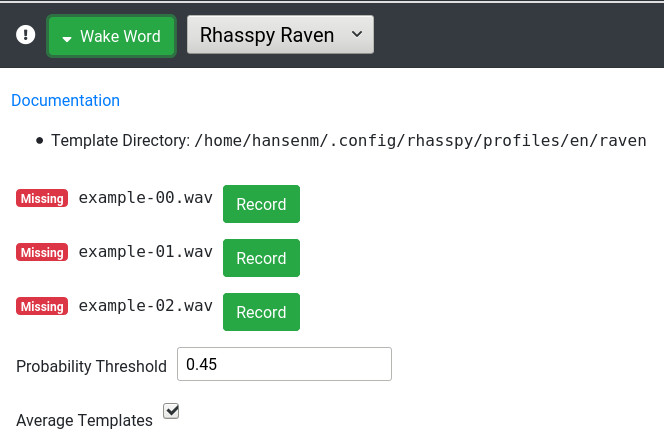
I added a place in the web UI to record the examples:

raven

You click “Record” next to each example and speak it. Right now, the web UI doesn’t support multiple wake words but this is absolutely possible in Raven :slight_smile:

Per @fastjack’s suggesting, I’m also working on the ability for Raven to save any positive detections to WAV files so you can train another system like Precise down the road.

4 Likes

Right. Seems like there are multiple FFTs being done on the same audio.

1 Like

Looking at Raven WAV templates dir, it seems there is no way to have a keyword use multiple templates (for later averaging per keyword). Averaging templates from different speakers will result in very poor accuracy.

As this is “personal” wake words, it would be nice to have the ability to setup multiple keywords (one for each family member) with multiple templates each (reducing calculation by averaging templates per keyword).

Maybe something like:

templates_dir/
    keyword1/
        template1.wav
        template2.wav
    keyword2/
        template3.wav
        template4.wav
...

And a CLI args like:

--keywords "./templates_dir/"

or

--keyword "keyword1=./templates_dir/keyword1/*.wav,sensitivity=0.54"
--keyword "keyword2=./templates_dir/keyword2/*.wav"

PS: Not a CLI expert :wink:

2 Likes

Yeah its always been the same prob due to KWS always using an external VAD but on each frame the data the FFT frame provides can be used for the MFCC frame and VAD frame.
But yeah 2x FFT runs because VAD & MFCC are usually separate projects/libs not sure why KWS don’t have a VAD function that does.

@fastjack Could you do a sort of feature extraction with VAD that looks for a tonal quality and then switch to a family member?

This is almost exactly what I’m working on now :slight_smile:

I think the way to do this in Raven would be to just have multiple keywords, one for each family member. Assuming MFCCs retain some information about tone, this should allow you to differentiate who spoke the command.

I keep mentioning it but https://github.com/JuliaDSP/MFCC.jl#pre-set-feature-extraction-applications does diarization.

The code is there even if not used.

1 Like

This is why I think a specific C++ library should be made to do all this directly in an optimized fashion (Audiochunk->VAD->Preemphasis->windowing->MFCCs).

Another C++ library can eventually help with the templates DTW comparison.

The wakeword is the main CPU bottleneck for a vocal assistant project (satellite). The rest easily run on a Pi 4.

1 Like

Man it would be Gorgeous to get as it would be so beneficial for so many VoiceAI projects.

I did give it a go and stalked C/C++ DSP programmers on github and sent pleading messages about a month ago.

I failed :frowning:

Apols all I am no use but at least my heart is there even though as said useless :slight_smile:

I know been same with wakeword and Linto now also hate me :slight_smile: for pestering

1 Like

PS just to name drop https://github.com/JuliaDSP/MFCC.jl#pre-set-feature-extraction-applications once more as I am not a Python programmer or any language any more, I do want to ask if some of the guys will take a look as supposed the interfacing between Python and Julia is supposedly quite straight forward.
Also julia for python experts is also supposedly more native whilst challenging C optimization speeds.

Also the Julia guys themselves wrote those libs are they are promoting what Julia could, can do and the author might be a very good contact to know.

@rolyan_trauts this looks like a perfect starting point for a native all-in-one system. I was able to piece together Raven thanks to the Snips article and @fastjack’s implementation, but I don’t know if I could create an all-in-one system in any reasonable amount of time from “scratch”.

I looked at the diarization part of feacalc a bit. So it extracts 13 MFCC features and does some normalization. Could this be calculated for the Raven templates, and then again once the wake word is detected, to do speaker recognition? DTW could be used again (probably without windowing), and the smallest cosine between all “diarization” templates would hint at who was speaking.

Yeah think so that it could select Raven templates might need to do a KWS failure once to switch Raven Profiles (not sure how long it needs to run for accuracy, but a single KWS failure to then switch isn’t that bad a proposition to accuracy gained, as only fails once when switch is needed)
but yeah multi-user templates could be a thing without load increase as raven would be switching profiles rather than trying to process profiles in parallel.
Has quite a few uses from maybe even voice biometrics and security.

It can also do the same for ASR that ASR can also switch profiles (models) based on diarization.
Say swap between 2 models such as gender to gain accuracy.

I like the idea of going native aka Rhasspy Rover but really that is all that is needed is Raven and RTP audio & control.

Its quite possible to have multiple simple satelites of the Simple Rover layout and use the result sensitivity to mix audio and deselect bad input from a distributed satellite array or just use best satellite single input signal, which a simple local KWS recognition can very much attain as that can be RTP info from each satellite to an ASR/Intent server that accompanies a stream.
In fact it can be just a asound channel mix as the KWS failures don’t initiate a stream.

MFCC+DTW already does speaker identification as the template is speaker specific.

That’s why I wrote above about multiple keywords (each with multiple templates) so each family member can provide multiple templates for the same keyword.

With this, Raven will be able to detect which person (keyword) has uttered the wakeword (even if it is the same for everyone).

I’ve tested with everyone in the household and it works flawlessly :grin:

3 Likes

Yeah but what we where talking is that your MFFC+VAD+DTW are all separate libs and multiples of load whilst they might not have to be.

If you are running against multiple keywords and multiple profiles then surely that is multiples of load also?
So if you can do diarization via VAD to select current profile at least then its only the multiples of keywords if you have them.

Also if you use the Julia Lib Vad+MFCC FFT use are off the same load and that is why the Julia Lib was forwarded so webrtcvad could be dropped from the load.
The diarization of JuliaMFCC is just another bonus that Julia lib has that could be used to cut load.

1 Like

Hi,

Need some feedback here on Raven settings.

I’m quite satisfy at the moment, but now in Production with lot of current conversation around, I have a few false positive and increase sensibility step by step. would hit the point where sensitivity is too high.

Actually I use Minimum Matches 1 and VAD sensitivity 1 (average checked)

Does Minimum Matches to 2 provide good result ? Does it allow to decrease sensitivity with still good detection and low false positive ? What about cpu charge ?

Anyone sharing experience regarding these settings would help :wink: I will have to get some Pis for testing setup but right now, just got production setup, can’t break it :rofl: