Test Results of Acusis S Linear Beamforming Microphone Array with AEC

Hey everyone,

I spent the last two days testing my new Acusis S. It is a linear microphone array that offers Far-Field Beamforming and AEC and can be used with just a USB cable. It was absolutely plug-and-play on Raspbian Buster and Windows 10 (no driver install needed).

If you want, you can use the Audio Jack of Acusis S to get Automatic Echo Cancellation.

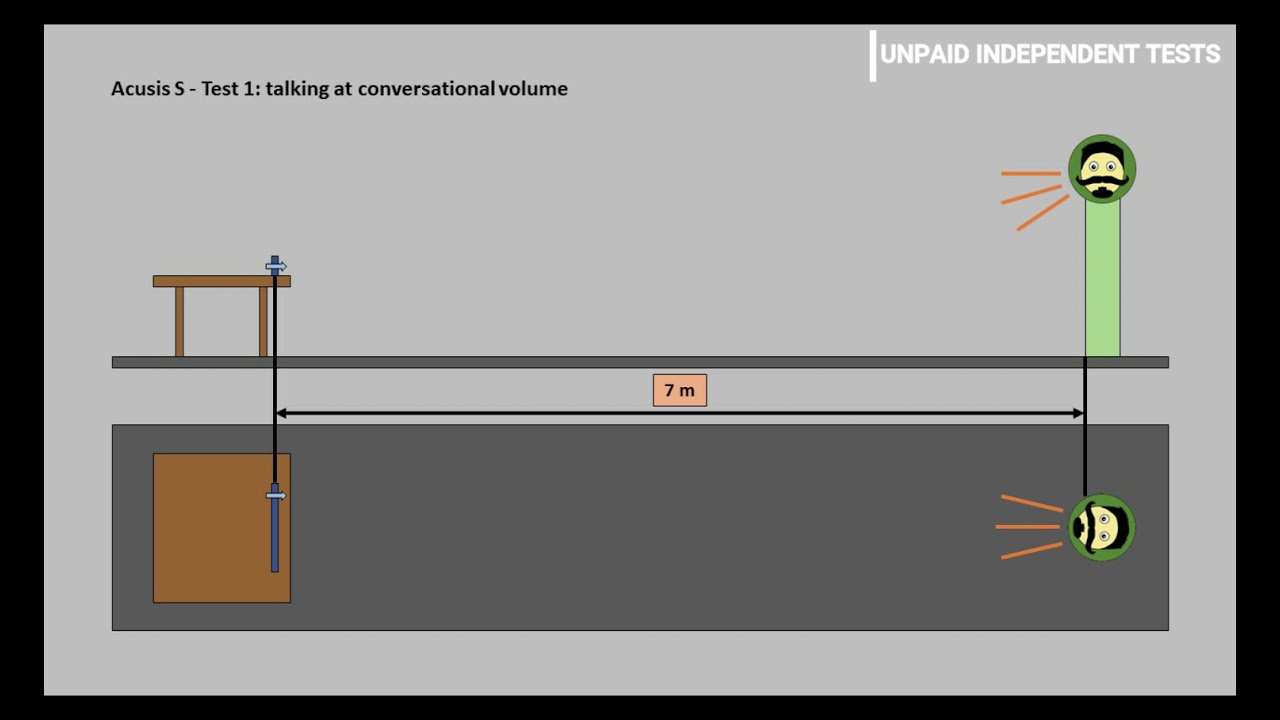
Here are my test results:

This is the product page:

Because of its cost (about 90 Euros), it will not be the right choice for everyone, but I am very happy with it. Digi-Key shipped it to me for free within 2 days (ordered on 22nd of December, received it on Christmas Eve in Germany).

Tell me what you think :slight_smile:
Manuel

3 Likes

quite impressive results :+1:t2:

1 Like

If I had not spent so much on just audio equipment to test & trial I would prob buy an Acusis S just to test & trial :slight_smile:
Beamformers have a geometry that tells the algs how to process and the Acusis S is the only linear wall mount geometry I know of, so on a wall it should be about perfect or any vertical face.

Its always the same with loud background noise as there is a threshold anything can cope with due to pure simple physics.

I think the XMOS XVF3500 DSP is a model up from any of the other XMOS units you can get (Respeaker) and they have opted to buy in Phillips ‘BeClear Speech Enhancement’

I am confused by what you mean by the Acusis audio ouput as thought it from a quick read it has audio pass through which is sort of cool as my test & trial head is thinking does that mean I can get a mixer and add microphones in places of noise if I so wanted and the background noise problem is a thing of the past.
Being analogue there should be no latency or clock drift problems which you will get if carrying audio via IP or I2S loopbacks that other boards have.
Also with AEC where we do have software my tinkering would be wondering what would it sound like with a double helping if run in conjunction with the Acusis S.

I would have a lot to play with still with the Acusis S and its expensive for a microphone but not much more than others and I think it does have some clear advantages.

If you put mics far and add them to AEC then you have some far more resilient to noise a BoyaMM1 or even better its super cardioid MM1+ right at the noise source with the rear facing voice.

You are probably happy with what you have and don’t want any more wires and cables but because it does have audio passthrough you do have the option to capture and process noise.

With one of these you could make the wife disappear https://www.aliexpress.com/item/32966474568.html
So ÂŁ15 for a mic and ÂŁ7 for a mixer many a man would say the ability is value for money.
Input both the audio output of your soundcard with the input of the mic and AEC should process both.
You might have to do some tinkering with levels but thinking a mic on a TV, Hifi or Piano through AEC should work extremely well or it will negate the AEC but thinking it would work.

The only software I use successfully is SpeexDSP but it works because you must use the soundcard your playing and capturing on and so negates the possibility to mix in further noise channels.

PS found a 4 channel stereo https://www.aliexpress.com/item/32967843730.html
But that sort of thing or even if you have a mixer as things there do sound musical.

There is a lot to play with that board, did you download or was that just default?
Acusis S Configuration Tool (aconfig)

We’ve developed our own Acusis S config tool (aconfig) to allow us to easily tune XVF3500 parameters from a host computer. Please check out XMOS (https://www.xmos.ai/) and XCore forum (https://www.xcore.com/) for more help and details on the parameters available for XVF3500.
Downloads https://acusis.s3-us-west-1.amazonaws.com/aconfig_linux.tgz

aconfig --set BEAMWIDTH is a pretty cool feature

1 Like

Hey @rolyan_trauts,

Thank you for the detailed response. You are right, I talked about the audio passthrough of the Acusis S and I could definitely imagine passing the sounds captured by other microphones through it to have them eliminated. So thank you for the hardware recommendations :slight_smile:

I did not download anything. All the results are absolutely default settings of the Acusis S.

Yeah without actually trying myself I really don’t like to give untested recommendations but the Acusis S did seem the best for for your needs.
I did this with an Anker Powerconf and only reason I have one is because when the recommendation didn’t work well I purchased one to see if I could fix things.
The Anker works well with Windows but audio out seems to go to sleep and cut under linux.

You seem to have no problem with the Acusis S and it ran as stock which is great as if like the Beclear documemtation says (also a relief :slight_smile: ).

BeClear is the only solution currently on the market capable of full duplex, multi-channel echo cancellation.

It might work by mixing noise into the ‘near echo’ signal of the aec passthrough or it might need another input channel to be implemented but as far as I am aware nothing else comes close.
Its has audio passthrough for convenience but I think it just needs an analogue input of the ‘near noise’ that you can combine with far by mics and have as an AEC input but obviously don’t pass through to output audio.

You used it in a Magic mirror which is an amazingly good builders project that maybe if the Acusis S & Pi formed a soundbar it could form something truly awesome also.

Because of the strong synergy between Magic Mirror & Voice AI I have been a bit dismayed that a MagicMirror page selector isn’t a default intent GUI “Mirror mirror on the wall” and if not Mirror then next step soundbar.

Soundbar is that if it is the audio output for one of the biggest causes of noise for far field recognition (TV) it already embodies all the audio inputs for main noise cancelation where diversity of use can justify cost of some extremely cutting edge tech and not just cutting edge builders tech.

The extra software allow you to set a beamwidth which in specific cases you might want a specific catchment zone and restrict the beamwidth to less than 180 to escape likely noise.

Acusis S Configuration Tool (aconfig)
We’ve developed our own Acusis S config tool (aconfig) to allow us to easily tune XVF3500 parameters from a host computer.

If beamwidth is no interest then all is great as its totally plug&play.

https://www.digikey.co.uk/product-detail/en/antimatter-research-inc/AR-ACS1/2850-AR-ACS1-ND/13147322 its £20 more than the respeaker and I think you know I don’t like the expense of the array mics but because of the analogue pass through, better Xmos and likely Beclear algs if your going cutting edge its prob the one to go for.
You can do something similar with 2x soundcards for approx ÂŁ20 that obviously lesser but either would be great and offer much more as a Rhasspy soundbar as noise is recognitions biggest problem.

Always a pleasure to read your detailed posts, @rolyan_trauts :smiley:

As we talked about in our private conversation, the Acusis S will be part of a Magic Mirror build to implement Rhasspy into it. Therefore I am very happy that you recommended it and that it fits so well for being mounted on a wall and all that without any driver installation or settings modification on the software side. The Phillips BeClear Speech Enhancement with full duplex, multi-channel echo cancellation really makes a difference (in comparison to my Matrix Voice which was about 70 Euros).

Your thoughts about integrating the Acusis S into a soundbar are very cool. It has the perfect form factor for such a use case.

Interesting device, thanks for posting the detailed testing.
Reading through thread this got me doing a quick search and I came across the “CrispMic II”. https://crispmic.com/crispmic-pcb/
Has anyone tried one?

It also looks interesting, but I’ve got a load of boards already that “looked interesting”… Matrix, ReSpeaker USB, Google AIY, ReSpeaker 2 mic hat, etc…

I’m really looking for something that can beamform based on the direction the wakeword arrived.

Now you said something of importance as without doubt the accuracy achievable by using known and trained wakeword to beamform to the direction of wakeword arrived is huge.

Crispmic needs to release more info about their product as things look a little less professional than Acusis and I am the same as have a useless Anker Powerconf a whole range of pointless Pi hats.
It would be great if you could give the Matrix a review and try to give a comparison to the Acusis as from what I am seeing it would seem to be the best of the bunch.
The matrix never seems to get a mention so haven’t a clue but heard very mixed reviews about the respeaker USB and then you get to the toys of Google AIY - 2 mic hats and they might as well just got a USB soundcard or a single I2S mic.

If Speechbrain do bring out https://speechbrain.github.io/ that touts ’ multi-microphone signal processing (e.g, beamforming)’ in a single toolkit that runs on the likes of a Pi its a huge gamechanger as we effectively will be able to train beamforming if we so choose.

I have been shouting this for a while but beamforming against physics with a singular room mic is always going to either need vastly more processing power or be less effective than simply using known keyword in a distributed conference array system.
That a base beamformer might be multiple instances of KWS 2x90, 3x60, 2x180 via directional mics.
That keyword confidence return is the channel metric and accuracy becomes a matter of trained models.

Without doubt though when it comes to the biggest problem of beamforming through interference patterns of noise the simple solution is not to do it and have locally near mics.
You might have 2x wireless KWS satellites running singular or multiple KWS/Mic instances at opposite ends of a room and opposite wall that is a basic config where KW confidence = voice near / noise far.

There is also https://distantspeechrecognition.sourceforge.io/ and my C and coding is very rusty and for me its a lot of work to test what the process load is as it does work.

I would say the Acusis S because it is very transparent in fact boasts a very good Xmos and Phillips Beclear alg usage that if you can afford then in terms of ‘dumb beamfrmers’ its the best we have seen.
Like all it can not be steered and is susceptible to noise whilst lower tech and cheaper solutions are not implemented.

The Respeaker USB is a decent far field mic. However, the beamform direction isn’t configurable from what I was able to tell. I was able to run through a few examples (over a year ago) and got DoA working, but without being able to set the direction of the beamform, it really only ever made the lights look cool.
That being said, out of the box if you use the audio out on the Respeaker, the AEC works great. I had Snapcast working and with music playing the mic would do a great job of isolating my voice. However the 3.5mm connections and an external speaker/amp wasn’t what I was hoping for.

The Matrix is also a pretty good far field mic, but for any of the audio tricks, it seems to all have to be done in software. I haven’t seen anyone get anything working with the DSP. If you look at the community, unfortunately it’s pretty dead. For DoA or Beamforming, they will typically refer to ODAS. https://github.com/introlab/odas
I was able to get it to run DoA using this tutorial and the results are pretty impressive, but the coding to make anything useful from all of it is above me.

Yeah I ran ODAS and can not remember if it was pi3/pi4 but had it running with the web app on my PC.
It was a sort of ‘Hmm’ thats great and boy that is a shed load of load.

WebRTC AEC actually has a direction input but none of it works in fact that is the weirdest thing about it as its locked from start and still doesn’t work or seem to do :slight_smile:

Singular beamforming is high load and extremely complex when KWS can run on $4 esp32 modules.
The Pi is a really odd fit at the moment as unless its going to host multiple instance KWS then its overpriced for distributed satellites and really falls far short of the needs of a centralised shared private service that collates usage and is self training.

I have been reasonably happy with a cheap Boya cardioid mic which seems to use a slightly bigger(14mm) and better quality unidirectional electret that el cheapo 9.7mm I have sourced.

All have the same problems of passing through predominant noise fields and the tech and cost just to use multiple placement is available and very cheap.

Thanks @RaspiManu & @rolyan_trauts for your discussion. I too have a collection of microphones at this point :sweat_smile: However, I went ahead and purchased an Acusis S on Saturday, which dispatched yesterday and will arrive tomorrow.

I have many satellites. Bedroom satellites are Pi Zeros with ReSpeaker 2 mics, conservatory is a Pi 3 with a ReSpeaker 4 mic. I initially bought the ReSpeakers as cheap and cheerful devices to test the viability of Snips and subsequently Rhasspy and simple matched the 2 & 4 to the form factor of the Pi. Fast forward and the ReSpeaker mics are still fine, because background noise in these rooms is low. I found the 2 mic to perform better than the 4s though, especially for the price, and have several 4s now gathering dust.

As for the living room, the most active room with the most background noise because of the TV, I found the ReSpeaker to be unsurprisingly poor. I purchased a Matrix Voice, which I’ve found to be better, but it would be amiss of me not to comment on the lack of development of the Matrix devices. Many of the promised features have not come to fruition, the community seems to be dead and I wonder if either Matrix is bankrupt, or they now only develop for private contracts/companies.

At the time I bought it I was aware of the missing features but there was still employee activity on their forums and development in progress - but that no longer seems to be the case - in retrospect it probably wasn’t a great purchase. Although our living room isn’t massive, it can be drowned out by the TV. I’ve written code to mute and pause the TV/ Roku/Shield upon hotword detection, but waking it in the first place isn’t guaranteed and overall, for the cost, I’d like it to perform better than it does.

The Acusis S seems to be a promising replacement to the Matrix Voice. I’d really like our living room environment to be more reliable and seemless than it is. Looking forward to trying it tomorrow!

2 Likes

I post this far too often but its a great bit of info if you sum channels of an array as the spacing and arrays of the 2 mic & 4 mic are fubar without beamforming algs.


The 2 mic for most parts is a broadside array that is only affected at the sides the 4 mic ends up as 2x broadside and is always affected if summed and likely better if you just use a single channel.

The Acusis looks really good and the reviews so far seem impressive but when it comes to noise beamforming just helps and depending on technology they are essentially just fancy directional microphones.
I think ODAS can do speaker Diarisation and if the Acusis could be steered that would also increase noise rejection but currently its likely it just focuses on the predominant audio signal and points that way and may not even provide VAD steering.
Probably does as presume the Philips BeClear software is a step up from the libs Xmos provide or Antimatter Research likely would not of purchased it.

The sensitivity to noise is also indicative of poor models and KW system and the problems of offering choice means we might not be talking of the same system or KWS.
I have been extremely bewildered with so much info with modern frameworks such as tensorflow, keras & pytorch that even a non programmer like me has assembled and run code examples that out perform what we have substantially.

The absence of provision to what is one of the easier models to provide has me waiting for external solutions as they could be provided but because they where not maybe elsewhere is a better option.
The distributed model and direction that has been chosen for opensource is essentially wrong as really we need a central system that trains via usage and not just black boxes provided my a singular person or entity.

That Acusis looks pretty amazing and without purchase still trying to work out how the audio passthrough works and if the BeClear multichannel function is part of the offering. (Someone explain USB audio in :slight_smile: )
Also in terms of feedback and direction of Antimatter Research can they improve on the software to allow dynamic steering & DOA feedback as not sure what the silicon is capable of.

But like I say microphone arrays without processing are fubar and singular directional mics are very valid and much more cost effective.
In fact you can have a directional array but a singular mic supplies the signal to a KWS instance otherwise just like omnidirectional when summed the effects can be detrimental.

The easiest way and still cheaper and more effective is multiple placement like professional conference wide distributed arrays where wifi technology is now so cheap it makes singular expensive beamformers a strange choice as they cost more and are inferior.

1 Like

Do you just want to know how the audio input from the Pi or PC works via USB, because the audio jack of the Acusis S is output only? When you connect the Acusis S with your system, you can choose it as Audio Input Device aswell as Audio Output Device. If you choose it for your system’s output, you can plug your speaker into the audio jack of the Acusis S. Hope this answers your question and I did not get it wrong :sweat_smile:

I know the Beclear has multichannel AEC but was wondering with the current if you mixed in a noise channel you don’t want it coming out of your audio out.
As you will have to input your audio out for AEC to work as I guess if audio input only then no AEC… ?

So way it is at the moment its Mic/Dac and the Dac signal is also used as the ‘noise’ for AEC removal.

:slight_smile:

Ok, now I understand what you were talking about. The standard AEC functionality works great when you send all the output over Acusis S to its audio jack and then remove the output audio waves from the audio input. You thought about sending background noise from other microphones to the Acusis S to filter it out via AEC, what would normally cause this microphone streams to come out of the connected speaker. I don’t know if you could configure the Acusis S to only output a special system audio stream and don’t output the others (background noise). It might be possible (maybe only with modifying the XMOS code), but I cannot answer your question, sorry.

Yeah it was just the Philips BeClear documentation that got me hoping the audio jack was in and connected to an ADC purely for AEC.
Then you can just split your output and also mix in, dunno why someone hasn’t had that idea but I don’t really have the rocket science degree that can work out why aec seems so sensitive to clock drift that the norm is to play and do aec via the dac.

The BeClear software can do multi-channel AEC but what you need for that I don’t know.
I might have a way to do it with a bit of alsa trickery and an additional sound card but its an off chance due latency matching that one time I will get round to testing.
Just surprised no system seems to of thought of a captured noise channel apart from high end conference equipment as presuming the DSP on that thing is far better than anything I can do with software.

Thanks for the replies as was curious but generally from what I hear impressed with the Acusis.

:+1:

I received my Acusis S yesterday. I haven’t had a great deal of time to use it yet. In my limited testing so far I have to say it’s much more effortless in terms of being plug and play, and it’s performance than the ReSpeakers (drivers) & Matrix Voice. I moved around the house whispering intents from nearby rooms and it peformed admirably.

Having said that, I hooked it into my TV for AEC and found I could not wake Rhasspy on what I would say is my usual volume. I don’t yet know why, I haven’t yet investigated/analysed the recordings. Is AEC not working? Is the noise too great? Have I connected it incorrectly due to my tiredness last night? Is the default config not appropriate? Have I totally misunderstood how AEC works? All possible answers at this moment :sweat_smile:

Edit - I did look at the default configuration. From my brief play I found their software to interact with the microphone doesn’t work on a Pi. I had to hook plug it into my Windows laptop for a few moments to look at the configuration. Hopefully I won’t need to change too much…

1 Like

From what I can gather AEC on that unit is like any other and not sure how you could hook it up to a TV :slight_smile:
The usb in is an audio dac and should be the output of rhasspy and it uses that to attenuate that signal from the mic in.
The audio out jack should go to an amp.

The conf software from what I read is just selecting beam coverage so again guessing but if you did have a noise source you could make a narrower band?

Its weekend soon so hopefully you will have time to give it a trial.

I made the same experience when trying to play music via the Acusis S audio jack and record myself talking at the same time. The music or TV gets attenuated to a very low volume level in comparison to your recorded voice, but it seems that the AEC is mainly made for filtering another person talking out in a conference setting. This works like a charm. I had an online meeting with some friends and used the Acusis S and my soundbar for it. They never head themselves talking although I had them on a high volume. When trying to play loud music, my friends did hear it at a low volume level. The reason for this might be, that it’s focused on voice frequencies or that a talking person has less audio input than a song with 4 instruments and someone singing and it maybe does not have that much processing power, to filter it out.

What you could try is getting the wake word recognized and let Rhasspy lower the volume of the music or TV to get all the low volume sound cancelled out while talking. Cancelling low volume sound out is possible. I had some kind of success when I tried it. If you try this whole idea and get it working, please tell me about it :sweat_smile:

AEC the type we are using of from telephony days of hearing back your own voice with the delay of transmission wasn’t good.
AEC doesn’t attenuate noise that doesn’t go through the noise channel it passes through and the only noise channel it has currently is what it plays.
Like telephony the aec cancels its own voice as in what Rhasspy plays.

It uses Philips BeClear technology and yeah it focuses on voice.

https://www.ip.philips.com/licensing/program/114#:~:text=BeClear%20Speech%20Enhancement%20is%20a,to%205%20meters%20and%20beyond.

Its really just a distance and clarity beast but noise is a killer of all, as the Acusis seems to be the king of current beamformers and I am really sorry but I have mentioned it so many times with the technology we have distributed mics where 1 can always be near and far from noise is the only solution.

Amazon & Google train KWS with noise and also noise suppression, part of the reason you have noise sensitive mics is that the KWS you use is noise sensitive.
Also another problem is choice of KWS in Rhasspy because in terms of accuracy some are OK and some are truly woeful and irrespective of that your comparisons mean nothing if your not using the same.
If you take the technology of say Raven its extremely easy to train and works well in a silent room but when it comes to error rate and noise there are reasons why no modern system elsewhere employs that type of basic audio recognition.
Precise as a name is probably an oxymoron and likely the worst thing in an opensource project the best performer is Porcupine and that is closed source.

So are hi-tech beamformers if fed into sub par KWS as until the model and audio processing chain is improved any mic in the presence of noise is likely to fail at fairly low thresholds.
You have an amazing mic far in excess of Amazon and Google units and the failure is due to what happens next with the signal.

One of the reasons I feel a soundbar is the best format for Rhasppy is that you can input the biggest sources of domestic noise TV & Hifi and play through Rhasspy as if you do connect noise channels to a unit it will absolutely trounce the like of google & amazon if we had the tensor cores they have in the cloud :slight_smile:

In the software config narrow the beam to a small radian and point away at far sources as bet its great fun but the technology of AI to decide what to point at is currently cutting edge with the likes of facebook https://github.com/facebookresearch/denoiser and https://www.nvidia.com/en-gb/geforce/guides/nvidia-rtx-voice-setup-guide/ and things like voice separation.
https://github.com/facebookresearch/svoice

But in a domestic situation common noise sources are known so you purely capture at source and it doesn’t take AI to decide that.
I would really love to connect that mic you have to RTX Voice as an experiment but wow that is so far out of the reaches of my pockets but the mics you have are pretty damn amazing.

Hook your output up to an amp play some audio and then check how well the AEC is working.
The USB on the Mic is USB UAC1 and UAC2 which is 24-bit/192kHz and Windows only supports the lower class 1.

I politely disagree. The problem with precise is that there are not many good models available for download and the documentation is not very good at all, especially on training. I had to figure out a lot of things myself and the learning curve was a little steep.
I myself have trained very robust models with precise that are both noise resistant and “precise”.
It just takes a bit of effort. The biggest negative is that its a bit cpu heavy and so cant run on a pi zero.
I get good results when I train on 40 plus wakeword samples from all household members that are than duplicated with added random noise.
I than train this dataset incremental against a about 10 hour long collection of 1 minute pieces of random audio that i have accumulated since i started training precise models.
Those are everything from recorded pieces around our household or while we were watching tv to chopped up audio from youtube videos like 1 hour of relaxing coffeeshop noises.
Everytime i find audio that triggers major false positives i just add it to the collection so its there the next time i train.
Our model right now has about 3-4 false positives a day and works from a couple of meters away while the tv is running. (over 200 wakeword samples with and without noise trained against the collection above)
You can find more details and some useful scripts i use for adding random noise or recording wakeword samples here in this post:

1 Like

That is totally pointless as the effort and ability limits the majority to what we have and I am discussing what we have and disagree all you like but all others have to do is check results.

And all im saying is precise can give results that are very good it just takes much more effort but for that effort you do get your personal wakeword you can choose and that doesn’t expire after 30 days. And also since the build in ones from porcupine often don’t work very well for non native speakers like myself.

1 Like

And for the majority who can not they will get those bad results that you confer as much effort is needed to get good results.

Also for your info Sonopy as a piece of code is flawed but works but as a feed to any KWS its sub optimal.
The RNN model of Precise is rather old and there are faster, lighter and newer architectures that have been available for some time.

Why we haven’t provided tools to make training easy is a curious one and why we haven’t adopted newer has left me bemused.

Even before we got Raven I pointed out its poor FApH but still it got included?!?

I have also been banging on about tools like Linto HMG to make model training easy and lightweight and confused that a opensource licence such as AGPL-3.0 License is so objectable.

Also why we haven’t progressed to self training mechanisms is also a bit of mystery and why people keep developing at the far end of the audio chain when the input of the system is currently as it is, is equally bemusing.

Porcupine you have to use a defined keyword or it is like you say but at least on initial install it works quite well and is light weight.
It why I have created an issue to maybe include ‘Raspberry’ or ‘RaspberryPi’ as maybe that could be the default for users who an not spare the effort or know how when simple tools are still missing.

@RaspiManu @Enc3ph4l0n

Did you get any info back? As fingers crossed the USB will have sub devices connected to a hardware mixer where multi channel can be fed.

I had a go at ‘duping’ outputs as part of how I think I can trick AEC to use multiple channels, but just basic duping seems not to work as the Alsa documents say.
Prob could do it with pulse or python but dunno why the following sounds so bad.

   pcm.!default plug:both

ctl.!default {
  type hw
  card 0
}

pcm.both {
  type route;
  slave.pcm {
      type multi;
      slaves.a.pcm "card0";
      slaves.b.pcm "card1";
      slaves.a.channels 2;
      slaves.b.channels 2;
      bindings.0.slave a;
      bindings.0.channel 0;
      bindings.1.slave a;
      bindings.1.channel 1;

      bindings.2.slave b;
      bindings.2.channel 0;
      bindings.3.slave b;
      bindings.3.channel 1;
  }

  ttable.0.0 1;
  ttable.1.1 1;

  ttable.0.2 1; # front left
  ttable.1.3 1; # front right
}

ctl.both {
  type hw;
  card 0;
}


pcm.card1 {
   type dmix
   ipc_key 1112231
   slave {
       pcm "hw:1"
       period_time 0
       period_size 1024
       buffer_size 8192
#       buffer_size 65536
#       buffer_time 0
#       periods 128
       rate 48000
       channels 2
    }
    bindings {
       0 0
       1 1
    }
}

pcm.card0 {
   type dmix
   ipc_key 1112230
   slave {
       pcm "hw:0"
       period_time 0
       period_size 1024
       buffer_size 8192
#       buffer_size 65536
#       buffer_time 0
#       periods 128
       rate 48000
       channels 2
    }
    bindings {
       0 0
       1 1
    }
}

ctl.card1 {
   type hw
   card 1
}

ctl.card0 {
   type hw
   card 0
}

In fact looking at that it just occurred to me that I never tried another resampler but hey dunno at the moment

Hey @rolyan_trauts,

I got answers to your question and a question I had from antimatter.ai team. Here they are:

1: Cancel out audio from other mic
Question (Manuel):

Is it possible to input two audio streams with one beeing the audio stream that needs to be processed by AEC and send to the speaker and one beeing an audio stream of another microphone capturing background noise somewhere else in the room that also needs to be processed by AEC but not to be send to the speaker?

Answer (Andrew Walters, antimatter.ai audio expert):

It might be possible. You’d need to have something running on the host to route the audio from your other mic to one of the Acusis output channels and then configure the audio output so that you’re not sending that audio to your actual speakers that are plugged into the 3.5mm jack. Note we haven’t tried out a scenario like this, so it’s not certain how correlated and time-aligned the two AEC channels need to be for the BeClear AEC to work properly.

Andrew also included information about the audio channels from an upcoming post:

Configuring Audio Channels: The Basics

By default, Acusis S presents itself as a USB Audio Class 1.0 (UAC1) device with 2 input and 2 output channels, but these channels have a very flexible configuration. In this post, we’ll start with the basics and a few examples of how to configure audio inputs for some common use cases. If you haven’t already, check out the quick start which includes download links for the Acusis S configuration tool, which you’ll use below.

The input channels are configured as a pseudo-stereo microphone. That is, the mono audio that is produced by Acusis’ beamformer is panned based on the detected direction of arrival. So, if you’re standing to Acusis’ left, the left (first) audio channel will have higher volume than the right (second) channel. If you move to the right, the audio will pan toward the right.

When in UAC1 mode, the input channels are configured by the audio_in_map_uac1 parameter, which is accessible through the config tool. This parameter consists of two 4-bit fields, where the value of each field determines what is routed to the input, according to this table:

Value Channel
0x0 Left stereo channel for communication
0x1 Right stereo channel for communication
0x2 Mono channel for communication
0x3 Mono channel for speech recognition
0x4 Raw microphone 1 (left when looking at Acusis S)
0x5 Raw microphone 2
0x6 Raw microphone 3
0x7 Raw microphone 4 (rightmost)
0x8 Left output channel loopback
0x9 Right output channel loopback
0xf Mute

We’ll look at just the first four values for now, and delve into the others in future posts.

The default value of audio_in_map_uac1 is 0x10, which gives you the pseudo-stereo input shown above. Note that ‘left’ and ‘right’ here are from the point of view of Acusis S (or of a person or camera sitting behind Acusis S), useful if you’re using Acusis S with a conferencing app. If you want to reverse the sense of left and right, simply reverse the channel settings by setting audio_in_map_uac1 to 0x01:

aconfig --set audio_in_map_uac1 0x01

If you prefer mono audio input for your conferencing app, you can set audio_in_map_uac1 to 0x22. With this, Acusis S will send the same mono audio to both input channels. It’s worth noting that some apps that deal with audio (such as Audacity) allow you to select the number of input channels to record, but this will not automatically downmix the channels. It will simply select the first of the two channels, so the setting of 0x22 is a surefire way to make sure you’re getting mono audio, regardless of whether your app is doing downmixing.

Acusis S also provides audio that is optimized for automatic speech recognition (ASR). To the ear, this channel sounds similar to the communication channel, but some of the noise reduction algorithms are tuned to work better with ASR. So if you’re using Acusis S with a voice assistant app, set audio_in_map_uac1 to 0x33.

We’ll have more about audio channels in a future posts!

Hope you this answers your question. Setting audio_in_map_uac1 to 0x33 to optimize the Acusis S for usage with a voice assistant sounds very interesting to me :slight_smile:


2: Use LEDs only on wake word detection
Question (Manuel):

Is it possible to connect the Acusis S with a voice assistant in a way, that the LEDs only light up and point towards the speaking person after a wake word was detected?

Answer (Andrew Walters, antimatter.ai audio expert):

The direction of arrival information can be extracted via the config tool or by communicating directly to the Acusis’ config interface which shows up as a virtual serial port. Also, the LEDs are completely controllable through the config interface, so with a little coding on the host side, you should be able to light up the LEDs and hold them steady when a wake word is detected (assuming your wake word detection is also running on the host, as Acusis S itself doesn’t do wake word detection).


They will be publishing some useful posts containing the channel part above and information about getting DOA angle (0-180°) and Detection of voice activity (0 or 1) etc. Andrew also said that he saw some interesting questions in our discussion and that he might join to answer them.

Have to say the antimatter.ai team do seem rather great as well does the functionality of the Acusis.

Its great that Andrew is so open as the noise channel with clock drift and matching the mix to mic capture is likely a no but worth a try. I like the attitude of worth a try even though the odds are stacked against, but you never know.

For me the Acusis is prob the ultimate soundbar mic as then we have the source rather than ‘noise’ mics.
But so many great features and they do need to publish more as wow thats more than my initial diggings on their site excavated :slight_smile:

I know have a ton more questions :slight_smile:

Speaking of audio input…
FYI, I just happened to look at ReSpeaker’s page to see if there have been any firmware updates since I’ve messed with it and… Q5 in the FAQ got my attention.
How to enable 3.5mm audio port to receive the signal as well as usb port?

I may have to try and get the Mic Array V2 back up and running to try this… if I can figure out how to get audio out to this any my soundbar at the same time… however, I have a feeling that might be more difficult with the timing.

I think the idea was to use another soundcard capture ‘noise’ on that and playback on that but also play a mix with noise to the Acusis but just not use the acusis output but the soundcard.
The acusis will just be used for AEC on the mic in for played + noise.

Guess you could also do the same but how the AEC behaves with clock drift and matching the mix to the volumes the mic gets could mean its not possible or difficult to assess

Hey guys.

Is the Acusis S able to output audio playback above 16KHz (unlike the Respeaker Mic Array v2)?

Or is it also limited by the XMOS chip capabilities?

Cheers.

Hi all! This is Andy from Antimatter. It’s great to see a lot of interest and discussion in Acusis S. I’ve been catching up on your discussion thread and beyond my initial answers to @RaspiManu via email, I’ll try to fill in some more details.

Regarding the potential use case of feeding audio from another mic into the AEC, as I said it might be possible but it’s untested and will need a little experimentation.

To set this up, you’d need to have something on the host that generates 2-channel audio stream, with one channel being the audio to be played out of your speaker (say, channel 1 or the ‘left’ channel) and the other channel being your remote mic audio (channel 2 or the ‘right’ channel). The AEC is stereo, so it should cancel both audio streams, but I don’t know if it expects the two channels to be correlated at all. The other potential issue is that if your remote mic is close enough to the Acusis, it will pick up desired audio, which could then get canceled out, so you’d need some experiments with the positioning of the two mics.

With that setup, on the speaker side of things, you can either physically wire things up so only the ‘left’ channel gets played out, or if that’s not possible, you can configure Acusis S to route that channel to both channels of the jack, effectively giving you mono output. To do that, run:

aconfig --set audio_out_map 0x88

Note that settings like this aren’t automatically saved, so behavior will revert back to default after the Acusis is power-cycled. The Acusis quick start shows how to create and save configurations.

1 Like

The Acusis S audio output runs at a 48kHz sampling rate, so you should get high quality audio from the 3.5mm jack (note that the jack is line-level only, so if you plug in some unamplified headphones, it won’t sound so great).

The input side also runs at 48kHz, although the processed mic inputs are bandlimited to 8kHz, so you could downsample to 16kHz without any change in quality. It is possible to access the raw microphone inputs (hinted at in the audio config information above), and these do actually run at full bandwidth.

1 Like

One more thing, I’ve seen some interest in this thread about trying out different open-source speech and audio toolkits. If you need to get at the raw microphone data to try out some of their features, you can put Acusis S into UAC2 mode:

aconfig --setdevicemode uac2

Unlike other settings, the device mode will get saved in flash immediately, and the firmware will reboot. Acusis S will then enumerate as a new device with a different name (“Acusis S (UAC2)”) and product ID. The big difference you’ll see is that you now get 8 input channels instead of 2. With everything else set to defaults, the raw mics will come through on channels 4 through 7 (if you number them starting from 0)-- leftmost mic is channel 4, rightmost is 7.

The config software does that show up in alsamixer or amixer controls on linux or is the config software going to be ported to linux.

Can you post opensource details of the virtual serial port and a complete register list as DOA & VAD are intensive processes on the Pi so to be able to ‘offload’ to hardware is a big plus.
As if no direct port with the info maybe someone will provide something,

Also any chance you might be getting a simple forum where users can help and share info?

Also as well as 48Khz is that S16_LE or S24_3LE word length?

Hey Andy,
Welcome to the Rhasspy community and thank you very much for joining our discussion to answer some questions :slight_smile:
I tried to figure out, where you will be publishing the upcoming posts you showed us a part of. Will it be linked on the Acusis S product page?

1 Like

@RaspiManu - Yes, the upcoming posts will be on our product page. We’re also working on getting the quick start guide there too, as it’s currently only posted as part of the Datasheet on the DigiKey product page.

@rolyan_trauts - The config tool is a separate tool. There is already an x86_64 Linux version available. The link to download is included in the quick start guide. There is a lot of configuration available, so it’ll take a while to document the virtual serial port protocol for everything. A lot of the configuration things can be done with the config tool and then saved to flash, and I’m working on writing up how to do some of the more interesting ‘real time’ tasks that you might want to do, such as getting DoA and controlling LEDs. Speaking of, here is the upcoming one on DoA:

Using the config tool

Acusis S has a command-line configuration tool for Linux, Mac, and Windows 10 that allows you to view and modify many of the audio parameters, including direction-of-arrival information. See the Acusis S datasheet for information on how to download and set up the tool for your platform.

With the tool (named aconfig or aconfig.exe) installed, you can get the direction-of-arrival (DOA) at any instant with the command:

aconfig --get DOAANGLE

This will print a single line response with an angle between 0 and 180 degrees, for example:

DOAANGLE: 107

If you are speaking head-on to the Acusis S, so that the middle LEDs are lighting up, you’ll get an angle of around 90 degrees. If you move all the way to your left, you’ll get close to 0 degrees, and if you move all the way to your right, you’ll get close to 180 degrees. If you happen to be behind the Acusis S instead of in front of it, you’ll still get an angle of 0 to 180 degrees, just mirrored from when you’re in front of it.

This command will report the most recent DOA of any sound, even sounds that are too quiet to register as voice activity. If you also want to see if voice activity is triggered (that is, LEDs are lit up), you can use the following command:

aconfig --get VOICEACTIVITY

This will respond with a 0 or 1, indicating whether Acusis S is detecting that someone is speaking:

VOICEACTIVITY: 1

Using the virtual serial interface

The config above communicates with Acusis S through a virtual serial interface that shows up on most operating systems. If you want to integrate DOA tracking into your own application, you might want to communicate directly with the serial interface. Communicating with this interface is like communicating with any other serial interface, and how to do this will depend on your OS, programming language, and libraries available.

To try it out without coding, first get a hold of a terminal program such as PuTTY, Minicom, or screen. Then find the name of the virtual serial port. If you have the config tool already installed, you can get the name by running:

aconfig -l

On Mac, this will likely be in the form /dev/tty.usbmodemNNNNN, on Linux, /dev/ttyACMN, and on Windows COMN (where N represents a decimal digit).

Use your terminal program to connect to the virtual serial port. You might want to turn on local echo and translate line feeds to CR+LF to make the display more readable. Baud rate and communication settings shouldn’t matter since the port isn’t physical, but 11520 bps, no parity, 8 data bits, 1 stop bit (115200 N81) will work fine if you need to set something.

To get direction of arrival, enter the following in your terminal (followed by CR and/or LF):

rawr15c00400

You will get raw data back in JSON format, such as (followed by LF):

{"data":[107,0,0,0]}

The first byte, 107, indicates the angle in degrees. The remaining 3 bytes are unused and are always 0.

Similarly, you can get the voice activity indicator with:

rawr13e50400

And the response:

{"data":[1,0,0,0]}

…where the first byte is a 0 or 1 indicating whether someone is speaking.
2 Likes

Nice, I will definitely take a look at the product page every now and then and check for new things that might help me customize Acusis S :slight_smile:

Nope. Me neither. Completely lost the plot! I said I was tired :sweat_smile: I quietly “celebrated” a milestone birthday this week too, in lockdown of course, worth mentioning I think as perhaps it’s relevant! :smile:

I’m still playing with the position, and from how this topic has developed I’m interested to play with the configuration of the device.

I’ve read an awful lot of what you’ve written on audio & KWS @rolyan_trauts. I value a lot of what you’ve said across many topics and your ideas. Please forgive me for not replying to everything you’ve said but I want you to know I’ve found it really valuable. My knowledge in audio is basic at best, but I’m definitely beginning to get a grasp of the concepts and your posts have gone a long way to help.

I mute the TV/pause the Roku/Shield when the hotword is detected and that’s fine, but Porcupine, whilst convenient isn’t perfect. Too many false positives when I reduce the sensitivity, and vice-versa, but is easily drowned out with the TV playing or other background noise.

Hi @andrewwalters, thanks for taking the time to post! Some good information you’ve posted, and I’m looking forward to the posts you plan to make available on the product page. I pulled the config when I first received the device, but struggled to find information about each the of key/value pairs, so will be good to understand them better and tune the device as necessary.

What @andrewwalters said about maybe feeding remote noise capture into one side of the stereo pair sounded interesting.
You never know with a 2nd soundcard maybe you could capture noise use the acusis channels for AEC and output via the 2nd card.

There is a lot to go at with the acusis and will be reading what you post as its an interesting product that irrespective of 3rd party noise I might invest in one.

It’s definitely an interesting experiment that I’m quite happy to try (I saw your PM). I have spare equipment available to experiment so I can swap over on the fly. One of the challenges I have, specifically with the living room, is the layout. It’s difficult for me to position items and run cables as I would like - there’s a lot going on.

I hope to find some more time over the coming weeks to get stuck in!

1 Like

The first four posts on Acusis S configuration are now up on the Acusis S product page. See the blog tab for them. There’s also an email notification signup for when we have new posts and product info.

For those who have pulled the current config via aconfig --getsettings, you’ll find a large number of audio and miscellaneous settings. I’ll work on getting more docs up on how to tweak some of these (such as AGC, AEC, and noise reduction settings) for various use cases. In the meantime, a lot of the audio settings (most of the ones in ALL CAPS) come straight from BeClear. So, other products based on XVF-3000/3500 have similar configuration, such as the ReSpeaker v2.0.

4 Likes

Hey @andrewwalters,
Thank you very much for keeping us up to date and providing the new information. The subscribe function is a nice feature :smile:

1 Like