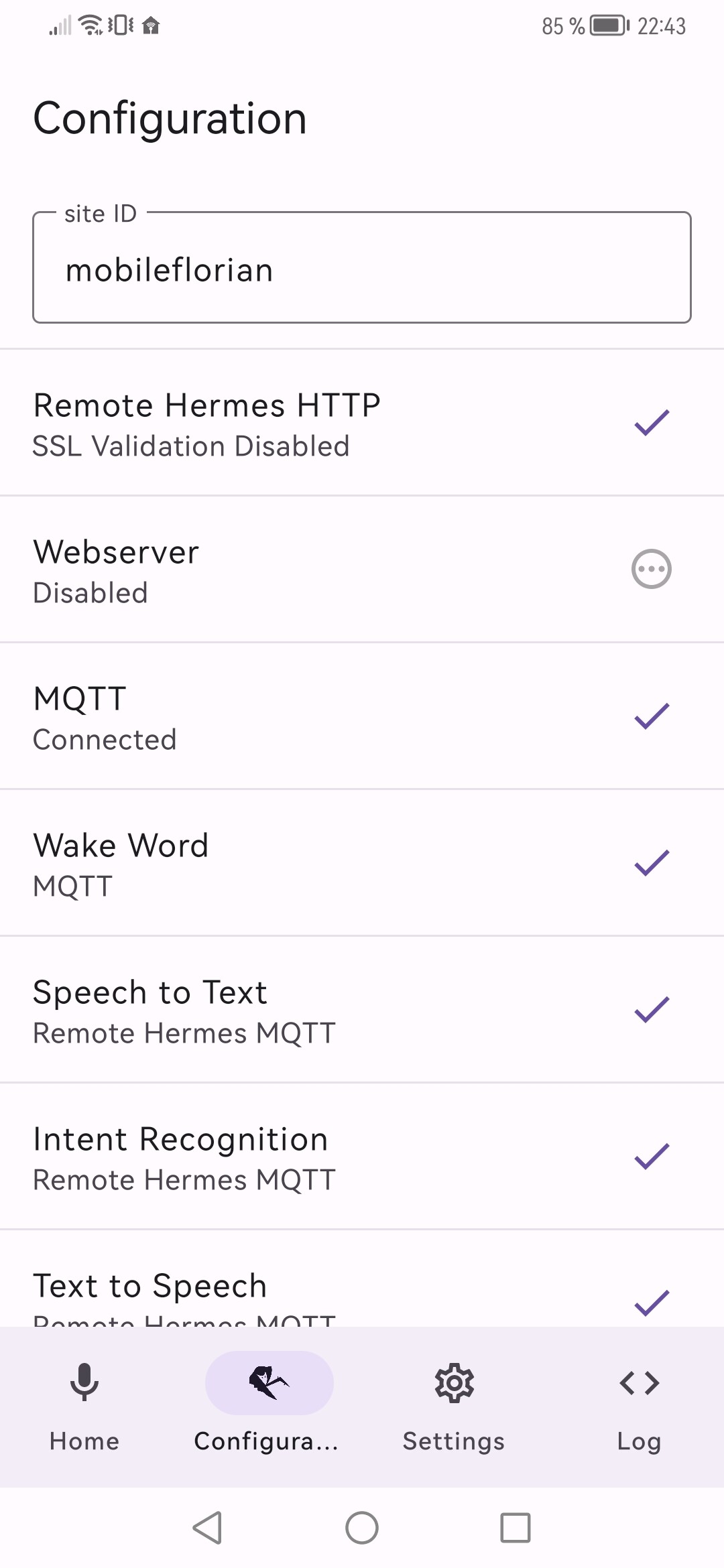
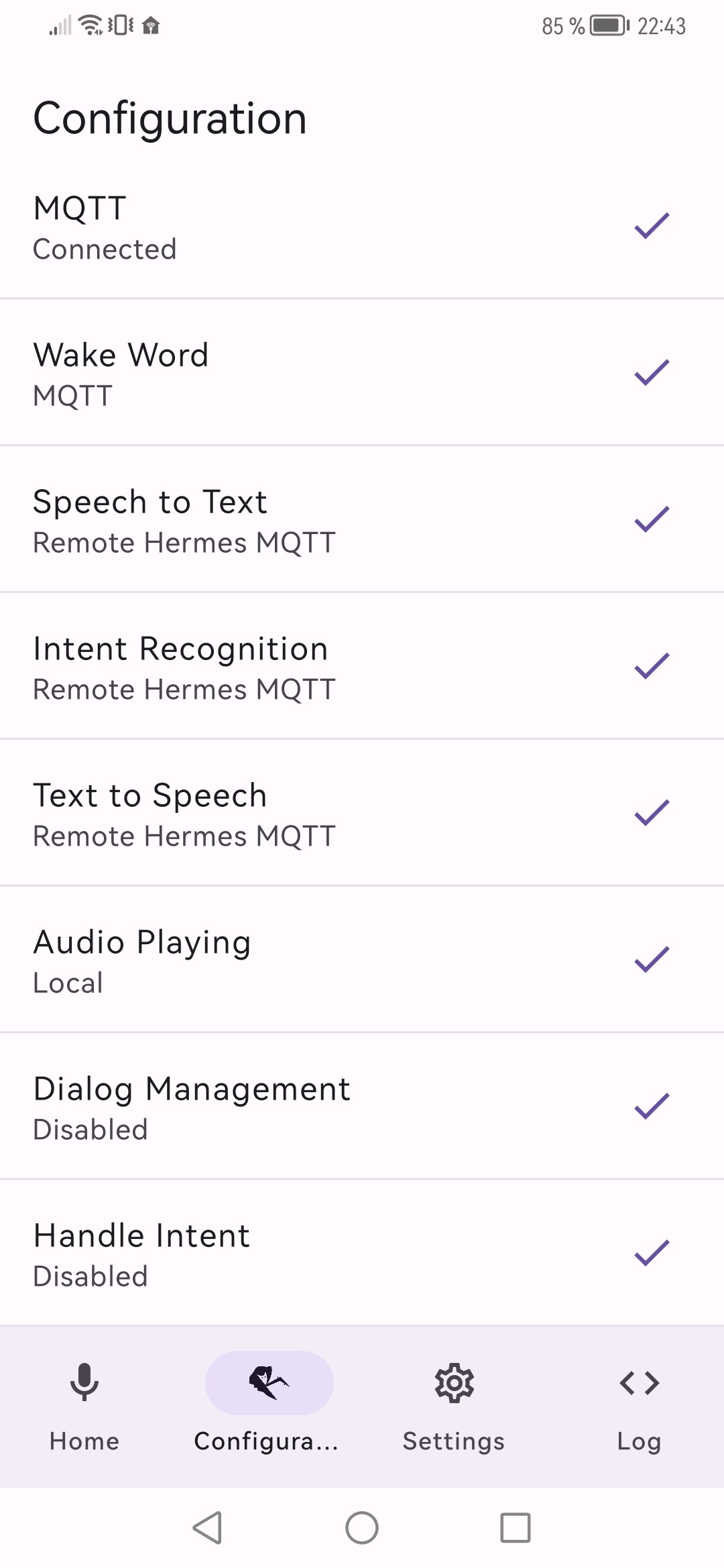
New Rhasspy Mobile App - Beta

Just released the Beta version of a new Rhasspy mobile app!
I know there is already the project from @razzo04 (Rhasspy mobile app) but it didn’t fit my needs and i was not able to update the project in it’s current status. Therefore i created a new project.

Github Project

Supported devices

  • Android mobile phone and tablet (minVersion Android 6.0)

  • iOS will maybe come later, some groundwork was already done

  • Smart Watches - no plans yet

  • TV (Android/iOS) - no plans yet

  • Desktop (windows/macos/linux) - no plans yet, docker container is simpler

Main Features:

  • Local Wake Word detection with Porcupine
    This was my most important feature, it also supports custom wake words and multiple wake words.

  • Background Service
    To run the app in the background continuously, this was one of the reasons why it was not possible to update the old app - i had very big issues implementing this together with Porcupine in Flutter

  • Indication when Wake Word is detected
    It’s possible to wake up the display, show an overlay animation and play a sound indication like rhasspy.

  • Microphone Overlay and Widget
    This was requested by other users, it allows to start recording with one click from everywhere and without wake word detection

  • Local Webserver
    Pretty much acts like the default rhasspy web server. Start listening for commands, turn on/off wake word, play sounds etc.

  • Intent and Broadcast to start listening
    This was also requested by other users. It allows to start recording via Broadcast. For example when using home assistant in kiosk mode you can send a Broadcast to the app without leaving the kiosk mode.

  • MQTT
    The Mqtt protocol is also mostly supported, just ignoring some params.

Whats next

I still have some ideas that can be found on the Project Board.
There is no iOS implementation yet, but because the App uses Kotlin Multiplatform Mobile the groundwork is already done but it will still require some work. Therefore i just want to start on it when there is enough need.

What do you think?

Please test my app, it’s currently open beta in the playstore or you can simply download it from the github releases.

12 Likes

Hello,

Thanks to this application without google etc.
I am unable to set up the application configuration with rhasspy. My master has no microphone and speaker. Here is the configuration of each:

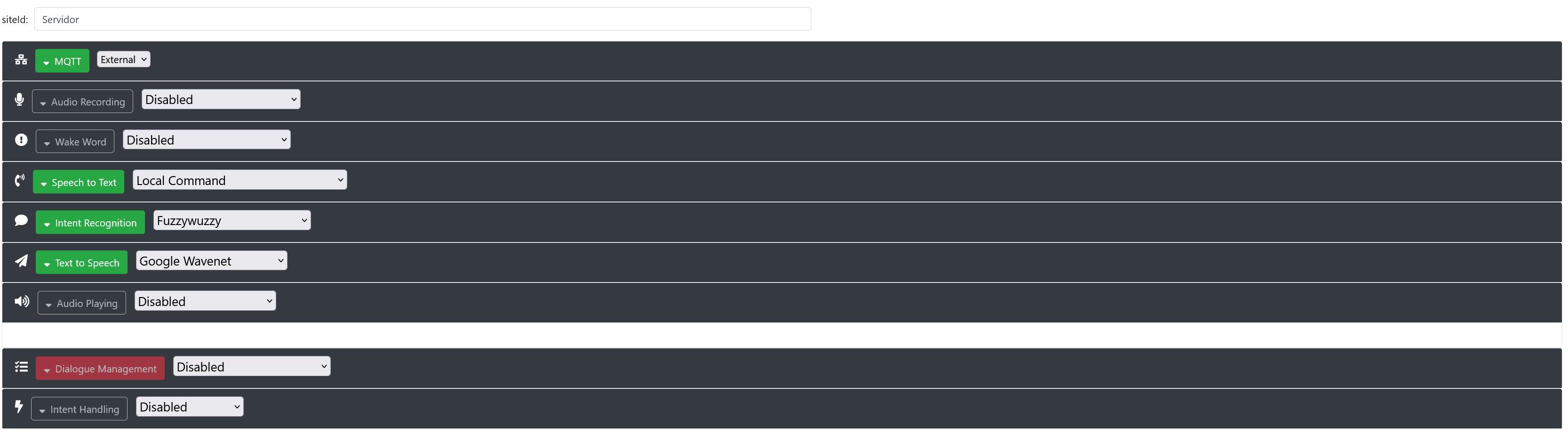
Master :

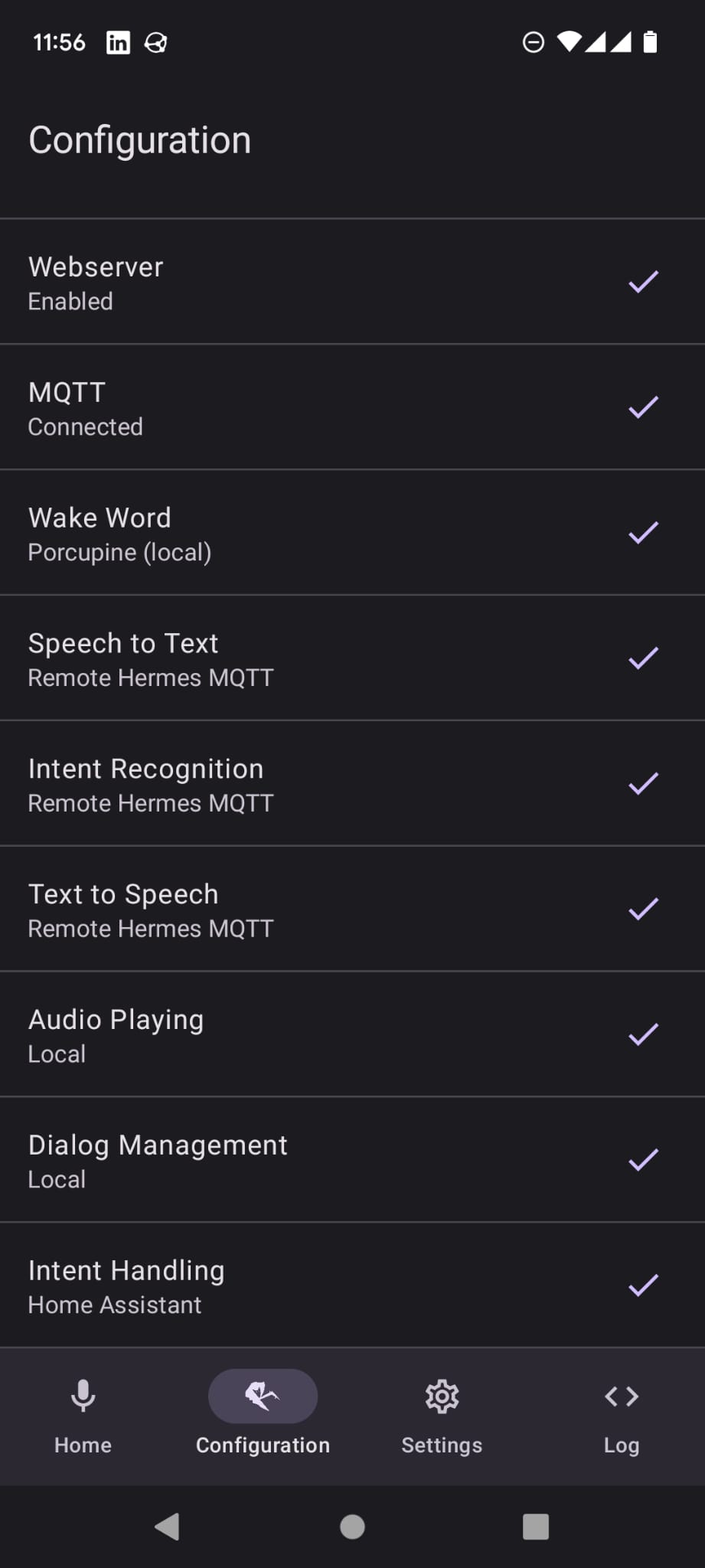
Satellite mobile :


Can you guide me?

Hi, i think you should change your “WakeWord” option in the app.

As in the Rhasspy documents (Wake Word - Rhasspy) when setting WakeWord to MQTT the app waits for a MQTT Topic hermes/hotword/<wakewordId>/detected so you should either use udp or porcupine.
In the current version udp is broken (will be fixed soon) so porcupine should be the way to go.

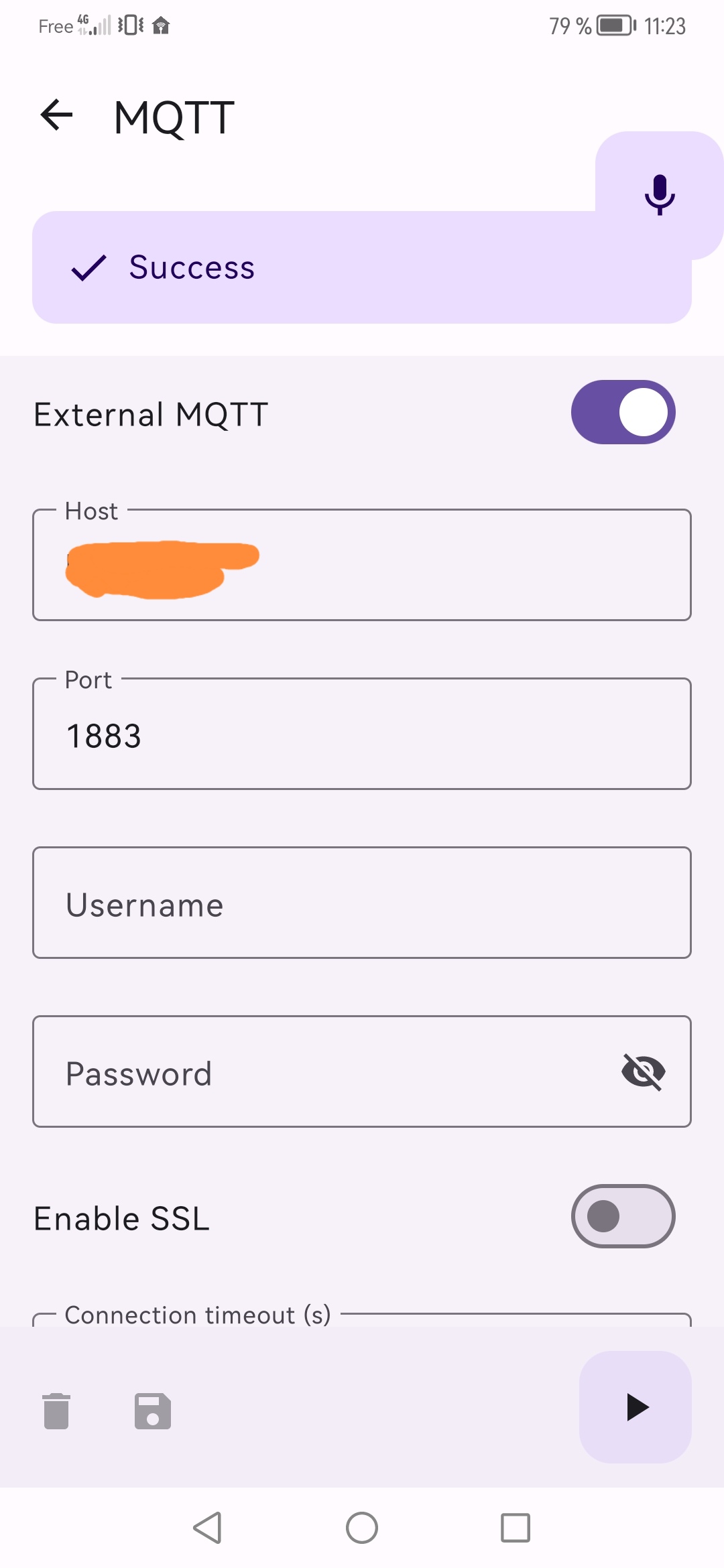
When you want to use MQTT for the other services (SpeechToText, TextToSpeech) etc you have to connect your Rhasspy base also with the same MQTT Broker. The reason is that the mobile app will send the audio data via MQTT Messages and the base has to receive them.

If you are going to split the processing over 2 or more devices, they ALL need to access the same MQTT broker. The Rhasspy “Internal MQTT” is a bit of a short-cut if all the modules will run on the same machine.

In other words, your “Master” needs to be set to External MQTT, pointing to the same MQTT broker as your mobile app.

1 Like

@donburch : Thank you for the precision on the configuration of the master, by going external it works perfectly.

@Nailik : Thanks for your feedback. I have the wakeword that works in MQTT on my side following the change recommended by donburch.

However, one thing persists. In host, I register my domain name which is attached to my personal ip. It works outside my home (the connection is established without worry) but not at home (I then have to put the local ip of the master). Is there a reason/trick?

Regarding the vocal feedback, I have none at all. Did I make the right configuration? The wish is that it be managed by the master and the feedback is done by voice on the phone.

About the domain issue i am not sure why this happens. Do you use a local dns? Then you could map your domain name to your local ip.

How do you trigger your vocal feedback?

No, I use my internet provider’s DNS.

I use Jeedom to my vocal feedback.

And how do you send the data to the app?

Your domain name is linked to point to your routers public IP address so that anyone on the internet can find your router. Your router’s job is (in part) to redirect any incoming IP packets received on the WAN (internet) port to the appropriate LAN private IP address - on your router the setting are probably under NAT > Port Redirection or similar

However when you are at home, you are connected to a designated private IP address range (probably 192.168.x.x) and the router’s job is to pass DNS requests to the WAN port, translating your LAN IP address to its WAN IP address as it goes. And when the reply comes back it tends to go pear-shaped :frowning:

Some routers have the ability to map a public IP address to a LAN IP address - though there is no standardisation as what it’s called.

I send the data with this configuration :

OK with :
out : mydomain.end
in : 192.168.1.X

It would be nice to add a config for the local and another for the external. If wifi connection activated, verification of the local, if ko, use the external method

I could add a “Backup” field for another Domain/Ip but i would recommend you to “fix” your local network to directly resolve your external address. An option would be pihole or check if your router supports that. Also i think you should not use MQTT from an external network without SSL enabled (how to setup ssl will be documented soon).

About playing sound through the app you could check “Audio Playing” there you can setup if the audio is played as sound/media or as notification. To play the audio data you can use:

  • Mqtt by publishing a Message on the topic hermes/audioServer/<siteId>/playBytes/<requestId>
  • Or you can play audio by enabling the server and calling /api/play-wav and adding the wav data as payload but this is probably not working when your outside your network

So you have to check if jeedom does post on the correct topic, for you that would be hermes/audioServer/mobileflorian/playBytes/<requestId>

1 Like

Adding this internal and external distinction would indeed be great. Would it also be possible to be able to put a different external and internal port? I use a Synology NAS to easily have a secure configuration so the port is different (locally I stay without ssl).
Regarding the ssl for the exterior, it is actually in the works, I will put it in place when I can use it with the local on the app.

I’ll take a look at the sound.

Hello,

I’m currently testing this app and not having any success at all. I have the same config as the person above. No mic/audio on the actual machine.

I have Mosquitto running and the app connects to it perfectly (all local). I have tried disabling the Handle Intent and also configure it for Home Assistant with the same result.

What happens is, when I go to the Home part, to get the microphone, it shows with a red outline. If I push the button, if plays the acknowledgment sound twice, as if I was pushing the button twice, and then just gets stuck, never stops or continues, I have to kill the app.
The wake word does the same, it wakes the phone, but two sounds, then just gets stuck.

Any ideas?

Hi,

the reason for a double indication sound could be that you have enabled “Indication - Sound” inside the App Settings and it is also played via your base.

For the “stuck” part. Make sure that you have added your mobile site id to your base configuration, below every service there is a “Satellite siteIds:” field. Also test different Dialog Management settings inside the app. You can also test each service separately by using the play button and the log may help you to find an issue in your setup.

Thanks, adding the satellite siteids and putting Dialog management to local seemed to have helped, and I could see stuff happen in the Rhasspy logs, but that didn’t last long and now it’s not working again and the logs show nothing happening and it’s back making two sounds. Frustrating to say the least.

One thing also, more often than not, the listening stops before I can even open my mouth to say anything. As in, it turns on and off a second after. When I had the logs still working, I could even see that it had passed a command even though i didn’t say anything.

Edit: this is what i see in the logs now when pushing the mic button
[DEBUG:2023-02-12 15:30:22,047] rhasspyserver_hermes: Sent 277 char(s) to websocket

That’s all, whereas before i could see more happen

Could you please share your settings? You can export them in the setting without sensitive data, also the log file would help.

<?xml version='1.0' encoding='utf-8' standalone='yes' ?>
<map>
    <int name="WakeWordPorcupineKeywordDefaultSelectedOptions.15.option" value="15" />
    <int name="WakeWordPorcupineKeywordDefaultSelectedOptions.16.option" value="16" />
    <int name="WakeWordPorcupineKeywordDefaultSelectedOptions.17.option" value="17" />
    <boolean name="WakeWordPorcupineKeywordDefaultSelectedOptions.17.isEnabled" value="false" />
    <int name="WakeWordPorcupineKeywordDefaultSelectedOptions.13.option" value="13" />
    <int name="WakeWordPorcupineKeywordDefaultSelectedOptions.14.option" value="14" />
    <int name="WakeWordPorcupineKeywordDefaultSelectedOptions.19.option" value="19" />
    <int name="WakeWordPorcupineKeywordDefaultSelectedOptions.11.option" value="11" />
    <int name="WakeWordPorcupineKeywordDefaultSelectedOptions.12.option" value="12" />
    <int name="WakeWordPorcupineKeywordDefaultSelectedOptions.18.option" value="18" />
    <float name="WakeWordPorcupineKeywordDefaultSelectedOptions.15.sensitivity" value="0.5" />
    <float name="WakeWordPorcupineKeywordDefaultSelectedOptions.14.sensitivity" value="0.5" />
    <string name="TextToSpeechOption">RemoteMQTT</string>
    <boolean name="WakeWordPorcupineKeywordDefaultSelectedOptions.10.isEnabled" value="false" />
    <float name="WakeWordPorcupineKeywordDefaultSelectedOptions.13.sensitivity" value="0.5" />
    <boolean name="WakeWordPorcupineKeywordDefaultSelectedOptions.39.isEnabled" value="false" />
    <int name="WakeWordPorcupineKeywordDefaultSelectedOptions.10.option" value="10" />
    <boolean name="WakeWordPorcupineKeywordDefaultSelectedOptions.24.isEnabled" value="false" />
    <float name="WakeWordPorcupineKeywordDefaultSelectedOptions.8.sensitivity" value="0.5" />
    <float name="WakeWordPorcupineKeywordDefaultSelectedOptions.12.sensitivity" value="0.5" />
    <float name="WakeWordPorcupineKeywordDefaultSelectedOptions.7.sensitivity" value="0.5" />
    <int name="WakeWordUDPOutputPort" value="***" />
    <boolean name="WakeWordPorcupineKeywordDefaultSelectedOptions.32.isEnabled" value="false" />
    <float name="WakeWordPorcupineKeywordDefaultSelectedOptions.5.sensitivity" value="0.5" />
    <float name="WakeWordPorcupineKeywordDefaultSelectedOptions.11.sensitivity" value="0.5" />
    <float name="WakeWordPorcupineKeywordDefaultSelectedOptions.6.sensitivity" value="0.5" />
    <float name="WakeWordPorcupineKeywordDefaultSelectedOptions.10.sensitivity" value="0.5" />
    <boolean name="WakeWordPorcupineKeywordDefaultSelectedOptions.40.isEnabled" value="false" />
    <int name="WakeWordPorcupineKeywordDefaultSelectedOptions.4.option" value="4" />
    <boolean name="WakeWordPorcupineKeywordDefaultSelectedOptions.16.isEnabled" value="false" />
    <boolean name="WakeWordPorcupineKeywordDefaultSelectedOptions.41.isEnabled" value="false" />
    <int name="WakeWordPorcupineKeywordDefaultSelectedOptions.8.option" value="8" />
    <boolean name="WakeWordPorcupineKeywordDefaultSelectedOptions.8.isEnabled" value="false" />
    <float name="WakeWordPorcupineKeywordDefaultSelectedOptions.9.sensitivity" value="0.5" />
    <boolean name="WakeWordPorcupineKeywordDefaultSelectedOptions.1.isEnabled" value="false" />
    <int name="WakeWordPorcupineKeywordDefaultSelectedOptions.2.option" value="2" />
    <int name="WakeWordPorcupineKeywordDefaultSelectedOptions.6.option" value="6" />
    <int name="WakeWordPorcupineKeywordDefaultSelectedOptions.0.option" value="0" />
    <boolean name="CustomTextToSpeechOptionHttpEndpoint" value="false" />
    <boolean name="WakeWordPorcupineKeywordDefaultSelectedOptions.25.isEnabled" value="false" />
    <boolean name="WakeWordPorcupineKeywordDefaultSelectedOptions.31.isEnabled" value="false" />
    <float name="WakeWordPorcupineKeywordDefaultSelectedOptions.16.sensitivity" value="0.5" />
    <float name="WakeWordPorcupineKeywordDefaultSelectedOptions.27.sensitivity" value="0.5" />
    <float name="WakeWordPorcupineKeywordDefaultSelectedOptions.17.sensitivity" value="0.5" />
    <boolean name="CustomSpeechToTextEndpoint" value="false" />
    <float name="WakeWordPorcupineKeywordDefaultSelectedOptions.28.sensitivity" value="0.5" />
    <float name="WakeWordPorcupineKeywordDefaultSelectedOptions.19.sensitivity" value="0.5" />
    <boolean name="WakeWordPorcupineKeywordDefaultSelectedOptions.38.isEnabled" value="false" />
    <float name="WakeWordPorcupineKeywordDefaultSelectedOptions.18.sensitivity" value="0.5" />
    <string name="TextToSpeechHttpEndpoint"></string>
    <float name="WakeWordPorcupineKeywordDefaultSelectedOptions.29.sensitivity" value="0.5" />
    <long name="DialogManagementLocalIntentRecognitionTimeout" value="10000" />
    <string name="MQTTHost">***</string>
    <int name="WakeWordPorcupineKeywordDefaultSelectedOptions.41.option" value="41" />
    <int name="WakeWordPorcupineKeywordDefaultSelectedOptions.42.option" value="42" />
    <boolean name="WakeWordPorcupineKeywordDefaultSelectedOptions.34.isEnabled" value="false" />
    <int name="WakeWordPorcupineKeywordDefaultSelectedOptions.20.option" value="20" />
    <boolean name="WakeWordPorcupineKeywordDefaultSelectedOptions.42.isEnabled" value="false" />
    <float name="WakeWordPorcupineKeywordDefaultSelectedOptions.26.sensitivity" value="0.5" />
    <int name="WakeWordPorcupineKeywordDefaultSelectedOptions.23.option" value="23" />
    <int name="WakeWordPorcupineKeywordDefaultSelectedOptions.24.option" value="24" />
    <float name="WakeWordPorcupineKeywordDefaultSelectedOptions.25.sensitivity" value="0.5" />
    <int name="WakeWordPorcupineKeywordDefaultSelectedOptions.27.option" value="27" />
    <int name="WakeWordPorcupineKeywordDefaultSelectedOptions.28.option" value="28" />
    <float name="WakeWordPorcupineKeywordDefaultSelectedOptions.24.sensitivity" value="0.5" />
    <string name="IntentRecognitionHttpEndpoint"></string>
    <boolean name="WakeWordPorcupineKeywordDefaultSelectedOptions.11.isEnabled" value="false" />
    <long name="MQTTRetryInterval" value="10" />
    <boolean name="WakeWordPorcupineKeywordDefaultSelectedOptions.3.isEnabled" value="false" />
    <boolean name="WakeWordPorcupineKeywordDefaultSelectedOptions.0.isEnabled" value="false" />
    <float name="WakeWordPorcupineKeywordDefaultSelectedOptions.23.sensitivity" value="0.5" />
    <boolean name="WakeWordPorcupineKeywordDefaultSelectedOptions.37.isEnabled" value="false" />
    <float name="WakeWordPorcupineKeywordDefaultSelectedOptions.20.sensitivity" value="0.5" />
    <float name="WakeWordPorcupineKeywordDefaultSelectedOptions.41.sensitivity" value="0.5" />
    <float name="WakeWordPorcupineKeywordDefaultSelectedOptions.42.sensitivity" value="0.5" />
    <float name="WakeWordPorcupineKeywordDefaultSelectedOptions.22.sensitivity" value="0.5" />
    <float name="WakeWordPorcupineKeywordDefaultSelectedOptions.43.sensitivity" value="0.5" />
    <float name="WakeWordPorcupineKeywordDefaultSelectedOptions.21.sensitivity" value="0.5" />
    <int name="MQTTConnectionTimeout" value="5" />
    <float name="WakeWordPorcupineKeywordDefaultSelectedOptions.3.sensitivity" value="0.5" />
    <boolean name="WakeWordPorcupineKeywordDefaultSelectedOptions.6.isEnabled" value="false" />
    <string name="DialogManagementOption">Local</string>
    <string name="MQTTPassword">***</string>
    <float name="WakeWordPorcupineKeywordDefaultSelectedOptions.0.sensitivity" value="0.5" />
    <float name="WakeWordPorcupineKeywordDefaultSelectedOptions.4.sensitivity" value="0.5" />
    <int name="WakeWordPorcupineKeywordDefaultSelectedOptions.7.option" value="7" />
    <float name="WakeWordPorcupineKeywordDefaultSelectedOptions.40.sensitivity" value="0.5" />
    <float name="WakeWordPorcupineKeywordDefaultSelectedOptions.1.sensitivity" value="0.5" />
    <int name="WakeWordPorcupineKeywordDefaultSelectedOptions.3.option" value="3" />
    <float name="WakeWordPorcupineKeywordDefaultSelectedOptions.2.sensitivity" value="0.5" />
    <int name="WakeWordPorcupineKeywordDefaultSelectedOptions.39.option" value="39" />
    <string name="MQTTUserName">***</string>
    <int name="MQTTPort" value="***" />
    <boolean name="WakeWordPorcupineKeywordDefaultSelectedOptions.27.isEnabled" value="false" />

    <boolean name="WakeWordPorcupineKeywordDefaultSelectedOptions.14.isEnabled" value="false" />
    <boolean name="WakeWordPorcupineKeywordDefaultSelectedOptions.9.isEnabled" value="false" />
    <int name="WakeWordPorcupineKeywordDefaultSelectedOptions.32.option" value="32" />
    <boolean name="WakeWordPorcupineKeywordDefaultSelectedOptions.21.isEnabled" value="false" />
    <int name="WakeWordPorcupineKeywordDefaultSelectedOptions.31.option" value="31" />
    <int name="WakeWordPorcupineKeywordDefaultSelectedOptions.33.option" value="33" />
    <boolean name="WakeWordPorcupineKeywordDefaultSelectedOptions.5.isEnabled" value="false" />
    <int name="WakeWordPorcupineKeywordDefaultSelectedOptions.34.option" value="34" />
    <string name="WakeWordOption">Porcupine</string>
    <int name="WakeWordPorcupineKeywordDefaultSelectedOptions.36.option" value="36" />
    <int name="WakeWordPorcupineKeywordDefaultSelectedOptions.35.option" value="35" />
    <boolean name="WakeWordPorcupineKeywordDefaultSelectedOptions.36.isEnabled" value="false" />
    <int name="WakeWordPorcupineKeywordDefaultSelectedOptions.30.option" value="30" />
    <float name="WakeWordPorcupineKeywordDefaultSelectedOptions.37.sensitivity" value="0.5" />
    <boolean name="WakeWordPorcupineKeywordDefaultSelectedOptions.28.isEnabled" value="false" />
    <float name="WakeWordPorcupineKeywordDefaultSelectedOptions.36.sensitivity" value="0.5" />
    <string name="SpeechToTextHttpEndpoint"></string>
    <boolean name="WakeWordPorcupineKeywordDefaultSelectedOptions.43.isEnabled" value="false" />
    <string name="WakeWordPorcupineAccessToken">***</string>
    <float name="WakeWordPorcupineKeywordDefaultSelectedOptions.33.sensitivity" value="0.5" />
    <float name="WakeWordPorcupineKeywordDefaultSelectedOptions.35.sensitivity" value="0.5" />
    <float name="WakeWordPorcupineKeywordDefaultSelectedOptions.34.sensitivity" value="0.5" />
    <boolean name="ShowLog" value="true" />
    <long name="DialogManagementLocalRecordingTimeout" value="10000" />
    <float name="WakeWordPorcupineKeywordDefaultSelectedOptions.31.sensitivity" value="0.5" />
    <boolean name="HotWordEnabled" value="true" />
    <boolean name="WakeWordPorcupineKeywordDefaultSelectedOptions.13.isEnabled" value="false" />
    <float name="WakeWordPorcupineKeywordDefaultSelectedOptions.32.sensitivity" value="0.5" />
    <boolean name="WakeWordPorcupineKeywordDefaultSelectedOptions.29.isEnabled" value="false" />
    <boolean name="WakeWordPorcupineKeywordDefaultSelectedOptions.35.isEnabled" value="false" />
    <boolean name="CustomIntentRecognitionHttpEndpoint" value="false" />
    <string name="SpeechToTextOption">RemoteMQTT</string>
    <boolean name="WakeWordPorcupineKeywordDefaultSelectedOptions.22.isEnabled" value="false" />
    <boolean name="Crashlytics" value="false" />
    <string name="IntentRecognitionOption">RemoteMQTT</string>
    <boolean name="WakeWordPorcupineKeywordDefaultSelectedOptions.12.isEnabled" value="false" />
    <int name="WakeWordPorcupineKeywordDefaultSelectedOptions.38.option" value="38" />
    <float name="WakeWordPorcupineKeywordDefaultSelectedOptions.38.sensitivity" value="0.5" />
    <boolean name="WakeWordPorcupineKeywordDefaultSelectedOptions.4.isEnabled" value="true" />
    <float name="WakeWordPorcupineKeywordDefaultSelectedOptions.39.sensitivity" value="0.5" />
    <boolean name="WakeWordPorcupineKeywordDefaultSelectedOptions.19.isEnabled" value="false" />
    <int name="WakeWordPorcupineKeywordDefaultSelectedOptions.40.option" value="40" />
    <boolean name="WakeWordPorcupineKeywordDefaultSelectedOptions.15.isEnabled" value="false" />
    <int name="WakeWordPorcupineKeywordDefaultSelectedOptions.43.option" value="43" />
    <boolean name="WakeWordPorcupineKeywordDefaultSelectedOptions.23.isEnabled" value="false" />
    <int name="WakeWordPorcupineKeywordDefaultSelectedOptions.22.option" value="22" />
    <int name="WakeWordPorcupineKeywordDefaultSelectedOptions.29.option" value="29" />
    <int name="WakeWordPorcupineKeywordDefaultSelectedOptions.21.option" value="21" />
    <boolean name="WakeWordPorcupineKeywordDefaultSelectedOptions.7.isEnabled" value="false" />
    <int name="WakeWordPorcupineKeywordDefaultSelectedOptions.25.option" value="25" />
    <int name="WakeWordPorcupineKeywordDefaultSelectedOptions.26.option" value="26" />
    <boolean name="WakeWordPorcupineKeywordDefaultSelectedOptions.30.isEnabled" value="false" />
    <boolean name="MQTTEnabled" value="true" />
    <boolean name="WakeWordPorcupineKeywordDefaultSelectedOptions.18.isEnabled" value="false" />
    <int name="WakeWordPorcupineKeywordCustomOptions.size" value="0" />
    <boolean name="WakeWordPorcupineKeywordDefaultSelectedOptions.26.isEnabled" value="false" />
    <int name="WakeWordPorcupineKeywordDefaultSelectedOptions.5.option" value="5" />
    <float name="WakeWordPorcupineKeywordDefaultSelectedOptions.30.sensitivity" value="0.5" />
    <boolean name="SpeechToTextMqttSilenceDetection" value="true" />
    <int name="WakeWordPorcupineKeywordDefaultSelectedOptions.1.option" value="1" />
    <int name="WakeWordPorcupineKeywordDefaultSelectedOptions.9.option" value="9" />
    <string name="WakeWordPorcupineLanguage">EN</string>
    <string name="MQTTKeyStoreFile">***</string>
    <string name="WakeWordUDPOutputHost">***</string>
    <boolean name="WakeWordPorcupineKeywordDefaultSelectedOptions.2.isEnabled" value="false" />
    <int name="WakeWordPorcupineKeywordDefaultSelectedOptions.37.option" value="37" />
    <int name="MQTTKeepAliveInterval" value="30" />
    <long name="DialogManagementLocalAsrTimeout" value="10000" />
    <boolean name="WakeWordPorcupineKeywordDefaultSelectedOptions.33.isEnabled" value="false" />
    <int name="WakeWordPorcupineKeywordDefaultSelectedOptions.size" value="44" />
    <string name="LanguageOption">English</string>
    <boolean name="WakeWordPorcupineKeywordDefaultSelectedOptions.20.isEnabled" value="false" />
</map>

Those are my app settings. Also I went check the Rhasspy docker logs and here is what it shows when pushing the button (still hearing two sounds and it seems to stop listening almost right away)

[DEBUG:2023-02-12 15:48:28,536] rhasspydialogue_hermes: <- HotwordDetected(model_id='manual', model_version='', model_type='personal', current_sensitivity=1.0, site_id='mobile', session_id=None, send_audio_captured=None, lang=None, custom_entities=None)

[DEBUG:2023-02-12 15:48:28,537] rhasspydialogue_hermes: Playing sound /usr/lib/rhasspy/etc/wav/beep_hi.wav

[DEBUG:2023-02-12 15:48:28,538] rhasspydialogue_hermes: -> HotwordToggleOff(site_id='mobile', reason=<HotwordToggleReason.PLAY_AUDIO: 'playAudio'>)

[DEBUG:2023-02-12 15:48:28,538] rhasspydialogue_hermes: Publishing 43 bytes(s) to hermes/hotword/toggleOff

[DEBUG:2023-02-12 15:48:28,539] rhasspydialogue_hermes: -> AsrToggleOff(site_id='mobile', reason=<AsrToggleReason.PLAY_AUDIO: 'playAudio'>)

[DEBUG:2023-02-12 15:48:28,539] rhasspydialogue_hermes: Publishing 43 bytes(s) to hermes/asr/toggleOff

[DEBUG:2023-02-12 15:48:28,540] rhasspydialogue_hermes: -> AudioPlayBytes(83948 byte(s)) to hermes/audioServer/mobile/playBytes/0e675b1a-a513-4d50-befd-aa2ab72e6dab

[DEBUG:2023-02-12 15:48:28,540] rhasspydialogue_hermes: Waiting for playFinished (id=0e675b1a-a513-4d50-befd-aa2ab72e6dab, timeout=1.2012925170068027)

[DEBUG:2023-02-12 15:48:28,540] rhasspywake_porcupine_hermes: <- HotwordToggleOff(site_id='mobile', reason=<HotwordToggleReason.PLAY_AUDIO: 'playAudio'>)

[DEBUG:2023-02-12 15:48:28,541] rhasspywake_porcupine_hermes: Disabled

[ERROR:2023-02-12 15:48:29,323] rhasspydialogue_hermes: parse_mqtt_message (topic=hermes/audioServer/mobile/playFinished)

Traceback (most recent call last):

  File "/usr/lib/rhasspy/rhasspy-hermes/rhasspyhermes/client.py", line 303, in parse_mqtt_message

    json_payload = json.loads(payload)

  File "/usr/lib/python3.7/json/__init__.py", line 348, in loads

    return _default_decoder.decode(s)

  File "/usr/lib/python3.7/json/decoder.py", line 337, in decode

    obj, end = self.raw_decode(s, idx=_w(s, 0).end())

  File "/usr/lib/python3.7/json/decoder.py", line 355, in raw_decode

    raise JSONDecodeError("Expecting value", s, err.value) from None

json.decoder.JSONDecodeError: Expecting value: line 1 column 1 (char 0)

[WARNING:2023-02-12 15:48:29,743] rhasspydialogue_hermes: Did not receive sayFinished before timeout

[DEBUG:2023-02-12 15:48:29,744] rhasspydialogue_hermes: -> HotwordToggleOn(site_id='mobile', reason=<HotwordToggleReason.PLAY_AUDIO: 'playAudio'>)

[DEBUG:2023-02-12 15:48:29,744] rhasspydialogue_hermes: Publishing 43 bytes(s) to hermes/hotword/toggleOn

[DEBUG:2023-02-12 15:48:29,745] rhasspydialogue_hermes: -> AsrToggleOn(site_id='mobile', reason=<AsrToggleReason.PLAY_AUDIO: 'playAudio'>)

[DEBUG:2023-02-12 15:48:29,745] rhasspydialogue_hermes: Publishing 43 bytes(s) to hermes/asr/toggleOn

[DEBUG:2023-02-12 15:48:29,745] rhasspydialogue_hermes: Starting new session (id=mobile-manual-9f74b3d9-3ae0-4103-a045-9164cae842b3)

[DEBUG:2023-02-12 15:48:29,746] rhasspydialogue_hermes: -> DialogueSessionStarted(session_id='mobile-manual-9f74b3d9-3ae0-4103-a045-9164cae842b3', site_id='mobile', custom_data='manual', lang=None)

[DEBUG:2023-02-12 15:48:29,747] rhasspydialogue_hermes: Publishing 125 bytes(s) to hermes/dialogueManager/sessionStarted

[DEBUG:2023-02-12 15:48:29,748] rhasspydialogue_hermes: -> HotwordToggleOff(site_id='mobile', reason=<HotwordToggleReason.DIALOGUE_SESSION: 'dialogueSession'>)

[DEBUG:2023-02-12 15:48:29,748] rhasspydialogue_hermes: Publishing 49 bytes(s) to hermes/hotword/toggleOff

[DEBUG:2023-02-12 15:48:29,748] rhasspydialogue_hermes: Listening for session mobile-manual-9f74b3d9-3ae0-4103-a045-9164cae842b3

[DEBUG:2023-02-12 15:48:29,749] rhasspydialogue_hermes: -> AsrStartListening(site_id='mobile', session_id='mobile-manual-9f74b3d9-3ae0-4103-a045-9164cae842b3', lang=None, stop_on_silence=True, send_audio_captured=True, wakeword_id='manual', intent_filter=None)

[DEBUG:2023-02-12 15:48:29,749] rhasspydialogue_hermes: Publishing 197 bytes(s) to hermes/asr/startListening

[DEBUG:2023-02-12 15:48:29,752] rhasspywake_porcupine_hermes: <- HotwordToggleOn(site_id='mobile', reason=<HotwordToggleReason.PLAY_AUDIO: 'playAudio'>)

[DEBUG:2023-02-12 15:48:29,753] rhasspywake_porcupine_hermes: Enabled

[DEBUG:2023-02-12 15:48:29,796] rhasspywake_porcupine_hermes: <- HotwordToggleOff(site_id='mobile', reason=<HotwordToggleReason.DIALOGUE_SESSION: 'dialogueSession'>)

[DEBUG:2023-02-12 15:48:29,796] rhasspywake_porcupine_hermes: Disabled

Sorry, forgot the app’s logs

[DEBUG:2023-02-12 15:48:28,536] rhasspydialogue_hermes: <- HotwordDetected(model_id='manual', model_version='', model_type='personal', current_sensitivity=1.0, site_id='mobile', session_id=None, send_audio_captured=None, lang=None, custom_entities=None)

[DEBUG:2023-02-12 15:48:28,537] rhasspydialogue_hermes: Playing sound /usr/lib/rhasspy/etc/wav/beep_hi.wav

[DEBUG:2023-02-12 15:48:28,538] rhasspydialogue_hermes: -> HotwordToggleOff(site_id='mobile', reason=<HotwordToggleReason.PLAY_AUDIO: 'playAudio'>)

[DEBUG:2023-02-12 15:48:28,538] rhasspydialogue_hermes: Publishing 43 bytes(s) to hermes/hotword/toggleOff

[DEBUG:2023-02-12 15:48:28,539] rhasspydialogue_hermes: -> AsrToggleOff(site_id='mobile', reason=<AsrToggleReason.PLAY_AUDIO: 'playAudio'>)

[DEBUG:2023-02-12 15:48:28,539] rhasspydialogue_hermes: Publishing 43 bytes(s) to hermes/asr/toggleOff

[DEBUG:2023-02-12 15:48:28,540] rhasspydialogue_hermes: -> AudioPlayBytes(83948 byte(s)) to hermes/audioServer/mobile/playBytes/0e675b1a-a513-4d50-befd-aa2ab72e6dab

[DEBUG:2023-02-12 15:48:28,540] rhasspydialogue_hermes: Waiting for playFinished (id=0e675b1a-a513-4d50-befd-aa2ab72e6dab, timeout=1.2012925170068027)

[DEBUG:2023-02-12 15:48:28,540] rhasspywake_porcupine_hermes: <- HotwordToggleOff(site_id='mobile', reason=<HotwordToggleReason.PLAY_AUDIO: 'playAudio'>)

[DEBUG:2023-02-12 15:48:28,541] rhasspywake_porcupine_hermes: Disabled

[ERROR:2023-02-12 15:48:29,323] rhasspydialogue_hermes: parse_mqtt_message (topic=hermes/audioServer/mobile/playFinished)

Traceback (most recent call last):

 File "/usr/lib/rhasspy/rhasspy-hermes/rhasspyhermes/client.py", line 303, in parse_mqtt_message

   json_payload = json.loads(payload)

 File "/usr/lib/python3.7/json/__init__.py", line 348, in loads

   return _default_decoder.decode(s)

 File "/usr/lib/python3.7/json/decoder.py", line 337, in decode

   obj, end = self.raw_decode(s, idx=_w(s, 0).end())

 File "/usr/lib/python3.7/json/decoder.py", line 355, in raw_decode

   raise JSONDecodeError("Expecting value", s, err.value) from None

json.decoder.JSONDecodeError: Expecting value: line 1 column 1 (char 0)

[WARNING:2023-02-12 15:48:29,743] rhasspydialogue_hermes: Did not receive sayFinished before timeout

[DEBUG:2023-02-12 15:48:29,744] rhasspydialogue_hermes: -> HotwordToggleOn(site_id='mobile', reason=<HotwordToggleReason.PLAY_AUDIO: 'playAudio'>)

[DEBUG:2023-02-12 15:48:29,744] rhasspydialogue_hermes: Publishing 43 bytes(s) to hermes/hotword/toggleOn

[DEBUG:2023-02-12 15:48:29,745] rhasspydialogue_hermes: -> AsrToggleOn(site_id='mobile', reason=<AsrToggleReason.PLAY_AUDIO: 'playAudio'>)

[DEBUG:2023-02-12 15:48:29,745] rhasspydialogue_hermes: Publishing 43 bytes(s) to hermes/asr/toggleOn

[DEBUG:2023-02-12 15:48:29,745] rhasspydialogue_hermes: Starting new session (id=mobile-manual-9f74b3d9-3ae0-4103-a045-9164cae842b3)

[DEBUG:2023-02-12 15:48:29,746] rhasspydialogue_hermes: -> DialogueSessionStarted(session_id='mobile-manual-9f74b3d9-3ae0-4103-a045-9164cae842b3', site_id='mobile', custom_data='manual', lang=None)

[DEBUG:2023-02-12 15:48:29,747] rhasspydialogue_hermes: Publishing 125 bytes(s) to hermes/dialogueManager/sessionStarted

[DEBUG:2023-02-12 15:48:29,748] rhasspydialogue_hermes: -> HotwordToggleOff(site_id='mobile', reason=<HotwordToggleReason.DIALOGUE_SESSION: 'dialogueSession'>)

[DEBUG:2023-02-12 15:48:29,748] rhasspydialogue_hermes: Publishing 49 bytes(s) to hermes/hotword/toggleOff

[DEBUG:2023-02-12 15:48:29,748] rhasspydialogue_hermes: Listening for session mobile-manual-9f74b3d9-3ae0-4103-a045-9164cae842b3

[DEBUG:2023-02-12 15:48:29,749] rhasspydialogue_hermes: -> AsrStartListening(site_id='mobile', session_id='mobile-manual-9f74b3d9-3ae0-4103-a045-9164cae842b3', lang=None, stop_on_silence=True, send_audio_captured=True, wakeword_id='manual', intent_filter=None)

[DEBUG:2023-02-12 15:48:29,749] rhasspydialogue_hermes: Publishing 197 bytes(s) to hermes/asr/startListening

[DEBUG:2023-02-12 15:48:29,752] rhasspywake_porcupine_hermes: <- HotwordToggleOn(site_id='mobile', reason=<HotwordToggleReason.PLAY_AUDIO: 'playAudio'>)

[DEBUG:2023-02-12 15:48:29,753] rhasspywake_porcupine_hermes: Enabled

[DEBUG:2023-02-12 15:48:29,796] rhasspywake_porcupine_hermes: <- HotwordToggleOff(site_id='mobile', reason=<HotwordToggleReason.DIALOGUE_SESSION: 'dialogueSession'>)

[DEBUG:2023-02-12 15:48:29,796] rhasspywake_porcupine_hermes: Disabled

That’s not the apps log and please also add the app version.

Oops, I copied the same thing twice… I actually got it mostly working, the only thing left is the short listening time. If I hesitate a split second, it stops listening, is there any way to extend that?


,{"time":"2023-02-13T14:52:46.711","severity":"Debug","tag":"DialogManagerService","message":"onAction WakeWordDetected from Local wakeWord: COMPUTER","throwable":null}
,{"time":"2023-02-13T14:52:46.714","severity":"Debug","tag":"IndicationService","message":"onWakeWordDetected","throwable":null}
,{"time":"2023-02-13T14:52:46.711","severity":"Debug","tag":"DialogManagerService","message":"WakeWordDetected from Local wakeWord: COMPUTER","throwable":null}
,{"time":"2023-02-13T14:52:46.716","severity":"Debug","tag":"DialogManagerService","message":"onAction StartSession from Local","throwable":null}
,{"time":"2023-02-13T14:52:46.717","severity":"Debug","tag":"DialogManagerService","message":"StartSession from Local","throwable":null}
,{"time":"2023-02-13T14:52:46.717","severity":"Debug","tag":"WakeWordService","message":"stopDetection","throwable":null}
,{"time":"2023-02-13T14:52:46.707","severity":"Debug","tag":"NativeLocalWakeWordService","message":"invoke - keyword detected","throwable":null}
,{"time":"2023-02-13T14:52:46.708","severity":"Debug","tag":"WakeWordService","message":"onKeywordDetected COMPUTER","throwable":null}
,{"time":"2023-02-13T14:52:46.734","severity":"Debug","tag":"MqttService","message":"onMessageReceived id 0 hermes/hotword/COMPUTER/detected","throwable":null}
,{"time":"2023-02-13T14:52:46.735","severity":"Debug","tag":"MqttService","message":"regexTopic hermes/hotword/COMPUTER/detected","throwable":null}
,{"time":"2023-02-13T14:52:46.735","severity":"Debug","tag":"DialogManagerService","message":"onAction WakeWordDetected from Mqtt wakeWord: COMPUTER","throwable":null}
,{"time":"2023-02-13T14:52:46.735","severity":"Debug","tag":"DialogManagerService","message":"WakeWordDetected from Mqtt wakeWord: COMPUTER","throwable":null}
,{"time":"2023-02-13T14:52:46.735","severity":"Debug","tag":"IndicationService","message":"onWakeWordDetected","throwable":null}
,{"time":"2023-02-13T14:52:46.736","severity":"Debug","tag":"DialogManagerService","message":"onAction StartSession from Local","throwable":null}
,{"time":"2023-02-13T14:52:46.736","severity":"Debug","tag":"DialogManagerService","message":"StartSession from Local","throwable":null}
,{"time":"2023-02-13T14:52:46.736","severity":"Debug","tag":"WakeWordService","message":"stopDetection","throwable":null}
,{"time":"2023-02-13T14:52:46.739","severity":"Debug","tag":"MqttService","message":"onMessageReceived id 0 hermes/hotword/toggleOff","throwable":null}
,{"time":"2023-02-13T14:52:46.740","severity":"Debug","tag":"MqttService","message":"regexTopic hermes/hotword/toggleOff","throwable":null}
,{"time":"2023-02-13T14:52:46.740","severity":"Debug","tag":"MqttService","message":"compareTopic hermes/hotword/toggleOff","throwable":null}
,{"time":"2023-02-13T14:52:46.740","severity":"Debug","tag":"AppSettingsService","message":"hotWordToggle value: false","throwable":null}
,{"time":"2023-02-13T14:52:46.757","severity":"Debug","tag":"MqttService","message":"onMessageReceived id 0 hermes/audioServer/mobile/playBytes/b4db9dd6-7f96-402b-9695-4b2d93699b0a","throwable":null}
,{"time":"2023-02-13T14:52:46.757","severity":"Debug","tag":"MqttService","message":"regexTopic hermes/audioServer/mobile/playBytes/b4db9dd6-7f96-402b-9695-4b2d93699b0a","throwable":null}
,{"time":"2023-02-13T14:52:46.758","severity":"Debug","tag":"DialogManagerService","message":"onAction PlayAudio from Mqtt size: 83948","throwable":null}
,{"time":"2023-02-13T14:52:46.758","severity":"Debug","tag":"IndicationService","message":"onPlayAudio","throwable":null}
,{"time":"2023-02-13T14:52:46.758","severity":"Debug","tag":"LocalAudioService","message":"stop","throwable":null}
,{"time":"2023-02-13T14:52:46.758","severity":"Debug","tag":"AudioPlayingService","message":"playAudio dataSize: 83948","throwable":null}
,{"time":"2023-02-13T14:52:46.759","severity":"Debug","tag":"LocalAudioService","message":"playAudio 83948","throwable":null}
,{"time":"2023-02-13T14:52:46.806","severity":"Debug","tag":"DialogManagerService","message":"onAction SessionStarted from Local","throwable":null}
,{"time":"2023-02-13T14:52:46.807","severity":"Debug","tag":"DialogManagerService","message":"SessionStarted from Local","throwable":null}
,{"time":"2023-02-13T14:52:46.808","severity":"Debug","tag":"DialogManagerService","message":"StartListening from Local sendAudioCaptured: false","throwable":null}
,{"time":"2023-02-13T14:52:46.808","severity":"Debug","tag":"DialogManagerService","message":"onAction StartListening from Local sendAudioCaptured: false","throwable":null}
,{"time":"2023-02-13T14:52:46.809","severity":"Debug","tag":"WakeWordService","message":"stopDetection","throwable":null}
,{"time":"2023-02-13T14:52:46.809","severity":"Debug","tag":"IndicationService","message":"onListening","throwable":null}
,{"time":"2023-02-13T14:52:46.809","severity":"Debug","tag":"SpeechToTextService","message":"startSpeechToText sessionId: f16625c3-0b3c-441e-b4b6-75da54c5590e fromMqtt false","throwable":null}
,{"time":"2023-02-13T14:52:46.810","severity":"Debug","tag":"RecordingService","message":"startRecording","throwable":null}
,{"time":"2023-02-13T14:52:46.822","severity":"Debug","tag":"MqttService","message":"onMessageReceived id 0 hermes/dialogueManager/sessionStarted","throwable":null}
,{"time":"2023-02-13T14:52:46.823","severity":"Debug","tag":"MqttService","message":"regexTopic hermes/dialogueManager/sessionStarted","throwable":null}
,{"time":"2023-02-13T14:52:46.824","severity":"Debug","tag":"MqttService","message":"compareTopic hermes/dialogueManager/sessionStarted","throwable":null}
,{"time":"2023-02-13T14:52:46.825","severity":"Debug","tag":"DialogManagerService","message":"onAction SessionStarted from Mqtt","throwable":null}
,{"time":"2023-02-13T14:52:46.825","severity":"Debug","tag":"SpeechToTextService","message":"startSpeechToText sessionId: f16625c3-0b3c-441e-b4b6-75da54c5590e fromMqtt false","throwable":null}
,{"time":"2023-02-13T14:52:46.825","severity":"Debug","tag":"DialogManagerService","message":"onAction StartListening from Local sendAudioCaptured: false","throwable":null}
,{"time":"2023-02-13T14:52:46.825","severity":"Debug","tag":"DialogManagerService","message":"SessionStarted from Mqtt","throwable":null}
,{"time":"2023-02-13T14:52:46.826","severity":"Debug","tag":"MqttService","message":"onMessageReceived id 0 hermes/asr/startListening","throwable":null}
,{"time":"2023-02-13T14:52:46.826","severity":"Debug","tag":"DialogManagerService","message":"StartListening from Local sendAudioCaptured: false","throwable":null}
,{"time":"2023-02-13T14:52:46.826","severity":"Debug","tag":"WakeWordService","message":"stopDetection","throwable":null}
,{"time":"2023-02-13T14:52:46.826","severity":"Debug","tag":"MqttService","message":"regexTopic hermes/asr/startListening","throwable":null}
,{"time":"2023-02-13T14:52:46.826","severity":"Debug","tag":"MqttService","message":"compareTopic hermes/asr/startListening","throwable":null}
,{"time":"2023-02-13T14:52:46.826","severity":"Debug","tag":"IndicationService","message":"onListening","throwable":null}
,{"time":"2023-02-13T14:52:46.826","severity":"Debug","tag":"DialogManagerService","message":"onAction StartListening from Mqtt sendAudioCaptured: false","throwable":null}
,{"time":"2023-02-13T14:52:46.827","severity":"Debug","tag":"DialogManagerService","message":"StartListening from Mqtt sendAudioCaptured: false","throwable":null}
,{"time":"2023-02-13T14:52:46.827","severity":"Debug","tag":"SpeechToTextService","message":"startSpeechToText sessionId: f16625c3-0b3c-441e-b4b6-75da54c5590e fromMqtt true","throwable":null}
,{"time":"2023-02-13T14:52:46.827","severity":"Debug","tag":"WakeWordService","message":"stopDetection","throwable":null}
,{"time":"2023-02-13T14:52:46.827","severity":"Debug","tag":"IndicationService","message":"onListening","throwable":null}
,{"time":"2023-02-13T14:52:47.624","severity":"Debug","tag":"LocalAudioService","message":"onFinished","throwable":null}
,{"time":"2023-02-13T14:52:47.625","severity":"Debug","tag":"DialogManagerService","message":"onAction PlayFinished from Local","throwable":null}
,{"time":"2023-02-13T14:52:47.625","severity":"Debug","tag":"IndicationService","message":"onListening","throwable":null}
,{"time":"2023-02-13T14:52:47.641","severity":"Debug","tag":"MqttService","message":"onMessageReceived id 0 hermes/audioServer/mobile/playFinished","throwable":null}
,{"time":"2023-02-13T14:52:47.642","severity":"Debug","tag":"MqttService","message":"regexTopic hermes/audioServer/mobile/playFinished","throwable":null}
,{"time":"2023-02-13T14:52:47.643","severity":"Debug","tag":"MqttService","message":"compareTopic hermes/audioServer/mobile/playFinished","throwable":null}
,{"time":"2023-02-13T14:52:47.644","severity":"Debug","tag":"IndicationService","message":"onListening","throwable":null}
,{"time":"2023-02-13T14:52:47.644","severity":"Debug","tag":"DialogManagerService","message":"onAction PlayFinished from Mqtt","throwable":null}
,{"time":"2023-02-13T14:52:47.948","severity":"Debug","tag":"MqttService","message":"regexTopic hermes/hotword/toggleOn","throwable":null}
,{"time":"2023-02-13T14:52:47.949","severity":"Debug","tag":"MqttService","message":"compareTopic hermes/hotword/toggleOn","throwable":null}
,{"time":"2023-02-13T14:52:47.950","severity":"Debug","tag":"AppSettingsService","message":"hotWordToggle value: true","throwable":null}
,{"time":"2023-02-13T14:52:47.948","severity":"Debug","tag":"MqttService","message":"onMessageReceived id 0 hermes/hotword/toggleOn","throwable":null}
,{"time":"2023-02-13T14:52:47.959","severity":"Debug","tag":"AppSettingsService","message":"hotWordToggle value: false","throwable":null}
,{"time":"2023-02-13T14:52:47.959","severity":"Debug","tag":"MqttService","message":"onMessageReceived id 0 hermes/dialogueManager/sessionStarted","throwable":null}
,{"time":"2023-02-13T14:52:47.960","severity":"Debug","tag":"MqttService","message":"regexTopic hermes/dialogueManager/sessionStarted","throwable":null}
,{"time":"2023-02-13T14:52:47.960","severity":"Debug","tag":"MqttService","message":"compareTopic hermes/dialogueManager/sessionStarted","throwable":null}
,{"time":"2023-02-13T14:52:47.960","severity":"Debug","tag":"DialogManagerService","message":"onAction SessionStarted from Mqtt","throwable":null}
,{"time":"2023-02-13T14:52:47.960","severity":"Debug","tag":"DialogManagerService","message":"SessionStarted from Mqtt","throwable":null}
,{"time":"2023-02-13T14:52:47.960","severity":"Debug","tag":"DialogManagerService","message":"onAction StartListening from Local sendAudioCaptured: false","throwable":null}
,{"time":"2023-02-13T14:52:47.961","severity":"Debug","tag":"DialogManagerService","message":"StartListening from Local sendAudioCaptured: false","throwable":null}
,{"time":"2023-02-13T14:52:47.961","severity":"Debug","tag":"WakeWordService","message":"stopDetection","throwable":null}
,{"time":"2023-02-13T14:52:47.961","severity":"Debug","tag":"IndicationService","message":"onListening","throwable":null}
,{"time":"2023-02-13T14:52:47.961","severity":"Debug","tag":"SpeechToTextService","message":"startSpeechToText sessionId: mobile-COMPUTER-b6bd6e42-3a29-4847-aa7d-db2bff0434b2 fromMqtt false","throwable":null}
,{"time":"2023-02-13T14:52:47.961","severity":"Debug","tag":"SpeechToTextService","message":"startSpeechToText sessionId: mobile-COMPUTER-b6bd6e42-3a29-4847-aa7d-db2bff0434b2 fromMqtt true","throwable":null}
,{"time":"2023-02-13T14:52:47.962","severity":"Debug","tag":"MqttService","message":"onMessageReceived id 0 hermes/hotword/toggleOff","throwable":null}
,{"time":"2023-02-13T14:52:47.962","severity":"Debug","tag":"MqttService","message":"regexTopic hermes/hotword/toggleOff","throwable":null}
,{"time":"2023-02-13T14:52:47.962","severity":"Debug","tag":"MqttService","message":"compareTopic hermes/hotword/toggleOff","throwable":null}
,{"time":"2023-02-13T14:52:47.962","severity":"Debug","tag":"MqttService","message":"onMessageReceived id 0 hermes/asr/startListening","throwable":null}
,{"time":"2023-02-13T14:52:47.962","severity":"Debug","tag":"MqttService","message":"regexTopic hermes/asr/startListening","throwable":null}
,{"time":"2023-02-13T14:52:47.963","severity":"Debug","tag":"MqttService","message":"compareTopic hermes/asr/startListening","throwable":null}
,{"time":"2023-02-13T14:52:47.963","severity":"Debug","tag":"DialogManagerService","message":"onAction StartListening from Mqtt sendAudioCaptured: true","throwable":null}
,{"time":"2023-02-13T14:52:47.963","severity":"Debug","tag":"DialogManagerService","message":"StartListening from Mqtt sendAudioCaptured: true","throwable":null}
,{"time":"2023-02-13T14:52:47.963","severity":"Debug","tag":"WakeWordService","message":"stopDetection","throwable":null}
,{"time":"2023-02-13T14:52:47.963","severity":"Debug","tag":"IndicationService","message":"onListening","throwable":null}
,{"time":"2023-02-13T14:52:49.025","severity":"Debug","tag":"MqttService","message":"onMessageReceived id 0 hermes/asr/textCaptured","throwable":null}
,{"time":"2023-02-13T14:52:49.026","severity":"Debug","tag":"MqttService","message":"regexTopic hermes/asr/textCaptured","throwable":null}
,{"time":"2023-02-13T14:52:49.027","severity":"Debug","tag":"MqttService","message":"compareTopic hermes/asr/textCaptured","throwable":null}
,{"time":"2023-02-13T14:52:49.030","severity":"Debug","tag":"DialogManagerService","message":"AsrTextCaptured from Mqtt text: ","throwable":null}
,{"time":"2023-02-13T14:52:49.031","severity":"Debug","tag":"IndicationService","message":"onRecognizingIntent","throwable":null}
,{"time":"2023-02-13T14:52:49.031","severity":"Debug","tag":"SpeechToTextService","message":"endSpeechToText sessionId: mobile-COMPUTER-b6bd6e42-3a29-4847-aa7d-db2bff0434b2 fromMqtt true","throwable":null}
,{"time":"2023-02-13T14:52:49.031","severity":"Debug","tag":"RecordingService","message":"stopRecording","throwable":null}
,{"time":"2023-02-13T14:52:49.030","severity":"Debug","tag":"DialogManagerService","message":"onAction AsrTextCaptured from Mqtt text: ","throwable":null}
,{"time":"2023-02-13T14:52:49.040","severity":"Debug","tag":"IndicationService","message":"onRecognizingIntent","throwable":null}
,{"time":"2023-02-13T14:52:49.040","severity":"Debug","tag":"MqttService","message":"onMessageReceived id 0 hermes/asr/textCaptured","throwable":null}
,{"time":"2023-02-13T14:52:49.041","severity":"Debug","tag":"MqttService","message":"regexTopic hermes/asr/textCaptured","throwable":null}
,{"time":"2023-02-13T14:52:49.041","severity":"Debug","tag":"MqttService","message":"compareTopic hermes/asr/textCaptured","throwable":null}
,{"time":"2023-02-13T14:52:49.041","severity":"Debug","tag":"DialogManagerService","message":"onAction AsrTextCaptured from Mqtt text: ","throwable":null}
,{"time":"2023-02-13T14:52:49.042","severity":"Debug","tag":"DialogManagerService","message":"AsrTextCaptured from Mqtt text: ","throwable":null}
,{"time":"2023-02-13T14:52:49.043","severity":"Debug","tag":"MqttService","message":"onMessageReceived id 0 hermes/hotword/toggleOff","throwable":null}
,{"time":"2023-02-13T14:52:49.044","severity":"Debug","tag":"MqttService","message":"regexTopic hermes/hotword/toggleOff","throwable":null}
,{"time":"2023-02-13T14:52:49.044","severity":"Debug","tag":"AppSettingsService","message":"hotWordToggle value: false","throwable":null}
,{"time":"2023-02-13T14:52:49.044","severity":"Debug","tag":"MqttService","message":"compareTopic hermes/hotword/toggleOff","throwable":null}
,{"time":"2023-02-13T14:52:49.093","severity":"Debug","tag":"MqttService","message":"onMessageReceived id 0 hermes/audioServer/mobile/playBytes/92c55f22-2a45-4724-b985-1c96d7c5f3c3","throwable":null}
,{"time":"2023-02-13T14:52:49.094","severity":"Debug","tag":"MqttService","message":"regexTopic hermes/audioServer/mobile/playBytes/92c55f22-2a45-4724-b985-1c96d7c5f3c3","throwable":null}
,{"time":"2023-02-13T14:52:49.094","severity":"Debug","tag":"DialogManagerService","message":"onAction PlayAudio from Mqtt size: 119908","throwable":null}
,{"time":"2023-02-13T14:52:49.095","severity":"Debug","tag":"IndicationService","message":"onPlayAudio","throwable":null}
,{"time":"2023-02-13T14:52:49.095","severity":"Debug","tag":"LocalAudioService","message":"stop","throwable":null}
,{"time":"2023-02-13T14:52:49.095","severity":"Debug","tag":"AudioPlayingService","message":"playAudio dataSize: 119908","throwable":null}
,{"time":"2023-02-13T14:52:49.095","severity":"Debug","tag":"LocalAudioService","message":"playAudio 119908","throwable":null}
,{"time":"2023-02-13T14:52:50.087","severity":"Debug","tag":"LocalAudioService","message":"onFinished","throwable":null}
,{"time":"2023-02-13T14:52:50.090","severity":"Debug","tag":"IndicationService","message":"onRecognizingIntent","throwable":null}
,{"time":"2023-02-13T14:52:50.089","severity":"Debug","tag":"DialogManagerService","message":"onAction PlayFinished from Local","throwable":null}
,{"time":"2023-02-13T14:52:50.100","severity":"Debug","tag":"MqttService","message":"onMessageReceived id 0 hermes/audioServer/mobile/playFinished","throwable":null}
,{"time":"2023-02-13T14:52:50.101","severity":"Debug","tag":"MqttService","message":"regexTopic hermes/audioServer/mobile/playFinished","throwable":null}
,{"time":"2023-02-13T14:52:50.101","severity":"Debug","tag":"IndicationService","message":"onRecognizingIntent","throwable":null}
,{"time":"2023-02-13T14:52:50.101","severity":"Debug","tag":"MqttService","message":"compareTopic hermes/audioServer/mobile/playFinished","throwable":null}
,{"time":"2023-02-13T14:52:50.102","severity":"Debug","tag":"DialogManagerService","message":"onAction PlayFinished from Mqtt","throwable":null}
,{"time":"2023-02-13T14:52:50.718","severity":"Debug","tag":"MqttService","message":"onMessageReceived id 0 hermes/hotword/toggleOn","throwable":null}
,{"time":"2023-02-13T14:52:50.720","severity":"Debug","tag":"AppSettingsService","message":"hotWordToggle value: true","throwable":null}
,{"time":"2023-02-13T14:52:50.721","severity":"Debug","tag":"MqttService","message":"onMessageReceived id 0 hermes/hotword/toggleOn","throwable":null}
,{"time":"2023-02-13T14:52:50.721","severity":"Debug","tag":"MqttService","message":"regexTopic hermes/hotword/toggleOn","throwable":null}
,{"time":"2023-02-13T14:52:50.724","severity":"Debug","tag":"AppSettingsService","message":"hotWordToggle value: false","throwable":null}
,{"time":"2023-02-13T14:52:50.725","severity":"Debug","tag":"MqttService","message":"compareTopic hermes/hotword/toggleOn","throwable":null}
,{"time":"2023-02-13T14:52:50.725","severity":"Debug","tag":"AppSettingsService","message":"hotWordToggle value: true","throwable":null}
,{"time":"2023-02-13T14:52:50.725","severity":"Debug","tag":"MqttService","message":"onMessageReceived id 0 hermes/hotword/toggleOff","throwable":null}
,{"time":"2023-02-13T14:52:50.726","severity":"Debug","tag":"MqttService","message":"regexTopic hermes/hotword/toggleOff","throwable":null}
,{"time":"2023-02-13T14:52:50.726","severity":"Debug","tag":"MqttService","message":"compareTopic hermes/hotword/toggleOff","throwable":null}
,{"time":"2023-02-13T14:52:50.726","severity":"Debug","tag":"MqttService","message":"onMessageReceived id 0 hermes/asr/stopListening","throwable":null}
,{"time":"2023-02-13T14:52:50.726","severity":"Debug","tag":"MqttService","message":"regexTopic hermes/asr/stopListening","throwable":null}
,{"time":"2023-02-13T14:52:50.727","severity":"Debug","tag":"MqttService","message":"compareTopic hermes/asr/stopListening","throwable":null}
,{"time":"2023-02-13T14:52:50.727","severity":"Debug","tag":"DialogManagerService","message":"onAction StopListening from Mqtt","throwable":null}
,{"time":"2023-02-13T14:52:50.727","severity":"Debug","tag":"DialogManagerService","message":"StopListening from Mqtt","throwable":null}
,{"time":"2023-02-13T14:52:50.728","severity":"Debug","tag":"MqttService","message":"compareTopic hermes/hotword/toggleOn","throwable":null}
,{"time":"2023-02-13T14:52:50.728","severity":"Debug","tag":"MqttService","message":"onMessageReceived id 0 hermes/nlu/intentNotRecognized","throwable":null}
,{"time":"2023-02-13T14:52:50.728","severity":"Debug","tag":"MqttService","message":"regexTopic hermes/nlu/intentNotRecognized","throwable":null}
,{"time":"2023-02-13T14:52:50.728","severity":"Debug","tag":"IndicationService","message":"onRecognizingIntent","throwable":null}
,{"time":"2023-02-13T14:52:50.729","severity":"Debug","tag":"SpeechToTextService","message":"endSpeechToText sessionId: mobile-COMPUTER-b6bd6e42-3a29-4847-aa7d-db2bff0434b2 fromMqtt true","throwable":null}
,{"time":"2023-02-13T14:52:50.719","severity":"Debug","tag":"MqttService","message":"regexTopic hermes/hotword/toggleOn","throwable":null}
,{"time":"2023-02-13T14:52:50.731","severity":"Debug","tag":"MqttService","message":"compareTopic hermes/nlu/intentNotRecognized","throwable":null}
,{"time":"2023-02-13T14:52:50.732","severity":"Debug","tag":"DialogManagerService","message":"onAction IntentRecognitionError from Mqtt","throwable":null}
,{"time":"2023-02-13T14:52:50.733","severity":"Debug","tag":"DialogManagerService","message":"IntentRecognitionError from Mqtt","throwable":null}
,{"time":"2023-02-13T14:52:50.734","severity":"Debug","tag":"IndicationService","message":"onError","throwable":null}
,{"time":"2023-02-13T14:52:50.734","severity":"Debug","tag":"DialogManagerService","message":"onAction SessionEnded from Local","throwable":null}
,{"time":"2023-02-13T14:52:50.735","severity":"Debug","tag":"DialogManagerService","message":"SessionEnded from Local","throwable":null}
,{"time":"2023-02-13T14:52:50.735","severity":"Debug","tag":"IndicationService","message":"onIdle","throwable":null}
,{"time":"2023-02-13T14:52:50.749","severity":"Debug","tag":"MqttService","message":"onMessageReceived id 0 hermes/audioServer/mobile/playBytes/65bb1aaf-6696-41ee-86e1-cd5f2367ba59","throwable":null}
,{"time":"2023-02-13T14:52:50.749","severity":"Debug","tag":"MqttService","message":"regexTopic hermes/audioServer/mobile/playBytes/65bb1aaf-6696-41ee-86e1-cd5f2367ba59","throwable":null}
,{"time":"2023-02-13T14:52:50.750","severity":"Debug","tag":"DialogManagerService","message":"onAction PlayAudio from Mqtt size: 155492","throwable":null}
,{"time":"2023-02-13T14:52:50.750","severity":"Debug","tag":"IndicationService","message":"onPlayAudio","throwable":null}
,{"time":"2023-02-13T14:52:50.750","severity":"Debug","tag":"AudioPlayingService","message":"playAudio dataSize: 155492","throwable":null}
,{"time":"2023-02-13T14:52:50.750","severity":"Debug","tag":"LocalAudioService","message":"stop","throwable":null}
,{"time":"2023-02-13T14:52:50.750","severity":"Debug","tag":"LocalAudioService","message":"playAudio 155492","throwable":null}
,{"time":"2023-02-13T14:52:50.751","severity":"Debug","tag":"MqttService","message":"regexTopic hermes/dialogueManager/sessionEnded","throwable":null}
,{"time":"2023-02-13T14:52:50.751","severity":"Debug","tag":"MqttService","message":"onMessageReceived id 0 hermes/dialogueManager/sessionEnded","throwable":null}
,{"time":"2023-02-13T14:52:50.752","severity":"Debug","tag":"MqttService","message":"compareTopic hermes/dialogueManager/sessionEnded","throwable":null}
,{"time":"2023-02-13T14:52:50.752","severity":"Debug","tag":"IndicationService","message":"onIdle","throwable":null}
,{"time":"2023-02-13T14:52:50.752","severity":"Debug","tag":"DialogManagerService","message":"SessionEnded from Mqtt","throwable":null}
,{"time":"2023-02-13T14:52:50.752","severity":"Debug","tag":"DialogManagerService","message":"onAction SessionEnded from Mqtt","throwable":null}
,{"time":"2023-02-13T14:52:51.974","severity":"Debug","tag":"IndicationService","message":"onIdle","throwable":null}
,{"time":"2023-02-13T14:52:51.971","severity":"Debug","tag":"DialogManagerService","message":"onAction PlayFinished from Local","throwable":null}
,{"time":"2023-02-13T14:52:51.969","severity":"Debug","tag":"LocalAudioService","message":"onFinished","throwable":null}
,{"time":"2023-02-13T14:52:51.983","severity":"Debug","tag":"MqttService","message":"onMessageReceived id 0 hermes/audioServer/mobile/playFinished","throwable":null}
,{"time":"2023-02-13T14:52:51.984","severity":"Debug","tag":"MqttService","message":"regexTopic hermes/audioServer/mobile/playFinished","throwable":null}
,{"time":"2023-02-13T14:52:51.984","severity":"Debug","tag":"IndicationService","message":"onIdle","throwable":null}
,{"time":"2023-02-13T14:52:51.984","severity":"Debug","tag":"MqttService","message":"compareTopic hermes/audioServer/mobile/playFinished","throwable":null}
,{"time":"2023-02-13T14:52:51.984","severity":"Debug","tag":"DialogManagerService","message":"onAction PlayFinished from Mqtt","throwable":null}
,{"time":"2023-02-13T14:52:52.764","severity":"Debug","tag":"MqttService","message":"onMessageReceived id 0 hermes/hotword/toggleOn","throwable":null}
,{"time":"2023-02-13T14:52:52.765","severity":"Debug","tag":"MqttService","message":"regexTopic hermes/hotword/toggleOn","throwable":null}
,{"time":"2023-02-13T14:52:52.766","severity":"Debug","tag":"MqttService","message":"compareTopic hermes/hotword/toggleOn","throwable":null}
,{"time":"2023-02-13T14:52:52.768","severity":"Debug","tag":"AppSettingsService","message":"hotWordToggle value: true","throwable":null}
,{"time":"2023-02-13T14:52:52.773","severity":"Debug","tag":"AppSettingsService","message":"hotWordToggle value: true","throwable":null}
,{"time":"2023-02-13T14:52:52.773","severity":"Debug","tag":"DialogManagerService","message":"stopListening parameter issue sessionId: null","throwable":null}
,{"time":"2023-02-13T14:52:52.773","severity":"Debug","tag":"MqttService","message":"onMessageReceived id 0 hermes/hotword/toggleOn","throwable":null}
,{"time":"2023-02-13T14:52:52.773","severity":"Debug","tag":"MqttService","message":"regexTopic hermes/hotword/toggleOn","throwable":null}
,{"time":"2023-02-13T14:52:52.774","severity":"Debug","tag":"MqttService","message":"onMessageReceived id 0 hermes/asr/stopListening","throwable":null}
,{"time":"2023-02-13T14:52:52.774","severity":"Debug","tag":"MqttService","message":"compareTopic hermes/hotword/toggleOn","throwable":null}
,{"time":"2023-02-13T14:52:52.774","severity":"Debug","tag":"MqttService","message":"onMessageReceived id 0 hermes/dialogueManager/sessionEnded","throwable":null}
,{"time":"2023-02-13T14:52:52.774","severity":"Debug","tag":"MqttService","message":"regexTopic hermes/dialogueManager/sessionEnded","throwable":null}
,{"time":"2023-02-13T14:52:52.774","severity":"Debug","tag":"MqttService","message":"regexTopic hermes/asr/stopListening","throwable":null}
,{"time":"2023-02-13T14:52:52.774","severity":"Debug","tag":"MqttService","message":"compareTopic hermes/dialogueManager/sessionEnded","throwable":null}
,{"time":"2023-02-13T14:52:52.774","severity":"Debug","tag":"MqttService","message":"compareTopic hermes/asr/stopListening","throwable":null}
,{"time":"2023-02-13T14:52:52.774","severity":"Debug","tag":"DialogManagerService","message":"onAction StopListening from Mqtt","throwable":null}
,{"time":"2023-02-13T14:52:52.775","severity":"Debug","tag":"DialogManagerService","message":"StopListening from Mqtt","throwable":null}
,{"time":"2023-02-13T14:52:52.776","severity":"Debug","tag":"DialogManagerService","message":"onAction SessionEnded from Mqtt","throwable":null}
,{"time":"2023-02-13T14:52:52.776","severity":"Debug","tag":"IndicationService","message":"onIdle","throwable":null}
,{"time":"2023-02-13T14:52:52.776","severity":"Debug","tag":"DialogManagerService","message":"SessionEnded from Mqtt","throwable":null}

I also noted that the MQTT Text to speech doesn’t seem to work, I get no answer on the phone when I test it out. But besides that, it seems to work!

Edit 2: the listening is pretty spotty, sometimes it closes fine, if I say “turn off the kitchen lights” but other times it’ll cut short even though I’m still talking, like “turn on the kitchen light full bright” so it only gets the beginning.
I tried without the MQTT slience detection, but then it closes after like a second or two

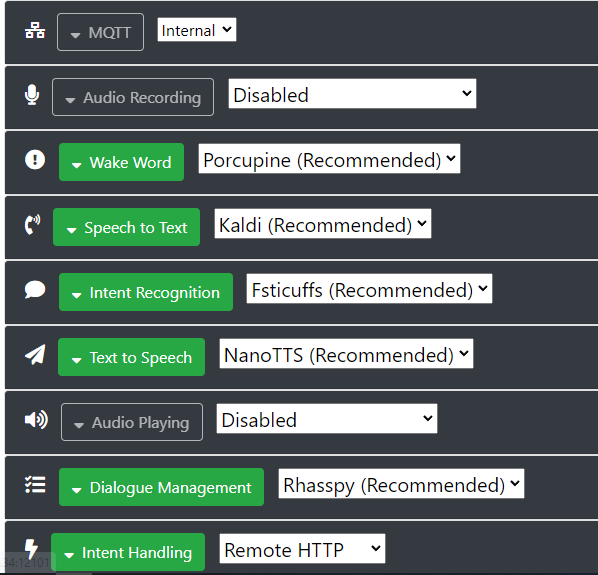
For those having the same issue with the listen part closing too quickly, the answer is actually in Rhasspy itself. In the text-to-speech option, there is a default for “silence after” of only 0.5s, so this needs to be raised in order to not be cut off too quickly, especially if your phone isn’t very close.

UUUUUUOOOO man, works incredible. In fact the wake word detection with Porcupine works better that in raspeberry (may be because the microphone of the mobile its better and nearest).

If you want I can help us to translate de app to catalan :wink:

Thanks for the amazing work

Once I set it up as a satellite according to this, things pretty much worked. Awesome app, thanks @Nailik! Already had a Home Assistant dashboard on an old tablet, and now I don’t need another RPi just for the Rhasspy satellite.

Same here. Not a huge deal, but it would be nice. Anybody have any pointers?

@Arnau_Dunjo You can make a Pull Request on Github, just translate the file rhasspy_mobile/strings.xml at master · Nailik/rhasspy_mobile · GitHub into a cat folder.

@arbrandes unfortunately i am not yet sure where the issue is, i still try to investigate this.

Some more info: TTS via MQTT actually worked for me, but only once, after force-stopping the app, reloading it, then using the wake word and issuing a command.

Relatedly, after trying to use the app more often, I notice that almost always after the second or third command issued after a force-stop-restart it will simply stop playing audio altogether, and commands stop working. I no longer hear the local notification, the remote start-recording playback sound, TTS, or anything.

I’m going to try more combinations of silence detection options (currently have MQTT silence enabled, and Automatic Silence Detection as well), and will also try on newer hardware and more recent Android version, and report back with some logs.

I think this happens due to a bug i did fix but not release yet.
In some circumstances when the Audio Player did already play sound (like the beep) and would then start to play another sound (like tts) it would hang and the tts would never succeed and could hang the app. I’ll build a release and publish it now - could take some hours until it is available in the playstore.

1 Like

Hi.

How could send the audio answer from Rhasspy to Rhasspy mobile app?

Thanks.

There are 2 ways currently:

Thanks for your anwer @Nailik.

I have try via remote HTTP and works, thanks. But If I would that the answer sound plays on the same device wich initiate the flow… I don’t understant wich configuration I must use.
I have all services in app redirected to server via HTTP. In th server I use Google STT and TTS.
I tried changing a lot of configuration in app, also only the TTS service to MQTT, but I have only eard the answers from server speakers.

Can you help me?

Thanks

It depends how you handle the intent.
For example when using node-red, i would check the incoming event for the siteId (event.siteId) and then depending on this you could call http://siteId:12101//api/text-to-speech with the text that should be spoken.
This works when using MQTT and when using Intent Handling by the app.
When you use HTTP and Intent Handling “With Recognition” you will get your base siteId inside the event.

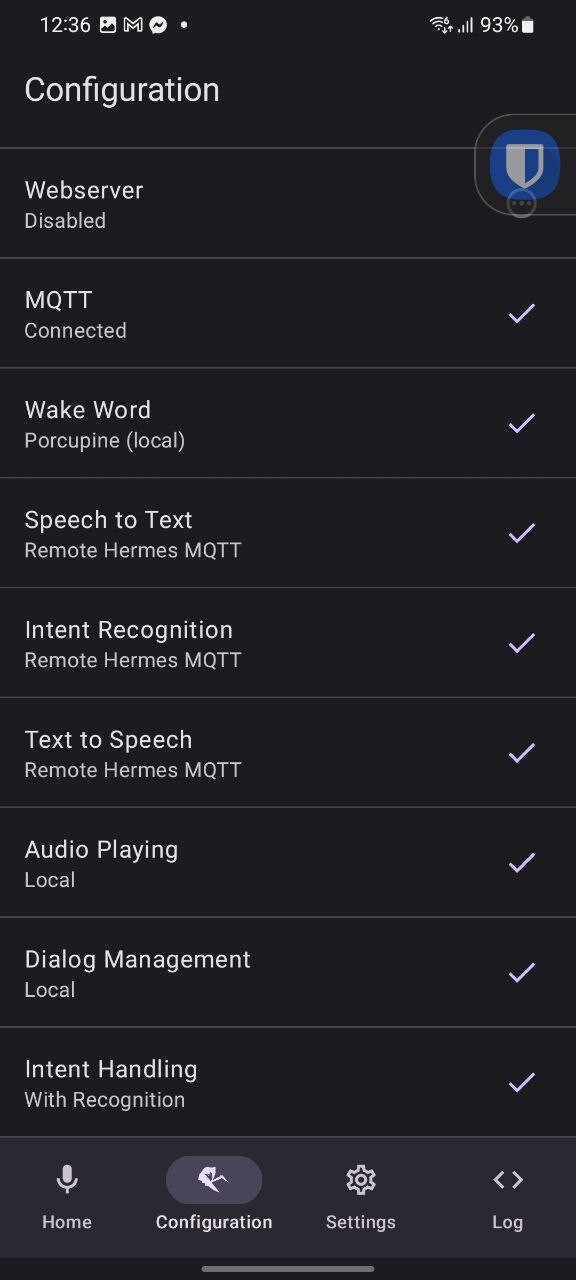
I managed to get this work flawlessly with TTS and Wakeword on Samsung S21 as satelite and want to share the configuration here:

Sorry for the 2nd comment, new user policy only 1 embed media per reply, The Dialog Management should be disabled, “Rhasspy” option was the culprit behind the 2 sounds and laggy thing. I’m trying to find a way for the mobile app to adapt to this

I’m trying to set up satellites using Android phones. I’m starting with just one phone for now.

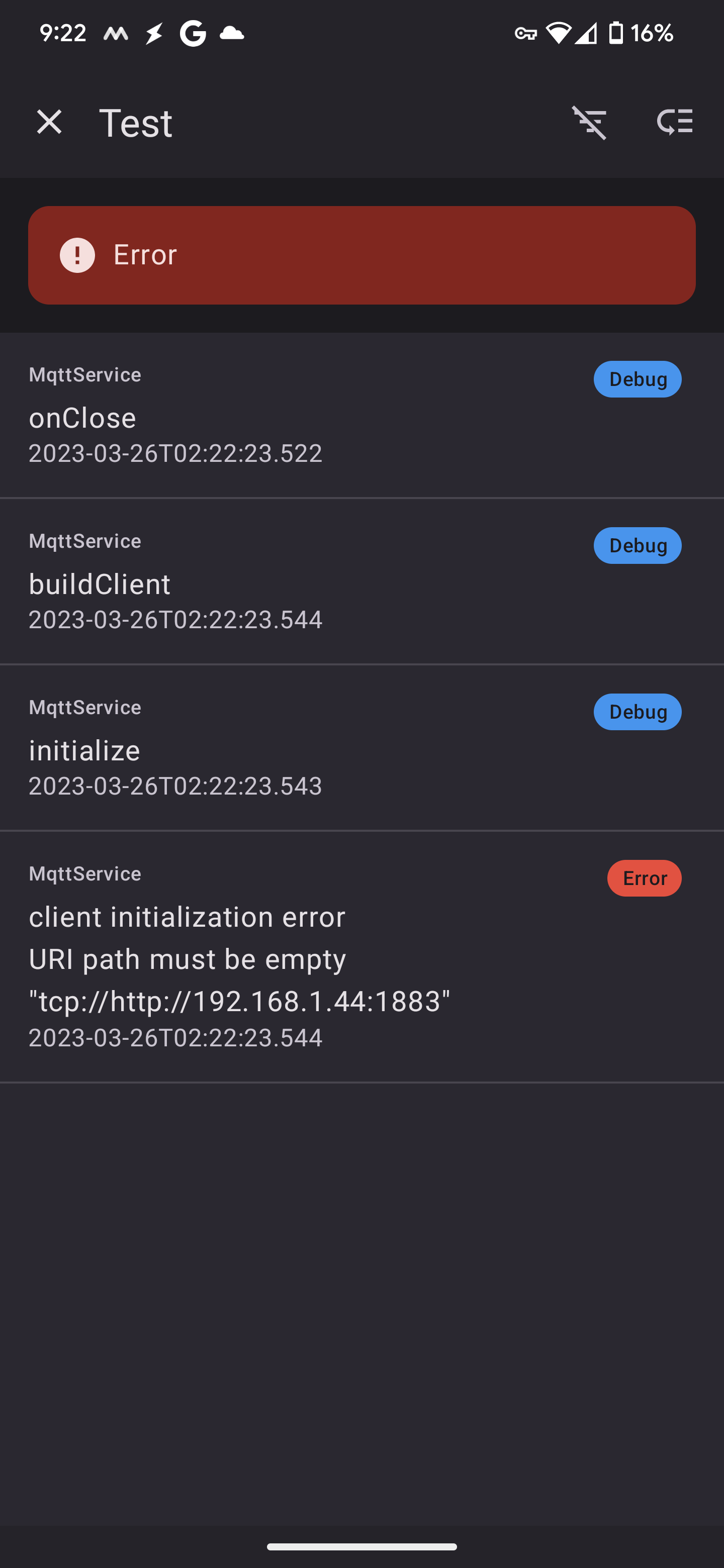
I configured the app connect to my Rhasspy for MQTT communication but it keeps failing with an error message that the “URI path must be empty” and even lists my Rhasspy server URL AND port number.

You have to remove the “http://” inside the the Mqtt host settings. The error message may not be the best because currently they are not optimized and just prints out whatever the mqtt library says.

Thanks. That got rid of that error. But it still doesn’t communicate with the server. If I press the microphone, I hear an acknowledgement sound and say my command. Then I hear the error sound.

When using MQTT remember to add your satellite id to the base server “Satellite siteIds” field for every service that you want to use via MQTT. You can also use the Arrow button on SpeechToText to see if this works.

That’s odd. I was sure I had entered that. I just went and looked – nope it wasn’t there. I added it and now it does work.

The only remaining issue that I currently know about is telling the mobile app that the intent has been handled. The server is throwing errors when I try to send the message back.

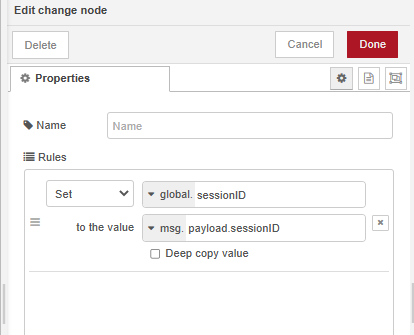
This first image shows setting the global.sessionID variable.
Screenshot 2023-03-27 094255

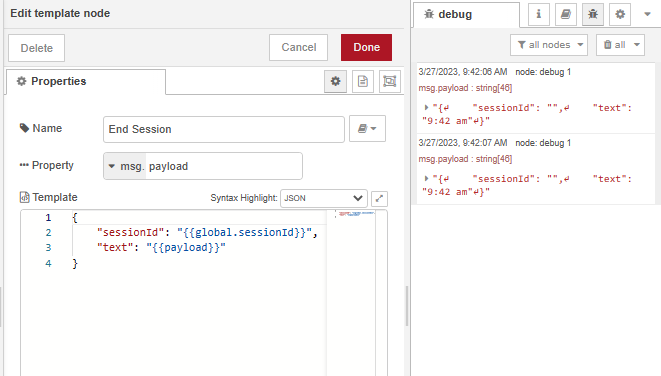
This image shows TRYING to set the payload to send the sessionID back to the client.
Screenshot 2023-03-27 094347

So i assume you want that the app then speaks the text.
So you have to post the text to “:/api/say”

Yes. That I the EVENTUAL goal. But the current issue is acknowledging to the satellite that it has been handled.

Okay so when the app uses it’s internal “intent handling” service, then the app will end the session after calling the configured service.
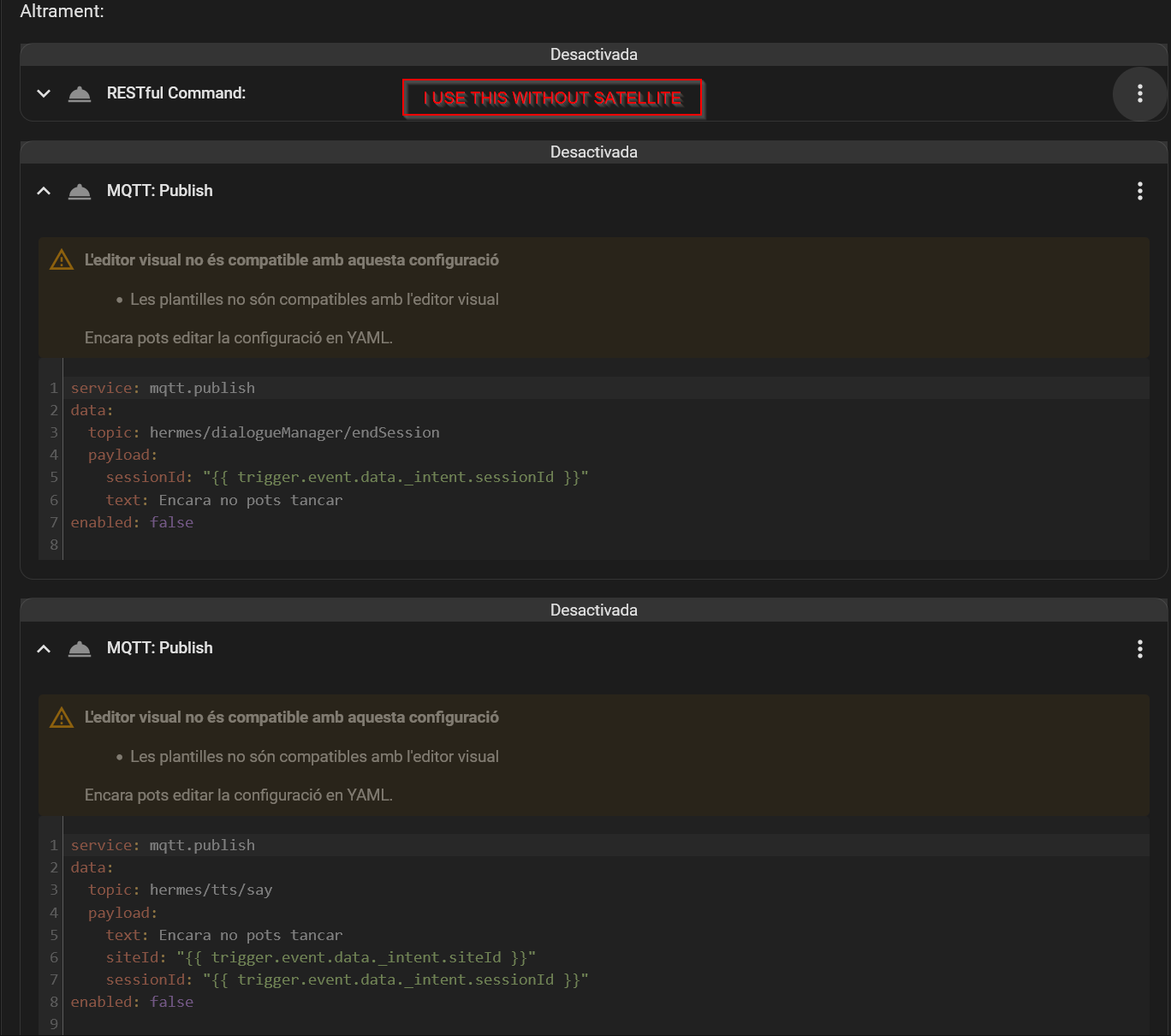
When you don’t use this you need to publish an mqtt topic to "hermes/dialogueManager/endSession "(Reference - Rhasspy)

I think this is a problem when someone doesn’t use mqtt so i created a issue to keep track of it. Add endSession HTTP endpoint · Issue #310 · Nailik/rhasspy_mobile · GitHub

When you say “the app”, I assume you mean the satellite (Rhasspy Mobile). I’m connecting via mqqtt to my Rhasspy server.

The server DOES process the intent correctly – the light turns on or off as requested. The server is just throwing an error when I try to send the end session back.

I talk about the app specifically because you can also host rhasspy on a rasperry pi as a satellite and i don’t want to confuse between them.

The app just fires the intent to home assistant or whatever and assumes it was handled and ends the session, there is no need to call end session from outside. If you want to end the session there is currently only mqtt as option as described above.

I knew that the main software could also be used to run in a satellite. That’s why I verified that you meant your android app. My point was that the server is properly processing the intent when the app sends it. But I’m stuck telling the server to send the endSession.

In an effort to troubleshoot this, I added a debug node to the output of the node that is supposed to set up the endSession parameter.

When I send the intent via the Rhasspy webUI, the debug node only shows once.

But when I send the intent via the app, the debug node shows twice. Here’s a short (30 something second) video so you can see what I mean.

https://youtu.be/kQTdGrlQ89s

Edit to add: I’ve also noticed if I attempt to send a request shortly after one has already processed, it fails. My guess is the app doesn’t know that the previous request was in fact processed so it refuses the new one. I don’t know that for sure though.

A thank you, now i understand what the problem is!
When you further inspect your incoming event you will recognized that it once get’s fired by the server and once by the satellite.
This is because when you use mqtt as intent recognition the server will always also handle it.

I’m not sure what you mean by the satellite would also process the intent. The whole point is that the server needs to process it.

And I’m still not sure how to have the server tell the client that it’s been processed.

The server processes it by recognizing the correct intent by the text. Then it handles it by sending it to homeassistant, the app is doing the same → it gets fired twice. You don’t need to tell the app that the intent has been handled.

That makes a little more sense to me. But all the sentence and slot info (needed to determine the intent info that should be sent to HA) is on Rhasspy server.

If the app is also sending intent info to HA, how does it know WHAT to send? If the app has the ability to send the info to HA directly, what is the Rhasspy server for?

The app knows what to send by using the intent recognition service of the server. It’s just a very modular design because it wanted to give maximum flexibility but that also leads to some complexity in setup.
I plan on adding a setup guide to the app to simplify this process and make it clearer on what certain services do.

1 Like

in the Rhasspy Mobile app, how does the MQTT option for wake word work? Or does it work? I’ve tried it, but haven’t managed to get it working.

Blockquote

Now that I was able to get Rhasspy working, the woke word is working too using the LOCAL (porcupine) setting.

yes, I got it working that way, but if I set several of these throughout the house, the 3 monthly users on the license will go by quickly.

That would be helpful. Since I don’t want the intent processed twice, do I need to turn off remote intent handling? If I do that, will the mobile app always have the latest versions of sentences and slots?

I hadn’t even noticed there is a limit.

Plus the whole point of doing this (as far as I’m concerned) is to get away from cloud services. I don’t like depending on them.

1 Like

I decided to try turning of Intent Recognition and Intent Handling both. Having done so, the server does correctly process the request and only once. But my second question still remains: will the app be kept up to date when changes are made on the server to the sentences and slots?

The app just sends the speech data to the server and it get’s processed there, so no worries about your sentences and slots

It should work when your server has added the client Side Id in the wakeword site Ids list.
It works by sending small packages to your server all the time (this floods mqtt a little bit), so i would advice you to either create multiple porcupine accounts or use udp instead.

For udp you add the server address in the app and then in your server u add the docker container ip address as udp audio input. Like 172.17.0.2:20000, you can use multiple devices as udp input by naming them like so: 172.17.0.2:20000:mobile1 … (i haven’t tried that yet)

Ok thanks. But this confuses me more. You previously said that both the app and the server will handle the intent.

Remote handling of the intent has been turned off and Node Red shows that it’s being handled ONCE.

And if we’re NOT running in a Docker container?

I’m on a Raspberry Pi 4B running Home Assistant OS with the Rhasspy server (NOT Lite).

When you are using the homeassistant addon for rhasspy it’s a docker container . You can read more about how to use udp in this thread for the other app UDP Wakeword detection with Rhasspy mobile app - #3 by Syntox

Thanks! I’ll check it out when I get home tonight. I always thought that if docker is involved in this, HA would be running in docker too.

A question related to the Porcupine (Local) implementation. If my Internet connection is down for some reason, will that cause the wake word functionality to fail because it couldn’t verify the license?

And a question about having text read to me on the satellite. I was able to get that working last night. But it sounds very robotic. Is it possible to change to a different speaking voice?

Porcupine only requires Internet access when verifying the license.

The robotic voice has nothing to do with the app, the app just plays sound and uses the server to generate the audio. There are various other options like certain homeassistant addons to generate better audio from text.

And when does that check happen? What happens if that check fails (internet is down)?

When it doesn’t work the wake word service shows an error.
It’s done after saving the configuration, when microphone permission is enabled. Else the wake word configuration shows and enable microphone permission button - after you click that it will verify the key. When you don’t click it it will be verified the first time it’s listening for a wake word + microphone permission is given.

When the phone or does it run as a service is restarted, do I need to start the app again manually? Will Porcupine need to do this verification again then?

If I don’t have to worry about the wake word not working just because the internet is down, I would be fine with their licensing scheme.

Once wake word is working correctly I’m just about ready to deploy this (get more satellites).

Related to that: is there a way to export and import my settings? That would be very helpful – I wouldn’t have to enter these settings on every phone I’m using as a satellite.

I have to check if porcupine needs to run the verification again, as far as i know it’s only done once.

You can go into Settings-> Save and Restore Settings → Save to create a full backup.

When I set it to MQTT, the red outline around the speaker button goes away, like it’s not listening for the wake word. I have wakeword setup on the base station and the site id added to it.

Setting it to UDP, it still shows the red outline, but it doesn’t work. Is there anything extra I need to do for this setup?

Why is a license required if it doesn’t use the internet to recognize the wake word? It’s not needed when using porupine in a normal rhasspy setup.

About MQTT not showing a red line: I will look into it.
UDP definitely works, depending what your server runs on you might need port forwarding, for example on a Synology Nas.

Rhasspy server uses an old version of porcupine that doesn’t require an authkey. I could try to add the latest version that doesn’t require an auth key as secondary option if it is still available.

1 Like

I have to correct how the MQTT wake word service works:

It waits for an incoming mqtt message to wake up just like rhasspy does normally Wake Word - Rhasspy

When it works, it works well. But I’m having reliability issues.

It sometimes gets into a funk where it acknowledges that I want to make a request then stops listening before I can actually make the request.

Please take a look at this short video (20 seconds) to see what I mean.

Is there a way to fix this?

https://youtu.be/e7P5DhYO7w0

What kind of silence detection do you use? Via MQTT or via the app (in the app settings)?
And please tell me what device you are using and on which android API level

In the app. I’m still figuring this out and didn’t even know mqtt was an option there. Which is better?

It’s a TCL 30 running Android 12.

After answering your question, I decided to try increasing the sensitivity. I’ll see if that helps.

Jeah when you use MQTT as speech to text service then the server will recognize the silence.
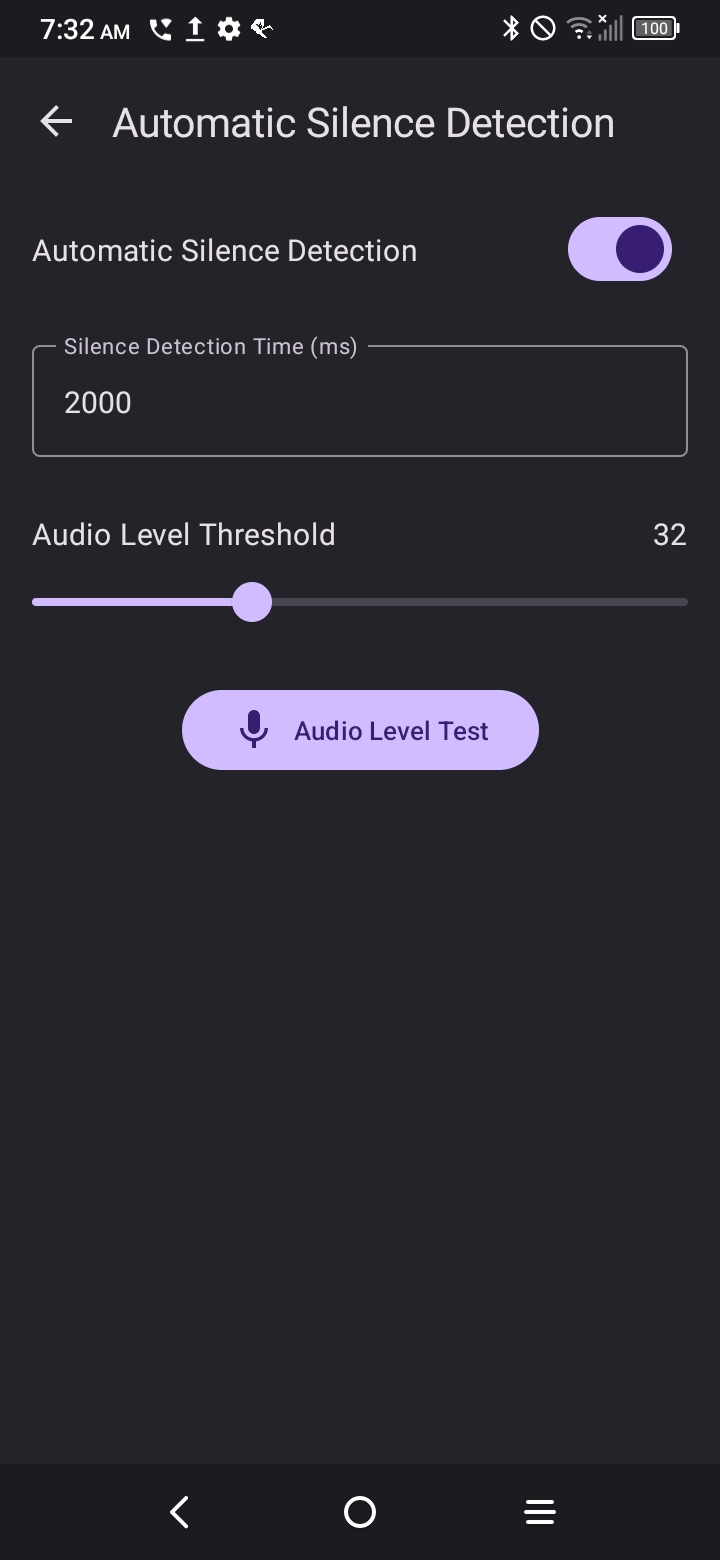
In the app it checks that the audio is below the audio level for the desired time. I could add a minimum length to a voice command, I think that would help.

I’ll investigate the MQTT option.

Tinkering with the sensitivity didn’t seem to have any effect at all.

Before reaching out, it was set to somewhere around 45.

I tried increasing it to the MAXIMUM and when that had no effect, I brought it way down to 5 and there was still no change.

https://youtu.be/qVI6MNL3ZE4

Can you test the “test Audi level” button and make a video ? That would help me to investigate the issue.

I did two test videos. In the first one, I’m trying to speak very softly. I’m trying to emulate someone speaking in the background without Rhasspy trying use those sounds too.

https://youtube.com/shorts/9NG8vP0I5Yc?feature=share

In the second video, I just spoke normally as if I wanted RHASSPY to do something – I just didn’t use the wake word.
https://youtu.be/b4oIwPMckWM

For me it looks like there might be some sort of exception happening, causing the recording to stop.
On the weekend there will be a new version with some bugfixes and also a setting to set a minimum time for the recording duration.

Hi.

I need some more help, sorry.
I followed the instruction Tutorials - Rhasspy to setup the satellite (mobile APP) with a base (Docker container in raspeberry pi ) but after several cobinations I couldn’t execute the intent and play the answer sound in mobile APP. When I used only the base station I used TTS and STT of google (STT with local command).

In the tutorial neither the satellite nor the base set the intent handle and don’t work for me. I set the intent handle in mobile APP (to Home Assistant) and I set the satellite id in the actived services of base station. The automation on Home assistant is fired, but the answer doesn’t play in mobile APP.

The current combination is this:


I triend publishing a message on hermes/dialogueManager/endSession or/and hermes/tts/say but nothing work (in actually combination I can’t load the sessionId from intent, in other’s combinations I could load but doesn’t work anyway)

I followed too the configuration of @ledz1996 but doesn’t work for me.
What are doing wrong? :sob:

Thanks

Convert the text to WAV data and use “hermes/audioServer/< siteId>/playBytes/< requestId>” or you use the http endpoint “/api/say” where you post the text or send the text to “Hermes/tts/say” on your rhasspy server with the correct satellite site id.

Edit:
The app doesn’t handle “hermes/tts/say” for the following reason:

When receiving “hermes/tts/say” in app and using mqtt for text-to-speech then the app has to call “hermes/tts/say” by itself to enable the base to do the text-to-speech operation. But this would result in a loop because the app itself would also receive the command.

Therefore you have to send “hermes/tts/say” with the siteId from the app, this will be consumed by the rhasspy base, it will do the text-to-speech operation and call “hermes/audioServer/< siteId>/playBytes/< requestId>” with the given siteId, this then results in the app playing the sound.

Ok, thanks I will wait until next version (I don’t know how compilate Kotling code).
I have commit the translation to catalan.

Thanks a lot for your work.

I updated my answer to clarify that the app won’t recognize “Hermes/tts/say” (also not in the future) and why. Hope it’s now clearer.

OK, thanks for clearing it up

I decided to support “Hermes/tts/say” with the newest Release because it simplifies app usage. It uses a specific sessionId so there won’t be a loop when also using mqtt as text-to-speech service.

Note that this endpoint expects a JSON string as input as described here Reference - Rhasspy

Nice app.
Is there a possibility to make this app for android TV?
Thanks a lot for your work.

Jeah it’s already planned.
Mostly I would need to do testing as well as thinking about how I make file selection.
Most AndroidTVs don’t have a File App therefore I think about a download dialog in order to eg use custom porcupine wakewords.
Also I would need to do some testing just to make sure everything works as expected.

Thank you for this. I had been looking for this for ages.

Is it possible to change the voices?

Do you mean for Text-To-Speech playback?

Right, is it possible to change voices for TTS playback?

Also, How to manage multiple satellites that we may be hearing the same command? So e.g. with Google speakers, only one of them responds at one point in time even though they all heard the wake word.

Also, Also, Any way of integrating with local AI for conversation? may be via Home Assistant?

For tts the selected System (http or mqtt) is used, you need to change the voice there. Another possibility is to process the command in Home assistant eg via nodered and the use some tts service and send only the audio to the app.

In order to have only one satellite react to a wakeword I think Mqtt dialog might be the way to go. You would need to listen to the wake word message and then tell only one satellite to react.

Maybe they found/will found a solution for this with rhasspy3/Wyoming protocol and I currently work on supporting it in the app.

1 Like

Hi there! I am quite new to Rhasspy and Mobile app seems to be very promising. However I can not get it to work. I am not sure where problem is but I suspect that I can not record the speech for some reason. I can activate microphone by pressing or by wake word but the listening time expires and no record is made. At least if I press Play Recording nothing happens. In Dialog section I am getting RecordingIntentState > SendAudioCaptured: false, asrtext Null, AsrTeimeoutError. I have allowed microphone recording to this app. Besides wake word works fine so the mic is accesible to the app. Installed it on other Android device - it is the same.

Hi VilnisRadio,
I know that Nailik will probably respond soon, if you look at my thread on Wall Panel, HA App, etc. Nailik has been incredibly gracious in offering support. Just as an FYI, I’m in the same boat, however, I’ve been able to get things to work by using the old Rhasspy Mobile App from Razzo04 (GitHub - Nailik/rhasspy_mobile: Rhasspy is a voice assistant software. This repository implements the functionality of a Rhasspy satellite, with local wake word recognition.) and a docker container running the OpenWakeWord (GitHub - dalehumby/openWakeWord-rhasspy: openWakeWord for Rhasspy). However, as Nailik pointed out, the platform to update the old Rhasspy android app is a tough one, and it hasn’t been updated in a long time. So, there’s some quirks with the old app, like requiring a user name / pw for the mosquitto broker, even if you don’t have that set up, and it doesn’t have the ability to be brought to the foreground on activation. Anyway, hope this helps; as I said working for me for now, I don’t have the $ to buy hardware that support the new voice platform for HA now, so this is good enough for now (can turn on/off lights, respond to specific queries built in HA automations.
Jeff

Hi!
Actually I have to apologize, especially to Nailik. I carefully studied on Tutorials page how the satelites architecture is built and the difference between mqqt and http solution. My problem was that I did not properly set up master and satellites mixing between mqqt and http and master and sattelites. Once I put all settings to mqqt it worked just perfectly. I just did not had enough patience to study how the voice recognition works as it was my first experience for the Speech to text.

Hi VilnisRadio,
Would you mind posting your main Rhasspy config & your satellite config? I’d really like to use Nailik’s app, but I can’t get the wake word to work.
Thank you,
Jeff

Hi guys,

please make sure you are using the same version :slight_smile:

I am glad you already found the issue!
When using the nightly build you should use the “Dialog” Screen to see the reason why stt was canceled/ended.

But maybe it’s also because of the bug that the Speech-to-text setting is not saved correctly.
I found the big it’s a weird race condition. I think the latest stable version saves just fine but the nightly doesn’t.
I’ll fix it in the upcoming days, not sure if I got enough time today.

And also thank you for using it. Currently my focus was on supporting Rhasspy3 and with it there are also some more changes, simplifying the code and hopefully also the usage. I just had a break but seeing some more users definitely is nice :smile: .

Hi Nailik,
Thank you so very much for continuing work on the app!! I’ve been doing a lot of reading about the new HA Assist & Voice, which is exciting, but it seems it really requires a lot of hardware to work well. I’m very happy with my Rhasspy 2.5 running on a raspberry pi, and my HA running as a docker in a very old unraid NAS using Kaldi as the TTS engine. My goal is to use an android satellite (check out this thread for the hardware, very nice looking, and inexpensive: Is this the perfect standalone tablet for HA? - Share your Projects! - Home Assistant Community ) in a part of my house where the current raspberry pi microphone coverage isn’t good. And yes, I understand about version checking :grinning: I’ve actually tried different versions of your app, as well as the old one and, I’d really, really like to use yours, much more elegant of an implementation, but I just can’t get it configured correctly. I’ll be patient, I promise…
Jeffrey

Please excuse my ignorance, but even after a lot of reading, I still don’t understand what this app does.
Is it a mean to command my Android mobile to do things, by using voice commands?
Or is it a replacement for Whisper & Piper so that I don’t need those to use voice commands in Home Assistant?

Hi, the idea is to use your already existing smartphone/tablet as microphone and speaker.

When I started implementing it the home assistant app didn’t have such features, now it has.

I already added local wake word detection with porcupine, so that the Android device doesn’t need to stream audio continuously.

1 Like

Well, thank you. So why use your app then, when the HA Companion App now has mic&speaker support? Are there still any obvious differences/benefits?

So first as i said, while starting to develop the HA Companion App didn’t have the features.
I am still not sure if the HA Companion App has an in-app wake word detection.
My main features are:

  • in app wake word (could also add speech to text and text to speech but not planned right now)
  • widget for easy access
  • background service (i think the ha app supports this too)
  • floating button
  • support for rhasspy 2.5 (especially interesting when you already use it and e.g. have a huge set of automations/senteces build in)
  • rhasspy 3/wyoming protocol (still working on it, api for other apps etc seems to be not fully stable yet and parts of it is hard to understand)

… basically just test it and use what fit’s your needs best.

Aha, I see…
Please don’t misunderstand me - but keep up the good work.
Me, I decided to switch from the HA Voice Assist to Willow using ESP32 S3 BOX instead. Mainly because of the horrible response times on the HA Assist, even when running Whisper and Piper on external Linux Server.