Would you mind explaining what shall be change in case of using snapcast?
Btw do you mean this: Snapcast?
Would you mind explaining what shall be change in case of using snapcast?
Btw do you mean this: Snapcast?
Yes, I meant snapcast 
Install a server somewhere (the same device as you have installed mopidy), Mopidy can pipe the output to the server.
You can use all sorts of devices as clients (multiroom audio).
Then, you can configure Rhasspy to output to MQTT. The part missing is a connection for listening to the MQTT stream and outputting it to to snapserver.
I do not know if something like that is already available.
Thanks. I’ll look into it the next days.
I will try to and do this as well
I have got Mopidy and snapserver running on a VM on proxmox, but I have not tried to use that same snapserver with Rhasspy
I’ve got rhasspy to set a german radio station (swr3) and start playing it over mopidy. What’s your approach? Playing local mp3 files?
I only play spotify at the moment
@romkabouter how is your progress?
I’ve opened a forums post at the mopidy community: https://discourse.mopidy.com/t/gstreamer-error/2481
Is the piping from mopidy to snapserver working in your case?
I’ve got another question to you. Is the setup as follows?
Like you said in a post above --> Snapserver and mopidy
I have a pi4 which is running rhasspy atm as well as mopidy and a snapserver. It’s not clear for me whether I need a snapclient as well or not? I think I don’t need one, because acutally the better approach would be to connect to the websocket api of the snapserver and get the stream from there and pipe it into the mqtt stream topic of rhasspy. What do you think?
Yesterday I’ve ran an snapclient on the console and the stream worked well. Except for the errors with stopping and actually correctly starting the stream using iris in mopidy.
I am partime schoolteacher now, so free time is sparse.
Piping works fine, I have mopidy and snapserver on the same machine.
You only need snapclients on the devices you want to play audio.
piping the snapserver into the MQTT stream might be a good idea, but I dont think the MQTT is a continues stream of bytes, but rather a stream of a lot of small wave files.
I will see if I can free up some time to try this as well
Would you mind showing me your config of mopidy?
How do you pipe it atm and which mopidy version and snapcast are you using?
Ok, lets consider another setup (the one I am trying to do)
my server:
- mopidy player (from sources like youtube, spotiy etc)  -> /tmp/snapfifo -> snapcast server -> stream -> snapcast clients

my Rpi client with Rhaaspy:
- rhasspy            ->
                         dmixed alsa device -> sound card
- snapcast client ->This is the config file at /etc/mopidy/mopidy.conf. I run a VM with debian stretch.
I have installed mopidy and snapcast
[core]
cache_dir = /var/cache/mopidy
config_dir = /etc/mopidy
data_dir = /var/lib/mopidy[logging]
config_file = /etc/mopidy/logging.conf
debug_file = /var/log/mopidy/mopidy-debug.log[file]
enabled = false[local]
enabled = false
media_dir = /var/lib/mopidy/media[m3u]
enabled = false
playlists_dir = /var/lib/mopidy/playlists[http]
hostname = ::[mpd]
enabled = true
hostname = ::[spotify]
client_id = id
client_secret = secret
username = user
password = pass[audio]
output = audioresample ! audio/x-raw,rate=48000,channels=2,format=S16LE ! audioconvert ! wavenc ! filesink location=/tmp/snapfifo[lastfm]
enabled = false
The [audio] part is the one that pipe the output form mopidy to the /tmp/snapfifo, which is the snapserver.
I do not know if Mopidy can output to multiple channels, but if you want to have output on the machine Mopidy is running, you can use snapclient -h I think.
I do not use that right now.
My clients are a pi zero with a BT speaker and a pi3 with a speaker. The BT speaker is actually a ceiling lamp so I can play audio over that.
So what I need to do is find a way to make Rhasspy output to the pipe on the mopidy/snapserver device.
On thing I can think of is to use this little gem:
https://github.com/koenvervloesem/hermes-audio-server
I was developed to subscribe to a MQTT topic and output the audio.
It is probably not complete, but the idea is to create a piece of code subscribed to your Rhasspy MQTT out topic and pipe that stream to you snapserver.
This is 1 idea however, so there might be already some code which does it
The idea of @litinoveweedle will work, but implies Rhasspy running on a different device.
One also being able to output audio. This is a problem if your Rhasspy is on a NUC or some other server. I currently have Rhasspy running as addon in Home Assistant
Thanks for your fast reply.
I see. Basically with hermes-audio-server you would run wakeword as well as actually all communication with rhasspy over this?
Advantage would be that rhasspy isn’t blocking the speaker in- and output all the time isn’t it?
Well, you might only have to run the hermes-audio-player to grab the MQTT stream from Rhasspy and pipe it to snapserver.
I do not think that software is currently capable, right @koan?
Well, I only created hermes-audio-server because Rhasspy was a big monolith then and I wanted a light piece of software to only process audio on a satellite. To be honest, I consider hermes-audio-server deprecated now that Rhasspy is modularized.
I don’t have any recent experience with snapcast or mopidy, so I’m not sure how you would use hermes-audio-server with it.
There is always going to be some need for an audio-service but to be honest I am the same as @koan as have never ran snapcast or mopidy.
I am sort of curious to how this is handled in server/satelite situations as being a Rhasspy noob not sure how its handled or what future plans are.
Each satelite has a microphone and vad to stop streaming on no voice and on multiple satelites obviously makes huge savings in bandwidth.
You might have a 5:1 or 7:1 or whatever mutichannel audio is in flavour, as that also makes a wide area mic array, so that can be a lot of bandwidth to save.
So presuming there will always be an audio-service even if just input.
You might still have 2 tier recognition with an authoritative server or a satelite model.
So even though its been modularized doesn’t the need reapear because it can now be partitioned into tiers?
My head is spinning a bit because with media its likely to be streaming channels with at least a single stream channel accompanied by a room echo channel + mic channel.
If you have a satelite mode then audio duck/cork initially is processed locally and continues duck/cork until server authorisation or releases to normal.
Thats a local audio process isn’t it and Rasspy process? As thought I would ask as not sure of what snapcast or mopidity do or even have any function or awareness for the need of a room echo channel, or input.
I have had a brief look over snapcast which looks awesome and the default audio backend whilst apps like mopidity are just audio clients to push streams onto snapcast.
Can you stream channels to and from snapcast or does each client pull the whole stream and then can be assigned a channel?
Thanks, it looks like this can do the same:
When creating a program which can be used as PLAY_COMMAND and puts the output to the /tmp/pipefifo
This also might be possible with sox as play_command, the rhasspy-speakers-cli-hermes runs the play_command in a subprocess. You could use aplay for example.
Thanks for the link.
I’ve opened an issue for the make docker command which isn’t working.
Anyway I’ve installed it using make debian and it’s working so far.
So far so good. To be honest I haven’t completely understood how this plugin is working. I thought it will publish everything coming in from the play-command at the right topic. As a result I will hear the sound over the speaker which I configured inside rhasspy.
I have no clue whether it’s good what running following command is telling me or not. But there’s no sound coming from my speakers.
(.venv) pi@raspberrypi:~ $ rhasspy-speakers-cli-hermes --play-command "play /home/pi/Documents/testSong.mp3" --debug
[DEBUG:2020-04-22 14:15:20,587] rhasspyspeakers_cli_hermes: Namespace(debug=True, host='localhost', list_command=None, log_format='[%(levelname)s:%(asctime)s] %(name)s: %(message)s', password=None, play_command='play /home/pi/Documents/testSong.mp3', port=1883, site_id=None, username=None)
[DEBUG:2020-04-22 14:15:20,589] asyncio: Using selector: EpollSelector
[DEBUG:2020-04-22 14:15:20,590] rhasspyspeakers_cli_hermes: Connecting to localhost:1883
[DEBUG:2020-04-22 14:15:20,600] asyncio: Using selector: EpollSelector
[DEBUG:2020-04-22 14:15:20,601] rhasspyspeakers_cli_hermes: Connected to MQTT broker
[DEBUG:2020-04-22 14:15:20,602] rhasspyspeakers_cli_hermes: Subscribed to hermes/audioServer/+/playBytes/#
[DEBUG:2020-04-22 14:15:20,603] rhasspyspeakers_cli_hermes: Subscribed to hermes/audioServer/toggleOff
[DEBUG:2020-04-22 14:15:20,603] rhasspyspeakers_cli_hermes: Subscribed to rhasspy/audioServer/getDevices
[DEBUG:2020-04-22 14:15:20,604] rhasspyspeakers_cli_hermes: Subscribed to hermes/audioServer/toggleOn
Afterwards I thought that maybe adding a siteId would solve it with no success.
(.venv) pi@raspberrypi:~ $ rhasspy-speakers-cli-hermes --play-command "play /home/pi/Documents/testSong.mp3" --debug --siteId "default"
usage: rhasspy-speakers-cli-hermes [-h] --play-command PLAY_COMMAND
                                   [--list-command LIST_COMMAND] [--host HOST]
                                   [--port PORT] [--username USERNAME]
                                   [--password PASSWORD] [--site-id SITE_ID]
                                   [--debug] [--log-format LOG_FORMAT]
rhasspy-speakers-cli-hermes: error: unrecognized arguments: --siteId default
I’ve configured rhasspy to use the external mosquitto broker which is running on the pi:
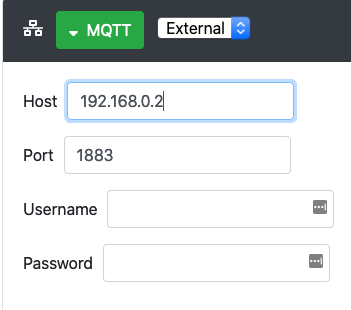
Any hint what I am doing wrong?
I do not know yet, but I think the play command is what is needed to play the INCOMING mqqt stream to a “device”
For instance play_command could be aplay.
I think you have a misconception about the play command, be the looks of it, is the the process which is taken input from stdin (which is actually your mqtt stream) and then OUTPUT is to something.
In your case, try:
rhasspy-speakers-cli-hermes --play-command “aplay” and publish to audio to the playBytes topic.
Hopefully that will take the incoming audio and play that with the raspbian command “aplay”
You can also add parameter to aplay to play on different speaker, but without it, it takes the system default
You can try on your Pi to play a wav with:
aplay test.wav
Obivously you should have test.wav on the Pi as a file.
Well I have no problems at all using the play command of sox to play a song over command line.
Anyway how do you mean and publish to audio? As far as I understood that’s the part I need to do myself. rhasspy-speakers-cli-hermes isn’t capable of doing this or am I wrong?
I meant publish your audio to the playBytes topic.
The playBytes topic also gets the audio from your TextToSpeech, but you can publish wave files as well.