I am using Kaldi with Fsticuffs…
Also note: The 2.5.7 raspi satelitte is not showing this issue (only the mobile app).
1 Like
I am trying to use the mobile app, but am running into a problem - I can use the speech to text in the app and it will transmit to my rhasspy (I see the intents in the app and my speech in the “recognize” field in the rhasspy web interface), but it doesn’t actually execute the intent (I get a “no one managed the intent: switches” on the app). I have Handle checked in both the app and the rhasspy web interface. If I press enter on the recognize field in the web interface it works. Any ideas on why the intent would not be executing from the app?
Probably with the modification happened in rhasspy 2.5.7 in which don’t force anymore use of ASCII character, the system that used previously to convert bytes to strings complained about the presence of not ASCII character now this problem should be solved with the latest version. Let me know if the problem persists.
1 Like
What system did you use to handle the intent?
Yes, with 1.6.3 the issue is fixed! Thank you very much!!!
I’m using Home Assistant as the intent handler
Thank you for helping me find bugs.
Strange, I also use Home Assistant as the intent handler. Did you have other rhasspy satellites worked? Did you manage the intent with events or intents?
I just tested a rhasspy satellite and it worked properly with the exact same siteId as the mobile app (the command shows in the base rhasspy webpage recognize box and the intent actually executes).
I am using Home Assistant event handler to handle the intents.
On the mobile app, I have the MQTT server configured, and the check is verified.
I can’t seem to put in the Rhasspy IP (IPADDRESS:12101) itself in the app settings, it says “cannot connect to rhasspy”.
The standard rhasspy satellite has no problem connecting to the same endpoint.
This may be the issue, any idea why it wouldn’t be able to connect?
I’m running rhasspy 2.5.7 and mobile app 1.6.3.
@razzo04
I’d like to start/stop recording with a phone shake.
Im trying to start a broadcast intent with automate but im failing miserably. do you know if its posible and how?
start/stop with a shake would be superb as it doesn’t need constant streaming for wake word detection.
I tried to use the automate app and it works instead of using the broadcast intent I used app start so that if the app is not running it will start and should start listening for command and if it is running it should just start listening. You must add in the parameter extras {“StartRecording”: “”} otherwise the app will only start and will not know that it must start listening. However, if you want there is also an android widget that does the same thing as app start.
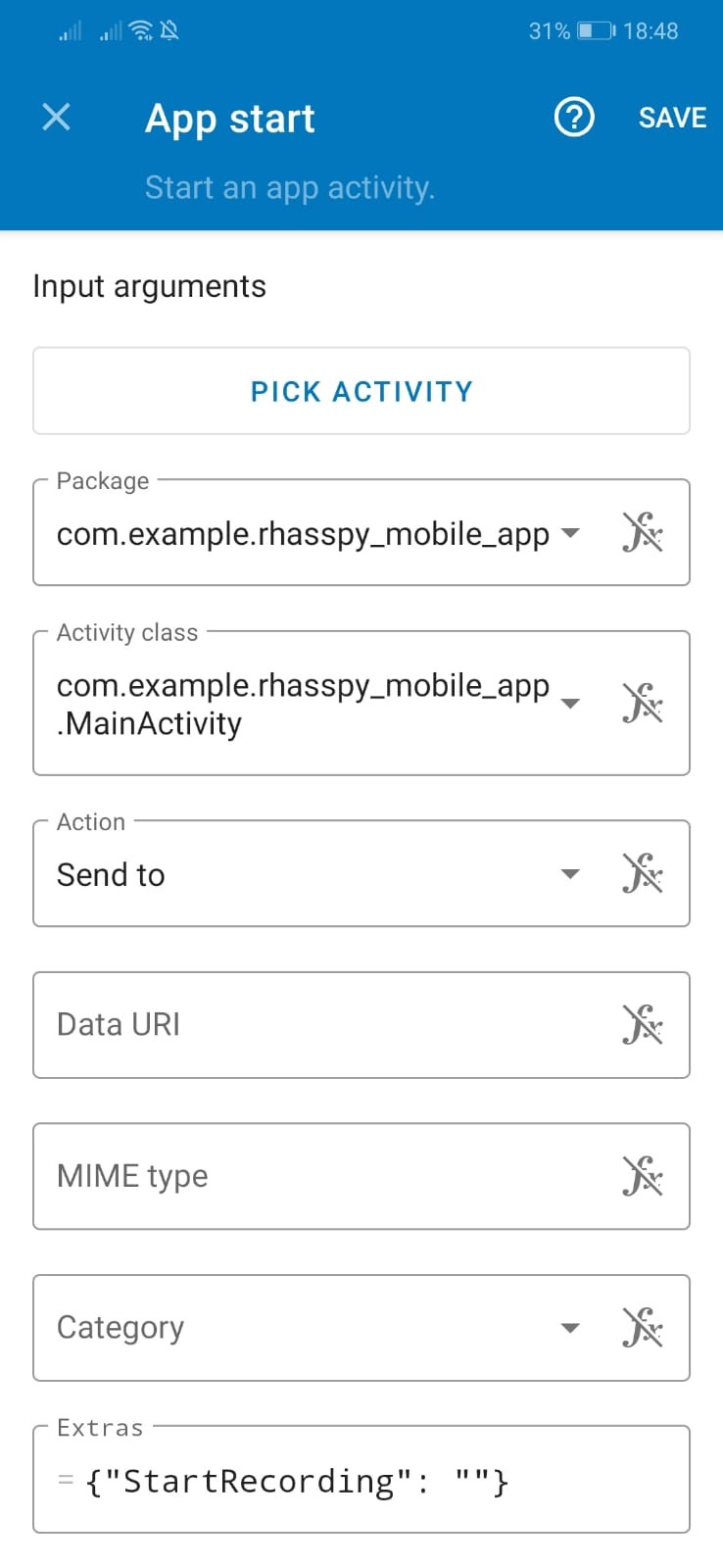
Hi Razzo04
thanks for you help. the point is start rhasspy without unlocking the phone but unfortunatelly it isn’t working.
now im having the same issue than RandomRhasspyUser
I can’t seem to put in the Rhasspy IP (IPADDRESS:12101) itself in the app settings, it says “cannot connect to rhasspy”.
and the “no one managed the intent: hassturnoff” issue too
mqtt msgs shown :
:
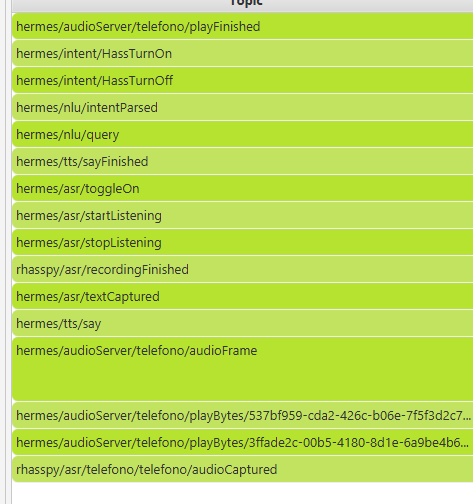
rhasspy configuration:

Android prevents an application that has no graphics element on the screen from performing certain tasks such as recording audio especially if the phone is locked to overcome this the app must have a Foreground notification at the moment there is no direct setting in the app that allows this but you can enable wake Word select on UDP and enter 127.0.0.1:20000 so the UDP packets will not be sent but will remain in the device. Concerning the problem that intent is not being handled, I suspect that the problem is that rhasspy is not sending the intent to home assistant. under the section Intent Handling, do you have inserted the siteId set on the app?
Hi, great app. I have the mobile App got working with nodered. At the moment i can click on the microphone symbol and talk and have to click again when finished. That is working already and i can switch on and off an wled stripe. Great for now.
But how exactly can i use wake word from your app? I dont understand your explanation in this thread about wake word using. I have a raspberry PI 3b with hypriot and rhasspy (port 12101) and nodered (port 1880) as docker Container at 192.168.0.54. A second raspberry is running mosquito mqtt broker at 192.168.0.30:1883. Can you explain to me what udp port and ip i have to choose in your App and in rhasspy to get the wake word function working? I use porcupine in rhasspy for wake word. In rhasspy i have german profile.
Hi there,
razzo04 thinks about an smartwatch App so we can use a Watch as Satellite. See here:
https://github.com/razzo04/rhasspy-mobile-app/issues/4
With this App we have a Satellite on our Wrist. Perhaps anyone has an Watch with Wear OS and Microphone, so we can help to develop. This time i have only a Pebble Time, but i will order a Wear OS Watch.
Greetings
I just installed the Mobile App but I realized the Settings are not loading, the wheel keeps spinning.
I both built it my self and also downloaded the app, I tried both.
What version of Android are you using?
Congratulations razzo04.
Your App is great!!!
I’m using it to control Domoticz with my Android Phone and a Node-Red structure to recognize the intents and execute commands via http responses to the Domoticz API.
For the moment is working fine. Now I want to to try with old Android phones placed in several rooms with the power supply connected and using wake up word.
My question is about the satellite siteId. I don’t know how to include the siteId in Rhasspy Mobile App to differenciatte bewteen them to send the audio from Rhasspy without active session to different mobiles.
Thanks in advace.
If you have any conflict with the siteId generated by the app you can change it manually by editing the text field “Siteid” and then you can click again on auto setup.