Issues with HA built-in intents [HassTurnOff]

Hi everybody,

I’m trying to get Rhasspy to work with a HA server, to perform simple tasks like turning off/on lights, nothing crazy. I’m using a server/satellite set-up.
Now I’m stuck at testing a few basic functions. I’m not very familiar with linux or programming, so maybe I’m missing something very obvious here.
I’d be grateful if somebody could point me in the right direction.

I want to switch on and off a Zigbee plug, into with a lamp is plugged in. Switching the plug via the HA GUI works fine.
So, in HA an enitity called “living room lamp” shall be turned on/off via Rhasspy.

On the HA-server, I added “intent:” to configuration.yaml.
I’ve added the intents [HassTurnOn] and [HassTurnoff] were added to the servers configuration.ini as described in the tutorial.
In Rhasspy server’s config, the Intent andking is set to “Home Assistant”.

When I talk to the Rhasppy-satellite, the voice command works successfully triggers the intent “HassTurnOff”. But the plug is not switched.

Here’s the log from the satellite:

[DEBUG:2021-01-03 17:50:17,126] rhasspyserver_hermes: Sent 703 char(s) to websocket
[DEBUG:2021-01-03 17:50:17,123] rhasspyserver_hermes: <- NluIntent(input=‘turn off the living room lamp’, intent=Intent(intent_name=‘HassTurnOff’, confidence_score=1.0), site_id=‘default’, id=None, slots=[Slot(entity=‘name’, value={‘kind’: ‘Unknown’, ‘value’: ‘living room lamp’}, slot_name=‘name’, raw_value=‘living room lamp’, confidence=1, range=SlotRange(start=13, end=29, raw_start=13, raw_end=29))], session_id=‘default-porcupine-ed5c5c1e-c803-4f21-8817-82e5d94fd2b3’, custom_data=None, asr_tokens=[[AsrToken(value=‘turn’, confidence=1.0, range_start=0, range_end=4, time=None), AsrToken(value=‘off’, confidence=1.0, range_start=5, range_end=8, time=None), AsrToken(value=‘the’, confidence=1.0, range_start=9, range_end=12, time=None), AsrToken(value=‘living’, confidence=1.0, range_start=13, range_end=19, time=None), AsrToken(value=‘room’, confidence=1.0, range_start=20, range_end=24, time=None), AsrToken(value=‘lamp’, confidence=1.0, range_start=25, range_end=29, time=None)]], asr_confidence=None, raw_input=‘turn off the living room lamp’, wakeword_id=‘porcupine’, lang=None)
[DEBUG:2021-01-03 17:50:10,855] rhasspyserver_hermes: <- HotwordDetected(model_id=’/usr/lib/rhasspy/rhasspy-wake-porcupine-hermes/rhasspywake_porcupine_hermes/porcupine/resources/keyword_files/raspberrypi/porcupine.ppn’, model_version=’’, model_type=‘personal’, current_sensitivity=0.5, site_id=‘default’, session_id=None, send_audio_captured=None, lang=None)

Log file of Rhasspy server:

[ERROR:2021-01-03 16:50:17,140] rhasspyserver_hermes: NotFound(404)
Traceback (most recent call last):
File “/usr/lib/rhasspy/.venv/lib/python3.7/site-packages/quart/app.py”, line 1821, in full_dispatch_request
result = await self.dispatch_request(request_context)
File “/usr/lib/rhasspy/.venv/lib/python3.7/site-packages/quart/app.py”, line 1863, in dispatch_request
raise request_.routing_exception
quart.exceptions.NotFound: NotFound(404)
[DEBUG:2021-01-03 16:50:17,077] rhasspyserver_hermes: Handling NluIntent (topic=hermes/intent/HassTurnOff, id=822b7264-59e3-48f0-b1b8-616ef3586354)
[DEBUG:2021-01-03 16:50:17,071] rhasspyserver_hermes: <- NluIntent(input=‘turn off the living room lamp’, intent=Intent(intent_name=‘HassTurnOff’, confidence_score=1.0), site_id=‘default’, id=‘28259950-a4c7-409d-ae1a-3f487a512341’, slots=[Slot(entity=‘name’, value={‘kind’: ‘Unknown’, ‘value’: ‘living room lamp’}, slot_name=‘name’, raw_value=‘living room lamp’, confidence=1.0, range=SlotRange(start=13, end=29, raw_start=13, raw_end=29))], session_id=‘28259950-a4c7-409d-ae1a-3f487a512341’, custom_data=None, asr_tokens=[[AsrToken(value=‘turn’, confidence=1.0, range_start=0, range_end=4, time=None), AsrToken(value=‘off’, confidence=1.0, range_start=5, range_end=8, time=None), AsrToken(value=‘the’, confidence=1.0, range_start=9, range_end=12, time=None), AsrToken(value=‘living’, confidence=1.0, range_start=13, range_end=19, time=None), AsrToken(value=‘room’, confidence=1.0, range_start=20, range_end=24, time=None), AsrToken(value=‘lamp’, confidence=1.0, range_start=25, range_end=29, time=None)]], asr_confidence=None, raw_input=‘turn off the living room lamp’, wakeword_id=None, lang=None)

Thanks!!
Can you add your intent from the configuration.yaml in HA?
HA does not have entity_id’s with spaces, so “living room lamp” is invalid.

Hi romkabouter,

I just added intent: to configuration.yaml:

# Configure a default setup of Home Assistant (frontend, api, etc)
default_config:

# Text to speech
tts:
  - platform: google_translate

group: !include groups.yaml
automation: !include automations.yaml
script: !include scripts.yaml
scene: !include scenes.yaml
intent:

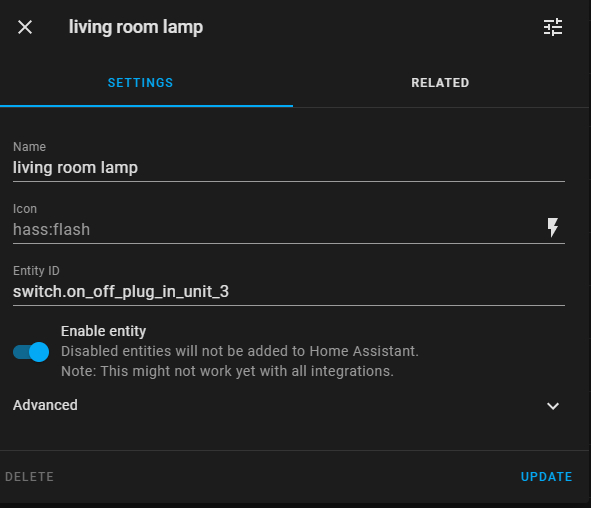
Regarding the name of the enttiy: I (probably falsly) used the name of the enttiy while it should be the entity ID, I suppose?

Would this be correct to add to the sentences.ini?

[HassTurnOn]
turn on the (living room lamp):switch.on_off_plug_in_unit_3 {name}

Thanks for your patience…

I think your sentences.ini is correct indeed.

Thanks for your response!
I restarteted HA and Rhasspy, but still doesn’t work, I’m puzzled.
Here the log of the Rhasspy server instance:

Logfile

[ERROR:2021-01-04 12:19:08,421] rhasspyserver_hermes: NotFound(404)
Traceback (most recent call last):
File “/usr/lib/rhasspy/.venv/lib/python3.7/site-packages/quart/app.py”, line 1821, in full_dispatch_request
result = await self.dispatch_request(request_context)
File “/usr/lib/rhasspy/.venv/lib/python3.7/site-packages/quart/app.py”, line 1863, in dispatch_request
raise request_.routing_exception
quart.exceptions.NotFound: NotFound(404)
[DEBUG:2021-01-04 12:19:08,341] rhasspyserver_hermes: Handling NluIntent (topic=hermes/intent/HassTurnOff, id=b05c1c9b-2408-4be4-8750-711961644c26)
[DEBUG:2021-01-04 12:19:08,333] rhasspyserver_hermes: <- NluIntent(input=‘turn off the switch.on_off_plug_in_unit_3’, intent=Intent(intent_name=‘HassTurnOff’, confidence_score=1.0), site_id=‘default’, id=‘249b2fc0-f386-4c01-9512-64e0e35e51aa’, slots=[Slot(entity=‘name’, value={‘kind’: ‘Unknown’, ‘value’: ‘switch.on_off_plug_in_unit_3’}, slot_name=‘name’, raw_value=‘living room lamp’, confidence=1.0, range=SlotRange(start=13, end=41, raw_start=13, raw_end=29))], session_id=‘249b2fc0-f386-4c01-9512-64e0e35e51aa’, custom_data=None, asr_tokens=[[AsrToken(value=‘turn’, confidence=1.0, range_start=0, range_end=4, time=None), AsrToken(value=‘off’, confidence=1.0, range_start=5, range_end=8, time=None), AsrToken(value=‘the’, confidence=1.0, range_start=9, range_end=12, time=None), AsrToken(value=‘switch.on_off_plug_in_unit_3’, confidence=1.0, range_start=13, range_end=41, time=None)]], asr_confidence=None, raw_input=‘turn off the living room lamp’, wakeword_id=None, lang=None)

Not sure what am I missing. I tried to following the tutorial step-by-step.
Excerpts from the relevant files:

sentences.ini: - see previous post

configuration.yaml - see previous post

profile.json

profile.json
{
    "dialogue": {
        "system": "rhasspy"
    },
    "handle": {
        "system": "hass"
    },
    "home_assistant": {
        "access_token": "",
        "api_password": "",
        "event_type_format": "rhasspy_{0}",
        "url": "http://192.168.1.34:8123/homeassistant/"
    },
    "intent": {
        "system": "fsticuffs"
    },
    "speech_to_text": {
        "system": "kaldi"
    },
    "text_to_speech": {
        "system": "nanotts"
    }
}

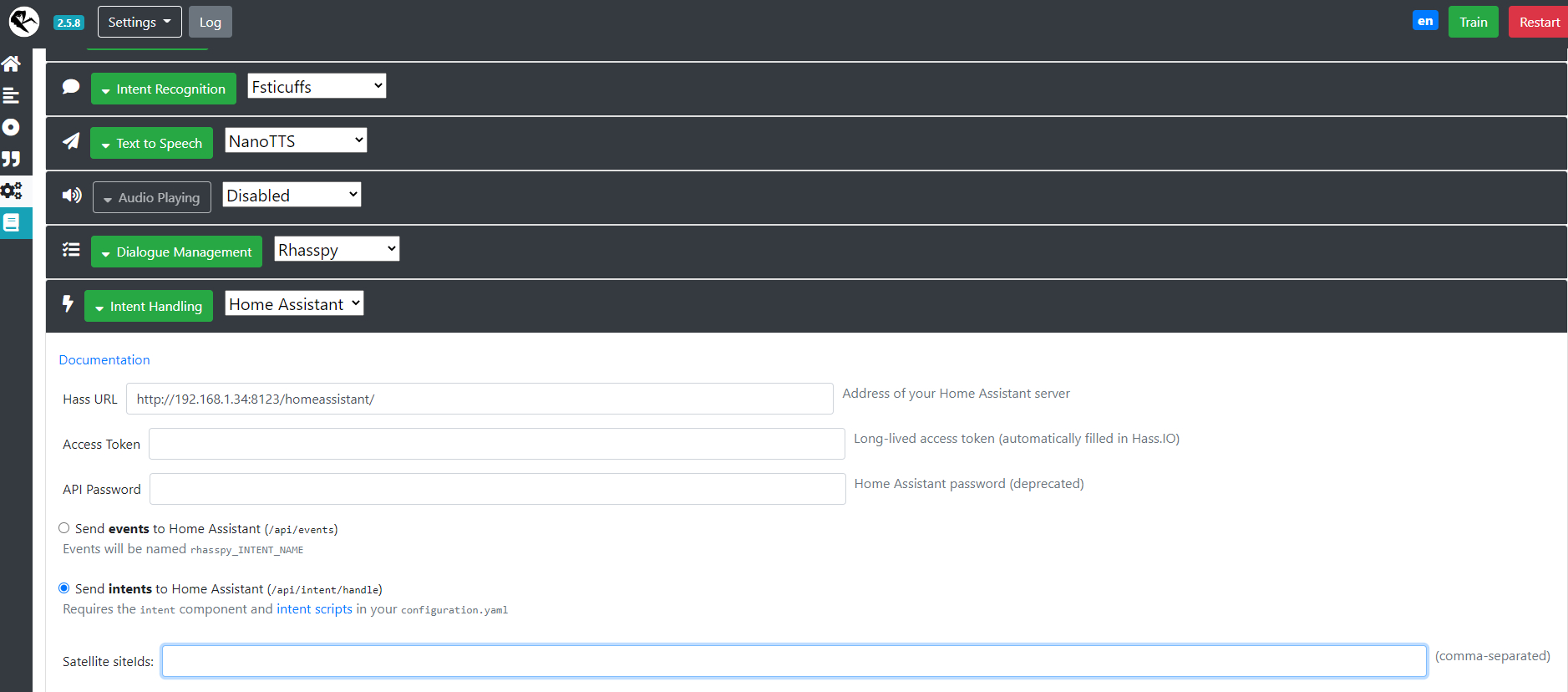
Rhasspy Intant Handling:

Are you running Rhasspy as an addon?
If not, you should create a token in Home Assistant and fill in inder Access Token in the Intent Handling
If you do, please the field Hass URL with http://hassio/homeassistant.
I see an 404 error in your Logfile

Which guide did your follow for creating your setup?

Yes, running as add-on. Sorry should have mentioned that.

Set-Up:
Server: Win10 running VM with hass.io 5.9. and Rhasspy 2.5.8.1 add-in & deCONZ

Satellite: RasPi 4 with Raspian Buster Lite and Rhasspy 2.5.8.1

Ok, can you set the Hass URL to the default?

I am not that familiar with intents because I use event, maybe the name is really the name and not the enitity id or with underscores instead of spaces.

I suggest to change you living room lamp to livingroom and also your sentences.ini to
turn on the livingroom{name}

Hey thanks again for helping, really appreciated.

I messed around again, but to no avail.

Renamed the entity to “livingroom” in HA.

Changed sentence.ini to:

[HassTurnOff]
turn off the (living room lamp):livingroom {name}

Changed profile.json to default, i.e.:

    "url": "http://hassio/homeassistant"

Added to configuration.yaml:

 http:
   base_url: localip.of.ha.server:8123

Just tried the same set-up but with the entity_ID instead of “name”, no change.

After reading this:

Maybe both intent and intent_script are needed.

It is not working for me either.

I suggest not using the built-in intents, but create your own as per:

I am using event by the way, which trigger automations. For me that is more natural and better to debug :slight_smile:

Yeah, I’ll take a look at that. Built-In sounded like the easy solution, but seems not to be the case. Thanks for all the suggestions.

And if you want speech feedback, I recommend using events and creating a light from your switch
Put this in your configuration.yaml:

light:
  - platform: switch
    name: Living room
    entity_id: switch. on_off_plug_in_unit_3
    
rest_command:
  rhasspy_speak:
    url: 'http://192.168.1.34:12101/api/text-to-speech?siteId={{ siteid }}'
    method: 'POST'
    payload: '{{ payload }}' 
    content_type: text/plain

And this in automations.yaml (you might be able to do that in the frontend):

- id: '1581372525473'
  alias: EventLights
  trigger:
  - event_data: {}
    event_type: rhasspy_Lights
    platform: event
  condition: []
  action:
  - data_template:
      siteid: '{{trigger.event.data._intent.siteId}}'
      payload: OK, {{ trigger.event.data.location }} {{trigger.event.data.action}}
    service: rest_command.rhasspy_speak
  - data_template:
      entity_id: light.{{ trigger.event.data.location }}
    service_template: light.turn_{{ trigger.event.data.action }}
  mode: single

Change your sentences.ini to this:
[Lights]
turn ($actions){action} the ($locations){location} lamp

Create slot for actions (name it actions, like before the $ in your sentences):

on
off

And for locations (name it locations):

livingroom

Restart HA en set Rhasspy to sending events.

2 Likes

Great idea. I’ll have to take some more time and understand more about scripting, intents etc.

I am using the above code exactly like that, you will probably find more “rhasspy_speak” rest command on this forum (copy pasted from me), but I have changed the url and added siteId
This is because when you have a satellite, the speech response also needs to go there.
When you omit the siteId, it will output the audio on your server :slight_smile:

Good luck and I will help if you need any

Question to this part of your code in the previous post: Is ‘url’ supposed to point to the satellite’s IP? Or the server’s IP? (In my concrete case .34 is the server)
I didn’t try it yet, hope to do so during this week.

ServerIP, because that is handling the responses :slight_smile:

Didn’t have time to work on this the last 2 weeks, but finally managed now. Triggerin HA automations by firing events works fine.

To your code I have some very, very basic questions to your post. I’ll descibe in layman terms, if I got it correctly:

Do I understand correctly that with the code you posted 2 things shuold be are achieved:
The light is actually switched and Rhasspy returns a spoken feedback, e.g. “OK, livingroom off”?

What I believe the code is doing:
By saying “turn on the livingroom lamp” the event “Lights” is triggered and sent to HA. HA then responds and sends the repsonse back to the rhasspy siteID the trigger came from, in this example ‘satellite’. This is done ist the 1st data_template section.
The 2nd data_template section toggles the switch.

If addtional lights should be integrated, the additiional entity names have to added at the bottem of this code section which then would look lile e.g.

light:
- platform: switch
name: Living room
entity_id: switch. on_off_plug_in_unit_3
entity_id: switch. on_off_plug_in_unit_2

and in sentence.ini and automations.yaml the respective event for that new entites would have to be defined addtionally. Because in your example, the event ‘rhasspy_Lights’ is explictiy for living room.

I know these questions are really basic. 'im just trying to understand if I need to define an individual event for every single possible state. I guess not because this would get very complex very fast, e.g. if “set lamp to brightness 60% and dark blue” were a single event.

Correct

Again correct :slight_smile:

You cannot add multiple entities with with light->switch. Only one entity:

If you want to be able to switch more lights, simply add them to the locations slot.
The data_template uses the light.{{ trigger.event.data.location }} to determine the correct light.

So, you now have livingroom. If you want to turn on a light in the kitchen, add “kitchen” to the locations slot and add a light with name “kitchen” to Home Assistant.

No, you can add brightness and color as a slot. Your sentence would be something like

[Lights]
turn ($actions){action} the ($locations){location} lamp
set $locations){location} to $colors{color} with brightness (0…100){brightness}

See documentation here:

You could also create two events, on for on/off and one for color/brightness.
If you want to use 1 event, you service_template would become more complicated than light.{{}}, because you will need to build depending on what sentence is provided.
My suggestion for that case to search on the the HA forum for service_templates.

No, the Lights event is for all lights you have in your locations slot which have a corresponding name in Home Assistant.
That is what templating does, it replaces the name.

This: light.{{ trigger.event.data.location }}
can become light.livingroom or light.kitchen or any other light entity.

Final feedback in this thread since this is way offtopic because of me already - thanks for pointing me in the right direction.
Voice command on/off of bulbs and plugs is fine via the events method.

I’ve tried to set up color chagning via a sepeate event, but only works for one entity I hardcode in HA. Somehow the location slot is not picked up by the HA event. I just don’t have the grasp of the HA automations work and heading over to HA forums.

The audio feedback isn’t working at the moment, but I havn’t taken a close look at the forum yet.

Can you post the automation? Otherwise it is a bit hard to find the error :wink:

Ok here goes. :smiley:

In this example I spoke to satellite (“sat”) to turn on an arc lamp. The arc lamp is a zigbee plug defined as light in HA and called “white_1”.

Switching the light works.

The audio feedback event in HA seems to fire fine in HA and feed info back to the server which processes the TTS.

[DEBUG:2021-01-24 10:19:45,272] rhasspyserver_hermes: -> TtsSay(text='OK, white_1 on', site_id='serv', lang=None, id='117ec17f-55e0-4b84-aad5-eac5e9ed4f60', session_id='', volume=1.0)
Full Server Log
[DEBUG:2021-01-24 10:19:45,459] rhasspyserver_hermes: Handling TtsSayFinished (topic=hermes/tts/sayFinished, id=de1f2e95-da1b-4907-ac60-86ec90a0a468)
[ERROR:2021-01-24 10:19:45,341] rhasspyserver_hermes: NotFound(404)
Traceback (most recent call last):
  File "/usr/lib/rhasspy/.venv/lib/python3.7/site-packages/quart/app.py", line 1821, in full_dispatch_request
    result = await self.dispatch_request(request_context)
  File "/usr/lib/rhasspy/.venv/lib/python3.7/site-packages/quart/app.py", line 1863, in dispatch_request
    raise request_.routing_exception
quart.exceptions.NotFound: NotFound(404)
[DEBUG:2021-01-24 10:19:45,317] rhasspyserver_hermes: Handling AudioPlayBytes (topic=hermes/audioServer/serv/playBytes/117ec17f-55e0-4b84-aad5-eac5e9ed4f60, id=de1f2e95-da1b-4907-ac60-86ec90a0a468)
[DEBUG:2021-01-24 10:19:45,272] rhasspyserver_hermes: Publishing 136 bytes(s) to hermes/tts/say
[DEBUG:2021-01-24 10:19:45,272] rhasspyserver_hermes: -> TtsSay(text='OK, white_1 on', site_id='serv', lang=None, id='117ec17f-55e0-4b84-aad5-eac5e9ed4f60', session_id='', volume=1.0)
[DEBUG:2021-01-24 10:19:45,265] rhasspyserver_hermes: Sent 752 char(s) to websocket
[DEBUG:2021-01-24 10:19:45,254] rhasspyserver_hermes: Handling NluIntent (topic=hermes/intent/Lights, id=7ddf37a8-9c84-4c90-8ac1-073adad75647)
[DEBUG:2021-01-24 10:19:45,245] rhasspyserver_hermes: <- NluIntent(input='switch on white_1', intent=Intent(intent_name='Lights', confidence_score=1.0), site_id='serv', id='41c651c9-c550-4a5a-afce-0c6ba36c5c6e', slots=[Slot(entity='actions', value={'kind': 'Unknown', 'value': 'on'}, slot_name='action', raw_value='on', confidence=1.0, range=SlotRange(start=7, end=9, raw_start=7, raw_end=9)), Slot(entity='locations', value={'kind': 'Unknown', 'value': 'white_1'}, slot_name='location', raw_value='arc lamp', confidence=1.0, range=SlotRange(start=10, end=17, raw_start=10, raw_end=18))], session_id='41c651c9-c550-4a5a-afce-0c6ba36c5c6e', custom_data=None, asr_tokens=[[AsrToken(value='switch', confidence=1.0, range_start=0, range_end=6, time=None), AsrToken(value='on', confidence=1.0, range_start=7, range_end=9, time=None), AsrToken(value='white_1', confidence=1.0, range_start=10, range_end=17, time=None)]], asr_confidence=None, raw_input='switch on arc lamp', wakeword_id=None, lang=None)
[DEBUG:2021-01-24 10:19:45,227] rhasspyserver_hermes: Publishing 204 bytes(s) to hermes/nlu/query
[DEBUG:2021-01-24 10:19:45,226] rhasspyserver_hermes: -> NluQuery(input='switch on arc lamp', site_id='serv', id='41c651c9-c550-4a5a-afce-0c6ba36c5c6e', intent_filter=None, session_id='41c651c9-c550-4a5a-afce-0c6ba36c5c6e', wakeword_id=None, lang=None)
[DEBUG:2021-01-24 10:19:44,302] rhasspyserver_hermes: Handling AsrTextCaptured (topic=hermes/asr/textCaptured, id=5a96629f-a13d-441e-9971-f122cb7ae8e3)
[DEBUG:2021-01-24 10:19:43,875] rhasspyserver_hermes: Publishing 71 bytes(s) to hermes/asr/stopListening
[DEBUG:2021-01-24 10:19:43,875] rhasspyserver_hermes: -> AsrStopListening(site_id='serv', session_id='2b688ffb-bda9-4574-b574-90f17ceaf082')
[DEBUG:2021-01-24 10:19:43,870] rhasspyserver_hermes: Sent 53108 byte(s) of WAV data
[DEBUG:2021-01-24 10:19:43,869] rhasspyserver_hermes: Publishing 178 bytes(s) to hermes/asr/startListening
[DEBUG:2021-01-24 10:19:43,868] rhasspyserver_hermes: -> AsrStartListening(site_id='serv', session_id='2b688ffb-bda9-4574-b574-90f17ceaf082', lang=None, stop_on_silence=False, send_audio_captured=True, wakeword_id=None, intent_filter=None)

Don’t really know what going on in sat1:

Satellite log
[ERROR:2021-01-24 10:19:45,428] rhasspyserver_hermes: 'utf-8' codec can't decode byte 0x80 in position 24: invalid start byte
Traceback (most recent call last):
  File "/usr/lib/rhasspy/.venv/lib/python3.7/site-packages/quart/app.py", line 1821, in full_dispatch_request
    result = await self.dispatch_request(request_context)
  File "/usr/lib/rhasspy/.venv/lib/python3.7/site-packages/quart/app.py", line 1869, in dispatch_request
    return await handler(**request_.view_args)
  File "/usr/lib/rhasspy/rhasspy-server-hermes/rhasspyserver_hermes/__main__.py", line 1129, in api_play_wav
    url_or_path = data.decode()
UnicodeDecodeError: 'utf-8' codec can't decode byte 0x80 in position 24: invalid start byte
[DEBUG:2021-01-24 10:19:45,314] rhasspyserver_hermes: Sent 825 char(s) to websocket
[DEBUG:2021-01-24 10:19:45,311] rhasspyserver_hermes: <- NluIntent(input='switch on arc lamp', intent=Intent(intent_name='Lights', confidence_score=1.0), site_id='sat1', id=None, slots=[Slot(entity='action', value={'kind': 'Unknown', 'value': 'on'}, slot_name='action', raw_value='on', confidence=1, range=SlotRange(start=7, end=9, raw_start=7, raw_end=9)), Slot(entity='location', value={'kind': 'Unknown', 'value': 'white_1'}, slot_name='location', raw_value='arc lamp', confidence=1, range=SlotRange(start=10, end=17, raw_start=10, raw_end=18))], session_id='sat1-porcupine_raspberry-pi-b9dfa2ae-a686-45f6-b8f8-88fc1fcf27e7', custom_data=None, asr_tokens=[[AsrToken(value='switch', confidence=1.0, range_start=0, range_end=6, time=None), AsrToken(value='on', confidence=1.0, range_start=7, range_end=9, time=None), AsrToken(value='arc', confidence=1.0, range_start=10, range_end=13, time=None), AsrToken(value='lamp', confidence=1.0, range_start=14, range_end=18, time=None)]], asr_confidence=None, raw_input='switch on arc lamp', wakeword_id='porcupine_raspberry-pi', lang=None)
[DEBUG:2021-01-24 10:19:40,981] rhasspyserver_hermes: <- HotwordDetected(model_id='/usr/lib/rhasspy/.venv/lib/python3.7/site-packages/pvporcupine/resources/keyword_files/raspberry-pi/porcupine_raspberry-pi.ppn', model_version='', model_type='personal', current_sensitivity=0.5, site_id='sat1', session_id=None, send_audio_captured=None, lang=None)

In this guy’s post, it was solved, but he seems to play the audio on the same Rhasspy instance where the TTS is produced. I didn’t test this solution on my set-up though.

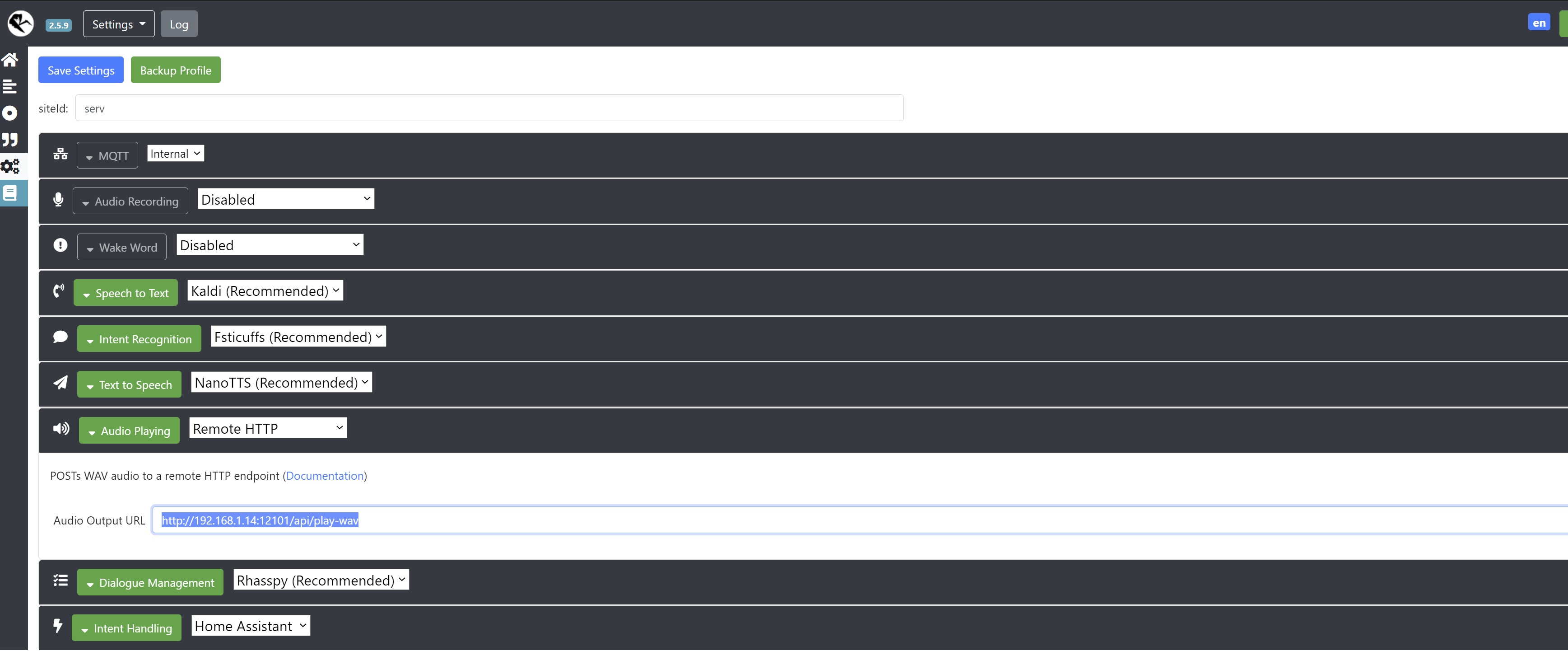
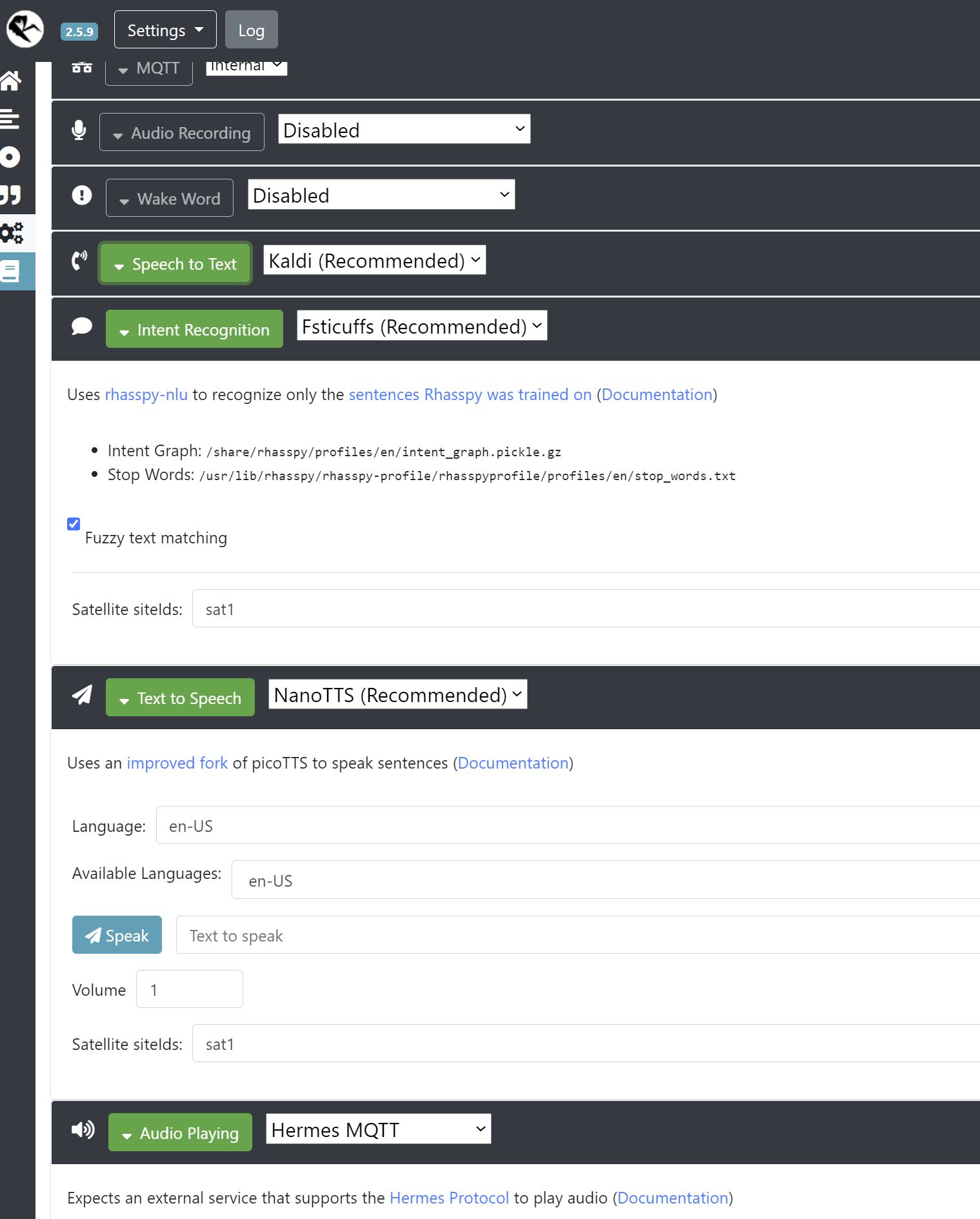
My Rhasspy instances are configured as shown below, which is most likely wrong, but I didn’t understand the documentation.

sat1:

serv:

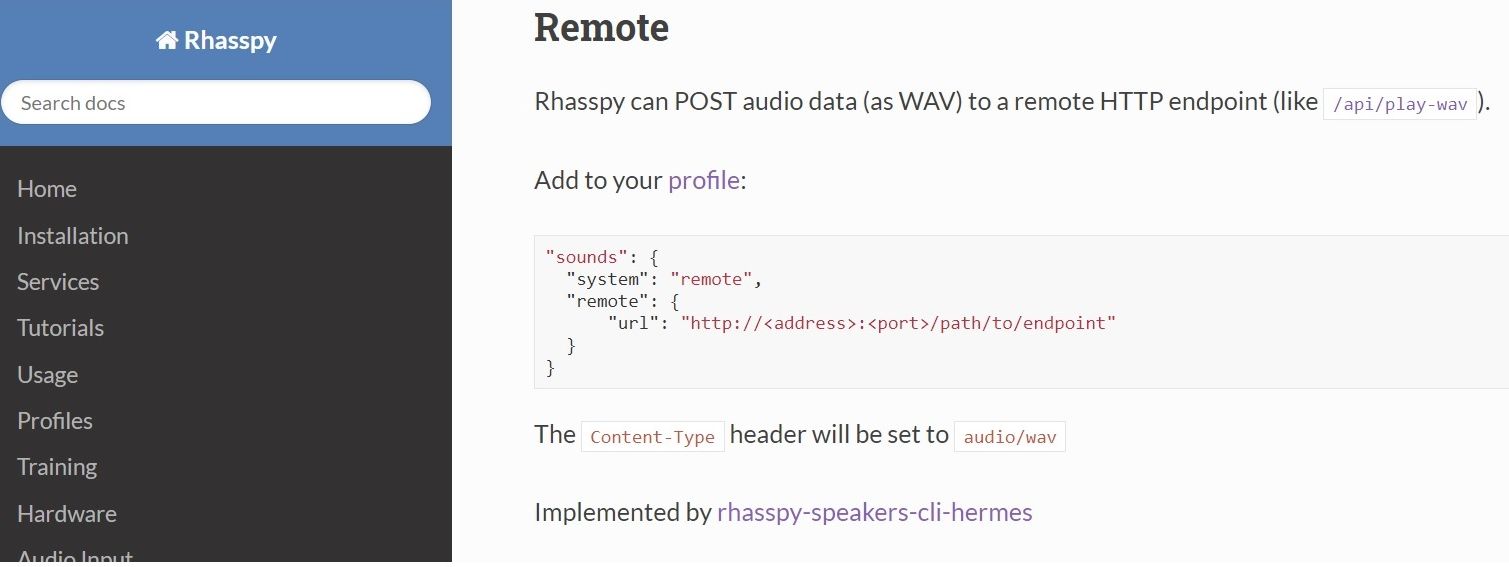
documenation

No, not your Rhasspy setup, but your automation form Home Assistant.
The one you created for this:

I’ve tried to set up color chagning via a sepeate event, but only works for one entity I hardcode in HA.

You mention audio feedback is not working and you have hardcoded the entity in HA.
So, assuming you use automations to react on those events, please post the automation you created in Home Asssistant

Why do you post the wav to an endpoint? (the audio play on the server)
That needs to be hermes, because you want to play the audio on the sat1 right?
And maybe more sats when this is done?

The hardcode bit was only about the 2 seperate events for turn on/off and changing color not working as expected first and using an ugly hardcode soltion. But now I sorted it out in the meantime. The automations for on/off an changing colors work with templates (on/off below).

- id: '1581372525473'
  alias: OnOffLight
  trigger:
  - event_data: {}
    event_type: rhasspy_Lights
    platform: event
  condition: []
  action:
  - data_template:
      siteid: '{{trigger.event.data._intent.siteId}}'
      payload: OK, {{ trigger.event.data.location }} {{trigger.event.data.action}}
    service: rest_command.rhasspy_speak
  - data_template:
      entity_id: light.{{  trigger.event.data.location  }}
    service_template: light.turn_{{  trigger.event.data.action  }}
  mode: single

I posted wav to the endpoint only for testing if it works at all in a single satellite set-up.
Of course you’re right it should be dynamic in case of several satellites. At the moment there is only sat1, where audio should be played.

Setting server to “MQTT: internal” and audio playing: Hermes MQTT and the satellite to MQTT: internal and audio playing: aplay didn’t solve it though.

The satellite’s name has to be entered in the server’s config, right?

Can you post this as well? From your configuration. Most probably it is missing the siteid

HA’s configuation.yaml

rest_command:
  rhasspy_speak:
    url: 'http://192.168.1.34:12101/api/text-to-speech?siteId={{ siteid }}'
    method: 'POST'
    payload: '{{ payload }}' 
    content_type: text/plain

If I get Rhasspy’s concept correctly, this should make the powerful server at .34:12101 process the TTS. Satellite is at .14:12101 btw.

That command should work indeed.
It should play audio to the correct sat.

With the server setting to Hermes MQTT, the audio will be published to the broker.
Can you please check if that works? It should be on hermes/audioServer/sat1/playBytes/#
The # is an ID, coming from the session of the Dialogue Manager
When there is an incoming message, the rest_command and server are correctly setup.

Then there is only one problem left, which is the setting of Audio Playing on the sat1.
I am using a device which plays incoming audio on that topic, but maybe that does not work. I will try to see if I can check this with a Pi I have :slight_smile:

I am not sure how the sat1 Audio Playing should be set however.

It looks like it’s not sending it to sat?? The AudioPlayByter line refers to ‘serv’.

Server log, after speaking to satellite:

[DEBUG:2021-01-24 17:14:51,483] rhasspyserver_hermes: Handling TtsSayFinished (topic=hermes/tts/sayFinished, id=16d2d383-b8d4-40c5-9149-b1e5dcf27524)
[ERROR:2021-01-24 17:14:48,431] rhasspyserver_hermes: NotFound(404)
Traceback (most recent call last):
  File "/usr/lib/rhasspy/.venv/lib/python3.7/site-packages/quart/app.py", line 1821, in full_dispatch_request
    result = await self.dispatch_request(request_context)
  File "/usr/lib/rhasspy/.venv/lib/python3.7/site-packages/quart/app.py", line 1863, in dispatch_request
    raise request_.routing_exception
quart.exceptions.NotFound: NotFound(404)
[DEBUG:2021-01-24 17:14:48,391] rhasspyserver_hermes: Handling AudioPlayBytes (topic=hermes/audioServer/serv/playBytes/2e1d5987-8cf7-4b2e-ba36-27daf55a962e, id=16d2d383-b8d4-40c5-9149-b1e5dcf27524)
[DEBUG:2021-01-24 17:14:48,345] rhasspyserver_hermes: Publishing 140 bytes(s) to hermes/tts/say
[DEBUG:2021-01-24 17:14:48,345] rhasspyserver_hermes: -> TtsSay(text='OK, ledstrip_1 off', site_id='serv', lang=None, id='2e1d5987-8cf7-4b2e-ba36-27daf55a962e', session_id='', volume=1.0)
[DEBUG:2021-01-24 17:14:48,329] rhasspyserver_hermes: Sent 765 char(s) to websocket
[DEBUG:2021-01-24 17:14:48,325] rhasspyserver_hermes: Handling NluIntent (topic=hermes/intent/Lights, id=077322f5-e38e-4120-b63e-230c1fedf181)
[DEBUG:2021-01-24 17:14:48,314] rhasspyserver_hermes: <- NluIntent(input='switch off ledstrip_1', intent=Intent(intent_name='Lights', confidence_score=1.0), site_id='serv', id='44f15910-0d6c-40b2-93d6-e2c3a61eec1c', slots=[Slot(entity='actions', value={'kind': 'Unknown', 'value': 'off'}, slot_name='action', raw_value='off', confidence=1.0, range=SlotRange(start=7, end=10, raw_start=7, raw_end=10)), Slot(entity='locations', value={'kind': 'Unknown', 'value': 'ledstrip_1'}, slot_name='location', raw_value='strip', confidence=1.0, range=SlotRange(start=11, end=21, raw_start=11, raw_end=16))], session_id='44f15910-0d6c-40b2-93d6-e2c3a61eec1c', custom_data=None, asr_tokens=[[AsrToken(value='switch', confidence=1.0, range_start=0, range_end=6, time=None), AsrToken(value='off', confidence=1.0, range_start=7, range_end=10, time=None), AsrToken(value='ledstrip_1', confidence=1.0, range_start=11, range_end=21, time=None)]], asr_confidence=None, raw_input='switch off strip', wakeword_id=None, lang=None)
[DEBUG:2021-01-24 17:14:48,261] rhasspyserver_hermes: Publishing 202 bytes(s) to hermes/nlu/query
[DEBUG:2021-01-24 17:14:48,259] rhasspyserver_hermes: -> NluQuery(input='switch off strip', site_id='serv', id='44f15910-0d6c-40b2-93d6-e2c3a61eec1c', intent_filter=None, session_id='44f15910-0d6c-40b2-93d6-e2c3a61eec1c', wakeword_id=None, lang=None)
[DEBUG:2021-01-24 17:14:47,366] rhasspyserver_hermes: Handling AsrTextCaptured (topic=hermes/asr/textCaptured, id=3d7603f6-cf12-4279-b7be-4c483c6b3d36)
[DEBUG:2021-01-24 17:14:46,999] rhasspyserver_hermes: Publishing 71 bytes(s) to hermes/asr/stopListening
[DEBUG:2021-01-24 17:14:46,998] rhasspyserver_hermes: -> AsrStopListening(site_id='serv', session_id='d5d070d5-e209-466e-8b50-7d58d9358228')
[DEBUG:2021-01-24 17:14:46,998] rhasspyserver_hermes: Sent 56948 byte(s) of WAV data
[DEBUG:2021-01-24 17:14:46,995] rhasspyserver_hermes: Publishing 178 bytes(s) to hermes/asr/startListening
[DEBUG:2021-01-24 17:14:46,994] rhasspyserver_hermes: -> AsrStartListening(site_id='serv', session_id='d5d070d5-e209-466e-8b50-7d58d9358228', lang=None, stop_on_silence=False, send_audio_captured=True, wakeword_id=None, intent_filter=None)

Is this related?

Please fill sat1 in all “Satellite siteIds:”

I do not know if it matters, but that is what I have entered :slight_smile:

For reference, did you follow this tutorial?

And then with Remote HTTP?

If so, then I need to review your settings.
sat1:

  • All Remote HTTP should point to your server and to the correct endpoint.
  • Dialogue Management and Intent Handling should be Rhasspy and Home Assistant.

This looks ok in your previous screenshot, except Intent Handling which is not shown.

serv:

  • Dialogue Management and Intent Handling should be disabled
  • Audio Playing can be disabled

I think what is happening is that the server is handling your intent and sends it to Home Assistant.
Therefore, site_id = serv.

If you disable it and set it on sat1 to Home Assistant, the intent will be send to HA by the sat1

1 Like

Yes, I used those tutorials with the Remote HTTP method.

I now switched to external MQTT, cheked all settings and syntaxes again…and it’s working! :smile: : I am thrilled to bits. Love it! Thanks to everybody creating this for all of us.

1 Like

Hi @Thomas_S and @romkabouter,

I am very pleased to have stumbled on this post, and thanks for all the detail. I had recently posted my issue (which is more or less the same as the way you, @Thomas_S, first describe your own) in a similarly named thread “Rhsaspy 2.5 with Hassio built in intents” (you referred to this, @romkabouter).

I will look into the EVENTS alternative as described here. Thanks again.

I do wonder though: If the built in Hassio intents are known not to be working, should they be reviewed, corrected and updated in the Rhasspy documentation? Or perhaps removed in favour of a rather more comprehensive explanation of implementation using Events? I am motivated by the fact that it took me many days to get the various components in Rhasspy and Hassio set up correctly and to achieve having entities pulled into Rhasspy. Following this with several days trying and failing to make the builtin HASS intents work before finding this thread. I just feel that others following us down this road would benefit from an update to the Rhasspy documents(?) Perhaps this is under way.

Yeah I hoped that giving a rather verbose description of everything I did would help other people who find this thread.

About the doc - well the way I see it is that this project is generously made available to everybody for free by people doing this in their spare time. And the project IMO is still aimed at more experience people, as you also can tell by many very technical posts on here which I usually can’t follow. So I kind of understand that updating the “end-user” tutorials are maybe not the top priorty for the folks.
Also, I’m not sure that it’s clear that the intents aren’t working - maybe the problem is somewhere else.

Just fyi: for me the built in intents in home assistant are working just fine…

The names are the entity names not the entity id

[HassTurnOn]
zet de (woonkamerverlichting | staande lamp | garageverlichting | bureauverlichting | dressoir){name} (aan){state}

[HassTurnOff]
zet de (woonkamerverlichting | staande lamp | garageverlichting | bureauverlichting | dressoir ){name} (uit|af){state}

In my configuration.yaml I just added:

intent: 
intent_script: !include intents.yaml    

an example intent script:

GetTime:
  speech:
    text: Het is nu {{ now().strftime("%H %M") }}
1 Like

Hi @Thomas_S… I agree with you. The work that people are doing here is absolutely incredible. One day I hope I might get up to speed and contribute something useful, but I do feel like a novice at the moment for sure. In my experience and as you have written, documentation is often the last to be updated. Having said that, the Rhasspy (and Hassio) docs are in fact very comprehensive and a lot of care has clearly been taken already to help the new comer get started. So thanks to all for the hard work.

I notice @tipofthesowrd has also replied stating that he has HASS builtin intents working. Thanks for posting that @tipofthesowrd as HASS builitin intents seems like a very clever solution, and I may have another go as I do like it as an approach.

The good news is that I managed to get the Event form working pretty much immediately!

My setup is Rhasspy within HASSIO on a Raspberry Pi. For my simple proof of concept test: I restored the HASSIO system baclk to a point of just after the Rhasspy install and initial choice of configuration entries as per docs. in Rhasspy I then enabled the intent handling as Home Assistant, and chose the Send Events option. No tokens or any other entry changes. In Hassio I created an automation with trigger of type Event and event_id rhasspy_ChangeLightState. The automation Action was kept simple to turn on a specific light to 100% brightness. No changes to the HASSIO configuration.yaml at all (no “intent:” entry, no “auth_providers:”).

The sentences was left “as is” from install of Rhasspy. It worked! Lights tuned on with a simple command of “turn on the dining lights”, and so I’m pretty happy (under statement!) with the Event solution!