This is the payload I send:
{
     "siteId": "default",
     "reason": "Voice Command"
}
This is the payload I send:
{
"siteId": "default",
"reason": "Voice Command"
}
And how is your setup? Is your Rhasspy setup actually called default or did you give your Rhasspy a different siteId?
Hmmm, my partner likes the TV fairly loud while she’s working in the kitchen; and then when watching TV or movie I find I’m constantly raising the volume to hear the dialog then rushing to lower it when the background music or effects comes on. Death is too good for the people who mix the sound for movies 
Anyway, this results in a lot of false hotword detections. I have tried adjusting porcupine’s sensitivity, but I believe there’s simply too much noise for porcupine to cope well with. Soooo… trying to think laterally
But first I can ask you all for other options which I have not thought of 
Depending on your system you use to manage all your devices you can actually get the play status of the TV (playing or paused).
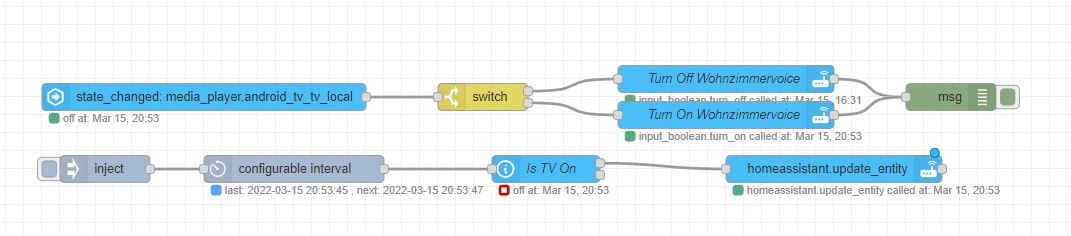
I’m using HomeAssistant with the Android TV addon and NodeRed and a helper input boolean.
On the Bottom you have an interval of 1s to faster update the playing state if the tv is on (otherwise it would be 10s)
On the top it reacts to the playing state and toggles the input boolean and the input boolean then calls the http service to turn on/off the wakeword
Hi Nailik, I have a nVidia ShieldTV (which to HA is just a glorified AndroidTV), a dumb TV, and HA with node-RED … so I’m having a go at implementing your flow.
I was initially a little reluctant about this approach because each androidTV app can operate in different ways; and “pause” doesn’t make much sense when watching live TV or streaming radio. If the ShieldTV’s remote had a “mute” button it would make sense to check that too.
But this does have the advantage of using the shieldTV remote and being relatively easy to implement.
I’m having a little trouble figuring out your bottom sequence … I assume the inject is repeating every 1 second, and updating the state of the media device if the TV is on … but what does the “configurable interval” do ?
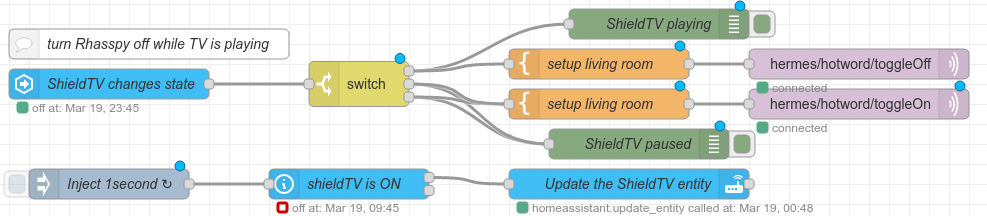
Also @romkabouter can you help ? I am trying to use MQTT to toggle rhasspy’s hotword detection, but I have obviously not got the payload correct, since it does not appear to stop listening for hotword. The satellite in my living room with the ShieldTV is “sat-1”. The most obvious nodes are:
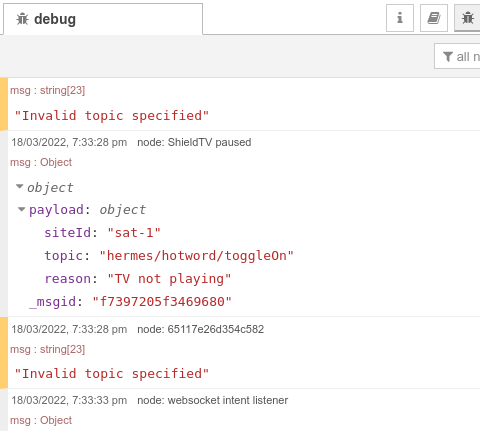
When the ShieldTV is paused (or turned off in this case) I am getting in the debug window
but what does the “configurable interval” do ?
I actually didn’t knwo that the inject node can repeat by itself and used it only to start up …
I am trying to use MQTT to toggle rhasspy’s hotword detection
I am using the http service to toggle wakeword detection /api/listen-for-wake and as payload i use the entity state of my input_boolean
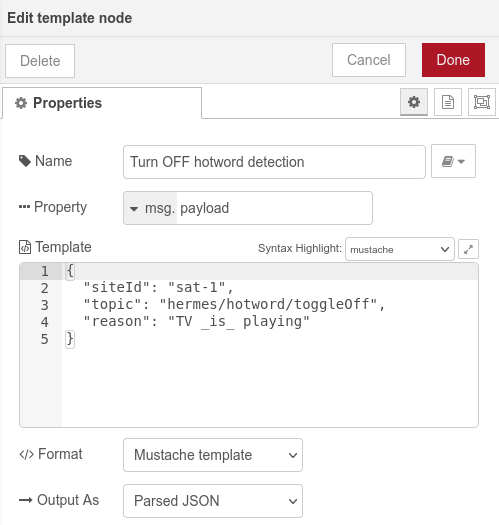
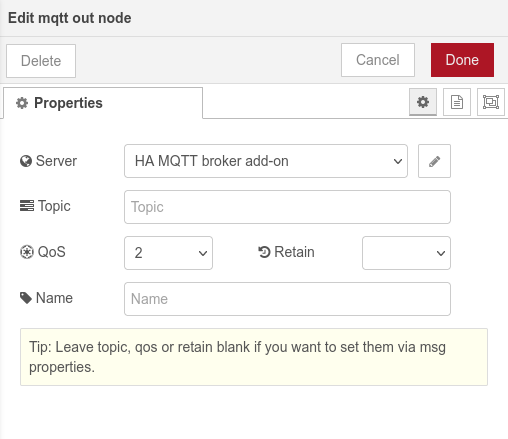
You should not put the topic inside the payload but inside the mqtt out node i think
I think you must add the topic in de Topic input box. Not in de payload message. I know it says you can leave it empty, but then you have the specify the topic in the msg object, not the msg payload.
So I suggest removing topic from the payload, and add it to the Topic input box.
@romkabouter, I had the same thought after posting my last message, so changed back to using 2 MQTT nodes which include the topic - but I didn’t have time to test last night.
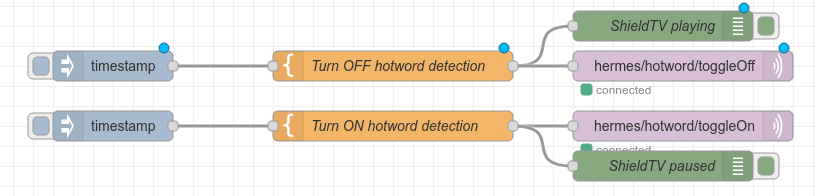
After a bit of testing, today I have made a couple of simple test sequences:
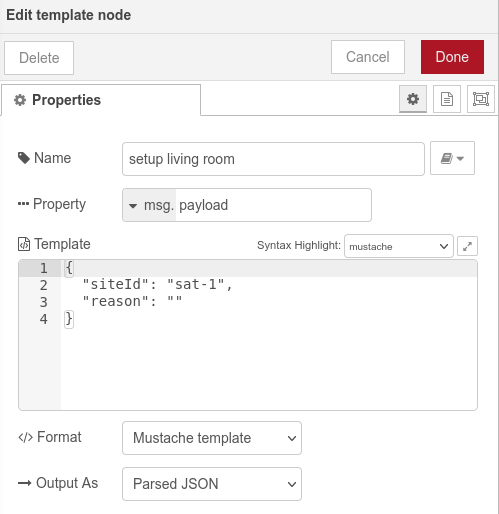
The “Turn OFF hotword detection” node is:
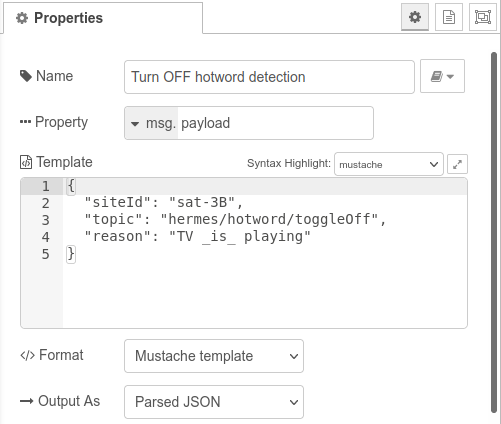
and the MQTT out node is:
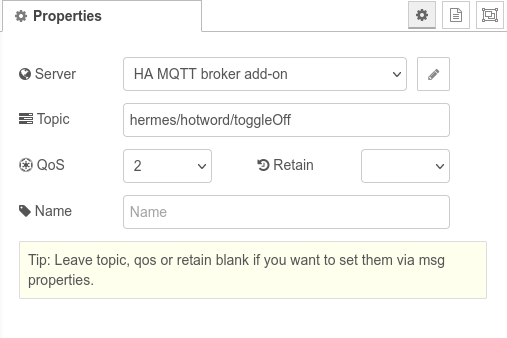
I am assuming that leaving the topic in the payload will be unexpected, and so ignored ?
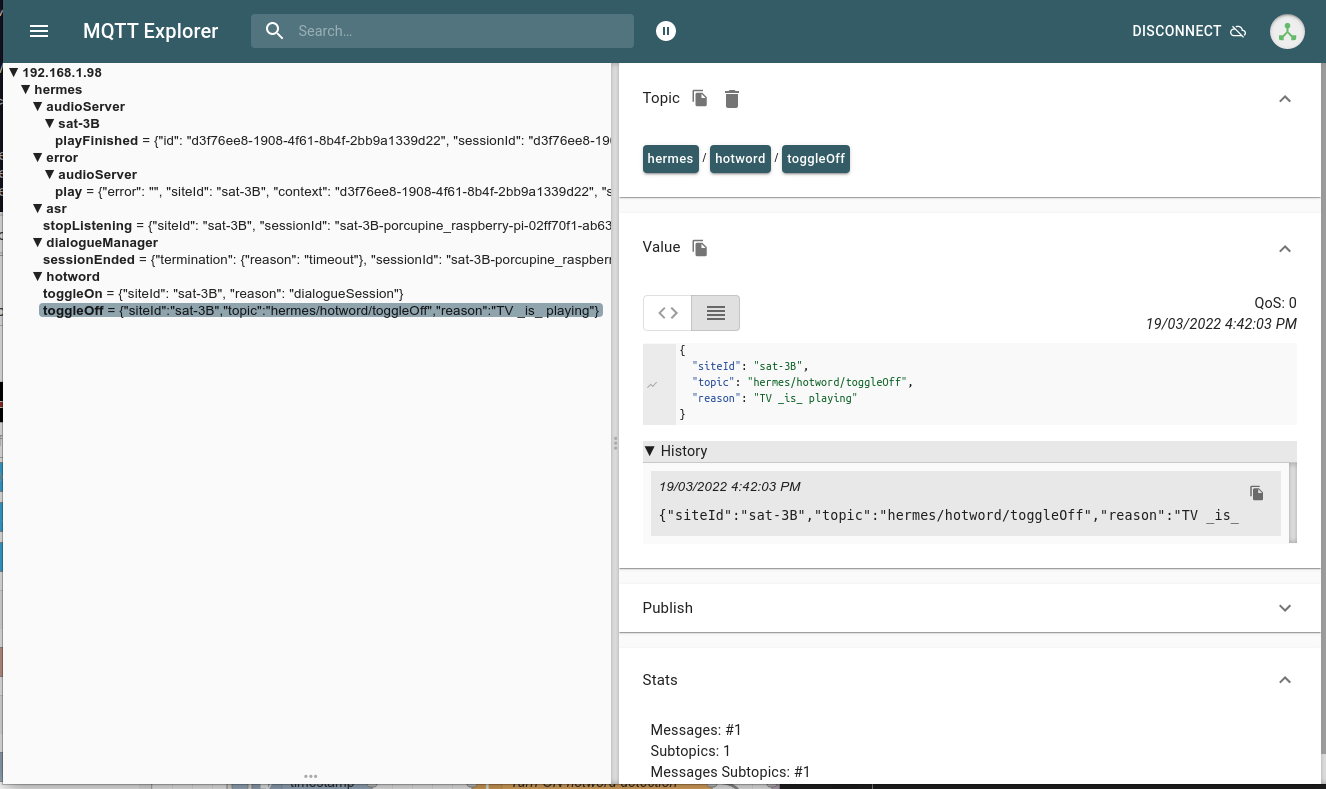
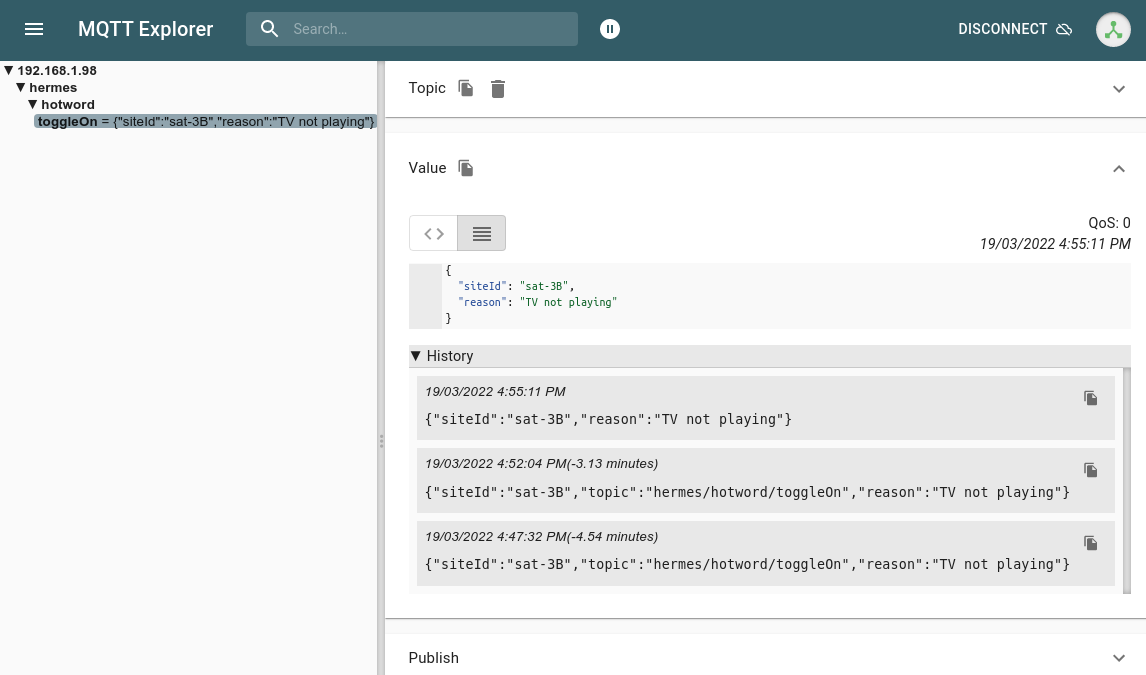
After rebooting the “sat-3B” satellite in my study for testing I have checked that Porcupine is responding, and cleared MQTT Explorer.
Injecting the Turn OFF hotword gives the expected debug result in node-RED, and in MQTT Explorer
BUT … when I inject the Turn ON hotword … Porcupine continues to ignore me !
Try again, and even remove the extra topic from the payload … but still no beep when speaking “porcupine”.
Please, can you help identify what I have missed.
Still fiddling with this. I went into the Rhasspy settings for Wakeword, and adjusted the sensitivity vale. On saving this setting, porcupine started listening again.
I do not know, you mention toggleOff working so I think you assume correct 
Can’t see an error in the toggleOn, maybe you can find what the regular flow publishes to the toggleOn topic. It should be the same, but might be different for some reason?
Or maybe rhasspy on sat-3 has simply stopped listening to MQTT ?
Leading me to the Rhasspy log - no, not the empty “log” in the web user interface - but to journalctl -e -u rhasspy.service … which includes:
ar 19 21:10:10 rhasspy-sat-2 rhasspy[609]: [ERROR:2022-03-19 21:10:10,833] rhasspywake_porcupine_hermes: parse_mqtt_message (topic=hermes/hotword/toggleOn)
Mar 19 21:10:10 rhasspy-sat-2 rhasspy[609]: ValueError: 'TV not playing' is not a valid HotwordToggleReason
Mar 19 21:10:20 rhasspy-sat-2 rhasspy[609]: ValueError: 'TV _is_ playing' is not a valid HotwordToggleReason
So, apparently the “reason” must be a pre-defined value. Another look at https://rhasspy.readthedocs.io/en/latest/reference/#hotword-detection and try with reason: “” … and it works - though on my RasPi 3B it takes 25 seconds for the hotword detection to start working.
Why so long to start working ? Back to the log. This time, as soon as I inject the Hotword ON I get 500 lines of python errors. Maybe something else got corrupted. Try the Microsoft fix: reboot sat-3B satellite and try again…
Turn OFF Hotword works correctly with MQTT explorer showing only the toggleOFF. Check the service log.
Turn ON Hotword detection, and it shows in WQTT Explorer. Log now shows:
Mar 20 12:54:33 rhasspy-sat-2 rhasspy[613]: [DEBUG:2022-03-20 12:54:33,476] rhasspyserver_hermes: Starting web server at http://0.0.0.0:12101
Mar 20 12:54:33 rhasspy-sat-2 rhasspy[613]: Running on 0.0.0.0:12101 over http (CTRL + C to quit)
Mar 20 13:05:39 rhasspy-sat-2 rhasspy[613]: [DEBUG:2022-03-20 13:05:39,487] rhasspywake_porcupine_hermes: <- HotwordToggleOff(site_id='sat-3B', reason=<HotwordToggleReason.UNKNOWN: ''>)
Mar 20 13:05:39 rhasspy-sat-2 rhasspy[613]: [DEBUG:2022-03-20 13:05:39,488] rhasspywake_porcupine_hermes: Disabled
Mar 20 13:08:12 rhasspy-sat-2 rhasspy[613]: [DEBUG:2022-03-20 13:08:12,961] rhasspywake_porcupine_hermes: <- HotwordToggleOn(site_id='sat-3B', reason=<HotwordToggleReason.UNKNOWN: ''>)
Mar 20 13:08:12 rhasspy-sat-2 rhasspy[613]: [DEBUG:2022-03-20 13:08:12,962] rhasspywake_porcupine_hermes: Enabled
Mar 20 13:08:13 rhasspy-sat-2 rhasspy[613]: [DEBUG:2022-03-20 13:08:13,009] rhasspywake_porcupine_hermes: Receiving audio sat-3B
Give Porcupine a command, and it works. Check the log and no errors ! So far, so good … but still takes up to 25 seconds after processing the hotword/toggleON before it starts to respond to the wakeword.
That is really long indeed. Can’t say why that happens but nice to see that it works. Maybe pass a know reason speeds it up
I did not know you need to pass a valid reason, that is not well documented
These are the valid reasons:
class HotwordToggleReason(str, Enum):
“”“Reason for hotword toggle on/off.”""
UNKNOWN = ""
"""Overrides all other reasons."""
DIALOGUE_SESSION = "dialogueSession"
"""Dialogue session is active."""
PLAY_AUDIO = "playAudio"
"""Audio is currently playing."""
TTS_SAY = "ttsSay"
"""Text to speech system is currently speaking."""
See here:
OK, to recap for any other newbie trying to do this …
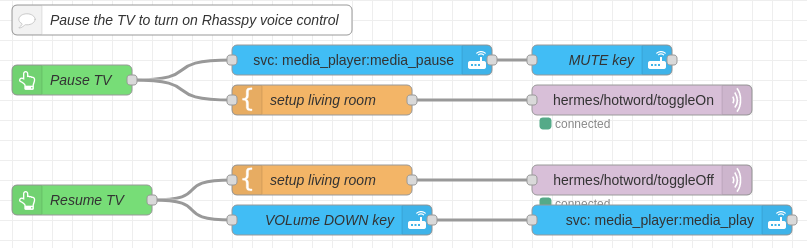
I have setup a couple of node-RED sequences to stop Rhasspy from listening for its wakeword in the living room while the TV is playing. This is to remove all those false positives where Porcupine thought it heard it’s name, and then listened to the TV for an intent.
How it works
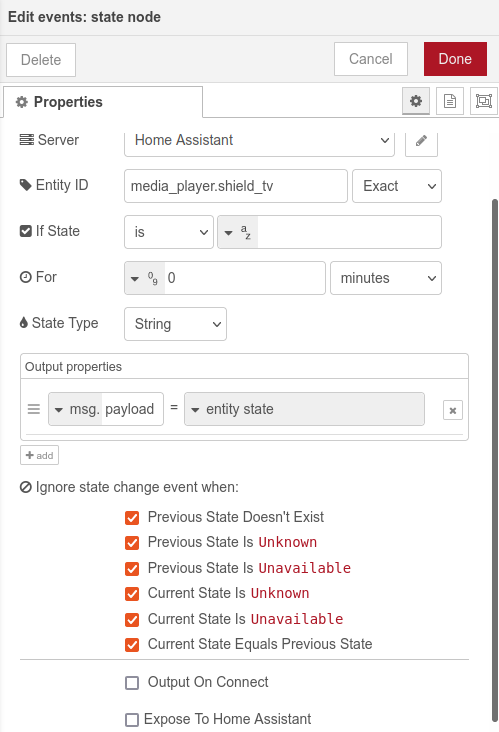
Whenever the state of the media_player.shield_tv changes, it checks the current state, and saves it in msg.payload.
The switch checks for msg.payload being “playing”; or “paused”, “standby” or any other value. In either case, we setup the msg.payload ready to send by MQTT. Note that “sat-1” is the name of the satellite in my living room, and reason apparently must be an empty string.
Finally use a MQTT Out node with topic of toggleON or toggleOFF as appropriate.
The other flow makes the above flow more responsive, by updating the shield_tv’s state every 1 second.
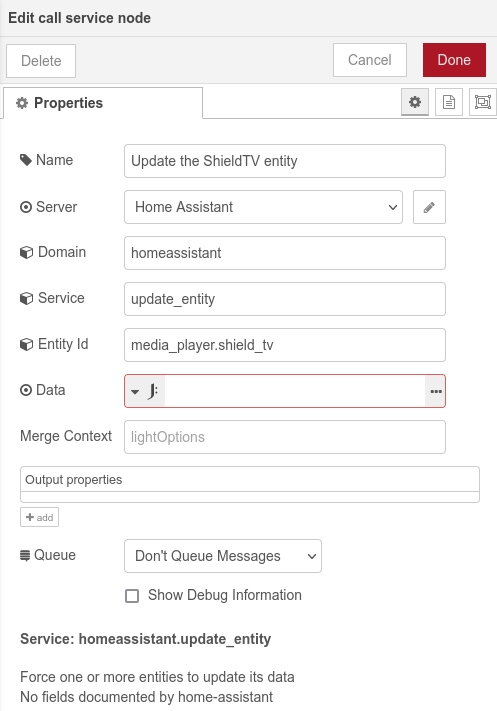
It starts with an inject, which repeats at 1 second interval. If the state of my shield_tv is not “off”, it calls home assistant’s update_entity service to update the media_player.shield_tv
Considerations:
Only the respeaker USB higher end cards have any form of NS the rest are just multi mic sound cards.
Even then NS (noise supression) works with relatively low level static noise such as fans or heaters and things that are more of a constant hum.
Get anything moving and jumping around such as TV or HiFi then your talking RTXvoice levels of NS or what is often used targeted speaker separation such as VoiceFilterLite which takes a different take to filtering unknown noise and doesn’t bother and extracts known voice.
Still no software like that avail that is currently running on a pi even though the latter could be possible.
Also because Rhasppy is NS agnostic the atrifacts some of the NS algs make can be a problem for recognition than say a system trained for a specific NS.
I think i would recommend you to use the http api rather than mqtt to toggle it back on.
Maybe this is a little bit faster (i do it this way)
just call rhasspyip/api/listen-for-wake and in the payload you have on and off
https://rhasspy.readthedocs.io/en/latest/reference/#:~:text=in%20recognized%20intent-,/api/listen-for-wake,-POST%20"on"%20to
but jeah it doesn’t work with any app 
As rolyan repeatedly points out, the cheaper multi-mic sound card hardware gives no benefit without the DSP programming, But … they are sold as development boards, not as end-user products.
I have noticed here that some people are using Jabra, reSpeaker USB and other high-end conferencing mics which already have the DSP programming built-in - and so I expect are much better for Voice Assistant. But they are too expensive for me to put around the house  But even these high-end multi-mic units with all the DSP are for a specific niche market - meeting room / audio conference, which assumes one person speaking at a time and external/background noise is minimised.
But if more than one person is speaking (or there is a TV or background noise) how can the DSP beamforming know which sound to focus on ? Thinking more about it, it will take an awful lot more AI to be able to isolate individual voices from the background … and I don’t see that in the foreseeable future… not in my price range anyhow 
… so, if no mic can cope well with a noisy environment, what is the alternative ? To turn the mic off when it is noisy.
Well, I disabled my node-RED sequence from post #19. From memory I think it was because (a) I can’t pause live TV, and (b) increasing the responsiveness of the sequence meant checking more frequently, which ended up taking up all the CPU time.
Instead I have gone with the “big red button” approach; currently implemented as two sequences from two buttons on my Home Assistant dashboard.
Now I just have to decide between buying a tablet to dedicate as a HA control panel on the coffee table (max functionality, but expensive); an Aeotec, Sonoff or similar smart button; or wiring up a switch and programming my livingroom RasPi rhasspy satellite (cheap, but for me most difficult).
Hi !
Finaly, i’ve used a MagicCube to control the mute and unmute (via mqtt message).
The left rotation mute, and, to remember this, i switch on the light on my ZStick.
And the right rotation does the unmute and switch off the light on the ZStick.
Personally, I find it quite humorous when Rhasspy listens in on my TV and when I’m having Teams meetings with my colleagues and the (unfortunately chosen) wake word of “computer” is mentioned.
It’s always an interesting gamble trying to predict how the system will interpret the next few seconds of speech and what it will come up with!
Thankfully, my HA system does not have control of anything critical so there can never be any real damage from these eavesdropping activations.
Thanks for the interesting discussion though. I have a simple button here on my coffee table which can turn the lights in my living room on and off. (It’s a much faster interface than telling HA to do it via Rhasspy.) With a quick reprint of the case and the addition of an extra button, it should be simple to add a “stop listening” button to the device. I probably also need to make the button aware of whether Rhasspy is currently deaf or listening so that it can control an LED to clearly show the current state. Otherwise I’ll look like a right fool shouting “computer”, “Computer!”, “COMPUTER!!!”. 
The high-end conferencing mics are not that great for this purpose as there is no link up with KWS so they just beamform to the strongest signal.
They are good conference mics but that design is not so great in this application as some might think.
If you have a streaming KWS you can sample a beamform envelope to apply to the current command sentence, but often the mics work standalone and lack the api to link to KWS even if it was part of the framework.
So really your just paying a price for hardware AEC of audio out, as the NS is usually for simple static noise whilst usually in a domestic scenario the noise is dynamic media, AKA TV, Radio or HiFi.