And you are running 2.4.19?
Yes, my setup consists of a Raspberry Pi 3B+ with a Matrix Voice, Raspbian Buster and Rhasspy Version 2.4.19 in a docker container. Sorry, I added it to the initial text of the topic but did not write it in my reply 
Hi @ulno, @Jorg_Baumann and everyone else interested in this topic,
It’s been some time now and I’m still not able to use Kaldi for speech recognition. I tried everything mentioned in here (except one thing, to be discussed later) but had no luck. That’s why I set up a fresh image of Buster and tried it again with installing the english profile. Sadly I still get the message, that Kaldi is “not compatible with this profile”.
When looking at the hardware and software setup described by @Jorg_Baumann… :
… I see 3 differences to my setup:
- I use a Raspberry Pi 3B+.
- My microphone is a Matrix Voice (working well).
- I use a desktop version of Raspbian Buster, because one goal of my project is voice controlling things shown on the screen.
Did anyone have problems with one of my setup’s components (soft- / hardware)?
The one thing to be discussed later:
I still don’t know how to never select pocketsphinx, because it’s the default of every fresh installed image of Rhasspy 2.4.19. How can I set up a fresh image without pocketsphinx to test this?
Hi,
IMHO Raspi 3B is Ok, because in the past I also used a 3B with Kaldi.
It’s only a little bit slower than my Raspi 4.
Matrix Voice also should be OK, because I know from another user, that Kaldi works with his Matrix Voice.
Buster Desktop perhaps slows down the speed a bit , but should not be a problem.
Meanwhile I installed Rhasspy V2.5-pre several times on a separate Raspi4 Test-System and there Kaldi works out of the box (after downloading the necessary files) with German profile. ( on the other hand, I have other problems with Rhasspy V2.5-pre, but not with Kaldi)
Perhaps you can also try to test Rhasspy V2.5-pre, to see, if Kaldi is working?
Hi @Jorg_Baumann,
thanks for the fast response. Can I test 2.5-pre with just stopping my 2.4.19 docker container and starting a new one with 2.5-pre, or will I have to remove the complete 2.4.19 image?
If I build my system with 2.5-pre, will it be possible to just update it to 2.5 when fully released, or will I have to build it again?
IMHO stopping the 2.4.19-container will be OK, but for security I would save the profile-directory before installing 2.5-pre
2.5-pre -> 2.5 final: IMHO, when 2.5 final is released, I would make a new container, because at the moment we don’t know what differences will be between 2.5-pre and 2.5 final.
But I think, that’s not hard work, when you backup your profile before.
By the way, I’m no Rhasspy specialist and can only share my experiences
It works!
I stopped the 2.4.19 docker container, started a new one with 2.5.0-pre and was able to choose Kaldi. It is very nice for recognizing the german language. This is the first time, I got kind of a working base system of Rhasspy. Thank you very much for your continuing help, @Jorg_Baumann.
Finally, we can move on to the second goal of this topic:
Having Home Assistant as intent handler on the same Pi.
I will start experimenting with it in a few days, so at this point, I am very interested in these questions:
- What type of installation of home assistant would fit best for my case? (need it inside Raspbian)
- Are there any good hints for a complete Home Assistant newbie before starting?
Don’t use the hassos version of home assistant. That one has some issues with hogging the audio devices and at least for me the known workarounds were never permanent. I use the home assistant docker now, that one does not interfere with the audio devices.
Thank you very much for that hint, @Daenara.
Is the docker version of home assistant updatable or will I have to overwrite it, when a new version is released?
I am actually not sure, I didn’t update since I switched to docker. The concept of docker would be to overwrite it, I think. There should be a section in the hass installation guide about how to update thought.
I got some more RasPis and was thinking about setting up one as Rhasspy and one with HassOS and let them communicate inside my local network so both have better performance and I got the updates and AddOns for Home Assistant. Could this be a good idea?
Because of the problems you had with HassOs, @Daenara,…
Could you please explain them a little bit more? Did HassOs have a problem with the devices for communicating with Rhasspy, microphone etc., or did you have problems with some Bluetooth Speakers in your home or something similar, that directly interacts with Home Assistant? Will I also have these problems, if I go for my idea described above?
Basically hassos is the supervisor that automatically starts and maintains quite a few docker containers for hass. One of them is a sound container and that one started hogging the audio devices after an update around 2 months ago. So basically rhasspy running on the same pi always reported that the audio device is busy. There are workarounds to that and apparently some seem to work long term for most ppl but I tried and tried but it always undid my workaround. There is a addon for hassos that is supposed to undo the change in the audio container but even that one stopped working for me after around a week and rhasspy did not get any input.
If you use two physical devices for rhasspy and hassos then you should be fine, but on the same device it might be a bit of a problem.
Here is the thread I first talked about that issue with the sound, it also contains the link to the github issue where you can find the workarounds and the link to the addon.
Thank you for the explanation, @Daenara 
I think I will try it with two separate Pis for the first try and report about the results.
Thanks for waiting, @Daenara.
I set up HassOS on a second Pi (just booted it and made a HA account that is logged in).
For connecting to Rhasspy, I did the following:

After that, I saved the settings, restarted Rhasspy, trained it, went to the home screen, checked the box for handling behind the recognize field and asked for the time. Rhasspy recognized the intent GetTime, but nothing else happened. It might be a complete beginner question, but this is the point, where Rhasspy should tell me the time, isn’t it?
Do I need to set some things in HA to get intents from Rhasspy working?
Are my Rhasspy setting for intent handling faulty?
I thought the access token is filled in automatically (like described), but it wasn’t. Do I have to enter something?
EDIT:
I found the point in HA settings where you can create long-lived access tokens and created one. I copied it and pasted it in the token field in Rhasspy’s HA settings. After restarting and training, nothing changed.
You need to actually configure hass to do something when the intent is detected but I never got that far because I keep getting distracted by other things. Basically rhasspy sends a json to hass when you set it up correctly but hass needs to know what to do with the intent and send an answer back. I think there is an intent component for hass (I used it with snips ages ago) that you can use to set interaction up but you might just need to read the documentation on it.
I read the HA docs about intents but I’m not sure what to do with the given information. There are some code samples but I could not find out where they have to be stored inside HA’s file system and what to do, to get them working.
Last point of the intent docs are HA’s built-in intents. I wanted to try HassShoppingListAddItem and HassShoppingListLastItems, so I set up some sentences in Rhasspy:
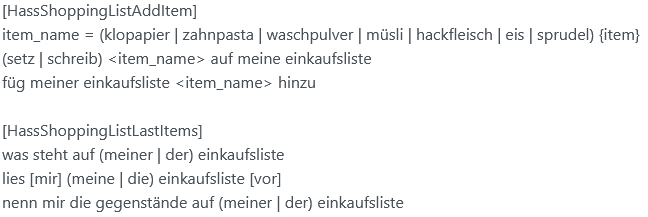
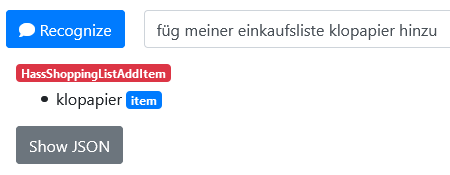
When trying them out (with handle check box active), Rhasspy recognizes the right intent and item (see picture below), but I get no response. I tried sending events to HA and sending intents to HA.
How are you using HA and what for, @Daenara? Are you getting responses of your voice assistant?
I think I understood something wrong in how Rhasspy and HA work together. Would be great, if I could get an explanation on that.
Perhaps @synesthesiam or @ulno can tell me how to get one of the pre-set sentences / intents in Rhasspy to work as expected. A big goal would be, to get Rhasspy to tell me the time after recognizing the GetTime intent. Is HA even needed for this? I was trying to get it working after reading the Rhasspy docs on intent handling, but had no success.
As I tried telling you in my last post, my rhasspy and homeassistant don’t work together yet. I use homeassistant via the app and rhasspy just for testing so far.
For the shopping list. Did you install/activate the shopping list in homeassistant? Before you try to control it with rhasspy always make sure it works from homeassistant itself.
As for the intents. They go in configuration.yaml like every other bit of homeassistant configuration.
My homeassistant is used to control my media center as well as a few lamps and the ceiling fan,but like I said, no voice activation yet because I keep getting distracted by other projects.
I’m sorry, I misunderstood.
I could not find out yet, how to activate the ShoppingList intents in HA. I thought they were a good choice for a test and might work without an activation, because they are built-in. At the moment, my main goal is to connect Rhasspy to voice control a simple intent in HA. Sadly, I don’t own any smart plugs or something similar yet, so I need to test it with an intent, that gives me a respond with an information like the current time or my shopping list items. Any hints and help on this are much appreciated.
I found this tutorial on how to set up Rhasspy and connect it to HA:
Because I got a running Rhasspy Setup, I started with the point “Hass Integration”. I created an access token and filled the Rhasspy Settings for intent handling with HA with the local Hass URL, the token and the password of my user account on my HassOS (second Pi) (see picture below).
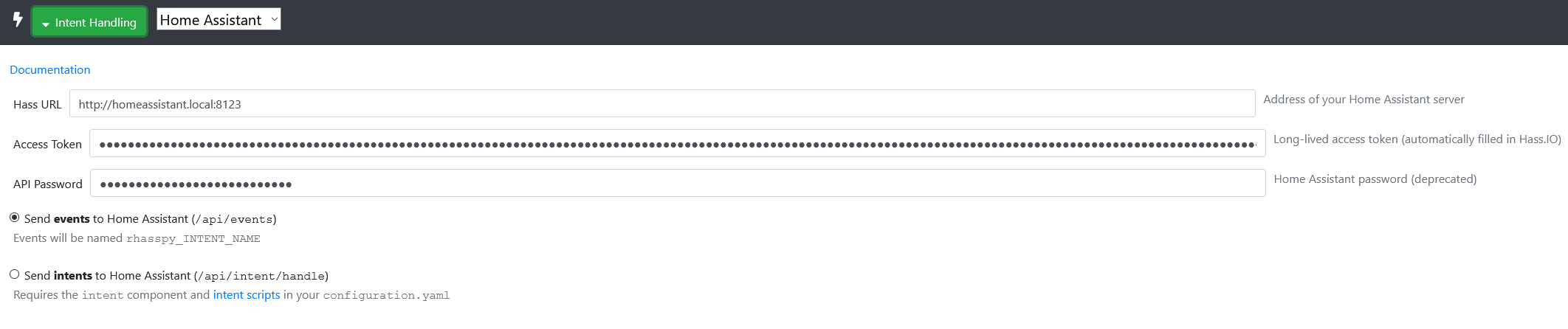
After that, I tested if the HA API is running with Windows console and the following command:
curl -X GET -H "Authorization: Bearer MY_CENSORED_ACCESS_TOKEN" -H "Content-Type: application/json" http://homeassistant.local:8123/api/
It returned:
{"message": "API running."}
That’s why I went to the next step of the tutorial. I opened the Web UI of my HassOS, went to:
Developer Tools > Events > Listen to events
and started listening for “rhasspy_GetTime” (see picture below) as shown in the tutorial.
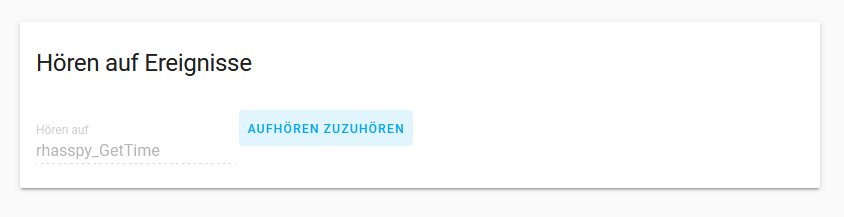
Now, if I ask my Rhasspy voice assistant for the time, HA should show me some output telling me it detected “rhasspy_GetTime”. Sadly, nothing happened.
Did I set up something wrong?
What could be the next step in trying to fix this?