That is strange indeed, because I actually use that script as well
I do not know how good you are with a command line, but this line should output the states:
(replace token and url)
curl -X GET \
     -H "Authorization: Bearer ${token}" \
     -H 'Content-Type: application/json' \
     "${url}/api/states"
Yes it is. I also recreated it from scratch (the whole addon) but everything works now exept the script. Can I somehow manually trigger it?
See comment above.
You can create a temporary token if needed, unless you have written down your Rhasspy one
Just to be sure I should leave {} in url and token?
{192.168.2.101:8123}
{mysupersecretoken}
No, it should be this:
curl -X GET -H "Authorization: Bearer eyJ0eXAiandtherestofthetoke" -H 'Content-Type: application/json' "http://192.168.2.101:8123/api/states"
Also with http:// 
That should printout all states for all entities.
1 Like
OK when I use it in the docker console I see as response a wall of infinite text with A LOT of things (shopping list, sonarr tv shows and all my stuff).
But the again if I readd
[HassOpenCover]
covers = $hass/entities,cover
open [the] (<covers>){name}

[HassCloseCover]
close [the] (<HassOpenCover.covers>){name}
I see the same error… 
good start
You token and url works
I do not know on what machine you are, but you can add the token and url in the script itself and run it from the command line.
You need to have jq installed.
It seems installed by default:
# apt-get install jq
Reading package lists... Done
Building dependency tree
Reading state information... Done
jq is already the newest version (1.5+dfsg-2+b1).
E: Archives directory /var/cache/apt/amd64/archives/partial is missing. - Acquire (2: No such file or directory)
To run the script via command line I tried with
bash entitiesredo (I changed the name)
The values I changed:
# Read Rhasspy profile JSON
profile="${RHASSPY_PROFILE_DIR}/profile.json"

# Example: http://localhost:8123
url="http://192.168.2.101:8123/api/states"

# Long-lived access token
token="eyJ0eXAiOiJKxxxxxxxxxxxxxx"
No error
So I readded
[HassTurnOn]
lights = $hass/entities,light
switches = $hass/entities,switch
entities = <lights> <switches>

turn on [the] (<entities>){name}

[HassTurnOff]
turn off [the] (<HassTurnOn.entities>){name}
Same error.
what is the output in this case?
No output 
I thought it was normal…
This:
curl -X GET -H “Authorization: Bearer token” -H ‘Content-Type: application/json’ “http://192.168.2.101:8123/api/states” | jq --raw-output ‘.[] as $e | “($e.entity_id) ($e.attributes.friendly_name)”’ | while read -r entity_id friendly_name; do echo “${entity_id} ${friendly_name}” ; done
should output something like this:
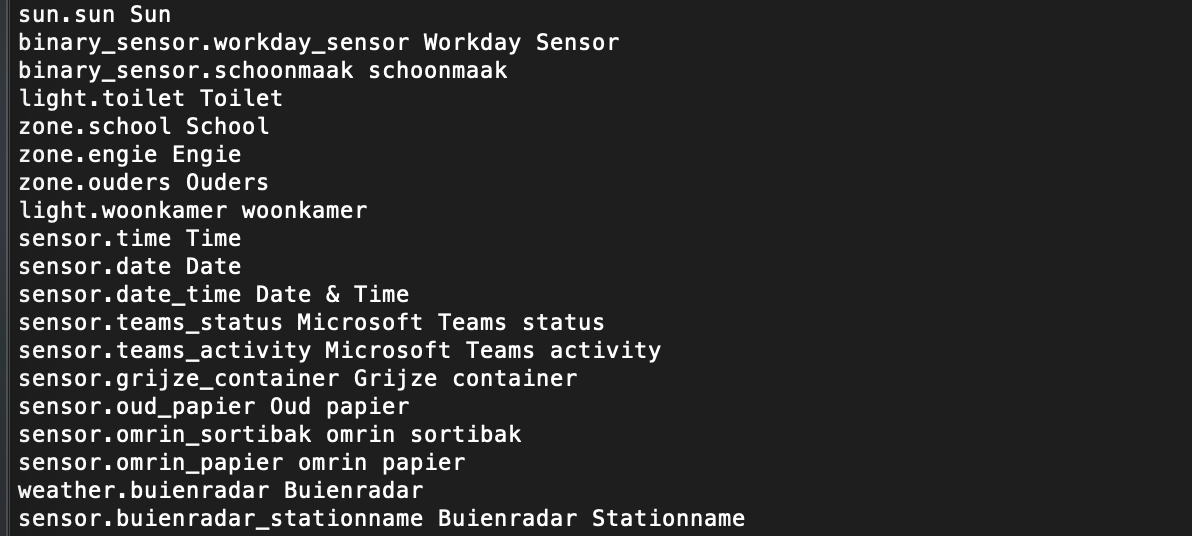
entity-id Friendly name
I’m total noob you know but I cannot use this script. There’s some error maybe.
Here’s the output
sh: 9: Syntax error: word unexpected (expecting ")")
# sh: 9: Syntax error: ")" unexpected
It should all be on one line, do you have that?
Is it kinda hard te debug like this 
I understand it’s hard. …so thanks again for your support
Here it is full:
# curl -X GET -H “Authorization: Bearer eyJ0eXAiOiJKV1QiLCJhbGciOiJIUzI1NiJ9.xxxxxxxxxxxxxxx” -H ‘Content-Type: application/json’ “http://192.168.2.101:8123/api/states” | jq --raw-output ‘.[] as $e | “($e.entity_id) ($e.attributes.friendly_name)”’ | while read -r entity_id friendly_name; do echo “${entity_id} ${friendly_name}” ; done
sh: 14: Syntax error: word unexpected (expecting ")")
# sh: 14: Syntax error: ")" unexpected
curl -X GET -H "Authorization: Bearer token" -H 'Content-Type: application/json' "http://192.168.2.101:8123/api/states" | jq --raw-output '.[] as $e | "\($e.entity_id) \($e.attributes.friendly_name)"' | while read -r entity_id friendly_name; do echo "${entity_id} ${friendly_name}" ; done
I formatted incorrectly, losing the \ - es before the (
Try the command above
This worked but gave me a lot of entities like also automation script device_tracker and so on
Yes, that is correct as well. Very strange that the script gave no output because that long list is exactly what you should get
Then I do not really know where to go next :\
1 Like
Me neither. Maybe it’s something regarding my config. dunno.
I will stay “manual” and add things on the fly right now. I’m starting to add covers as well.
This is working ( I put here for all italians that maybe will have same need)
[ChangeCoverState]
cover_cmd = (alza | abbassa | imposta){covercommand}

<cover_cmd> [la] (tapparella| serranda) [in] [($custom/rooms){room}] [al] [a] [(0..100){percentage}] [percento]
1 Like