Training issue with Rhasspy 2.5: string index out of range

@Martin_Maier @fastjack

First, thank you all for your help. I followed your hints, unfortunately without significant changes.

This is the current situation:

Yes, you were right. There were some errors. Some sentences were simply cut at the end. Don’t ask me how this can happen when copying the old slot files to the new slot folder.

However, this was not the reason.

In a previous post a couple of weeks ago I asked, whether this way of installation is mandatory. The reason to ask was, that I found contradictory information (tutorial says “docker” while another link (can’t find it at the moment) recommends “py venv”). Unfortunately I got no answer. Nevertheless, today I believe it shouldn’t make a difference, in what kind of virtual environment the satellite has been installed.

Regarding Training of satellites: I agree, I usually don’t train my satellite. In this specific situation I just thought it might help. And of course: I don’t have sentences and slots on my satellite. My existing 2.4.19 system works exactly the way you described it. And that’s of course what I intend to get again with 2.5.

@kaykoch

I checked and tested as recommended:

  1. At first I repaired the faulty sentences and got a different error message: string index out of range
  2. I deleted all of my individual sentences and slots. Finally only the initial sentences provided by default remained and no slots. That didn’t help neither
  3. I edited just one sentence and added the necessary slots: No change
  4. In each case I also restarted the docker container to see whether this helps: It did not

The LOGs are looking differently in each case. I’ll post them at the end.

There is one thing I should mention: Since I have no separate testing hardware for 2.5 I installed 2.5 in parallel to 2.4.19, but in different folders:

2.4.19 master and satellite in ~/.config/rhasspy/profiles/de
2.5 master in~/.config/rhasspy/master/de
2.5 sat in ~/.config/rhasspy/satellite/de

Of course only one instance is running at the same time on one piece of hardware. From my perspective this should not cause the error. Maybe you know better.

Here are the LOGs:

At 1 (sentences.ini repaired):

[ERROR:2020-04-08 12:08:54,146] rhasspyserver_hermes: string index out of range
Traceback (most recent call last):
File “/usr/lib/rhasspy-voltron/.venv/lib/python3.7/site-packages/quart/app.py”, line 1821, in full_dispatch_request
result = await self.dispatch_request(request_context)
File “/usr/lib/rhasspy-voltron/.venv/lib/python3.7/site-packages/quart/app.py”, line 1869, in dispatch_request
return await handler(**request_.view_args)
File “/usr/lib/rhasspy-voltron/rhasspy-server-hermes/rhasspyserver_hermes/main.py”, line 1208, in api_train
result = await core.train()
File “/usr/lib/rhasspy-voltron/rhasspy-server-hermes/rhasspyserver_hermes/init.py”, line 285, in train
word_transform=word_transform,
File “/usr/lib/rhasspy-voltron/rhasspy-server-hermes/rhasspyserver_hermes/train.py”, line 87, in sentences_to_graph
slot_visitor=word_visitor,
File “/usr/lib/rhasspy-voltron/rhasspy-nlu/rhasspynlu/slots.py”, line 72, in get_slot_replacements
sentence = Sentence.parse(line)
File “/usr/lib/rhasspy-voltron/rhasspy-nlu/rhasspynlu/jsgf.py”, line 112, in parse
parse_expression(s, text)
File “/usr/lib/rhasspy-voltron/rhasspy-nlu/rhasspynlu/jsgf.py”, line 333, in parse_expression
if text[next_index] == “(”:
IndexError: string index out of range
[DEBUG:2020-04-08 12:08:54,145] rhasspynlu.slots: Loading slot device_name_switch from /profiles/de/slots/device_name_switch
[DEBUG:2020-04-08 12:08:54,061] rhasspynlu.slots: Running program for slot rhasspy/number,1,200,1: [’/usr/lib/rhasspy-voltron/rhasspy-profile/rhasspyprofile/profiles/de/slot_programs/rhasspy/number’, ‘1’, ‘200’, ‘1’]
[DEBUG:2020-04-08 12:08:54,060] rhasspynlu.slots: Loading slot synonyms_time from /profiles/de/slots/synonyms_time
[DEBUG:2020-04-08 12:08:53,981] rhasspynlu.slots: Running program for slot rhasspy/number,17,30,1: [’/usr/lib/rhasspy-voltron/rhasspy-profile/rhasspyprofile/profiles/de/slot_programs/rhasspy/number’, ‘17’, ‘30’, ‘1’]
[DEBUG:2020-04-08 12:08:53,980] rhasspynlu.slots: Loading slot device_name_blind from /profiles/de/slots/device_name_blind
[DEBUG:2020-04-08 12:08:53,898] rhasspynlu.slots: Running program for slot rhasspy/number,1,100,1: [’/usr/lib/rhasspy-voltron/rhasspy-profile/rhasspyprofile/profiles/de/slot_programs/rhasspy/number’, ‘1’, ‘100’, ‘1’]
[DEBUG:2020-04-08 12:08:53,814] rhasspynlu.slots: Running program for slot rhasspy/number,5,30,1: [’/usr/lib/rhasspy-voltron/rhasspy-profile/rhasspyprofile/profiles/de/slot_programs/rhasspy/number’, ‘5’, ‘30’, ‘1’]
[DEBUG:2020-04-08 12:08:53,813] rhasspynlu.slots: Loading slot device_name_shoppinglist from /profiles/de/slots/device_name_shoppinglist
[DEBUG:2020-04-08 12:08:53,812] rhasspynlu.slots: Loading slot device_name_thermostat from /profiles/de/slots/device_name_thermostat
[DEBUG:2020-04-08 12:08:53,812] rhasspynlu.slots: Loading slot device_name_dimmer from /profiles/de/slots/device_name_dimmer
[DEBUG:2020-04-08 12:08:53,811] rhasspynlu.slots: Loading slot synonyms_change_command from /profiles/de/slots/synonyms_change_command
[DEBUG:2020-04-08 12:08:53,811] rhasspynlu.slots: Loading slot device_name_window from /profiles/de/slots/device_name_window
[DEBUG:2020-04-08 12:08:53,810] rhasspynlu.slots: Loading slot synonyms_temperature from /profiles/de/slots/synonyms_temperature
[WARNING:2020-04-08 12:08:53,810] rhasspynlu.slots: Failed to load file/program for slot shopping_item (tried: [PosixPath(’/profiles/de/slots’), PosixPath(’/usr/lib/rhasspy-voltron/rhasspy-profile/rhasspyprofile/profiles/de/slots’)], [PosixPath(’/profiles/de/slot_programs’), PosixPath(’/usr/lib/rhasspy-voltron/rhasspy-profile/rhasspyprofile/profiles/de/slot_programs’)])
[DEBUG:2020-04-08 12:08:53,800] rhasspynlu.ini_jsgf: Loaded ini file
[DEBUG:2020-04-08 12:08:53,798] rhasspyserver_hermes: Generating intent graph
[DEBUG:2020-04-08 12:08:53,797] rhasspyserver_hermes: Loading sentences from [PosixPath(’/profiles/de/sentences.ini’)]
[INFO:2020-04-08 12:08:53,797] rhasspyserver_hermes: Starting training
[DEBUG:2020-04-08 12:08:53,783] rhasspyserver_hermes: Writing /profiles/de/sentences.ini

At 2: (initial sentences only. no slots)

Mit leeren Slots und Standard Sentences:
[ERROR:2020-04-08 12:32:34,081] rhasspyserver_hermes:
Traceback (most recent call last):
File “/usr/lib/rhasspy-voltron/.venv/lib/python3.7/site-packages/quart/app.py”, line 1821, in full_dispatch_request
result = await self.dispatch_request(request_context)
File “/usr/lib/rhasspy-voltron/.venv/lib/python3.7/site-packages/quart/app.py”, line 1869, in dispatch_request
return await handler(**request_.view_args)
File “/usr/lib/rhasspy-voltron/rhasspy-server-hermes/rhasspyserver_hermes/main.py”, line 1208, in api_train
result = await core.train()
File “/usr/lib/rhasspy-voltron/rhasspy-server-hermes/rhasspyserver_hermes/init.py”, line 369, in train
timeout_seconds=self.training_timeout_seconds,
File “/usr/lib/rhasspy-voltron/rhasspy-server-hermes/rhasspyserver_hermes/init.py”, line 854, in publish_wait
result_awaitable, timeout=timeout_seconds
File “/usr/lib/python3.7/asyncio/tasks.py”, line 449, in wait_for
raise futures.TimeoutError()
concurrent.futures._base.TimeoutError
[ERROR:2020-04-08 12:22:34,086] rhasspyserver_hermes: on_message
Traceback (most recent call last):
File “/usr/lib/rhasspy-voltron/rhasspy-server-hermes/rhasspyserver_hermes/init.py”, line 959, in on_message
topic, payload, self.subscribed_types
File “/usr/lib/rhasspy-voltron/rhasspy-hermes/rhasspyhermes/client.py”, line 269, in parse_mqtt_message
json_payload = json.loads(payload)
File “/usr/lib/python3.7/json/init.py”, line 348, in loads
return _default_decoder.decode(s)
File “/usr/lib/python3.7/json/decoder.py”, line 337, in decode
obj, end = self.raw_decode(s, idx=_w(s, 0).end())
File “/usr/lib/python3.7/json/decoder.py”, line 355, in raw_decode
raise JSONDecodeError(“Expecting value”, s, err.value) from None
json.decoder.JSONDecodeError: Expecting value: line 1 column 1 (char 0)
[DEBUG:2020-04-08 12:22:34,086] rhasspyserver_hermes: Handling NluTrainSuccess (topic=rhasspy/nlu/Master/trainSuccess, id=78864af8-9b17-4991-85a8-5aa6beb8bc9a)
[DEBUG:2020-04-08 12:22:34,080] rhasspyserver_hermes: Handling AsrTrainSuccess (topic=rhasspy/asr/Master/trainSuccess, id=78864af8-9b17-4991-85a8-5aa6beb8bc9a)
[DEBUG:2020-04-08 12:22:34,079] rhasspyserver_hermes: Publishing 130 bytes(s) to rhasspy/nlu/Master/train
[DEBUG:2020-04-08 12:22:34,079] rhasspyserver_hermes: -> NluTrain(id=‘5474c136-f6d3-41fc-906d-df390fa218f2’, graph_path=’/profiles/de/intent_graph.pickle.gz’, graph_format=‘pickle-gzip’)
[DEBUG:2020-04-08 12:22:34,078] rhasspyserver_hermes: Publishing 130 bytes(s) to rhasspy/asr/Master/train
[DEBUG:2020-04-08 12:22:34,078] rhasspyserver_hermes: -> AsrTrain(id=‘5474c136-f6d3-41fc-906d-df390fa218f2’, graph_path=’/profiles/de/intent_graph.pickle.gz’, graph_format=‘pickle-gzip’)
[DEBUG:2020-04-08 12:22:34,078] rhasspyserver_hermes: Subscribed to hermes/error/nlu
[DEBUG:2020-04-08 12:22:34,077] rhasspyserver_hermes: Subscribed to rhasspy/nlu/Master/trainSuccess
[DEBUG:2020-04-08 12:22:34,077] rhasspyserver_hermes: Subscribed to hermes/error/asr
[DEBUG:2020-04-08 12:22:34,077] rhasspyserver_hermes: Subscribed to rhasspy/asr/Master/trainSuccess
[DEBUG:2020-04-08 12:22:34,076] rhasspyserver_hermes: Finished writing /profiles/de/intent_graph.pickle.gz
[DEBUG:2020-04-08 12:22:34,076] rhasspyserver_hermes: Writing /profiles/de/intent_graph.pickle.gz
[DEBUG:2020-04-08 12:22:34,073] rhasspynlu.ini_jsgf: Loaded ini file
[DEBUG:2020-04-08 12:22:34,069] rhasspyserver_hermes: Generating intent graph
[DEBUG:2020-04-08 12:22:34,067] rhasspyserver_hermes: Loading sentences from [PosixPath(’/usr/lib/rhasspy-voltron/rhasspy-profile/rhasspyprofile/profiles/de/sentences.ini’)]
[INFO:2020-04-08 12:22:34,065] rhasspyserver_hermes: Starting training

At 3: (with minimum set of sentences and slots)

[ERROR:2020-04-08 12:52:20,658] rhasspyserver_hermes:
Traceback (most recent call last):
File “/usr/lib/rhasspy-voltron/.venv/lib/python3.7/site-packages/quart/app.py”, line 1821, in full_dispatch_request
result = await self.dispatch_request(request_context)
File “/usr/lib/rhasspy-voltron/.venv/lib/python3.7/site-packages/quart/app.py”, line 1869, in dispatch_request
return await handler(**request_.view_args)
File “/usr/lib/rhasspy-voltron/rhasspy-server-hermes/rhasspyserver_hermes/main.py”, line 1208, in api_train
result = await core.train()
File “/usr/lib/rhasspy-voltron/rhasspy-server-hermes/rhasspyserver_hermes/init.py”, line 369, in train
timeout_seconds=self.training_timeout_seconds,
File “/usr/lib/rhasspy-voltron/rhasspy-server-hermes/rhasspyserver_hermes/init.py”, line 854, in publish_wait
result_awaitable, timeout=timeout_seconds
File “/usr/lib/python3.7/asyncio/tasks.py”, line 449, in wait_for
raise futures.TimeoutError()
concurrent.futures._base.TimeoutError
[DEBUG:2020-04-08 12:50:32,486] rhasspyserver_hermes: Publishing 130 bytes(s) to rhasspy/nlu/Master/train
[DEBUG:2020-04-08 12:50:32,485] rhasspyserver_hermes: -> NluTrain(id=‘5fd91773-7015-4b6b-a3eb-f4e360c337ee’, graph_path=’/profiles/de/intent_graph.pickle.gz’, graph_format=‘pickle-gzip’)
[DEBUG:2020-04-08 12:50:32,485] rhasspyserver_hermes: Publishing 130 bytes(s) to rhasspy/asr/Master/train
[DEBUG:2020-04-08 12:50:32,485] rhasspyserver_hermes: -> AsrTrain(id=‘5fd91773-7015-4b6b-a3eb-f4e360c337ee’, graph_path=’/profiles/de/intent_graph.pickle.gz’, graph_format=‘pickle-gzip’)
[DEBUG:2020-04-08 12:50:32,484] rhasspyserver_hermes: Finished writing /profiles/de/intent_graph.pickle.gz
[DEBUG:2020-04-08 12:50:32,483] rhasspyserver_hermes: Writing /profiles/de/intent_graph.pickle.gz
[DEBUG:2020-04-08 12:50:32,481] rhasspynlu.slots: Loading slot device_state from /profiles/de/slots/device_state
[DEBUG:2020-04-08 12:50:32,481] rhasspynlu.slots: Loading slot synonyms_change_command from /profiles/de/slots/synonyms_change_command
[DEBUG:2020-04-08 12:50:32,481] rhasspynlu.slots: Loading slot device_name_switch from /profiles/de/slots/device_name_switch
[DEBUG:2020-04-08 12:50:32,479] rhasspynlu.ini_jsgf: Loaded ini file
[DEBUG:2020-04-08 12:50:32,478] rhasspyserver_hermes: Generating intent graph
[DEBUG:2020-04-08 12:50:32,478] rhasspyserver_hermes: Loading sentences from [PosixPath(’/profiles/de/sentences.ini’)]
[INFO:2020-04-08 12:50:32,477] rhasspyserver_hermes: Starting training

At 4: (after restart, previous = by chronological means)

[ERROR:2020-04-08 13:02:57,626] rhasspyserver_hermes: on_message
same as previous
[ERROR:2020-04-08 13:02:57,584] rhasspyserver_hermes: on_message
same as previous
[ERROR:2020-04-08 13:02:57,500] rhasspyserver_hermes: on_message
Traceback (most recent call last):
File “/usr/lib/rhasspy-voltron/rhasspy-server-hermes/rhasspyserver_hermes/init.py”, line 959, in on_message
topic, payload, self.subscribed_types
File “/usr/lib/rhasspy-voltron/rhasspy-hermes/rhasspyhermes/client.py”, line 269, in parse_mqtt_message
json_payload = json.loads(payload)
File “/usr/lib/python3.7/json/init.py”, line 348, in loads
return _default_decoder.decode(s)
File “/usr/lib/python3.7/json/decoder.py”, line 337, in decode
obj, end = self.raw_decode(s, idx=_w(s, 0).end())
File “/usr/lib/python3.7/json/decoder.py”, line 355, in raw_decode
raise JSONDecodeError(“Expecting value”, s, err.value) from None
json.decoder.JSONDecodeError: Expecting value: line 1 column 1 (char 0)
[ERROR:2020-04-08 13:02:56,153] rhasspyserver_hermes: on_message
same as previous
[ERROR:2020-04-08 13:02:56,142] rhasspyserver_hermes: on_message
same as previous
[ERROR:2020-04-08 13:02:56,132] rhasspyserver_hermes: on_message
same as previous
[ERROR:2020-04-08 13:02:56,099] rhasspyserver_hermes: on_message
Traceback (most recent call last):
same as previous
[ERROR:2020-04-08 13:02:56,083] rhasspyserver_hermes: on_message
same as previous
[ERROR:2020-04-08 13:02:56,073] rhasspyserver_hermes: on_message
same as previous
[ERROR:2020-04-08 13:02:56,063] rhasspyserver_hermes: on_message
same as previous
[ERROR:2020-04-08 13:02:56,053] rhasspyserver_hermes: on_message
same as previous
[ERROR:2020-04-08 13:02:56,042] rhasspyserver_hermes: on_message
same as previous
[ERROR:2020-04-08 13:02:56,032] rhasspyserver_hermes: on_message
same as previous
[ERROR:2020-04-08 13:02:56,022] rhasspyserver_hermes: on_message
same as previous
[ERROR:2020-04-08 13:02:56,001] rhasspyserver_hermes: on_message
Traceback (most recent call last):
same as previous
[ERROR:2020-04-08 13:02:55,990] rhasspyserver_hermes: on_message
Traceback (most recent call last):
File “/usr/lib/rhasspy-voltron/rhasspy-server-hermes/rhasspyserver_hermes/init.py”, line 959, in on_message
topic, payload, self.subscribed_types
File “/usr/lib/rhasspy-voltron/rhasspy-hermes/rhasspyhermes/client.py”, line 276, in parse_mqtt_message
message = message_type.from_dict(json_payload)
File “/usr/lib/rhasspy-voltron/rhasspy-hermes/rhasspyhermes/nlu.py”, line 92, in from_dict
message.slots = [Slot.from_dict(s) for s in slot_dicts]
File “/usr/lib/rhasspy-voltron/rhasspy-hermes/rhasspyhermes/nlu.py”, line 92, in
message.slots = [Slot.from_dict(s) for s in slot_dicts]
File “/usr/lib/rhasspy-voltron/rhasspy-hermes/rhasspyhermes/intent.py”, line 101, in from_dict
slot = Slot(value=value, **object_dict)
TypeError: init() missing 1 required positional argument: ‘entity’

And finally: This is the minimum set of sentences and slots I used at 3:

[ChangeDeviceState]
($synonyms_change_command) [(die | das)] ($device_name_switch){device} ($device_state){value} (:){state:.STATE}

Slot device_state
aus:false
ein:true

Slot device_name_switch
(rechtekuechenlampe):hm-rpc.0.OEQ1234567.1

Slot synonyms_change_command
schalt:true

Sorry for asking you again. I hope we will get soon out of this mess.

Best
Thomas

Hi Thomas,
your sentences and slots are OK. I tested:
schalt die rechtekuechenlampe aus -> OK
Must be something else

Hi Kay,

That’s good news, since it confirms that my slots and sentences should work with 2.5 as well.

A different result would have been astonishing, since many users certainly have the request to reuse their previous configuration without changes.

I agree with you: It must be something different.
I just pulled the newest release of 2.5 to my master, installed it with this command:

docker run -it \
    -v "$HOME/.config/rhasspy/master:/profiles" \
    --network host \
    rhasspy/rhasspy:2.5.0-pre \
    --profile en \
    --user-profiles /profiles

and got plenty of error messages in my terminal. The installation process could not be completed and stopped without prompt.

In parallel I installed 2.5 on an old Pi3 and tthe installation process was completed with the system prompt.

I have to do some further investigations and will then come back.

Best
Thomas

Hi,

@synthesiam, @fastjack, @Martin_Maier

I have good news and maybe some interesting information that might help people who are migrating from 2.4.x to 2.5 as well.

In the meantime I did some testing with an old Pi3, which I used for several installations. I found out that there is a big difference in behaviour, whether a 2.5 stand alone Rhasspy is installed or a master or satellite is installed.

In case of a stand alone system I did the installation with this command:

docker run -d -p 12101:12101 \
   --restart unless-stopped \
   -v "$HOME/.config/rhasspy/profiles:/profiles" \
   --device /dev/snd:/dev/snd \
   rhasspy/rhasspy:2.5.0-pre \
   --user-profiles /profiles \
   --profile 

The installation process ended successfully, the session was closed and the prompt re-appeared in the terminal.

Quite different withe a master or satellite installation, using the commands from the tutorial, as mentioned above. In these cases the session remains running and does not return to the terminal prompt.

That helped me to see what happend, when I began to configure the system. At first I configured MQTT, switched to “external” and put in the MQTT IP. I immediately got plenty of error messages. So I re-configured to internal and got no more error messages.

I was then able to completely install the kaldi dictionary, my sentences and the slots as I was used to using them in V2.4.19. There were only two minor changes:

  1. It seems (I am not quite sure) that at the end of a slot’s last entry a line feed is required. If not, this results in the error message “string index out of range”.
  2. The same error message is caused, if a slot is not completely defined. This was the case in my “device_name_switch”-slot, which looked like this:

(allelampen):
(mobilesteckdose):hm-rpc.0.LEQ0476533.1

(allelampen) was just a preparation for future purposes. It was accepted by V2.4.19 but it’s not by V2.5.

So thank you for your hints. They showed me the right way.

Nevertheless the question remains open, how I can connect to my external MQTT broker now:

Am I running into the same problem as @Jorg_Baumann and others described it?
And how @kaykoch have you got your system running with an external MQTT broker?

It seems these are currently the most important questions to come to a operationable V2.5. But they are a different issue. So I will close this one.

Best
Thomas

Sorry for the late reply.
I’m using external mqtt broker with no authentication in a docker file.
Just put in Host and port.
If you have problems, try to “talk” to the broker with mosquito to the server from each raspi:

mosquitto_pub -h <broker-ip> -t "test" -m "test-message"

mosquitto_sub -h <broker-ip> -t "test"

Happy Easter at first and thank you for your response. I now had a chance to check the commands you suggested.

One my satellite they look like this:

pi@Rhasspy-Sat1:~ $ mosquitto_pub -h 192.168.13.152:1883 -t “test” -m “test-message”
Unable to connect (Lookup error.).
pi@Rhasspy-Sat1:~ $ mosquitto_sub -h 192.168.13.152:1883 -t “test”
Unable to connect (Lookup error.).
pi@Rhasspy-Sat1:~ $ netstat -tln | grep 1883
tcp 0 0 0.0.0.0:1883 0.0.0.0:* LISTEN

while the Rhasspy-master doesn’t show any results at all:

pi@ioBroker-Master:/opt/iobroker$ mosquitto_sub -h 192.168.13.152:1883 -t “test”
Unable to connect (Lookup error.).
pi@ioBroker-Master:/opt/iobroker$ mosquitto_pub -h 192.168.13.152:1883 -t “test” -m “test-message”
Unable to connect (Lookup error.).
pi@ioBroker-Master:/opt/iobroker$ netstat -tln | grep 1883
pi@ioBroker-Master:/opt/iobroker$

Master’s IP is …155 and the MQTT broker on …152 is running of course.

I have read quite a lot in the meantime without finding a solution yet Maybe I really have to wait until Hermes is fully implemented in 2.5 and the bug synthesiam is already aware of will finally be resolved.

Best
Thomas

Hi Thomas,
if I understand well:

Master-IP: 192.168.13.155
Sat-IP:192.168.13.152

Your MQTT-Broker is the rhasspy Broker insite the satellite

Anyway:
Unable to connect (Lookup error.) means, that it is not possible to connect to this pc.
I guess, that the rhasspyMQTTBroker is only configured to listen to localhost and not to its real IP.
Create your own mqtt Broker on the server with a docker-image and try ist again:
Here is my docker-compose file:

mosquitto:
  image: vimagick/mosquitto
  hostname: mqtt-server
  container_name: mqtt-server
  restart: unless-stopped
  ports:
    - "1883:1883"
    - "8883:8883"
  volumes:
    - /opt/mqtt/mosquitto.conf:/etc/mosquitto/mosquitto.conf
    - /opt/mqtt/pwfile:/etc/mosquitto/pwfile
    - /opt/mqtt:/var/lib/mosquitto

happy easter

Hi Kay,

my setup is a bit different:

Master-IP: 192.168.13.155 with Rhasspie’s internal MQTT broker on port 12183, this IP is also my iobroker master
Sat-IP:192.168.13.157
iobroker subsystem: 192.168.13.152, running a MQTT broker/server on port 1883 (can be changed)

I can easily delete this broker on the subsystem and re-install on IP …155. So, the broker wouldn’t be in a separate docker, but at least on the system with the same IP as the Rhasspy master has it. From my perspective the way, how the MQTT broker is provided on IP …155 shouldn’t be relevant.

So I will at first test what you recommended with this setup. If it fails, I will go your way. Thank you for your kind help again.

Best
Thomas

Hi Thomas,

Does that mean, you use ioBroker and Rhasspy-Master on 192.168.13.155 / 24?
Is your MQTT broker the one in Rhasspy or in ioBroker?

I startet with iobroker. I tried to use this MQTT-Broker for my ziggbe2Mqtt.
I had NEVER done it. I think there is something different in it’s configuration. At the end I don’t use ioBroker anymore.
My Rhasspy-Master, Rhasspy-Satellites, MQTT-Server, Node Red and MaryTTS are docker containers. (Also TV-Headend and Wireguard)
But, off cause, you can install your mqtt-server without docker.

Does that mean, you use another ioBroker and Rhasspy-Satellite on 192.168.13.152 / 24?
And there is ALSO a MQTT-Broker running?

You have to:

  • create a running MQTT-SERVER (try it NOT with ioBrokers MQTT Server)
  • point ALL rhasspys (Master and all sats) to MQTT-EXTERNAL
  • point ALL rhasspys (Master and all sats) to the SAME IP-ADRESS of your new MQTT-SERVER

Why don’t use ioBoker MQTT-Server anymore?
For me with Rhasspy V2.4.19 it is working very well.
Rhasspy V 2.4.19 runs on a separate Raspi4 and communicates with the ioBroker MQTT-broker on another Raspi4.
Perhaps this issue is related to it?
Just my 2 cent
Jörg

Just I was not able to get ioBrokers mqtt-server working. Thats what I remember.
The problem here is not the rhasspy, cause Thomas could not even contact his MQTT-Broker. As long as he can not publish and subscribe from each client, rhasspy CAN not work:

This could happen when:

  • the port is wrong -> try to netstat on the server (You did already)

netstat -tln | grep 1883

  • the ip / subnet is wrong -> try to ping (I guess, you did)

ping SERVER-IP

  • the port is not allowed (firewall or only localhost is allowed) -> try nmap on the server and the client (my favorite)

nmap SERVER-IP -p 1883

Hi Kay,

Yes, you are right. My entire network is a /24-network and my ioBroker master and my Rhasspy master are both running on 192.168.13.155, which is an Odroid H2 with 16 G of RAM. The only MQTT broker on this system is the internal one provides by Rhasspy. To my knowledge, this broker can only be switched to an external instance, but cannot be stopped. I guess in external mode this broker is a client, while it is a server in internal mode.

Currently my own MQTT broker (=server) is running as ioBroker adapter on my ioBroker subsystem with IP 192.168.13.152.

And finally my Rhasspy satellite is running without any MQTT broker (beside the Rhasspy internal one) on IP 192.168.13.152.

I have never experienced any problems with this configuration with Rhasspy 2.4.19.

Following your previous post I now would have switched my own MQTT server from IP …152 to IP …155. Since it is easier for me to install and to maintain, I would have preferred to use the ioBroker MQTT adapter again.

Of course, getting a working system based on Rhasspy 2.5 is more relevant than my current preference.

So I will entirely follow your recommendations depicted here:

One thing is new for me. In one of your very early posts regarding Rhasspy 2.5 you said, that the Rhasspy satellite has to point via EXTERNAL to the master’s IP-address, while the Master is either pointing to itself (in case of INTERNAL) or to a separate MQTT server (in case of EXTERNAL). Now both systems shall point to the MQTT-servers address. This sounds much more logical to me.

Funny enough: In the official Voltron installation guide for master/sat-systems the recommended configuration of INTERNAL/EXTERNAL is exactly vice versa! Since you are reporting to have a running system, I trust you most.

OK, I’ll try and will report.

Best
Thomas

Hi Kay,

due to another project, I still had no chance to do chase the MQTT topic. However, I had a small chat with @Jorg_Baumann in the meantime, and we now have a question to you.

Both of us are familiar with ioBroker MQTT but not with an external MQTT server/broker running in docker. In ioBroker it’s rather easy to see the objects created by the MQTT broker and to address them with any kind of programming tool, either Blockly or Node Red or Javascript.

Our question thus is: How can we see and address MQTT objects, that are created by an external MQTT server/broker, by e.g. Javascript? Maybe you can show us some examples.

Thank you very much.

Best
Thomas

First of all. I try to clear whats your problem:

  • You are using iobroker to control whatever
  • You want to use rhasspy to get inputs by voice
  • You want to “read” the intents and slots with mqtt in iobroker to control things.
  • You still have problems to use the intern mqtt-Broker (Server) of ioBroker

I repeat:

  • You need a mqtt-Broker (Server), which can be reached from ALL your devices (ioBroker, Rhasspy-Server, Rhasspy-Clients)
  • All of them must be able to publish and subscribe messages
    If this works with ioBroker you got it

I did not get this running. So I use my Docker MQTT-Server.
If you need another Broker (outsite ioBroker) your new Problem is to “read” the mqtt-messages insite ioBroker and use them to control your stuff.
I’m not sure, so don’t be upset. I will explain you how mqtt works.

Using MQTT is like watching videos on YOUTUBE

  • There is Microsoft, who has the YOUTUBE-Server (lets say, its only one)
    There is ONE MQTT-Server ( 192.168.13.152, In Docker or in ioBroker)

  • There are many users who upload videos to YOUTUBE server
    Everybody can upload messages to the MQTT server.

    mosquitto_pub -h 192.168.13.152:1883 -t “test” -m “test-message”
    
  • There are many users who watches videos. The video is send to them, when they are online.
    Everybody can subscribe to the MQTT-Server and will receive messages as soon as they are send

    mosquitto_sub -h 192.168.13.152:1883 -t “test”
    

When You want to receive messages in ioBroker, you need a Tool, that can subscribe to the MQTT-Broker. This can be:

  • a program in Python (Python Skill Code)
  • a node in nodered (thats what I’m using)
  • a program in javascript (not my business)
  • (a oBroker MQTT-Client (I’m not sure. I think there is one)

I still not know, what is working in your home

Test ioBroker as MQTT Broker (SERVER):

  • let it run (SERVER !!!)
  • subscripe from rhasspy-sat and publish from rhasspy-Server
  • If it works, try it the other way
  • if its not working, try to install another mqtt-Broker,
    (Docker is the easiest way, or try it on a raspberry 3)
  • If THIS WORKS, ioBrokers MQTT is the evil.
  • If not, you need an exorcist :japanese_ogre:
  • If it works, anyway which solution, let ALL your rhasspys point to the IP-Adress of the MQTT-Broker.

If you have an MQTT-Server working and the rhasspys are working with it, then let’s talk about using mqtt-messages.
As I said, I use nodered. And only nodered because all devices, that I used in ioBroker are also supported by nodered.
Awaiting your reports

Kay

Hi Kay,
I am just at the beginning of a conference call. So just briefly:

I have just installed the broker. It’s up and running. Until now and because of my call: currently no further experiences.

Will come back later

Hi Kay,
I’m coming back for a short report. Of course I haven’t been able to perform a complete test in the meantime. However I have some impressions I would like to share.

Let me start with your considerations:

In my case its Javascript, and for quick drafts and testing blockly and nodered

In a first step I have used ioBroker’s MQTT adapter to mediate between Rhasspy and ioBroker. The MQTT adapter was able to identify the intents spread by Rhasspy. Simultaneously, Rhasspy was not able to connect to this broker and consequencially, intent recognition failed.

As I have reported briefly, I have installed an eclipse mqtt broker on IP …155 with port 1883. Rhasspy sat and master are both pointing to this address. In order to make mqtt intents visible I have also installed a mqtt client on iobroker, that also points to this address. Still I have not redirected my Javascripts to the adresses of this client. But this is not an issue.

Now I have got this situation:

  1. I was able to see in the master’s and in the satellite’s terminal that they have connected to the new mqtt broker
  2. the mqtt client on iobroker is showing all intents published by the new mqtt broker
  3. However both, the master and the satellite, are reporting the lookup error on the mosquitto_pub and …-sub command
  4. netstat on the satellite is reporting:

pi@Rhasspy-Sat1:~ $ netstat -tln | grep 1883
tcp 0 0 0.0.0.0:1883 0.0.0.0:* LISTEN

  1. netstat on the master is reporting:

pi@ioBroker-Master:/opt/mqtt$ netstat -tln | grep 1883
tcp6 0 0 :::1883 :::* LISTEN

Thus no IP V4!!!

  1. netmap on sat:

pi@Rhasspy-Sat1:~ $ nmap 192.168.13.155 -p 1883
Starting Nmap 7.70 ( https://nmap.org ) at 2020-04-16 23:40 CEST
Nmap scan report for ioBroker-Master.fritz.box (192.168.13.155)
Host is up (0.0015s latency).
PORT STATE SERVICE
1883/tcp open mqtt
Nmap done: 1 IP address (1 host up) scanned in 0.13 seconds

  1. nmap on master:

pi@ioBroker-Master:/opt/mqtt$ nmap 192.168.13.155 -p 1883
Starting Nmap 7.60 ( https://nmap.org ) at 2020-04-16 23:42 CEST
Nmap scan report for ioBroker-Master (192.168.13.155)
Host is up (0.00019s latency).
PORT STATE SERVICE
1883/tcp open mqtt
Nmap done: 1 IP address (1 host up) scanned in 0.08 seconds

So, besides the missing TCP IP V4 on the master side, everything seems to be OK

However, the texts in the terminals of master and satellite are continoulsy running, showing error messages at the end. Due to these activities the entire system (both Rhasspy and ioBroker) are being lamed. (Or is this caused by the new mqtt broker? I still haven’t find out yet.)

Error message on Master:

[ERROR:2020-04-16 21:52:19,131] rhasspyasr_kaldi_hermes: parse_mqtt_message (topic=hermes/asr/startListening)
Traceback (most recent call last):
File “/usr/lib/rhasspy-voltron/rhasspy-hermes/rhasspyhermes/client.py”, line 303, in parse_mqtt_message
json_payload = json.loads(payload)
File “/usr/lib/python3.7/json/init.py”, line 348, in loads
return _default_decoder.decode(s)
File “/usr/lib/python3.7/json/decoder.py”, line 337, in decode
obj, end = self.raw_decode(s, idx=_w(s, 0).end())
File “/usr/lib/python3.7/json/decoder.py”, line 355, in raw_decode
raise JSONDecodeError(“Expecting value”, s, err.value) from None
json.decoder.JSONDecodeError: Expecting value: line 1 column 1 (char 0)

Error message on satellite:

RuntimeError
[ERROR:2020-04-16 21:52:45,596] rhasspyremote_http_hermes: handle_audio_frame
Traceback (most recent call last):
File “/usr/lib/rhasspy-voltron/rhasspy-remote-http-hermes/rhasspyremote_http_hermes/init.py”, line 465, in handle_audio_frame
with wave.open(in_io) as in_wav:
File “/usr/lib/python3.7/wave.py”, line 510, in open
return Wave_read(f)
File “/usr/lib/python3.7/wave.py”, line 164, in init
self.initfp(f)
File “/usr/lib/python3.7/wave.py”, line 153, in initfp
chunk.skip()
File “/usr/lib/python3.7/chunk.py”, line 160, in skip
self.file.seek(n, 1)
File “/usr/lib/python3.7/chunk.py”, line 113, in seek
raise RuntimeError
RuntimeError

These error messages do not occur, when the Rhasspy master is using it internal mqtt broker and the satellite is pointing to this.

So, still there must be something different between your and my configuration. I don’t think it’s a big story.

In order to sort out, I would like to ask the following questions:

  1. What user and group are you using for mqtt. My system looks like this:

pi@ioBroker-Master:/opt$ ls -l
total 16
drwx–x--x 4 root root 4096 Feb 15 14:29 containerd
drwxrwxr-x+ 10 iobroker iobroker 4096 Apr 16 17:24 iobroker
drwxrwxr-x+ 11 iobroker iobroker 4096 Apr 10 11:17 iobrokerold
drwxr-xr-x 3 root root 4096 Apr 16 18:23 mqtt
pi@ioBroker-Master:/opt/mqtt$ ls -l
total 12
-rw-r–r-- 1 root root 315 Apr 16 18:22 docker-compose.yml
-rw-r–r-- 1 root root 1644 Apr 16 18:17 mosquitto.conf
drwxr-xr-x 2 root root 4096 Apr 16 18:23 pwfile

  1. On my satellite I have configured site-ID = Satellite1 and Satellite site-ID: Satellite1 in each section. Is this correct or do you have it different? Because in section “Audio Recording” the first and only time “Output siteId” appears, while in all other sections it is called “Satellite site-ID”.
  2. Finally: I have nothing configured regarding UDP. Is this correct?

My conclusion: With the installation of an new mqtt broker and a mqtt client located on iobroker, most mqtt issues seem to be resolved. Still there are some issues with this fgrxzqyc Version 2.5

How can we sort them out?

Nevertheless, you put me on the right track, which was very helpfull. Thank you very much again for your kind help.

Best Thomas

Hi Thomas,
I tried something and the result is strange:
NOT Working:

mosquitto_pub -h 10.2.254.1:1883 -t “test” -m “test-message”
mosquitto_sub -h 10.2.254.1:1883 -t “test”

WORKING !

mosquitto_pub -h 10.2.254.1 -t “test” -m “test-message”
mosquitto_sub -h 10.2.254.1 -t “test”

Also WORKING !

mosquitto_pub -h 10.2.254.1 -p 1883 -t “test” -m “test-message”
mosquitto_sub -h 10.2.254.1 -p 1883 -t “test”

So please try it. I guess its working also with you and everything (mqtt) is OK.

–> Correct !!
-> Everywhere in client-places must be the ID of the client
-> Everywhere in master-places (if used by mqtt) must be ALL IDs of the clients

–> You can use it or leave it.
If you leave it, you will have a lot of traffic. I use it.

Here you can compare the configs:

My Satellite-IDs: wohnzimmer,badezimmer,küche,schlafzimmer
(Wohnzimmer has its own wakeword)
My Master-IP: 10.2.254.1
My maryTTS-IP: 10.2.254.1

Master:

{
    "dialogue": {
        "satellite_site_ids": "wohnzimmer,badezimmer,küche,schlafzimmer",
        "system": "rhasspy"
    },
    "intent": {
        "satellite_site_ids": "wohnzimmer,badezimmer,küche,schlafzimmer",
        "system": "fsticuffs"
    },
    "mqtt": {
        "enabled": "true",
        "host": "10.2.254.1",
        "site_id": "master"
    },
    "sounds": {
        "error": "${RHASSPY_PROFILE_DIR}/wav/beep.wav",
        "recorded": "${RHASSPY_PROFILE_DIR}/wav/answer.wav",
        "wake": "${RHASSPY_PROFILE_DIR}/wav/question.wav"
    },
    "speech_to_text": {
        "satellite_site_ids": "wohnzimmer,badezimmer,küche,schlafzimmer",
        "system": "kaldi"
    },
    "text_to_speech": {
        "marytts": {
            "locale": "de",
            "url": "http://10.2.254.1:59125/process",
            "voice": "bits1-hsmm"
        },
        "satellite_site_ids": "badezimmer,küche,schlafzimmer",
        "system": "marytts"
    }
}

Satellite:

{
    "intent": {
        "system": "hermes"
    },
    "microphone": {
        "arecord": {
            "device": "default:CARD=seeed2micvoicec",
            "siteId": "schlafzimmer",
            "udp_audio_port": "12202"
        },
        "system": "arecord"
    },
    "mqtt": {
        "enabled": "true",
        "host": "10.2.254.1",
        "site_id": "schlafzimmer"
    },
    "sounds": {
        "aplay": {
            "device": "sysdefault:CARD=seeed2micvoicec"
        },
        "recorded": "${RHASSPY_PROFILE_DIR}/wav/answer.wav",
        "system": "aplay",
        "wake": "${RHASSPY_PROFILE_DIR}/wav/question.wav"
    },
    "speech_to_text": {
        "system": "hermes"
    },
    "text_to_speech": {
        "system": "hermes"
    },
    "wake": {
        "snowboy": {
            "model": "computer_2mic.pmdl",
            "sensitivity": "0.45",
            "udp_audio_port": "12202"
        },
        "system": "snowboy"
    }
}

Hi Kay,

sorry, I had some missions for my wife to complete and had no time to attend to Rhasspy.

Thank you very much for your extensive explanations, which are very helpful. I will start tomorrow to look after the Rhasspy configuration. Using UDP in order to reduce the amount of traffic on the network seems extremely valuable to me. Unless you could explain to me, what needless and surplus traffic is good for :joy:

OK, have a good week
Thomas

Hello Kay,

I apologize to have to contact you again, but Rhasspy 2.5 is very much different to it’s previous version. I am still not familiar with it.

OK: In the meantime I set up the system as you recommended it. Intent recognition works fine with the new MQTT broker . Switching back to ioBroker’s MQTT adapter confirmed what you said: This combination with Rhasspy does not work.

On my MQTT client I am now able to see the data model and the intents and I recognised some differences to Rhasspy 2.4.19.

In 2.4.19 Rhasspy’s all intents were included in mqtt.hermes.intent with their complete JSON string and also in mqtt.rhasspy.intent with the relevant information (e.g. device, state, level etc. as it is also shown in the rhasspy home screen).

My Javascripts picked up intents under mqtt.rhasspy.intent to trigger the devices and applications.

Opposed to this in 2.5 only one intent under mqtt.rhasspy.intent has been created automatically and with no content. I created another intent manually, however this also does not receive any data.

How did you manage it to forward the intents correctly?

Furthermore I found out, that two intents obviously do not exist any more. These are “mqtt.rhasspy.de.transition.SnowboyWakeListener” and “…WebrtcvadCommandListener”, which we used to send back voice messages (confirmations) to Rhasspy’s speakers.

I assume, this has been resolved differently now. Do you know how?

Thank you very much in advance

Best
Thomas

Hi Thomas,
no problem. I stay at home.

reading intents : hermes/intent/#
sesion startet: hermes/dialogueManager/sessionStarted
finish session: hermes/dialogueManager/endSession
say something: hermes/tts/say

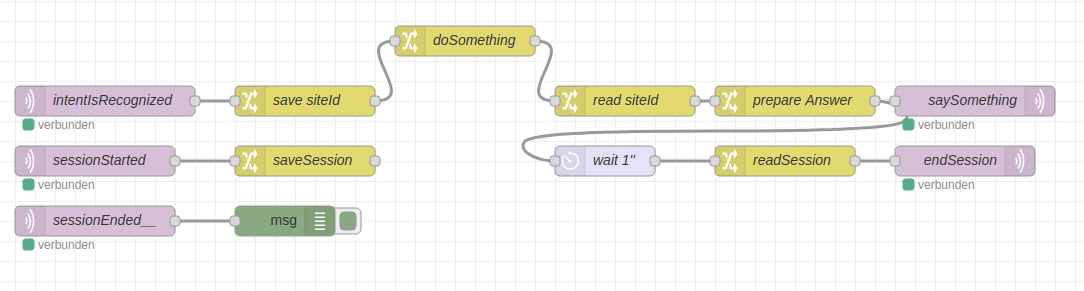
Here’s something for nodeRed (version 1):

I save the siteId and in second example the sessionId, cause in some nodes all payload are destroyed.

[{"id":"341f829c.eef3ee","type":"mqtt in","z":"27a1dcd5.ab7ad4","name":"intentIsRecognized","topic":"hermes/intent/#","qos":"2","datatype":"json","broker":"6f747297.64151c","x":110,"y":520,"wires":[["bce45bd4.746cd8"]]},{"id":"185bb0bc.bae1df","type":"mqtt out","z":"27a1dcd5.ab7ad4","name":"saySomething","topic":"hermes/tts/say","qos":"","retain":"","broker":"6f747297.64151c","x":980,"y":520,"wires":[]},{"id":"bd10ced8.e046","type":"change","z":"27a1dcd5.ab7ad4","name":"doSomething","rules":[{"t":"set","p":"payload","pt":"msg","to":"Etwas wurde erledigt","tot":"str"}],"action":"","property":"","from":"","to":"","reg":false,"x":470,"y":460,"wires":[["237a18ca.addcf8"]]},{"id":"bce45bd4.746cd8","type":"change","z":"27a1dcd5.ab7ad4","name":"save siteId","rules":[{"t":"set","p":"mySiteId","pt":"global","to":"payload.siteId","tot":"msg"}],"action":"","property":"","from":"","to":"","reg":false,"x":310,"y":520,"wires":[["bd10ced8.e046"]]},{"id":"5ffd1b8a.cd8534","type":"change","z":"27a1dcd5.ab7ad4","name":"prepare Answer","rules":[{"t":"set","p":"payload","pt":"msg","to":"{\t \"text\":msg.payload,\t \"lang\":\"de\",\t \"id\":\"\",\t \"siteId\":msg.siteId,\t \"sessionId\":\"\"\t \t}","tot":"jsonata"}],"action":"","property":"","from":"","to":"","reg":false,"x":800,"y":520,"wires":[["185bb0bc.bae1df"]]},{"id":"237a18ca.addcf8","type":"change","z":"27a1dcd5.ab7ad4","name":"read siteId","rules":[{"t":"set","p":"siteId","pt":"msg","to":"mySiteId","tot":"global"}],"action":"","property":"","from":"","to":"","reg":false,"x":630,"y":520,"wires":[["5ffd1b8a.cd8534"]]},{"id":"6f747297.64151c","type":"mqtt-broker","z":"","name":"MQTT","broker":"10.2.254.1","port":"1883","clientid":"","usetls":false,"compatmode":true,"keepalive":"60","cleansession":true,"birthTopic":"","birthQos":"0","birthPayload":"","closeTopic":"","closeQos":"0","closePayload":"","willTopic":"","willQos":"0","willPayload":""}]

Here’s something for nodeRed (version 2):

now I also save the sessionId to end the session after answering

[{"id":"71ad8e3c.aa46c","type":"mqtt in","z":"27a1dcd5.ab7ad4","name":"sessionStarted","topic":"hermes/dialogueManager/sessionStarted","qos":"2","datatype":"json","broker":"6f747297.64151c","x":100,"y":580,"wires":[["5ef9514c.863a5"]]},{"id":"341f829c.eef3ee","type":"mqtt in","z":"27a1dcd5.ab7ad4","name":"intentIsRecognized","topic":"hermes/intent/#","qos":"2","datatype":"json","broker":"6f747297.64151c","x":110,"y":520,"wires":[["bce45bd4.746cd8"]]},{"id":"185bb0bc.bae1df","type":"mqtt out","z":"27a1dcd5.ab7ad4","name":"saySomething","topic":"hermes/tts/say","qos":"","retain":"","broker":"6f747297.64151c","x":980,"y":520,"wires":[]},{"id":"e350059e.44f328","type":"mqtt out","z":"27a1dcd5.ab7ad4","name":"endSession","topic":"hermes/dialogueManager/endSession","qos":"","retain":"","broker":"6f747297.64151c","x":970,"y":580,"wires":[]},{"id":"5ef9514c.863a5","type":"change","z":"27a1dcd5.ab7ad4","name":"saveSession","rules":[{"t":"set","p":"session","pt":"global","to":"{ \"sessionId\":msg.payload.sessionId, \"siteId\": msg.payload.siteId }","tot":"jsonata"}],"action":"","property":"","from":"","to":"","reg":false,"x":310,"y":580,"wires":[[]]},{"id":"bd10ced8.e046","type":"change","z":"27a1dcd5.ab7ad4","name":"doSomething","rules":[{"t":"set","p":"payload","pt":"msg","to":"Etwas wurde erledigt","tot":"str"}],"action":"","property":"","from":"","to":"","reg":false,"x":470,"y":460,"wires":[["237a18ca.addcf8"]]},{"id":"3f2d8464.acdbdc","type":"change","z":"27a1dcd5.ab7ad4","name":"readSession","rules":[{"t":"set","p":"payload","pt":"msg","to":"session","tot":"global"}],"action":"","property":"","from":"","to":"","reg":false,"x":790,"y":580,"wires":[["e350059e.44f328"]]},{"id":"5eca4b1.2c03ab4","type":"delay","z":"27a1dcd5.ab7ad4","name":"wait 1''","pauseType":"delay","timeout":"1","timeoutUnits":"seconds","rate":"1","nbRateUnits":"1","rateUnits":"second","randomFirst":"1","randomLast":"5","randomUnits":"seconds","drop":false,"x":610,"y":580,"wires":[["3f2d8464.acdbdc"]]},{"id":"bce45bd4.746cd8","type":"change","z":"27a1dcd5.ab7ad4","name":"save siteId","rules":[{"t":"set","p":"mySiteId","pt":"global","to":"payload.siteId","tot":"msg"}],"action":"","property":"","from":"","to":"","reg":false,"x":310,"y":520,"wires":[["bd10ced8.e046"]]},{"id":"5ffd1b8a.cd8534","type":"change","z":"27a1dcd5.ab7ad4","name":"prepare Answer","rules":[{"t":"set","p":"payload","pt":"msg","to":"{\t \"text\":msg.payload,\t \"lang\":\"de\",\t \"id\":\"\",\t \"siteId\":msg.siteId,\t \"sessionId\":\"\"\t \t}","tot":"jsonata"}],"action":"","property":"","from":"","to":"","reg":false,"x":800,"y":520,"wires":[["185bb0bc.bae1df","5eca4b1.2c03ab4"]]},{"id":"237a18ca.addcf8","type":"change","z":"27a1dcd5.ab7ad4","name":"read siteId","rules":[{"t":"set","p":"siteId","pt":"msg","to":"mySiteId","tot":"global"}],"action":"","property":"","from":"","to":"","reg":false,"x":630,"y":520,"wires":[["5ffd1b8a.cd8534"]]},{"id":"1472dd78.aa2e53","type":"mqtt in","z":"27a1dcd5.ab7ad4","name":"sessionEnded__","topic":"hermes/dialogueManager/sessionEnded","qos":"2","datatype":"json","broker":"6f747297.64151c","x":100,"y":640,"wires":[["2fbaa744.027eb8"]]},{"id":"2fbaa744.027eb8","type":"debug","z":"27a1dcd5.ab7ad4","name":"","active":true,"tosidebar":true,"console":false,"tostatus":false,"complete":"true","targetType":"full","x":290,"y":640,"wires":[]},{"id":"6f747297.64151c","type":"mqtt-broker","z":"","name":"MQTT","broker":"10.2.254.1","port":"1883","clientid":"","usetls":false,"compatmode":true,"keepalive":"60","cleansession":true,"birthTopic":"","birthQos":"0","birthPayload":"","closeTopic":"","closeQos":"0","closePayload":"","willTopic":"","willQos":"0","willPayload":""}]

Here’s something for nodeRed (version 3):

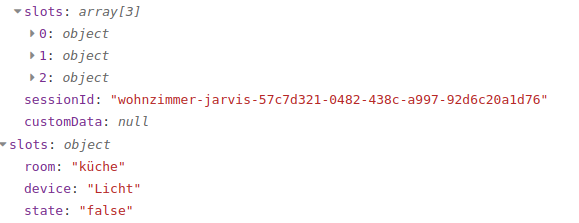
I was always not happy with the numbered array of the slots. So I changed them to own variables. Also, if now room is said ithe the intent, the actual sideId is taken. Both is in the function node in javascript:
mqtt_example_4
Heres the nodeRed nodes:
mqtt_example_3

[{"id":"9d9044a8.bb4108","type":"mqtt in","z":"27a1dcd5.ab7ad4","name":"FromRhasspy","topic":"hermes/intent/#","qos":"2","datatype":"json","broker":"6f747297.64151c","x":410,"y":680,"wires":[["be3c58cb.88e6a8"]]},{"id":"be3c58cb.88e6a8","type":"function","z":"27a1dcd5.ab7ad4","name":"createNewSlots","func":"var slots = {\"room\":msg.payload.siteId}\nfor (var i in msg.payload.slots){\n slots[msg.payload.slots[i].slotName] = msg.payload.slots[i].value.value\n}\nmsg.slots = slots\n \nreturn msg","outputs":1,"noerr":0,"x":600,"y":680,"wires":[["a7e5d908.ebc348"]]},{"id":"a7e5d908.ebc348","type":"debug","z":"27a1dcd5.ab7ad4","name":"","active":true,"tosidebar":true,"console":false,"tostatus":false,"complete":"true","targetType":"full","x":770,"y":680,"wires":[]},{"id":"6f747297.64151c","type":"mqtt-broker","z":"","name":"MQTT","broker":"10.2.254.1","port":"1883","clientid":"","usetls":false,"compatmode":true,"keepalive":"60","cleansession":true,"birthTopic":"","birthQos":"0","birthPayload":"","closeTopic":"","closeQos":"0","closePayload":"","willTopic":"","willQos":"0","willPayload":""}]