I ran out of links due to my noob status but https://github.com/OAID all looks interesting for embedded irrespective of SoC.
http://www.tengine.org.cn/
Due to links still thinking either the rk3308 or r328 could make a great https://rhasspy.github.io/rhasspy-voltron/tutorials.html#server-with-satellites.
Still waiting for my https://wiki.radxa.com/RockpiS $13.99 but it might be painfull with a very new dts and debian image and looking like I have to figure the mic circuit out myself.
I know its called Rhasspy but the framework is so great an flexible that these might make a really great option.
I read some good reviews of the Respeaker 2 mic hat regarding sensitivity and far field capture. If ALSA AEC can be achieved using the loopback of the hat (or maybe using ALSA loopback plugin?) it will be a huge progress for vocal assistant 
Really looking forward to your feedback 
@fastjack how are you performing to play music over rhasspy and he is still listening for the wakeword? What Software are you using? I’ve been trying to play radio over mopidy and keep rhasspy to listen to the wakeword. Yet mopidy tells me that the resource is busy when I Start the radio stream. A busy resource makes sense to me. Thats why I wondering how you’re perforimg this task.
Yeah the respeaker or clone 2mic is a great option due to cost and if EC could be made to a level where VAD could kick in then maybe something could be workable.
VAD is in Speex and AEC is in SpeexDsp but its a maybe.
I will let you know but been waiting for some time for delivery https://www.ebay.co.uk/itm/Blesiya-ReSpeaker-2-Mic-Pi-HAT-V1-0-Expansion-Board-I2C-For-Raspberry-Pi/253876990739
But the master/satelite mode of rhasspy gets really cost effective with the Rockchip/Allwinner as the are just the right combination on silicon and not much use for anything else than satelite mic/speakers.
But the Pi3A+ and the above £10 mic/soundcard aint that bad a price.
pcm.!default {
    type plug
    slave.pcm "dmix"
}
You prob just need to add another line to your asound.conf and use a dmix pcm that multiple applications can use rather than a sole PCM or device.
Its “dsnoop” for mics “dmix” for outputs just do a google.
Also I have a ps3eye but with the driver problems even though it has a great array I think its a really bad device to use as it can cause all sorts of confusion with alsa-util failures and for a couple of $ more a 2 mic even has a little amp built in with some leds.
So yeah if EC can be made to work its definately a top pick and also even without EC, but that is another problem.
I have seen these on sale in China and have my fingers crossed at a similar price they will turn up on ebay or aliexpress.
http://bbs.16rd.com/shop_product-1-381.html
But that might be Yaun not Yen 
But supposedly similar as these https://detail.tmall.com/item.htm?id=569134471494
Is supposedly a R328 so fingers crossed wither way.
Any idea why this might not work within a Docker container? I can play and record from multiple applications at the same time outside of Docker (which indicates to me that my dmix and dsnoop config is working), but then when I try to play back a file from the host and from within the Rhasspy container at the same time, I get an error from aplay:
root@1530daa229ed:/usr/lib/rhasspy-voltron# aplay etc/wav/beep_hi.wav
ALSA lib pcm_dmix.c:1108:(snd_pcm_dmix_open) unable to open slave
aplay: main:828: audio open error: Device or resource busy
Is the Docker container is trying to grab the hardware device and create an entirely new dmix plugin instance within the container instead of using the existing one outside of the container?
I’ve tried linking my /etc/asoundrc.conf into the container, making /dev/snd/ available in the container, and even setting the container to privileged without any success.
This is on a Pi Zero so I’d rather not run pulseaudio and hog more CPU…
Any advice would be appreciated! Thanks!
Ooof if /dev/snd is avail then I thought that would be it.
Must be docker if running out but not in the container and pulseaudio with dbus and everything is even worse for docker implementation.
I know alsa from Mycroft experience but never run in a container.
I am a Rhasspy noob and just trying the new https://github.com/rhasspy/rhasspy-voltron which is just python virt-env
So have no idea don’t even know what you can run on a zero with rhasspy yet.
My advice would be to install in a virt-env rather than docker as prob not eloquent but as a noob its prob a fix.
Doubt you are running much else on a zero and also don’t know how much of rhasspy will run on a zero.
Unless its something as simple as the docker run needs --group-add audio aswell ? dunno guessing.
But apols as a bit stumped as thought that would just work.
[EDIT] apols
Doh you are creating a file to the asound.conf internal docker file? As it will not see /etc/asound.conf or .asoundrc from the host and not have or at least just be defaults
Also if you write changes it will not be persistant unless you add an external in the run.
I should of mentioned this doh! apols
-v /etc/asound.conf:/etc/asound.conf:ro
To the docker run
If not stumped as not really used the docker version and still very much a fresh rhasspy noob
The persistance and what is in the container can be mighty confusing at times
This is what I did, as I mentioned in my first post when I said that I tried linking my asoundrc.conf into the container. The container uses the host’s config successfully.
ALSA does take a bit to get your head wrapped around it all, but I feel like I’ve got a good grasp on it at this point - at least on the host directly. It’s the Docker game I’m still trying to figure out
Thanks for the ideas! I’ll keep poking around.
Yeah as apols as same, thought that would just work.
Maybe its just a matter of https://rhasspy.readthedocs.io/en/latest/installation/#virtual-environment as really don’t know.
aplay --verbose see if it gives a clue, someone on here will know as sure this must be a common thing.
I’m sure if I ran Rhasspy through venv, I wouldn’t be having the issue… It’s something with Docker for sure.
No difference in the output with aplay -v in the container or out of it. I just get the error message inside the container whenever something is already playing out of it.
Yeah not really sure how to get more debug from alsa as its tricky if the logs and verbose output don’t give a clue.
Maybe alsa-info would show something but doubt it.
I would post elsewhere as the title of this thread is prob stopping replies.
Or Venv as presume on a zero being in a container is of little benefit.
Maybe just needs a unique ipc_key to host such as ipc_key 555555 and maybe create a asound.conf in $HOME as a dumb conatiner file or something so they can have different keys.
But dunno that is a straw clutch.
1st card to turn up is the 4 mic linear 4 Pi.
So not using loopback and running ec rather than ec_hw
The ec load seems very low on a Pi4 no OC
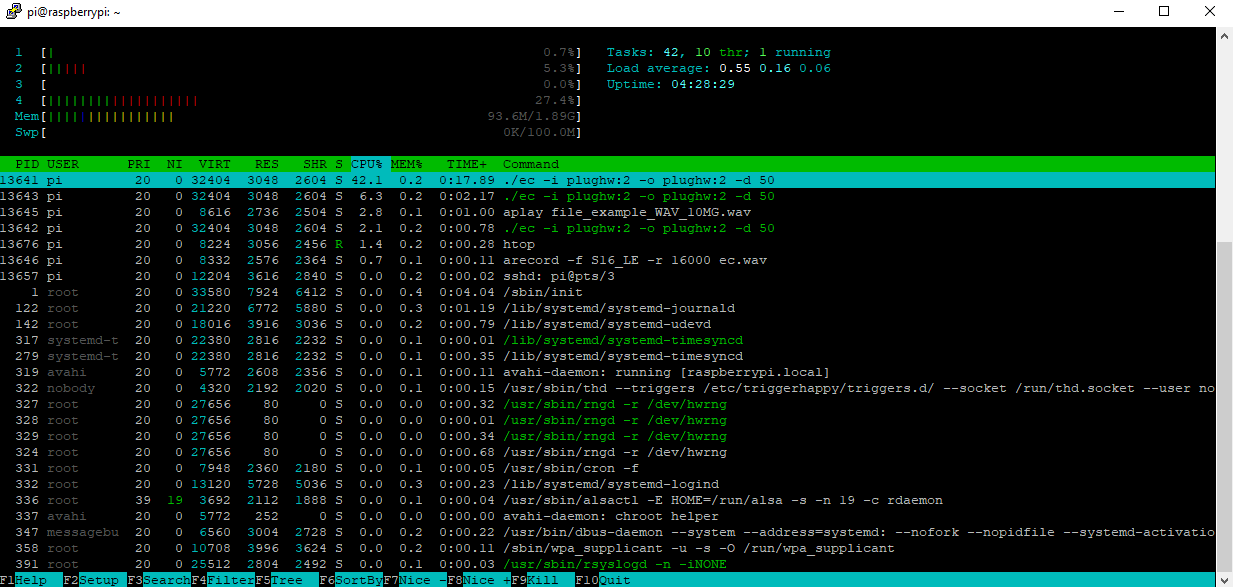
Now strangely because I have the 4 mic linear I haven’t been able to run ec_hw yet as not really sure which channel is the loopback.
But will try but the 4 mic linear seems great and actually not bad for £25 but the linear mic strip suits prob a retangle ‘radio’ shape box due to length.
I am pretty sure I can add some extra filters forgot the music term but that will filter out the low volume and that should reduce even further.
Speex & EC doesn’t totally remove echo and really needs the same sound card as clock drift kills its function.
But on a soundcard and presuming the 2mic will be the same its likely effective EC can be used to give a mic signal fit for purpose.
Now what I have to do is figure out how to install the drivers with rt-prempt kernel and see if that gives any improvement.
I ran with default EC settings so should also give that a play and think my pi4 is about 50ms latency so used that.
But I would say that this will run on a Pi3a+ dunno about the zero though.
I am using https://github.com/voice-engine/ec not sure what the speex alsa-plugins actually do?
Still got it set up via alsa with the ec asound.conf
Whats the term for a musical filter that removes the low volume portion of a wav?
But prob a few things I can still do to improve further.
1 Like
Sorry I did not read whole topic, but I can confirm, that Respeaker Mic Array v2 (USB) work very well with AEC (so MIC listen while audio is being played via same card). I reflashed firmware to 48kHz 1 mic channel. The only problem was to get Respeaker card working both output for Respeaker in Docker and Snapcast on host. I did solve it with help of others here on the forum.
Yeah the $70 Respeaker Mic Array v2 damn well ought to have hardware DSP
You can do it with software with $10 2 mic Pi soundcards, been on a bit of a crusade to get it working.
I found that you have to have playback/capture on the same cards as since I got a 4mic linear for Pi software AEC works quite well.
The idea is satellite speaker/mics with with Pi4/Respeaker V2 USB starts to get a tad expensive.
But you can Pi3A+/2mic4Pi AEC away quite nicely for $35 and as a disclaimer haven’t tried the Pi3A+ but the load is so little on the Pi4 that I am presuming its yes.
I should get my skates on and check that.
There is a Master/Satellite form of Rhasspy that has a number of advantages and is pretty cool, but costs can quickly add up.
There is also the Software AEC of pulseaudio but again pulseaudio can be a docker pain and its adding more bloat to low end satellites that are little more than streaming speakers with mic arrays.
I think its of more interest for those who want to run home cloud AI without big data services.
But localising and distributing voice capture and creating what is essentially a wide array microphone has natural physics on its side rather than technology.
PS if anyone is trying the software.
Is slightly wrong edit ec.c so the frame size is a power of 2 and your FFT filter will be much better (128, 256 or 512) prob.
The line
int frame_size = config.rate * 10 / 1000; // 10 ms even for someone like me is easy to change, then make.The above line is likely to make primes not good for FFT.
[Pi3] with a quick test seems very much like the Pi4
Did you notice audio playback quality issue (like strange « shh ») with the 48Khz firmware?
Isn’t 16khz if you enable AEC, but that is my foggy memory but seem to remember thinking Oh so just wideband audio.
Just to update older thread, there is 48kHz firmware for Respeaker Mic Array v2 available. So AEC is now also available for 48kHz playback/recording.
Thanks. I know of it and tested it a few months back to no avail. AEC is pretty inexistant and audio playback quality suffers from strange saturation issues.
Seed has stated on their forum that the playback quality / AEC issue can not be solved because of the limited capabilities of the XMOS chip.
@litinoveweedle Hi  . Can you confirm that the Respeaker 48KHz 1 channel firmware have a working AEC? Did you notice audio quality issues? Thanks