I am trying to set up MaryTTS and I am running the docker run command from the docs, but it never completes and I get the following error standard_init_linux.go:211: exec user process caused "exec format error". Any ideas how to fix?
What hardware / software are you trying?
RPi 3B+ with a matrix voice
MaryTTS docker is only available for amd64, so that is causing the error.
You cannot use it on a Pi.
Check this topic as well:
Can’t you just Start the precompiled jar file? That’s how I’ve done it yet on ubuntu. Gotta try to run the server standalone without docker on my pi tomorrow.
Whomp whomp  , oh well, i’ll just have to stick with pico. thanks!
How does one go about that? The installation docs are surprisingly sparse in my research
1 Like
I’ve downloaded marytts zip file. Unzip it and run the marytts-server file as: ./marytts-server
Afterwards you’ll see the web UI at localhost:59125
Awesome! I’ll give it a try tonight. Thanks!
Tim
Is it working for you?
I’ve managed to move everything in a docker container. So in case someone wants to setup marytts as well in docker I’ll share my config:
At first create a dockerfile containing these lines:
Note: Label is as far as I know not mandatory.
FROM ubuntu:16.04

LABEL yourName <yourEmail>

RUN mkdir marytts && \
    apt-get update && \
    apt-get install -y unzip && \
    apt-get install -y default-jre && \
    apt-get install -y wget && \
    apt-get clean
RUN wget https://github.com/marytts/marytts/releases/download/v5.2/marytts-installer-5.2.zip

RUN unzip marytts-installer-5.2.zip && \
    rm marytts-installer-5.2.zip && \
    cd marytts-installer-5.2
RUN chmod +x ./marytts

WORKDIR /marytts-installer-5.2
RUN ./marytts install:bits1-hsmm
CMD ["./marytts"]
EXPOSE 59125
configure the last RUN command as you like. I’m using a german voice so if you want a different one just change bits1-hsmm to any other voice tag (that’s what I used as basis for my configuration: MaryTTS voice tags)
Use a terminal to navigate into the folder which is containing the just created dockerfile.
Next run docker image build -t yourImageName:yourVersionNumber .
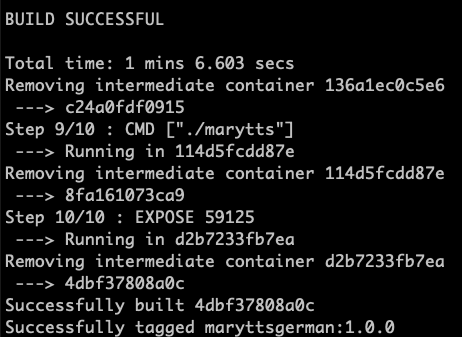
Next create a file called docker-compose.yml and fill in following lines:
version: "3"

services:
    marytts:
        image: yourImageName:yourVersionNumber
        ports:
            - 59125:59125
        restart: always
Adjust your image name and version number, save the file and navigate into the folder containing this file.
Run docker-compose up -d
This command will start the container we’ve just build and start maryTTS.
After some seconds or minutes, depending on your hardware you can navigate to localhost:59125 or if you’re just connected using ssh: IPADRESS_OF_YOUR_PI:59125
I hope it works out for everyone.
Have a good time and watch yourself in times of corona.
3 Likes
Is anyone using marytts and is having voice output? My docker image running like a charm but there is just no output from marytts.
curl http://192.168.0.2:59125/process?INPUT_TEXT=Es+ist+17+Uhr+48&INPUT_TYPE=TEXT&AUDIO=WAVE&OUTPUT_TYPE=AUDIO&LOCALE=de_DE&VOICE=bits1-hsmm | aplay
[1] 18575
[2] 18576
[3] 18577
[4] 18578
[5] 18579
ALSA lib pcm_hw.c:1903:(_snd_pcm_hw_open) card is not defined
aplay: main:828: audio open error: Invalid argument
[2]   Done                    INPUT_TYPE=TEXT
[3]   Done                    AUDIO=WAVE
[4]-  Done                    OUTPUT_TYPE=AUDIO
[5]+  Done                    LOCALE=de_DE
I don’t get whats the problem. Respeaker USB Mic Array is working. Mic is fine and if I click the wake button I can hear the signal.
Is someone having similiar issues?
EDIT. by the way using espeak works fine. Output is coming from the headphone jack at the Respeaker USB Mic Array
Hello @Bozor ,
I’m not quite sure, but maybe access to the microphone / speaker from a docker container is limited. To allow Rhasspy to access my Jabra 510, the docker-compose is as follows (devices:…):
  rhasspy:
    image: "synesthesiam/rhasspy-server:latest"
    container_name: Rhasspy
    .. blabla
    devices:
        - "/dev/snd:/dev/snd"
Maybe this helps?
I’ll play around tomorrow. Thanks for the hint
Yeah, I’d orientate myself by the documentary for the Rhasspy Docker Container. Good success!
rhasspy:
    image: "synesthesiam/rhasspy-server:latest"
    restart: unless-stopped
    volumes:
        - "$HOME/.config/rhasspy/profiles:/profiles"
    ports:
        - "12101:12101"
    devices:
        - "/dev/snd:/dev/snd"
command: --user-profiles /profiles --profile enI got this working by using @Bozor suggestion. But I don’t use it because my wife didn’t like the voice the best. Switched back to wavenet
1 Like
Would you mind sharing your dockerfile and docker-compose file? My sound output is still not working
I’m using MarryTTs in docker on same machine as rhasspy with german voice:
Here are docker-compose files and relevant profiles.json entries
1.) If you are using different language than english, you have to add locale in rhassy profile.json
I use two german voices, located in same folder as docker-compose file
(voice-bits1-hsmm, voice-bits3-hsmm)
2.) --log-level ERROR reduces log entries
"text_to_speech": {
    "marytts": {
        "locale": "de",
        "url": "http://10.2.254.1:59125",
        "voice": "bits3-hsmm",
        "effects": {
            "effect_F0Add_selected": "on",
            "effect_F0Add_parameters": "f0Add:30.0;"
        }
    },
rhasspy:
image: "synesthesiam/rhasspy-server:latest"
hostname: rhasspy-server
container_name: rhasspy-server

restart: unless-stopped
privileged: true

ports:
    - "12101:12101"

volumes:
    - "/opt/rhasspy/profiles:/profiles"

command: --user-profiles /profiles --profile de --log-level ERROR
marytts:
image: synesthesiam/marytts:5.2
container_name: marytts
hostname: marrytts-server

restart: unless-stopped

ports:
- "59125:59125"

volumes:
 - "./marytts-5.2/lib/voice-bits1-hsmm-5.2.jar:/marytts/lib/voice-bits1-hsmm-5.2.jar"
 - "./marytts-5.2/lib/voice-bits3-hsmm-5.2.jar:/marytts/lib/voice-bits3-hsmm-5.2.jar"
1 Like
Thanks for the great instructions! With this information I have built my first docker container. And it works great almost right away!
The only issue was that in the manual of @Bozor the voice bits3-hsmm was used, I overlooked this in the beginning when I took over the Rhasspy configuration from @kaykoch With bits1-hsmm instead of bits3-hsmm it works great.
@Bozor: I did not use the option with:
devices:
- “/dev/snd:/dev/snd”
There were moments when I didn’t have voice output via Rhasspy, but this was a configuration problem.
Thanks for the information - I wanted to get away from pico tts for a long time and I am very happy with Mary. 
1 Like
@kaykoch Where did you download the voices
- voice bits1-hsmm-5.2.jar
- voice-bits3-hsmm-5.2.jar
Which one do you find better? Are there any other alternative german voices for MaryTTS?
First of all:
I used docker image
synesthesiam/marytts:5.2
as descriped here
Right now, I try to create my own docker image. Thanks @Bozor
In this description, there is also a script to download translation files.
If you only want to download German files:
First is female (used for my wakeword: COMPUTER)
Second is male (used for my wakeword JARVIS)
Create a folder (marytts-5.2) in your docker-compose folder, unzip the zip files in (xx.jar):
 volumes:
 - "./marytts-5.2/lib/voice-bits1-hsmm-5.2.jar:/marytts/lib/voice-bits1-hsmm-5.2.jar"
- "./marytts-5.2/lib/voice-bits3-hsmm-5.2.jar:/marytts/lib/voice-bits3-hsmm-5.2.jar"You can add more languages in this line like
RUN ./marytts install:bits1-hsmm bits3 bits3-hsmm
I created my own image as Bozer descriped and add more languages. I prefer bits1-hsmm for female but bits3 (without hsmm) for male
@kaykoch hanks for the detailed information! Makes sense!
But I still don’t understand how to get from the github name (voice-bits3-hsmm) to the command (RUN ./marytts install:bits1-hsmm). Just leave out “voice-”? Is that the system?
Until now I defined the languages via RUN within dcokerfilr.
But with every new build everything is downloaded new I use this code:
cd /docker/_compose/ha_environment/ && docker-compose stop marytts && docker-compose rm -f marytts && docker image build -t marytts:1.0 . && docker-compose up -d ; cd -
Tomorrow I will try to use volumes for mounting - then the voice data will not be reloaded during build.
I also want to try other voices. On guthib/marytts/ there are still some german releases (german-bitsX-3.5.0, german-hmm-bitsX-3.5.0, german-dfki-bundesliga-3.5.0, voice-dfki-pavoque-neutral-5.2). However, some of the releases do not include *.jar. Well, I will have a closer look at that tomorrow.
1 Like
@j3mu5 in which directory are you running these commands? If you’re folder in which your are running this command has a lot of files and is bigger than ~5Gb try moving your necessary files in a smaller folder. The docker image build ... command is always taking your current context to load into the docker container daemon and takes pretty long to build the image if the context folder is too big.
If you use this line:
RUN ./marytts install:bits1 bits1-hsmm bits3 bits3-hsmm dfki-pavoque-neutral dfki-pavoque-neutral-hsmm dfki-pavoque-styles
These are all german voices you can use, I guess. After that you find on maryTTS GUI on your server
http://10.2.254.1:59125/
following pic:
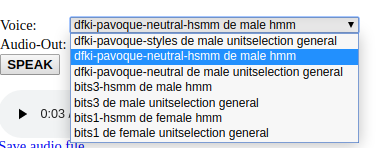
There you can find the names of the languages. In this case: dfki-pavoque-neutral-hsmm
On rhasspy GUI:
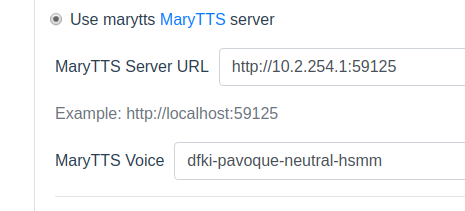
Good Luck
Sorry to be a bit stupid, but it’s not really working for me yet.
Thanks @kaykoch for the hint!
1. what works?
Docker file with the line
RUN ./marytts install:bits1-hsmm bits3-hsmm
Then in bash: (@Bozor Thanks for the tip! In the folder where I execute the commands there is only docker-compose.yaml and dockerfile so this should not be a problem.)
docker-compose stop marytts && docker image build -t marytts:1.4 . && docker-compose up -d
Then I can open the web interface of MaryTTS and see both voices.
2.1 More voices do not work
Docker file with the line
RUN ./marytts install:bits1 bits1-hsmm bits3 bits3-hsmm dfki-pavoque-neutral dfki-pavoque-neutral-hsmm dfki-pavoque-styles
Afterwards again in bash (the build takes longer, you see that more work is done)
docker-compose stop marytts && docker image build -t marytts:1.4 . && docker-compose up -d
However, the web interface is not available. Via Portainer I get the following log for martts (which does not help me):
* What went wrong:


Execution failed for task ':server'.


> Process 'command '/usr/lib/jvm/java-8-openjdk-armhf/bin/java'' finished with non-zero exit value 1


* Try:


Run with --stacktrace option to get the stack trace. Run with --info or --debug option to get more log output.


BUILD FAILED


Total time: 22.758 secs


Starting a new Gradle Daemon for this build (subsequent builds will be faster).


MARY server 5.2 starting as a HTTP server...Exception in thread "main" java.lang.Exception: Problem starting module Synthesis


	at marytts.server.Mary.startModules(Mary.java:151)


	at marytts.server.Mary.startup(Mary.java:297)


	at marytts.server.Mary.startup(Mary.java:204)


	at marytts.server.Mary.main(Mary.java:513)


Caused by: java.lang.OutOfMemoryError: Java heap space


	at marytts.unitselection.select.JoinCostFeatures.loadFromByteBuffer(JoinCostFeatures.java:218)


	at marytts.unitselection.select.JoinCostFeatures.load(JoinCostFeatures.java:143)


	at marytts.unitselection.select.JoinCostFeatures.init(JoinCostFeatures.java:119)


	at marytts.unitselection.UnitSelectionVoice.<init>(UnitSelectionVoice.java:120)


	at marytts.unitselection.UnitSelectionSynthesizer.startup(UnitSelectionSynthesizer.java:94)


	at marytts.modules.Synthesis.startupSynthesizers(Synthesis.java:73)


	at marytts.modules.Synthesis.startup(Synthesis.java:65)


	at marytts.server.Mary.startModules(Mary.java:149)


	... 3 more


Exception in thread "Thread-1" java.lang.IllegalStateException: MARY system is not running


	at marytts.server.Mary.shutdown(Mary.java:371)


	at marytts.server.Mary$2.run(Mary.java:290)


:server FAILED


FAILURE: Build failed with an exception.


* What went wrong:
2.2 Integration via volume in docker-compose is not possible
Docker build from 1. that works and remove one of the two voices:
RUN ./marytts install:bits1-hsmm
Again afterwards:
docker-compose stop marytts && docker image build -t marytts:1.4 . && docker-compose up -d
-> Docker container starts and only one voice is visible So far, so reasonable.
Now add the following line in the docker-compose (on my system the file is of course in the path!)
volumes:
 - /docker/MaryTTS/voice-bits3-hsmm-5.2.jar:/marytts/lib/voice-bits3-hsmm-5.2.jar
bash:
docker-compose stop marytts && docker image build -t marytts:1.4 . && docker-compose up -d
Mary starts, but only shows bits1-hsmm from the RUN command
I was still trying to help myself a little:
docker exec -it MaryTTS bash
find . -type f -name '*bits1*'
gives me: ./installed/voice-bits1-hsmm-5.2.jar
So I adapted the docker-compose
volumes:
 - /docker/MaryTTS/voice-bits3-hsmm-5.2.jar:/installed/voice-bits3-hsmm-5.2.jar
and again:
docker-compose stop marytts && docker image build -t marytts:1.4 . && docker-compose up -d
-> Mary still starts, but still shows only bits1-hsmm from the RUN command
I would prefer to be able to integrate the voices via docker-compose volumes. The reason is the following: My docker-compose contains a lot of containers. Sometimes I want to update all containers at once:
docker-compose down && docker-compose up -d
Since “down” deletes all containers and images including marytts, it gets a little more complicated. I have to rebuild the container before the “up -d”. That works, but thanks to the build it takes much longer than before:
cd /docker/_compose/ha_environment/ && docker-compose stop marytts && docker-compose rm -f marytts && docker-compose down -v --rmi all && cd /docker/_compose/ha_environment/ && docker image build -t marytts:1.0 . && docker-compose up -d ; cd -
I’ve just added your RUN line in my dockerfile with all languages. Not as docker volumes. I’m not using this a lot so I have no clue what’s going wrong.
I’m pretty sure you’re facing the same issue. Running your docker-compose up without -d will show you the same result I guess.
Creating maryttsgerman ... done
Attaching to maryttsgerman
maryttsgerman | Starting a new Gradle Daemon for this build (subsequent builds will be faster).
maryttsgerman | :serverMARY server 5.2 starting as a HTTP server...Exception in thread "main" java.lang.Exception: Problem starting module Synthesis
maryttsgerman | 	at marytts.server.Mary.startModules(Mary.java:151)
maryttsgerman | 	at marytts.server.Mary.startup(Mary.java:297)
maryttsgerman | 	at marytts.server.Mary.startup(Mary.java:204)
maryttsgerman | 	at marytts.server.Mary.main(Mary.java:513)
maryttsgerman | Caused by: java.lang.OutOfMemoryError: Java heap space
maryttsgerman | 	at marytts.unitselection.select.JoinCostFeatures.loadFromByteBuffer(JoinCostFeatures.java:220)
maryttsgerman | 	at marytts.unitselection.select.JoinCostFeatures.load(JoinCostFeatures.java:143)
maryttsgerman | 	at marytts.unitselection.select.JoinCostFeatures.init(JoinCostFeatures.java:119)
maryttsgerman | 	at marytts.unitselection.UnitSelectionVoice.<init>(UnitSelectionVoice.java:120)
maryttsgerman | 	at marytts.unitselection.UnitSelectionSynthesizer.startup(UnitSelectionSynthesizer.java:94)
maryttsgerman | 	at marytts.modules.Synthesis.startupSynthesizers(Synthesis.java:73)
maryttsgerman | 	at marytts.modules.Synthesis.startup(Synthesis.java:65)
maryttsgerman | 	at marytts.server.Mary.startModules(Mary.java:149)
maryttsgerman | 	... 3 more
maryttsgerman | Exception in thread "Thread-1" java.lang.IllegalStateException: MARY system is not running
maryttsgerman | 	at marytts.server.Mary.shutdown(Mary.java:371)
maryttsgerman | 	at marytts.server.Mary$2.run(Mary.java:290)
maryttsgerman |  FAILED
maryttsgerman |
maryttsgerman | FAILURE: Build failed with an exception.
maryttsgerman |
maryttsgerman | * What went wrong:
maryttsgerman | Execution failed for task ':server'.
maryttsgerman | > Process 'command '/usr/lib/jvm/java-8-openjdk-armhf/bin/java'' finished with non-zero exit value 1
maryttsgerman |
maryttsgerman | * Try:
maryttsgerman | Run with --stacktrace option to get the stack trace. Run with --info or --debug option to get more log output.
maryttsgerman |
maryttsgerman | BUILD FAILED
maryttsgerman |
maryttsgerman | Total time: 27.391 secs
Your Java runtime is out of memory. Give marytts more RAM or install less voices will fix it I guess.
I haven’t found any documentation of marytts concerning command line flags like -Dxxxx
Does anyone know where to find these? Maybe @kaykoch knows something?
Either you create your own docker image or you use the one from synesthesiam
For your own docker image the languages will be packed inside the image during build. For this, you have to “tell” this to the dockerfile. Here is my complete dockerfile:
#!/bin/bash
FROM ubuntu:16.04

LABEL kay koch <kay.koch@gmx.de>

RUN mkdir marytts && \
   apt-get update && \
   apt-get install -y unzip && \
   apt-get install -y default-jre && \
   apt-get install -y wget && \
   apt-get clean
RUN wget https://github.com/marytts/marytts/releases/download/v5.2/marytts-installer-5.2.zip

RUN unzip marytts-installer-5.2.zip && \
  rm marytts-installer-5.2.zip && \
  cd marytts-installer-5.2
RUN chmod +x ./marytts

WORKDIR /marytts-installer-5.2
RUN ./marytts install:bits1 bits1-hsmm bits3 bits3-hsmm dfki-pavoque-neutral dfki-pavoque-neutral-
hsmm dfki-pavoque-styles
CMD ["./marytts"]
EXPOSE 59125
This is exactly the file from Bozer, but with more languages.
Create this file, then you create an other file (no matter which name. Let’s say: build_image)
!/bin/bash
docker image build -t kay_marytts:version_1 .
Importent: the Point at the end.
kay_marytts is the name for my image. (No matter which name. Let’s take it)
After you make it executable:
chmod +x build_image
This takes long, but after you should have your own image, called kay_marytts:version_1
Then you have to create the container. For this you have to create a configuration file.
After the creation, you have a container called: marytts-server-kay
version: "3"

services:
marytts:
    image: kay_marrytts:version_1
    container_name: marytts-server-kay
    hostname: marrytts-server
    ports:
        - 59125:59125
    restart: always
Here you have to take the name of your created image. Thats the difference to the configuration from here .
Thats the image, created from synesthesiam. In this Image there is only one english language. If you want to use this image, you have to add more languages with. Off couse, you have to download them first.
volumes:
   - "./marytts-5.2/lib/voice-bits1-hsmm-5.2.jar:/marytts/lib/voice-bits1-hsmm-5.2.jar"
   - "./marytts-5.2/lib/voice-bits3-hsmm-5.2.jar:/marytts/lib/voice-bits3-hsmm-5.2.jar"
In your own image, there are these languages already in.
After that you have to create your docker container:
docker-compose up
I don’t use “-d” because then I can see if somthing went wrong. After testing:
http://IP-ADRESS:59125/
and everything is OK, I stop the composing procedure with crtl+c and start the container from docker: (This stops the running container, not the creation of it)
docker container start marytts-server-kay
Then it should run. You can test it with:
docker container ls
If you want to change something in your image, you have to change the image_name, and do the build procedure again. You don’t need to delete it. After you can create another container. Also with new name. But if you start a new container, you have to stop the running one (PORT !!). Then you have different images and different container. If you are happy with one, you can delete all others.
docker container stop marrytts-server-kay
And then you can test another container.
I write this all, because I don’t know how much you know about docker and I don’t like “ALL-IN-ONE”.
Important: All of this files must be in the same folder. I created a folder for every docker-container like:
/etc/docker_compose/docker_maryTTS
/etc/docker_compose/docker_rhasspy
Good Luck
2 Likes
@kaykoch hank you very much for the detailed description! I am sure that this helps not only me, but also others.
The Docker container from synesthesiam does not run on my Raspberry Pi, i think it’s related to something about architecture and stuff. -> So no voices that I can include via volumes.
Maybe the problem with RAM with too many voices is also because I use a Pi as @Bozor mentioned. Therefore, I tried it with only one voice:
RUN ./marytts install:dfki-pavoque-neutral
docker-compose up
That won’t work either, giving the error below. Maybe I’ll just stick with the two voices bits1-hsmm and bits3-hsmm with which it works.
Pulling marytts_ownbuild (marytts_ownbuild:1)...
ERROR: The image for the service you're trying to recreate has been removed. If you continue, volume data could be lost. Consider backing up your data before continuing.

Continue with the new image? [yN]y
Pulling marytts_ownbuild (marytts_ownbuild:1)...
ERROR: pull access denied for marytts_ownbuild, repository does not exist or may require 'docker login': denied: requested access to the resource is denied
Most of the steps I have already done this way - using only bits1-hsmm and bits3-hsmm works fine.
But I have not made the image executable yet. I have problems understanding this: after a successful build i can’t see where the container is located. As soon as i execute “chmod +x build_image” or “chmod +x kay_marytts” (which one is correct?) in the bash in the folder where i executed “docker image build -t kay_marytts:version_1 .”, i get an error message
chmod: cannot access ‘marytts’: No such file or directory
If I execute “chmod +x build_image” directly, as soon as the build was successful, something else happens. But executing the container also works without “chmod +x build_image” (at least when only bits1-hsmm bits3-hsmm are used) - hence my (stupid) question: So what’s the point?
It also makes total sense not to start the container as daemon. I got into the habit of “up -d” and enter this without thinking. Thanks for the tip 
There is a line break and a blank in the following line of your docker file, the build will not work with.
RUN ./marytts install:bits1 bits1-hsmm bits3 bits3-hsmm dfki-pavoque-neutral dfki-pavoque-neutral-
hsmm dfki-pavoque-styles
The thing about all-in-one might be a matter of taste. I like to have interdependent or thematically related containers in a docker-compose, categorically different ones end up in different folders. I find it convenient to give a depends_on on mosquitto and influxdb for homeassistant, grafana depends_on influxdb, rhasspy depends_on homeassistant (I’m still working on the dependency on marytts, because the healthcheck for marytts doesn’t work).
healthcheck:
  test: ["CMD", "curl", "-sI", "http://127.0.0.1:59125"]
  interval: 30s
  timeout: 10s
  retries: 10
But for the beginning to play around it makes sense to have a separate docker-compose. That’s the way I do it at the moment. Later, as soon as everything works fine, MaryTTS will be integrated into the HomeAssistant cluster.
1.) You have to build an Image.
1.2) You have to create a configuration for the image
Create a file called dockerfile in the same folder with following lines
#!/bin/bash
FROM ubuntu:16.04

LABEL kay koch <kay.koch@gmx.de>

RUN mkdir marytts && \
apt-get update && \
apt-get install -y unzip && \
 apt-get install -y default-jre && \
apt-get install -y wget && \
apt-get clean
RUN wget https://github.com/marytts/marytts/releases/download/v5.2/marytts-installer-5.2.zip

RUN unzip marytts-installer-5.2.zip && \
rm marytts-installer-5.2.zip && \
cd marytts-installer-5.2
RUN chmod +x ./marytts

WORKDIR /marytts-installer-5.2
RUN ./marytts install:bits1 bits1-hsmm bits3 bits3-hsmm dfki-pavoque-neutral dfki-pavoque-neutral-hsmm dfki-pavoque-styles
CMD ["./marytts"]
EXPOSE 59125

#!/bin/bash
FROM ubuntu:16.04

LABEL kay koch <kay.koch@gmx.de>

RUN mkdir marytts && \
apt-get update && \
apt-get install -y unzip && \
 apt-get install -y default-jre && \
apt-get install -y wget && \
apt-get clean
RUN wget https://github.com/marytts/marytts/releases/download/v5.2/marytts-installer-5.2.zip

RUN unzip marytts-installer-5.2.zip && \
rm marytts-installer-5.2.zip && \
cd marytts-installer-5.2
RUN chmod +x ./marytts

WORKDIR /marytts-installer-5.2
RUN ./marytts install:bits1 bits1-hsmm bits3 bits3-hsmm dfki-pavoque-neutral dfki-pavoque-neutral-hsmm dfki-pavoque-styles
CMD ["./marytts"]
EXPOSE 59125
1.2) You have to create a building command (directly in terminal or like I do in a file)
Write the following 2 lines in a file called: build_image
!/bin/bash
 docker image build -t kay_marytts:version_1 .
Then this file should be executable. So you have to write the folowing command in a terminal in the same folder:
chmod +x ./build_image
NOW you have to create the image by executing the build file
./build_image
The image will be created with name inside this file (build_image)
2.) You have to create the container
2.1) You have to create a configuration for the container
Create a file called docker-compose in the same folder with following lines
version: "3"

services:
marytts:
image: kay_marrytts:version_1
container_name: marytts-server-kay
hostname: marrytts-server
ports:
    - 59125:59125
restart: always
NOW you hav to create the container by executing following command in a terminal in the same folder
docker-compose upHello,
i have a same Prolbem.
I run the Docker Container with " docker run -it --name marytts -p 59125:59125 --restart unless-stopped synesthesiam/marytts:5.2"
How can i add language in this container ?
When i wnat install marytts on my system, i get this error "Could not determine java version from ‘11.0.6’.
Did you try the instructions above from kaykoch?
Yes,
that the error when in try to install
/home/marytts/marytts-installer-5.2$ ./marytts install:bits1 bits1-hsmm bits3 bits3-hsmm dfki-pavoque-neutral
FAILURE: Build failed with an exception.
- What went wrong:
Could not determine java version from ‘11.0.6’. - Try:
Run with --stacktrace option to get the stack trace. Run with --info or --debug option to get more log output.
Uninstall your current Java Version and try installing an older Version <= 8. Seems like marytts has some trouble with newer Java versions
damn, big thanks  its work
1 Like
How do you have two different wake words?
Trying to debug my MaryTTS docker config today, I realized I never copied my ALSA .asoundrc config file into the image. When that still did not generate sound, I used the command
docker exec -it MaryTTS bash
to enter the Docker container and look around. It doesn’t have any ALSA software or configuration or anything, and only a very minimal Pulse audio config file located in
/etc/pulse/client.conf
I did provide the /dev/snd pass-through in my Docker command, but haven’t a clue about Pulse Audio. 