I have two problems which drive me nuts. I have the rhasspy add-on installed on my rpi 4 in home assistant. I have a pi zero 2W which has rhasspy installed on it. I have (currently) one anker power conf microphone and speaker combo. I can attach it through USB to both devices. Both devices see the speaker/microphone combo because I can select it from the drop-down menu. But there is no response on the micro/speaker combo. I don’t understand why it doesn’t pick up anything nor plays anything while I can select the device.
My second problem is the “error” and “timeout error” I get very often. As far as I understand it should be possible on my pi zero 2w but also on my pi 4.
I would love to get this working especially now synthesiam will join nabu casa. Any solutions or suggestions? Everything will be appreciated!
The Rhasspy add-on which is installed on your Home Assistant RasPi4 … was it a recent install of Rhasspy Junior (Current version: 0.2.2); or Rhasspy Assistant (Current version: 2.5.11) ?
You say that your Anker microphone connects via USB, and is detected and displayed in the Audio Input and Output drop-downs, which is good,
Next step depends very much on whether you are running the Junior or full version of Rhasspy. No point confusing you with the wrong instructions, so let us know which.
Where are you seeing these errors ? What are the actual error messages ? What should be possible ?
Thanks for the quick reply. I have the full version of the rhasspy add on version 2.5.11.
The errors don’t give (me at least) much clues. It’s just a red bar beneath which states error or Timeout error.
I tried to change the language (Dutch to English) as well to see if there is a problem with the Dutch language. But other then that Kaldi does function in English the same errors occurs.
I have a RasPi Zero W (not even the model 2) and it works OK as a satellite (though noticeably slower to respond than my RasPi3A+ satellite) - but I would not even try to run the more CPU-intensive modules on it.
I see you have 2 equally viable options:
Since Rhasspy on your RasPi 4 detects the USB audio device, you can use the RasPi 4 for HA and Rhasspy add-on, and your audio device - all on the one machine. Simpler for testing, but limited to using voice commands in the room where the RasPi 4 is located.
If you want multi-room voice control you could also go the base + satellites route now since you already have two RasPis. It uses your RasPi4 with HA and the Rhasspy add-on (called the base) to provide the more CPU-intensive services and action your commands.
You use the RasPi Zero 2 W as a Rhasspy satellite by connecting your audio device, installing full Rhasspy, but configuring only audio input, audio output and wakeword - everything else it sends to your RasPi 4 Rhasspy add-on,
They both have advantages and disadvantages. I know I got confused when reading the Rhasspy documentation because - while it’s all in there - it’s not so clear which parts are relevant to what configuration.
Next step is to decide whether you want to go the all-in-one or base+satellite mode ?
log
Yeah, I don’t often bother looking at that log because it doesn’t say much
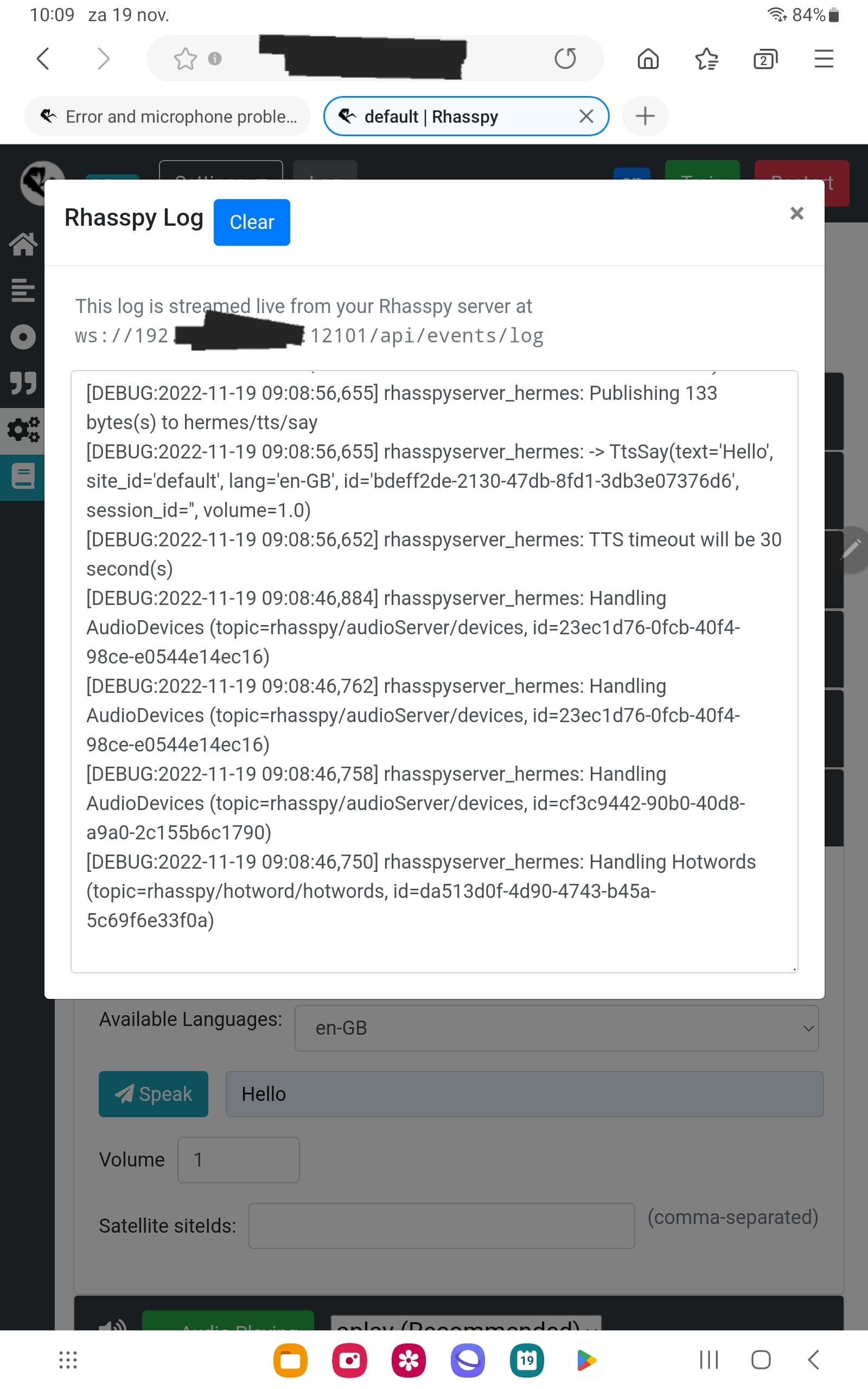
On your RasPi 4 you can go into the Rhasspy add-on and look at the “log” tab there … to be overwhelmed by the sheer number of apparently meaningless messages - it’s a famine or feast However I have found useful information hiding in there.
Thanks @donburch. I think I will go the sattelite route and buy an extra speaker/microphone combi. Raspi4 is in the livingroom so not usefull for my bedroom/office. Might buy the anker powerconf s330 that works on the pi4 so hopefully also on a pi zero 2w.
Popi do not buy more hardware, at least until you are happy with your current RasPi 4 and RasPi Zero 2 working as you want.
OK, base + satellite install.
This is a pretty classic client-server configuration. The satellite (client) devices detect the audio, and coordinate the processing, calling the appropriate modules (services) on the local or base machine to perform particular tasks. The satellite machine is in charge of the overall process.
base machine
On the base machine you already have Home Assistant and the Rhasspy add-on.
If you don’t already you should install HA’s MQTT add-on to allow multiple machines and apps to talk to each other (the Internal MQTT option only allows the rhasspy modules on that machine to interact).
If you are like me you have probably tried fiddling with all the different settings; but there is actually not much required. My base machine’s Rhasspy settings are:
Note that only some of the sections are used, and mostly with default settings. Other sections are disabled.
satellite_site_ids are very important, as this tells the base station which satellite machines it should provide that service for. I called mine “base”, “sat-1”, “sat-2” because I have no imagination, and I was unsure which room I will end up putting them.
I have chosen to use IP addresses, and have created a separate user in HA for the MQTT service to use … probably not necessary.
satellite machine
On a satellite you only need the minimum to run Rhasspy.
For my RasPi Zero I installed Raspberry Pi OS lite version, then a Debian Rhasspy install - without Docker because honestly I didn’t want to tackle that learning curve yet; and the satellite will only be running the one task so minimal complexity.
On your regular PC simply browse to the satellite machine’s web interface on port 12101 (eg http://192.168.1.92:12101/) to see Rhasspy’s interface.
It’s the same user interface as the base, which can be confusing, but you can plug in your audio device, configure the Audio input and output.
You could use the base for listening for the wake word - but that will send all the sound over the network - so local wake word detection is probably better.
Note that I have not used Intent Handling - which is because I am using node-RED add-on in Home Assistant to listen for the messages and action them. You will want to set Intent Handling to your machine running Home Assistant
Wow, that’s probably enough for now. Time for me to locate that tutorial I wrote way back, to see what else I did (particularly when I used Intents).
Found it. I had tried to distil all the knowledge I had learned; and provide a detailed tutorial of every aspect including:
installing the reSpeaker 2-mic HAT for RasPi
troubleshooting audio problems
configuring base machine
configuring Rhasspy on the satellite
adding HermesLedControl to flash the LEDs on the reSpeaker as a visual indicator
running Rhasspy on the satellite as a service (so it doesn’t need to be manually started every reboot)
Telling Rhasspy what commands to expect (setting up sentences)
setting up intents within Home Assistant
actioning those intents in Home Assistant
… and when I got to 30 pages I was wondering if I had bitten off more than I could chew Should I really be covering so much, and in so much detail ? Obviously I should split it in to manageable sections - but where ?
Also I’m a ‘first principles’ guy - I like to know why, and what the other options are; so maybe I was giving too much general info and background. Heck, the first 7 pages were introduction
Would you like the whole 30 page document, or just the relevant notes as you get to them ?
I ran out of steam, particularly when trying to anticipate all the troubleshooting that could be possible - given that I was learning it myself at the time
@donburch it is improving with the help of your guide! Currently working on the base station pulseaudio server configured and states working. Intents do get recognize but nothing is spoken by the speaker yet. Also wakeword is not working yet but I am further then I have ever beencin this proces. Thanks for all your help!
Popi, I believe standard Rhasspy should play a sound to let you know that Rhasspy has recognised the wakeword, and another to indicate that it has stopped listening. I am concerned that you are not hearing those, and that Wakeword is not recognised. have you verified that the audio is working ? Not sure whether my notes on troubleshooting the audio will be as much help for your USB device.
Pleas let me know any question or problems with my document, as I really should get back and polish it off for publication - and it needs to work for a new user.
I gave up on the Anker Powerconf the drivers for Linux just dont’ work well, in fact so badly I got a full refund from Anker who where superb.
I got mine when it was released and spoke for some time with there tech support.
But also the xmos chip it was built on I don’t rate as I also have a Anker Powerconf C300 2mic cam and its absolutely glorious for farfield and clarity, which is so weird as the powerconf speaker/mic so isn’t.
The powerconf would often need a 2-3 sec wakeup so would cut output and various other problems but also its farfield wasn’t that great.
Conference speaker mics work in a different way that what you need really for a smart assistant as they don’t focus on a particular voice and beam to the most predomiant noise and voice if they have vad.
There is a huge hole in available hardware and also audio engineering from Rhasspy and every body dodges this point of honesty.
The best solution is likely one of the 2mic hats and then its not that great but at least you only spent about $10.
Well that’s is the strange thing. Saying my wakeword doesn’t work but the tv did wake it up yesterday evening. The button wake up does give the “listening sound”, records what I say (I can see the intent) and then gives the “off” sound. I am considering if I just should switch to English instead of Dutch and hope that when the rhasspy developer works for HA Dutch will eventually work. Kaldi doesn’t work in Dutch for example. My guess is that it does work considering wake up en speech do work but I haven’t found the correct working settings yet.
Edit: I just used wakeword “grasshopper” and the speaker woke up and the intent got properly recognized. I didn’t get de date back as I asked. So it should be able to become a working setting.
@donburch progress update. HA Base rhasspy is running in Dutch wakeword works, intents get recognized but no speech response. Longer sentences don’t get recognized, do you have the same?
Satelite rhasspy installed through docker (had trouble with the other installation) it’s running, speaker get’s recognized so now I need to adjust and get the intents working.
@donburch satelite is working but it gives me double the speech. So just one bleep but the text message get’s spoken twice? HA Base still not working but we are making progress.
Oh Popi now I am totally confused about what is working and what is not !
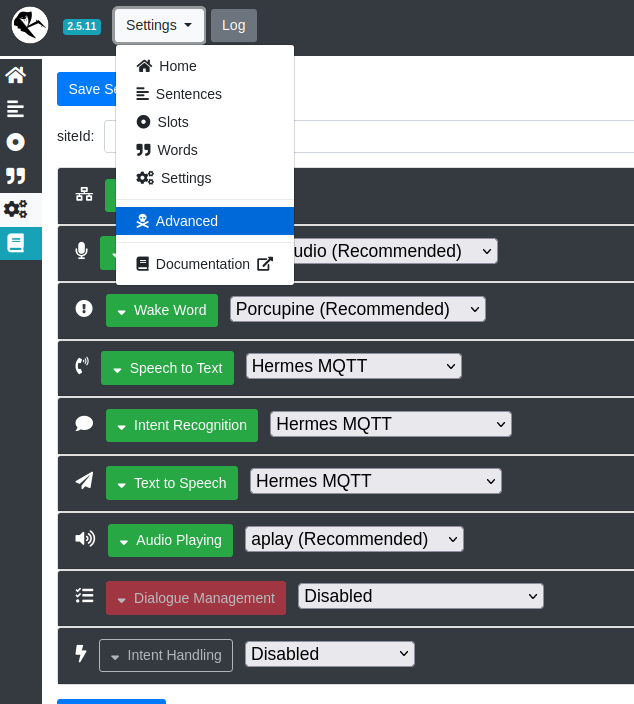
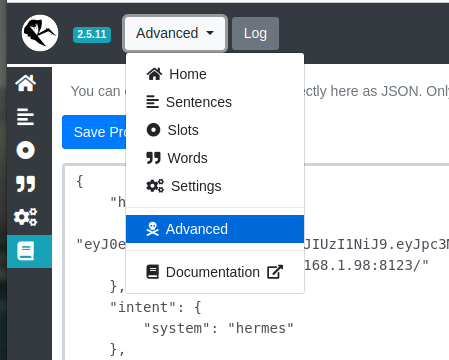
Can you please post the current configuration for both your base and satellite Rhasspys. The regular GUI is too many images to post - but the summary can be found under the “Avdvanced” option of the drop-down menu (as shown here)
When pasting here, use the </> Preformatted Text button to keep the indentation and formatting.
This satellite configuration gives me double the sentence when I ask for the time for example. At least I can conclude that it does work. Both the base and the satellite do work just not all the time. Thanks to your help and guide I am much further then I ever was.
Thanks for your suggestion. I had those settings but it didn’t work. I have changed it back now but still the same. The base station does recognize my wakeword en the intent but there is no action afterwards. Like giving me the time. The sattelite doesn’t do anything when there is no intent handler selected. Dialogue management was already disabled on the satellite. I have removed most of the satellite id’s on the satellite. Only the siteid in settings on the top is left.
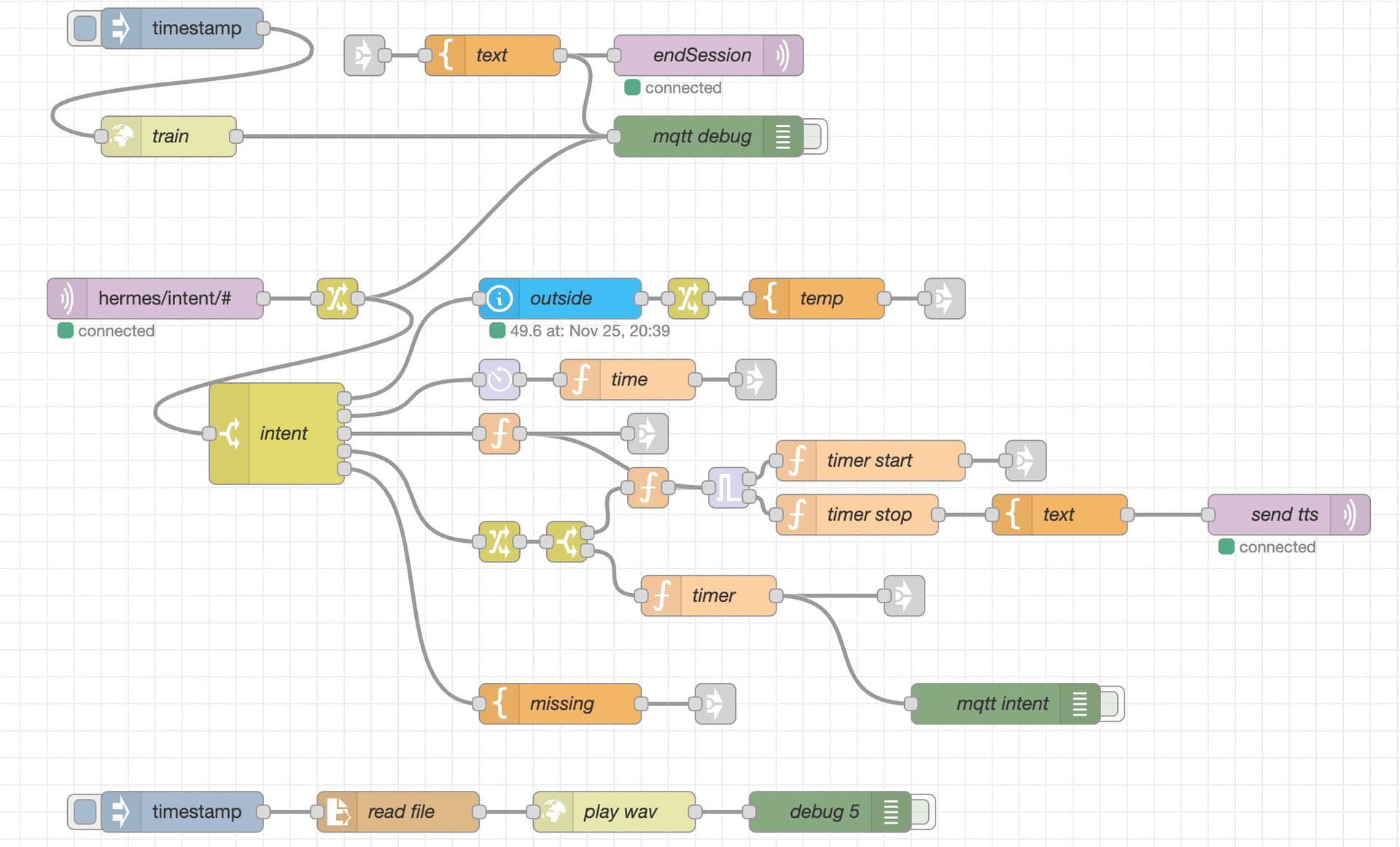
This only needs to be configured on your base, I personally went with the Node Red option (and so I didn’t configure Events or Intents at all, so I left the intents disabled). It allows me to put together more complex flows; like creating a timer for each satellite; get the remaining time; Play a timer done wav (at the request of my wife).
Sure, I will preface this with I just started using Rhasspy this week; so I’m a bit of a newb (first drafts only). It’s very possible there are better ways of doing this.
[{"id":"fd62aedfec593c5f","type":"tab","label":"rhasspy","disabled":false,"info":"","env":[]},{"id":"03908a97249587b1","type":"mqtt in","z":"fd62aedfec593c5f","name":"","topic":"hermes/intent/#","qos":"2","datatype":"json","broker":"7ff47827abc0a6bf","nl":false,"rap":true,"rh":0,"inputs":0,"x":120,"y":260,"wires":[["97518b80b2b5205f"]]},{"id":"41be4306208c3598","type":"debug","z":"fd62aedfec593c5f","name":"mqtt intent","active":false,"tosidebar":true,"console":false,"tostatus":false,"complete":"true","targetType":"full","statusVal":"","statusType":"auto","x":750,"y":560,"wires":[]},{"id":"32381bef6bf9e36f","type":"mqtt out","z":"fd62aedfec593c5f","name":"endSession","topic":"hermes/dialogueManager/endSession","qos":"","retain":"","respTopic":"","contentType":"","userProps":"","correl":"","expiry":"","broker":"7ff47827abc0a6bf","x":530,"y":80,"wires":[]},{"id":"3d422fdbfb4f9c5b","type":"template","z":"fd62aedfec593c5f","name":"text","field":"payload","fieldType":"msg","format":"json","syntax":"mustache","template":"{\"sessionId\" : \"{{sessionId}}\",\"text\": \"{{text}}\"}","output":"str","x":370,"y":80,"wires":[["32381bef6bf9e36f","344871c8282d7af9"]]},{"id":"97518b80b2b5205f","type":"change","z":"fd62aedfec593c5f","name":"","rules":[{"t":"set","p":"sessionId","pt":"msg","to":"payload.sessionId","tot":"msg"},{"t":"set","p":"siteId","pt":"msg","to":"payload.siteId","tot":"msg"},{"t":"set","p":"wakewordId","pt":"msg","to":"payload.wakewordId","tot":"msg"},{"t":"move","p":"payload","pt":"msg","to":"mqtt","tot":"msg"},{"t":"set","p":"timestamp","pt":"msg","to":"","tot":"date"}],"action":"","property":"","from":"","to":"","reg":false,"x":255,"y":260,"wires":[["344871c8282d7af9","5b93b028a2f103d7"]],"l":false},{"id":"5b93b028a2f103d7","type":"switch","z":"fd62aedfec593c5f","name":"intent","property":"mqtt.intent.intentName","propertyType":"msg","rules":[{"t":"eq","v":"GetTemperature","vt":"str"},{"t":"eq","v":"GetTime","vt":"str"},{"t":"eq","v":"TimerCancel","vt":"str"},{"t":"eq","v":"TimerSet","vt":"str"},{"t":"else"}],"checkall":"false","repair":false,"outputs":5,"x":210,"y":360,"wires":[["442daf9ba29bf19c"],["b9903708e35b2ccb"],["4ea99c44ea740857"],["aeba827af2018634"],["c1871180eecf2602"]]},{"id":"c1871180eecf2602","type":"template","z":"fd62aedfec593c5f","name":"missing","field":"text","fieldType":"msg","format":"handlebars","syntax":"mustache","template":"uh oh, missing intent","output":"str","x":420,"y":560,"wires":[["593820bd421182d3"]]},{"id":"da39b6cbfd7ceb19","type":"link in","z":"fd62aedfec593c5f","name":"mqtt end","links":["d0dd8874b3654c72","8183de9a0324a6b6","575c8b42c3ea0a17","593820bd421182d3","d4822e524d8f184a","a801366582219385"],"x":275,"y":80,"wires":[["3d422fdbfb4f9c5b"]]},{"id":"d0dd8874b3654c72","type":"link out","z":"fd62aedfec593c5f","name":"intent out","mode":"link","links":["da39b6cbfd7ceb19"],"x":705,"y":260,"wires":[]},{"id":"442daf9ba29bf19c","type":"api-current-state","z":"fd62aedfec593c5f","name":"outside","server":"3894cb67.ddb574","version":3,"outputs":1,"halt_if":"","halt_if_type":"str","halt_if_compare":"is","entity_id":"sensor.front_door_sensor_temperature","state_type":"num","blockInputOverrides":false,"outputProperties":[{"property":"temp","propertyType":"msg","value":"","valueType":"entityState"}],"for":"0","forType":"num","forUnits":"minutes","override_topic":false,"state_location":"payload","override_payload":"msg","entity_location":"data","override_data":"msg","x":420,"y":260,"wires":[["1fd4163f52fa50cf"]]},{"id":"a27b26222b2e5856","type":"template","z":"fd62aedfec593c5f","name":"temp","field":"text","fieldType":"msg","format":"handlebars","syntax":"mustache","template":"Its currently {{temp}} degrees right now.","output":"str","x":610,"y":260,"wires":[["d0dd8874b3654c72"]]},{"id":"344871c8282d7af9","type":"debug","z":"fd62aedfec593c5f","name":"mqtt debug","active":false,"tosidebar":true,"console":false,"tostatus":false,"complete":"true","targetType":"full","statusVal":"","statusType":"auto","x":530,"y":140,"wires":[]},{"id":"1fd4163f52fa50cf","type":"change","z":"fd62aedfec593c5f","name":"","rules":[{"t":"set","p":"temp","pt":"msg","to":"$ceil(temp)","tot":"jsonata"}],"action":"","property":"","from":"","to":"","reg":false,"x":515,"y":260,"wires":[["a27b26222b2e5856"]],"l":false},{"id":"b9903708e35b2ccb","type":"moment","z":"fd62aedfec593c5f","name":"","topic":"","input":"timestamp","inputType":"msg","inTz":"America/Los_Angeles","adjAmount":0,"adjType":"days","adjDir":"add","format":"object","locale":"en","output":"time","outputType":"msg","outTz":"America/Los_Angeles","x":375,"y":320,"wires":[["aeee554e4aabbcd6"]],"inputLabels":["timestamp"],"outputLabels":["human timestamp"],"l":false},{"id":"c036f7c093bfdd83","type":"inject","z":"fd62aedfec593c5f","name":"","props":[{"p":"payload"},{"p":"topic","vt":"str"}],"repeat":"","crontab":"","once":false,"onceDelay":0.1,"topic":"","payload":"","payloadType":"date","x":140,"y":60,"wires":[["818586d29736587b"]]},{"id":"818586d29736587b","type":"http request","z":"fd62aedfec593c5f","name":"train","method":"POST","ret":"txt","paytoqs":"ignore","url":"http://ha.lan:12101/api/train","tls":"","persist":false,"proxy":"","insecureHTTPParser":false,"authType":"","senderr":false,"headers":[],"credentials":{},"x":130,"y":140,"wires":[["344871c8282d7af9"]]},{"id":"aeee554e4aabbcd6","type":"function","z":"fd62aedfec593c5f","name":"time","func":"var text = \"Its \"\nvar midday = \", ey m\"\n\nif (msg.time.hours > 12) {\n text += msg.time.hours - 12\n midday = \", p m\"\n} else if (!msg.time.hours) {\n text += \"12\"\n midday = \", ey m\"\n} else {\n text += msg.time.hours\n}\n\nif (msg.time.minutes < 10) {\n text += \" o\"\n} \ntext += \" \" + msg.time.minutes\ntext += midday\n\nmsg.text = text\nreturn msg;","outputs":1,"noerr":0,"initialize":"","finalize":"","libs":[],"x":470,"y":320,"wires":[["8183de9a0324a6b6"]]},{"id":"8ed5c1484a22c191","type":"trigger","z":"fd62aedfec593c5f","name":"","op1":"","op2":"","op1type":"pay","op2type":"payl","duration":"1","extend":false,"overrideDelay":true,"units":"s","reset":"","bytopic":"topic","topic":"siteId","outputs":2,"x":545,"y":400,"wires":[["193829021761e5ae"],["bc7c56109464ed77"]],"l":false},{"id":"aeba827af2018634","type":"change","z":"fd62aedfec593c5f","name":"","rules":[{"t":"set","p":"s","pt":"msg","to":"$number($.mqtt.slots[slotName=\"s\"].value.value)","tot":"jsonata"},{"t":"set","p":"m","pt":"msg","to":"$number($.mqtt.slots[slotName=\"m\"].value.value)","tot":"jsonata"},{"t":"set","p":"h","pt":"msg","to":"$number($.mqtt.slots[slotName=\"h\"].value.value)","tot":"jsonata"},{"t":"set","p":"deadline","pt":"msg","to":"$flowContext(msg.siteId).timer","tot":"jsonata"}],"action":"","property":"","from":"","to":"","reg":false,"x":375,"y":440,"wires":[["560de57eafba3662"]],"l":false},{"id":"99c94c2d276b07bc","type":"mqtt out","z":"fd62aedfec593c5f","name":"send tts","topic":"hermes/tts/say","qos":"","retain":"","respTopic":"","contentType":"","userProps":"","correl":"","expiry":"","broker":"7ff47827abc0a6bf","x":960,"y":420,"wires":[]},{"id":"b4c1b74c7ef9570d","type":"template","z":"fd62aedfec593c5f","name":"text","field":"payload","fieldType":"msg","format":"json","syntax":"mustache","template":"{\"siteId\" : \"{{siteId}}\",\"text\": \"{{text}}\"}","output":"str","x":790,"y":420,"wires":[["99c94c2d276b07bc"]]},{"id":"8183de9a0324a6b6","type":"link out","z":"fd62aedfec593c5f","name":"intent out","mode":"link","links":["da39b6cbfd7ceb19"],"x":565,"y":320,"wires":[]},{"id":"575c8b42c3ea0a17","type":"link out","z":"fd62aedfec593c5f","name":"intent out","mode":"link","links":["da39b6cbfd7ceb19"],"x":765,"y":380,"wires":[]},{"id":"593820bd421182d3","type":"link out","z":"fd62aedfec593c5f","name":"intent out","mode":"link","links":["da39b6cbfd7ceb19"],"x":535,"y":560,"wires":[]},{"id":"fdeecd38a93d80e9","type":"function","z":"fd62aedfec593c5f","name":"calculate delay","func":"var id = msg.siteId + \".timer\"\nvar delay_ms = 0\nif (msg.h) {\n delay_ms += msg.h * 600000\n}\nif (msg.m) {\n delay_ms += msg.m * 60000\n}\nif (msg.s) {\n delay_ms += msg.s * 1000\n}\nmsg.delay = delay_ms\nif (!msg.delay) {\n msg.delay = 15000\n msg.s = 15\n}\nvar deadline = msg.timestamp + delay_ms\n//node.warn(\"countdown: \" + (deadline - msg.timestamp)/1000);\nflow.set(id, deadline)\nreturn msg;","outputs":1,"noerr":0,"initialize":"","finalize":"","libs":[],"x":485,"y":400,"wires":[["8ed5c1484a22c191"]],"l":false},{"id":"193829021761e5ae","type":"function","z":"fd62aedfec593c5f","name":"timer start","func":"var text = \"Okay, your timer is set for \"\nif (msg.h) {\n text += msg.h + \" hours \"\n}\nif (msg.m) {\n text += msg.m + \" minutes \"\n}\nif (msg.s) {\n text += msg.s + \" seconds\"\n}\nmsg.text = text\nreturn msg;","outputs":1,"noerr":0,"initialize":"","finalize":"","libs":[],"x":650,"y":380,"wires":[["575c8b42c3ea0a17"]]},{"id":"60275641025b5638","type":"http request","z":"fd62aedfec593c5f","name":"play wav","method":"POST","ret":"txt","paytoqs":"ignore","url":"http://ha.lan:12101/api/play-wav?siteId=test","tls":"","persist":false,"proxy":"","insecureHTTPParser":false,"authType":"","senderr":false,"headers":[{"keyType":"other","keyValue":"Content-Type","valueType":"other","valueValue":"audio/wav"}],"x":460,"y":640,"wires":[["d0595951b26f27aa"]]},{"id":"ca0fae51715215e9","type":"file in","z":"fd62aedfec593c5f","name":"read file","filename":"/media/wav/timer_done.wav","filenameType":"str","format":"","chunk":false,"sendError":false,"encoding":"none","allProps":false,"x":300,"y":640,"wires":[["60275641025b5638"]]},{"id":"bfa651f70e1b5d3c","type":"inject","z":"fd62aedfec593c5f","name":"","props":[{"p":"payload"},{"p":"topic","vt":"str"}],"repeat":"","crontab":"","once":false,"onceDelay":0.1,"topic":"","payload":"","payloadType":"date","x":140,"y":640,"wires":[["ca0fae51715215e9"]]},{"id":"d0595951b26f27aa","type":"debug","z":"fd62aedfec593c5f","name":"debug 5","active":false,"tosidebar":true,"console":false,"tostatus":false,"complete":"false","statusVal":"","statusType":"auto","x":620,"y":640,"wires":[]},{"id":"4ea99c44ea740857","type":"function","z":"fd62aedfec593c5f","name":"cancel timer","func":"var id = msg.siteId + \".timer\"\nvar timer = flow.get(id)\nif (timer) {\n msg.text = \"Timer has been canceled\"\n} else {\n msg.text = \"no, timer found\"\n}\nmsg.reset = true\nflow.set(id, null)\nreturn msg;","outputs":1,"noerr":0,"initialize":"","finalize":"","libs":[],"x":375,"y":360,"wires":[["8ed5c1484a22c191","d4822e524d8f184a"]],"l":false},{"id":"d4822e524d8f184a","type":"link out","z":"fd62aedfec593c5f","name":"intent out","mode":"link","links":["da39b6cbfd7ceb19"],"x":485,"y":360,"wires":[]},{"id":"bc7c56109464ed77","type":"function","z":"fd62aedfec593c5f","name":"timer stop","func":"var id = msg.siteId + \".timer\"\nflow.set(id, null)\nmsg.text = \"Timer is done\"\nreturn msg;","outputs":1,"noerr":0,"initialize":"","finalize":"","libs":[],"x":640,"y":420,"wires":[["b4c1b74c7ef9570d"]]},{"id":"560de57eafba3662","type":"switch","z":"fd62aedfec593c5f","name":"","property":"deadline","propertyType":"msg","rules":[{"t":"null"},{"t":"else"}],"checkall":"false","repair":false,"outputs":2,"x":425,"y":440,"wires":[["fdeecd38a93d80e9"],["7143a0328900e0df"]],"l":false},{"id":"7143a0328900e0df","type":"function","z":"fd62aedfec593c5f","name":"timer","func":"var remaining = Math.trunc((msg.deadline - msg.timestamp)/1000)\n// node.warn(\"remaining: \" + remaining)\nvar text = \"Time remaining is \"\nvar hours= 0\nvar mins = 0\nvar seconds = 0\nif (remaining > 3600) {\n hours = Math.trunc(remaining/3600)\n remaining = (remaining % 3600) \n}\nif (remaining > 60) {\n mins = Math.trunc(remaining / 60)\n remaining = (remaining % 60)\n}\nvar seconds = Math.trunc(remaining)\nif (hours) {\n text += hours + \" hours \"\n}\nif (mins) {\n text += mins + \" minutes \"\n}\nif (seconds) {\n text += seconds + \" seconds \"\n} else {\n text = \"Timer is running\"\n}\nmsg.text = text\nreturn msg;","outputs":1,"noerr":0,"initialize":"","finalize":"","libs":[],"x":530,"y":480,"wires":[["a801366582219385","41be4306208c3598"]]},{"id":"a801366582219385","type":"link out","z":"fd62aedfec593c5f","name":"intent out","mode":"link","links":["da39b6cbfd7ceb19"],"x":675,"y":480,"wires":[]},{"id":"7ff47827abc0a6bf","type":"mqtt-broker","name":"","broker":"ha.lan","port":"1883","clientid":"nodered","autoConnect":true,"usetls":false,"protocolVersion":"4","keepalive":"60","cleansession":true,"birthTopic":"","birthQos":"0","birthPayload":"","birthMsg":{},"closeTopic":"","closeQos":"0","closePayload":"","closeMsg":{},"willTopic":"","willQos":"0","willPayload":"","willMsg":{},"userProps":"","sessionExpiry":""},{"id":"3894cb67.ddb574","type":"server","name":"Home Assistant","version":5,"addon":true,"rejectUnauthorizedCerts":true,"ha_boolean":"y|yes|true|on|home|open","connectionDelay":true,"cacheJson":true,"heartbeat":false,"heartbeatInterval":30,"areaSelector":"friendlyName","deviceSelector":"friendlyName","entitySelector":"friendlyName","statusSeparator":"at: ","statusYear":"hidden","statusMonth":"short","statusDay":"numeric","statusHourCycle":"h23","statusTimeFormat":"h:m","enableGlobalContextStore":true}]
[GetTime]
what time [is it]
what [is|the] time
tell [me|the] time

[GetTemperature]
what [is|the] (weather | temperature | temp)
how (hot | cold) [is it]

[TimerSet]
seconds = (0..1000){s} [sec | secs | second | seconds]
minutes = (0..1000){m} [min | mins | minute | minutes]
hours = (0..1000){h} [hour | hours]
set [a] timer for <seconds>
set [a] timer for <minutes>
set [a] timer for <hours>
set [a] timer for <minutes> [and] <seconds>
set [a] timer for <hours> [and] <minutes>
timer

[TimerCancel]
cancel timer
stop timer
Also be aware there is currently a bug in rhasspy that I will push a fix for shortly here so the play wav from a base to a satellite is broken (ie my Timer done wav)
Popi, it looks as though your Base machine is currently set to Internal MQTT. They should both be set to External with the save values 9especially the same Port number).
After I got my base+satellite configuration working, I went back and was surprised how few settings were actually required
One thing I would recommend that you add on your satellite is to enable "UDP Audio " by entering the same port number (I use 12203) in the Audio Recording and Wake Word sections. This provides a direct link from the microphone to the module which is listening just for the Wake Word (otherwise it gets sent across the network and back). Once Wake word is detected it is appropriate to send the (short) audio recording of the command to the general purpose speech_to_text module on the base machine.
OMG … i come back to finish this message and you’re already onto node-RED !!!
I think I did something similar … play an announcement over multiple satellites if the freezer (located in garage downstairs) was consuming power for too long (lid not shut ?), or was off for too long (power off ?).
My result (which I’m still using) is here. Note that I prefix the message by playing a chime.wav
Thank you both! Will try your suggestion/examples. My satellite isn’t working at the moment. No wake up at all but my base is working when I use node red. Need to understand it a bit better. I have 2 lights above the dinner table I can get one on by voice but I can’t get it off. General question. Do you have any issues regarding the recognizing intent? My setup is in Dutch and sometimes I need to say the same thing a couple of times before it get’s recognized but when I do playback I can hear the sentence perfectly. I am guessing it has to do with the language but I like to make sure.
Well when I wrotecthat literally nothing was working. When I changed base again to mqtt external, wake word button works again but using the wake word still doesn’t. Intents do get recognized again as well. I read that it might be working better when you use your own wakeword.
@shellcode could you help me with the following. I have added your flow and it’s working nicely so I thought let’s try making my own. I have an intent with my lights and switched combined. So the intents I will be using is HassTurnOn and HassTurnOff. Then I need to distinguish first if it’s lights or switches and then I need to call the service turn on or off. I am manage to get it working with one light or one switch but how do I add all of them. Any suggestions?
I can see if I can help this one is a little more complicated; I added a script that generates all my entities or a slot program. I had a few bugs in my flows above that I updated. I can post the updates somewhere shortly.
This gist of it is here:
/root/share/rhasspy/profiles/en/slot_programs/hass
url="https://ha.lan"
token="..."

# -----------------------------------------------------------------------------

# Use REST api to list the states of all Home Assistant entities.
# Returns a JSON list of entity states.
# We use jq to reformat this as a two-column list with the format: <entity_id> <friendly_name>.
echo "GET ${url}/api/states" >&2
curl -k -X GET \
     -H "Authorization: Bearer ${token}" \
     -H 'Content-Type: application/json' \
     "${url}/api/states"  | \
    jq --raw-output '.[] as $e | "\($e.entity_id) \($e.attributes.friendly_name)"' | \
    while read -r entity_id friendly_name;
    do
        # Debug to stderr
        #echo "${entity_id} ${friendly_name}" >&2

        if [[ ! -z "$1" ]]; then
            # Filter based on domain
            for domain in "$@";
            do
                # Check if entity id starts with domain and a dot
                domain_regex="^${domain}\."
                if [[ "${entity_id}" =~ $domain_regex ]]; then
                    echo "${friendly_name}"
                    break
                fi
            done
        else
            # All entities
            echo "${friendly_name}"
        fi
    done
Thank you so much I have finally figured this out. Lights and switches are working! I have only 1 strange thing now. I have 2 lifx bulbs dinner left and right and I have 2 double switches and when I try to turn one of them on they both go on. Have you got any ideas how to fix this? Or you @donburch
There has to be a bug in your node red flow. The slot program displays all the entity friendly names. If you run it manually and review the list you should be able to see what data it is passing to node red. Can you show me the code you added to do the friendly name to entity lookup?
I am not sure if I am doing it right I have added the token and my url: 192.168.xx.xx but then I get “pipe pipe while >” or I get “bad substitution”" . I have used a script from everything smart home to import my ha entities. There I don’t get any problems but then I still have the left right problem. What exactly do I need to show? My slots list hass/entities,lights or the nodered config or something else? Sorry very new to this stuff.
Oh Popi … you could try giving us some detail, and stop changing things while we’re trying to help. I understand you’re impatient, but you make it shooting at a moving target !
If you want us to google search for those particular error messages without knowing where it is coming from … well, you can do that yourself.
As shellcode said:
You are using nodeRED ? Most people use a print-screen … but usually this doesn’t have any detail, so posting a flow is better (as shellcode did in message 27 above). In node-RED use the “Export” option in the hamburger menu button (three horizontal lines in the very top right corner) to download or save to clipboard. If you first highlight a part of the flow you will have the option of exporting just the highlighted nodes, as well as exporting the entire current flow, or all flows.
You can save to the clipboard, then paste here using </> Preformatted Text
There are of course several different ways to tackle a problem like this. That is why we ask which method you are already trying, rather than confuse you with something totally different.
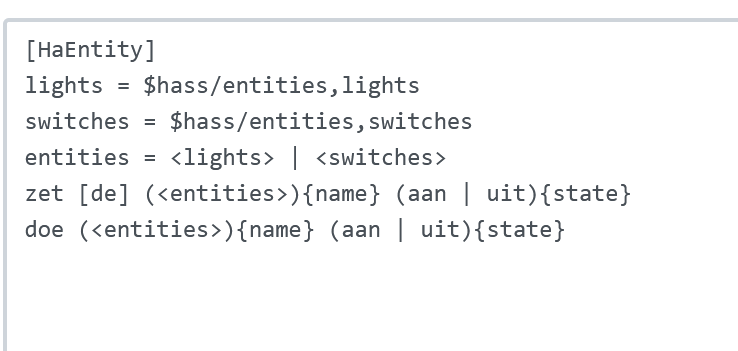
One simple method is to do the mapping using substitutions in Rhasspy sentences.ini
Another common technique (if you have named your devices appropriately) is to use a function in your Home Assistant to translate “living room” to “living_room” like
#
# intents.yaml - the actions to be performed by Rhasspy voice commands
#

GetTime:
  speech:
    text: The current time is {{ now().strftime("%H %M") }}

LightState:
  speech:
    text: Turning {{ name }} {{state }}
  action:
    - service: light.turn_{{ state }}
      target:
        entity_id: light.{{ name | replace(" ","_") }}
In my case I have done it the hard way I gave my power switches, light bulbs and Rhasspy satellites all non-specific names because I don’t want to have to rename everything if (e.g.) I re-purpose a power switch to turn my Xmas lights on/off, and because I wasn’t sure how many satellites I would have, or where i would put them. When renting I have learnt to expect change. That and i am not known for my imagination
Anyway, this is the part of my flow which maps the Rhasspy siteId to the deviceId of the LIFX light bulb in that room.
[{"id":"a50bed4c9e64117b","type":"function","z":"b74f060c.6b2908","name":"set bulb from slots.name","func":"/*\n This routine returns the entity ID of the appropriate light bulb. \n\n msg.slots.name identifies which room was named in the intent. \n msg.slots.name may also be empty (default to the location of the satellite), or \"all\" being specified.\n siteId Area Bulb\n ------- --------------- ------------\n sat-0 kitchen n/a\n sat-1 living room lifxcolor_141\n sat-3B study lifxmini_140\n bedroom lifxcolor_142\n laundry n/a\n Dining room \n\nThis routine passes back:\n - msg.slots.name = from intent or default to siteId\n - msg.slots.bulb = device_id of the appropriate light bulb(s)\n*/\n\nvar bulb = {}; // create a new empty object\n\n// If slots.name is blank we get the room from the rhasspy siteId\nif (msg.slots.name == \"\") {\n switch (msg.siteId) {\n case \"sat-0\": msg.slots.name = \"kitchen\"; break\n case \"sat-1\": msg.slots.name = \"living room\"; break\n case \"sat-3B\": msg.slots.name = \"study\"; break\n default: \n node.error(\"No area or siteId\");\n }\n}\n\n// lookup which light bulb is in the room\nswitch (msg.slots.name) {\n case \"study\": bulb = \"lifx_mini_140\"; break;\n case \"living room\": bulb = \"lifx_color_141\"; break;\n case \"bedroom\": bulb = \"lifx_color_142\"; break;\n case \"dining room\": bulb = \"basicZBR3\"; break;\n case \"all\": bulb = \"lifx_mini_140, lifx_color_141, lifx_color_142, basicZBR3\"; break;\n default:\n node.error(\"No bulb at \"+ msg.slots.name );\n}\n\nmsg.slots.bulb = bulb; // save back into msg.\n\nreturn msg","outputs":1,"noerr":0,"initialize":"","finalize":"","libs":[],"x":240,"y":1420,"wires":[["bea4078becf8b6b6","b2ea4974db700e13"]]},{"id":"236fcf9297a40af5","type":"link in","z":"b74f060c.6b2908","name":"lookup light bulb deviceID","links":[],"x":35,"y":1420,"wires":[["a50bed4c9e64117b"]]},{"id":"bea4078becf8b6b6","type":"link out","z":"b74f060c.6b2908","name":"","mode":"return","links":[],"x":485,"y":1420,"wires":[]},{"id":"7276a449ef4c5485","type":"comment","z":"b74f060c.6b2908","name":"Lookup light bulb deviceID","info":"","x":140,"y":1380,"wires":[]},{"id":"b2ea4974db700e13","type":"debug","z":"b74f060c.6b2908","name":"after function","active":true,"tosidebar":true,"console":false,"tostatus":false,"complete":"true","targetType":"full","statusVal":"","statusType":"auto","x":540,"y":1460,"wires":[]},{"id":"defb47cac878fba1","type":"link in","z":"b74f060c.6b2908","name":"intent_ChangeLightState","links":[],"x":35,"y":1620,"wires":[["56281f751244f35c"]]},{"id":"83f077bf02a6b736","type":"comment","z":"b74f060c.6b2908","name":"intent_ChangeLightState","info":"","x":130,"y":1580,"wires":[]},{"id":"8732ed20d1b81bd3","type":"link out","z":"b74f060c.6b2908","name":"","mode":"return","links":[],"x":955,"y":1620,"wires":[]},{"id":"580cd8e6b46f3769","type":"template","z":"b74f060c.6b2908","name":"light on/off","field":"payload","fieldType":"msg","format":"json","syntax":"mustache","template":"{\n \"domain\": \"light\",\n \"service\": \"turn_{{slots.state}}\",\n \"data\": {\n \"entity_id\": \"light.{{slots.bulb}}\"\n },\n \"sessionId\": \"{{sessionId}}\",\n \"siteId\": \"{{siteId}}\"\n}\n","output":"json","x":450,"y":1620,"wires":[["8199b2293d9d1401","c0b5998cea70e27d"]]},{"id":"8199b2293d9d1401","type":"api-call-service","z":"b74f060c.6b2908","name":"","server":"4d17a7dd.3f7c98","version":5,"debugenabled":true,"domain":"","service":"","areaId":[],"deviceId":[],"entityId":[],"data":"","dataType":"json","mergeContext":"","mustacheAltTags":false,"outputProperties":[],"queue":"none","x":670,"y":1620,"wires":[["bb9af3550c6e1ccd"]]},{"id":"bb9af3550c6e1ccd","type":"template","z":"b74f060c.6b2908","name":"Light Text","field":"payload","fieldType":"msg","format":"handlebars","syntax":"mustache","template":"{{slots.name}} light is {{slots.state}}!","output":"str","x":840,"y":1620,"wires":[["8732ed20d1b81bd3"]]},{"id":"56281f751244f35c","type":"link call","z":"b74f060c.6b2908","name":"","links":["236fcf9297a40af5"],"timeout":"30","x":210,"y":1620,"wires":[["580cd8e6b46f3769"]]},{"id":"c0b5998cea70e27d","type":"debug","z":"b74f060c.6b2908","name":"debug 2","active":true,"tosidebar":true,"console":false,"tostatus":false,"complete":"false","statusVal":"","statusType":"auto","x":680,"y":1580,"wires":[]},{"id":"4d17a7dd.3f7c98","type":"server","name":"Home Assistant","version":5,"addon":true,"rejectUnauthorizedCerts":true,"ha_boolean":"y|yes|true|on|home|open","connectionDelay":false,"cacheJson":true,"heartbeat":false,"heartbeatInterval":"30","areaSelector":"friendlyName","deviceSelector":"friendlyName","entitySelector":"friendlyName","statusSeparator":"at: ","statusYear":"hidden","statusMonth":"short","statusDay":"numeric","statusHourCycle":"h23","statusTimeFormat":"h:m","enableGlobalContextStore":true}]
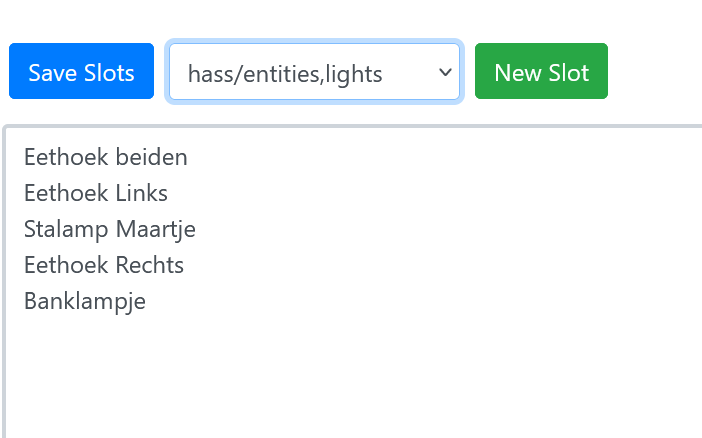
Okay some more info. I have used the installation guide from everything smart home for the installation (Local Voice Control With Home Assistant Just Got Easier! - YouTube). He uses a script to import the HA entities to Rhasspy, I have used that one. Then I have made a slot conform what he uses which is calles hass/entities,lights. In that slot I have stated the friendly names of my 4 smart bulbs. Of those 4 2 work without issues. The problem is with Eethoek Links (Dinning Left) and Eethoek Rechts (Dinning Right). It doesn’t matter which one I ask to turn on or off because both go on.
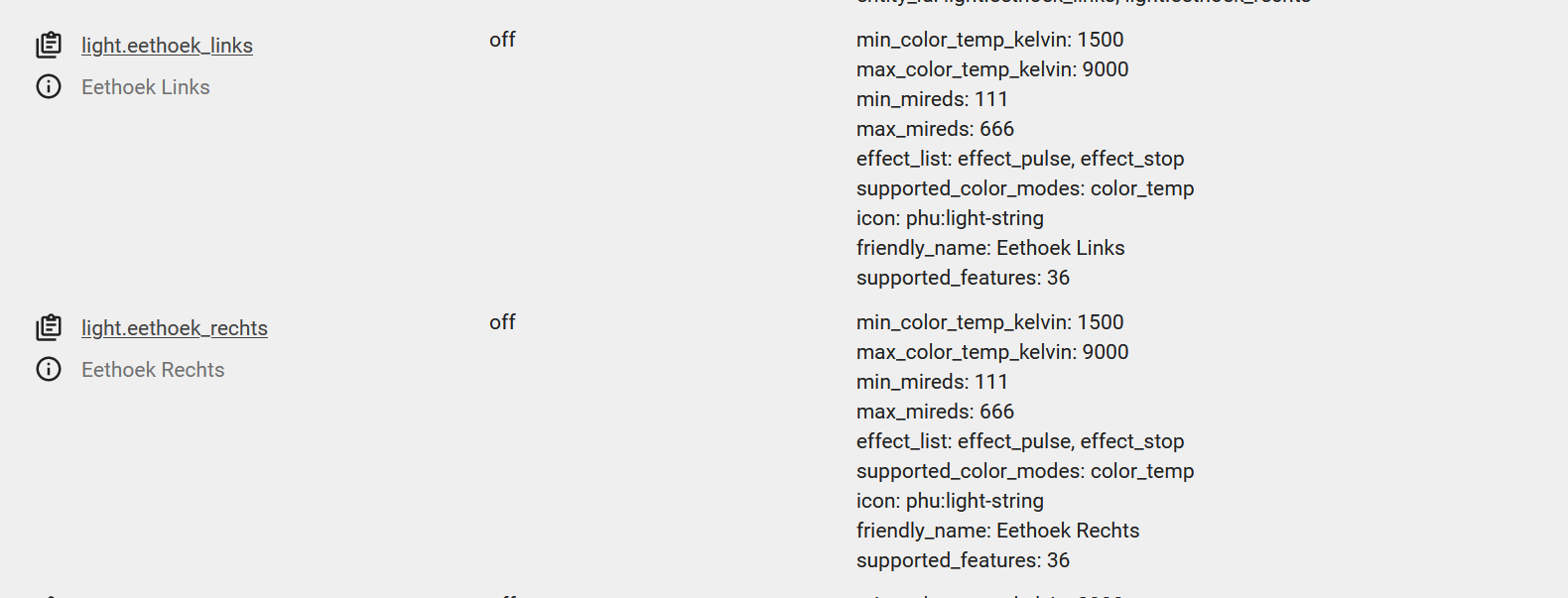
This is what developer tools in Ha tells me about these 2 lights.
This is the node re flow I have made [{"id":"75de9173a59eb82b","type":"tab","label":"rhasspy","disabled":false,"info":""},{"id":"a52a1695b000fb71","type":"websocket in","z":"75de9173a59eb82b","name":"rhasspy","server":"5b65b639ed72b721","client":"","x":70,"y":300,"wires":[["6c9f23ca4d3abeaf","f89c4b9ac7cc816f"]]},{"id":"6c9f23ca4d3abeaf","type":"switch","z":"75de9173a59eb82b","name":"intent filter","property":"intent.name","propertyType":"msg","rules":[{"t":"eq","v":"HaEntity","vt":"str"}],"checkall":"false","repair":false,"outputs":1,"x":90,"y":440,"wires":[["d7390b10de4d1a25","c8dacb09d9203c81"]]},{"id":"f89c4b9ac7cc816f","type":"debug","z":"75de9173a59eb82b","name":"","active":true,"tosidebar":true,"console":false,"tostatus":false,"complete":"true","targetType":"full","x":90,"y":200,"wires":[]},{"id":"1b04ec2770854a98","type":"api-call-service","z":"75de9173a59eb82b","name":"eethoek beiden","server":"7e24b1f3.1fe48","version":5,"debugenabled":true,"domain":"light","service":"toggle","areaId":["eethoek"],"deviceId":[],"entityId":["light.eethoek_beiden"],"data":"","dataType":"json","mergeContext":"","mustacheAltTags":false,"outputProperties":[],"queue":"none","output_location":"","output_location_type":"none","x":900,"y":80,"wires":[[]]},{"id":"ca91a5d6559d040f","type":"api-call-service","z":"75de9173a59eb82b","name":"Stalamp Maartje","server":"7e24b1f3.1fe48","version":5,"debugenabled":true,"domain":"light","service":"toggle","areaId":[],"deviceId":[],"entityId":["light.stalamp_maartje"],"data":"","dataType":"json","mergeContext":"","mustacheAltTags":false,"outputProperties":[],"queue":"none","output_location":"","output_location_type":"none","x":900,"y":200,"wires":[[]]},{"id":"80a0a2ecd597d4af","type":"api-call-service","z":"75de9173a59eb82b","name":"Banklampje","server":"7e24b1f3.1fe48","version":5,"debugenabled":true,"domain":"light","service":"toggle","areaId":[],"deviceId":[],"entityId":["light.banklampje"],"data":"","dataType":"json","mergeContext":"","mustacheAltTags":false,"outputProperties":[],"queue":"none","output_location":"","output_location_type":"none","x":890,"y":240,"wires":[[]]},{"id":"983abd1011dbce39","type":"api-call-service","z":"75de9173a59eb82b","name":"Wasdroger","server":"7e24b1f3.1fe48","version":5,"debugenabled":true,"domain":"switch","service":"toggle","areaId":[],"deviceId":[],"entityId":["switch.wasdroger"],"data":"","dataType":"json","mergeContext":"","mustacheAltTags":false,"outputProperties":[],"queue":"none","output_location":"","output_location_type":"none","x":890,"y":280,"wires":[[]]},{"id":"9a4ef7e257fa642d","type":"api-call-service","z":"75de9173a59eb82b","name":"Wasmachine","server":"7e24b1f3.1fe48","version":5,"debugenabled":true,"domain":"switch","service":"toggle","areaId":[],"deviceId":[],"entityId":["switch.wasmachine"],"data":"","dataType":"json","mergeContext":"","mustacheAltTags":false,"outputProperties":[],"queue":"none","output_location":"","output_location_type":"none","x":890,"y":320,"wires":[[]]},{"id":"bdd642a574e2b26d","type":"api-call-service","z":"75de9173a59eb82b","name":"Printer","server":"7e24b1f3.1fe48","version":5,"debugenabled":true,"domain":"switch","service":"toggle","areaId":[],"deviceId":[],"entityId":["switch.printer"],"data":"","dataType":"json","mergeContext":"","mustacheAltTags":false,"outputProperties":[],"queue":"none","output_location":"","output_location_type":"none","x":870,"y":360,"wires":[[]]},{"id":"d7390b10de4d1a25","type":"switch","z":"75de9173a59eb82b","name":"Lampen","property":"slots.name","propertyType":"msg","rules":[{"t":"cont","v":"Eethoek beiden","vt":"str"},{"t":"cont","v":"Eethoek Rechts","vt":"str"},{"t":"cont","v":"Eethoek Links","vt":"str"},{"t":"cont","v":"Stalamp","vt":"str"},{"t":"cont","v":"Banklampje","vt":"str"}],"checkall":"true","repair":false,"outputs":5,"x":500,"y":160,"wires":[["1b04ec2770854a98"],["761bcef96293e6b4"],["391cc8e7087355ad"],["ca91a5d6559d040f"],["80a0a2ecd597d4af"]]},{"id":"c8dacb09d9203c81","type":"switch","z":"75de9173a59eb82b","name":"Stekkers","property":"slots.name","propertyType":"msg","rules":[{"t":"cont","v":"Wasdroger","vt":"str"},{"t":"cont","v":"Wasmachine","vt":"str"},{"t":"cont","v":"Printer","vt":"str"},{"t":"cont","v":"Waterkoker","vt":"str"}],"checkall":"true","repair":false,"outputs":4,"x":500,"y":360,"wires":[["983abd1011dbce39"],["9a4ef7e257fa642d"],["bdd642a574e2b26d"],["b571f875082fd2cf"]]},{"id":"b571f875082fd2cf","type":"api-call-service","z":"75de9173a59eb82b","name":"Waterkoker","server":"7e24b1f3.1fe48","version":5,"debugenabled":true,"domain":"switch","service":"toggle","areaId":[],"deviceId":[],"entityId":["switch.waterkoker"],"data":"","dataType":"json","mergeContext":"","mustacheAltTags":false,"outputProperties":[],"queue":"none","output_location":"","output_location_type":"none","x":890,"y":400,"wires":[[]]},{"id":"761bcef96293e6b4","type":"api-call-service","z":"75de9173a59eb82b","name":"eethoek rechts","server":"7e24b1f3.1fe48","version":5,"debugenabled":true,"domain":"light","service":"toggle","areaId":["eethoek"],"deviceId":[],"entityId":["light.eethoek_rechts"],"data":"","dataType":"json","mergeContext":"","mustacheAltTags":false,"outputProperties":[],"queue":"none","output_location":"","output_location_type":"none","x":900,"y":120,"wires":[[]]},{"id":"391cc8e7087355ad","type":"api-call-service","z":"75de9173a59eb82b","name":"eethoek links","server":"7e24b1f3.1fe48","version":5,"debugenabled":true,"domain":"light","service":"toggle","areaId":["eethoek"],"deviceId":[],"entityId":["light.eethoek_links"],"data":"","dataType":"json","mergeContext":"","mustacheAltTags":false,"outputProperties":[],"queue":"none","output_location":"","output_location_type":"none","x":890,"y":160,"wires":[[]]},{"id":"5b65b639ed72b721","type":"websocket-listener","path":"ws://192.168.178.53:12101/api/events/intent","wholemsg":"true"},{"id":"7e24b1f3.1fe48","type":"server","name":"Home Assistant","addon":true,"rejectUnauthorizedCerts":true,"ha_boolean":"y|yes|true|on|home|open","connectionDelay":false,"cacheJson":true,"heartbeat":false,"heartbeatInterval":"","entitySelector":"id","statusSeparator":"","enableGlobalContextStore":false}]
I do know that the flow does work because i can turn on/off lights (lampen in Dutch) and the switches (stekkers in Dutch).
The lights with the problems are lifx mini’s and the switches which I have the same problem with are the woox R6073 (Woox R6073 Dual Smart Plug - Products from WOOX UK). I have imported those through local tuya in HA. I would love to be able to turn on of those as well instead of turning them both on and off at the same time. I have 2 of those Woox switches. The devices itself are called Keuken 1 (Kitchen 1) and Keuken 2 (Kitchen 2). Kitchen 1 has two entities Waterkoker (Waterboiler in English) and Koffiezetapparaat (Coffeemachine) and Kitchen 2 has gasfornuis (gas stove) and vaatwasser (dishwasher). Because I haven’t fixed the issue yet I haven’t added all of the entities yet. If I understand your example correct I should change both lights in the slot.
In your Call Service nodes for eethoek rechts and eethoek links you have entered “eethoek” in the “Area” field as well as “light.eethoek_rechts” in the “Entity” field.
My first thought is that only one of Area/Device/Entity is required, and that HA may be turning on all the lights in the Area, rather than just the one Entity.
You have not entered an Area for Stalamp Maartje and Banklampje, so it is not a required field.
I suggest you try removing the Area value from one of the Call Service nodes, save, and test.
–
I notice also that you have used the “toggle” service, which will ignore whether you gave the voice command to “turn on” or “turn off”.
And that is the reason that in my flow I left most of my Call Service node empty and first used a Edit Template node to setup all the fields using Mustache template substitution. Oh, so many things to learn !
That actually did the trick removing the area’s thanks! Now I can turn them on separately.
I am not sure what you mean with the “toggle” remark. If say turn on it goes on and if I say turn off it goes off. Can you explain?
So grateful for both your help right now it can tell me the time, turn on/off bulbs+switches, set timer. Next project give me the date and the weather. I also need to find the best wake word option. Currently using raven because the porcupine gives me a lot of false positives.
say “turn on the light” (ok, say the correct Dutch words)
say “turn on the light” again
say “turn off the light”
say “turn on the light” again
Every time you say to Turn on, it is just flipping the switch (toggling) without checking whether it is currently on or off.
Fortunately you are already sending the on or off in the {state} slot, so it is a matter of setting the “service” to “turn_on” or “turn_off” depending on … ah, I just realised you also have to translate the Dutch words to English “on” and “off” ??
So maybe substituting on and off in sentences.ini, and in node-RED a template similar to mine above. Or if you prefer programming you can do it in a Function node … or, well, there is always more than one way.

 However I have found useful information hiding in there.